

Field Service

Florian Bartholomäus, osapiens Expert | 30. January 2026 | Lesezeit 12 min.
Field service organizations lose several hours per month to scheduling inefficiencies, missed appointments, and technician downtime. The right scheduling software for field service transforms chaotic workflows into streamlined operations – reducing costs, improving first-time fix rates, and keeping customers satisfied.
Start with scheduling software













TRUSTED BY LEADING COMPANIES




ENTERPRISE-READY
 SAP Certification
 ISO 27001
 EU Hosting
 Entra ID & Okta
 Multi-Entity
Table of Contents
- Key Facts
- Why Field Service Scheduling Is Critical for Service Organizations
- Key Features to Look for in Scheduling Software for Field Service
- Popular Examples: Scheduling Software For Field Service
- How osapiens HUB for Maintenance Transforms Field Service Scheduling
- Common Challenges in Field Service Management – And How Software Solves Them
- Conclusion: Streamline Your Field Service Operations with the Right Scheduling Software
- FAQ
Your technician just drove 45 minutes to a service call – only to find the customer wasn’t expecting anyone today. Meanwhile, three urgent service requests sit unassigned because you’re not sure who’s available or qualified. Phone calls pile up, schedules conflict, and your field service team wastes hours every week on preventable chaos. Modern scheduling software for field service eliminates these costly mistakes by automating task assignment, optimizing routes, and keeping field technicians synchronized in real time.
Key Facts
- Better resource planning: Scheduling software for field service optimizes capacity planning by matching technician skills with job requirements, forecasting workload demand, and identifying resource gaps before they impact service delivery.
- First-time fix rates: Proper dispatching with skill-based assignment increases first-visit resolution to 89 %, eliminating costly truck rolls and reducing service errors by 21 %.
- Customer satisfaction: Automated appointment reminders and real-time technician tracking keep customers informed and reduce no-shows.
- Seamless field operations with osapiens: The osapiens HUB provides field technicians with a mobile-first platform featuring offline access, drag-and-drop scheduling, and automated service reports – transforming chaotic workflows into streamlined operations.
Why Field Service Scheduling Is Critical for Service Organizations
Why is field service scheduling important? It directly impacts your bottom line and customer experience. Poor scheduling creates a domino effect: field technicians arrive unprepared, jobs take longer than necessary, customers grow frustrated, and your field service business loses revenue through wasted drive time and repeat service calls. Manufacturing plants alone lose several hours per month to scheduling inefficiencies and preventable downtime.
Manual scheduling processes can’t keep pace with day-to-day operations in growing service organizations. Dispatchers juggle phone calls, spreadsheets, and memory to match technicians with jobs – often missing critical details like skill requirements, parts availability, geographic proximity, or customer time preferences. This approach fails when your field service teams grow beyond a handful of technicians, leading to missed appointments, duplicate truck rolls, and declining first-time fix rates.
What Field Service Management Software Does Differently
Scheduling software for field service transforms this chaos into predictable, efficient service delivery. By centralizing customer data, technician availability, skill sets, and job requirements in one system, you make data-driven decisions that optimize resource usage. Field service management software enables intelligent dispatching based on location, expertise, and workload – ensuring the right technician reaches the right job at the right time.

Your field service management operations become measurable, manageable, and consistently profitable. Instead of reactive firefighting, you gain proactive control over scheduling, route optimization, and workforce planning.
Key Features to Look for in Scheduling Software for Field Service
Field service scheduling software should support daily dispatching, workload balancing, and real-time visibility into field operations. Differences between tools become visible in how they handle technician availability, skill based assignment, and schedule changes.
Drag-and-Drop Scheduling and Real-Time Visibility
Visual scheduling interfaces let dispatchers assign and reassign jobs with simple drag-and-drop actions. You see your entire team’s schedule at a glance – who’s available, who’s running behind, and where gaps exist. Real-time visibility means you can respond immediately when a high-priority service request comes in or when a technician finishes early.
A good scheduling software for field service shows job status updates as they happen. When field technicians mark tasks complete or encounter delays, the back office sees these changes instantly. This seamless flow of information eliminates constant phone calls asking “Where are you?” or “Are you done yet?”

Mobile Access for Field Technicians
Your field service teams need more than paper work orders. A robust mobile app puts complete job details in technicians’ hands: customer information, service history, equipment specifications, and step-by-step instructions. Mobile access transforms how field technicians work – they arrive prepared, complete tasks efficiently, and document everything digitally.
Offline mode is non-negotiable for field service software. Technicians often work in basements, remote locations, or areas with spotty connectivity. The mobile app must function fully offline, syncing data automatically when connection returns. This ensures accurate records regardless of signal strength and prevents technicians from losing work.
Look for mobile apps that support photo capture, digital signatures, and real-time data entry. These features eliminate manual processes and paperwork, allowing technicians to close jobs on-site and move immediately to the next appointment.

Automated Task Assignment Based on Skills and Availability
Smart scheduling goes beyond checking who’s free. The software should automatically match jobs with qualified technicians based on certifications, experience, location, and current workload. This intelligent assignment ensures the right technician handles each service request the first time.
Consider a scenario: An HVAC business receives an urgent commercial chiller repair request. Manual scheduling means calling multiple technicians to find someone with commercial refrigeration experience who’s nearby and available. Automated assignment instantly identifies the best match and sends the job details to their mobile device.
Integration capabilities with your existing systems enhance this automation. When scheduling software for field service connects to your accounting system, CRM, or inventory management tools, it considers parts availability, customer history, and billing status before assigning jobs. This holistic approach prevents technicians from arriving without necessary parts or to customers with outstanding payment issues.
Integration with Work Order Management and Asset History
Scheduling software shouldn’t exist in isolation. Seamless integration with work order management creates a centralized system where every piece of information connects. When technicians access job details, they see complete service history, previous repairs, parts used, and any recurring issues with specific assets.
This integration eliminates duplicate data entry and keeps everyone on the same page. Service requests automatically generate work orders, which populate schedules based on priority and technician availability. As technicians complete tasks, their updates flow back to work order records, creating accurate records without additional administrative work.
For maintenance-focused operations, integration with asset management and spare parts tracking is crucial. Technicians see equipment specifications, maintenance schedules, and parts availability before leaving for a job, reducing delays and improving efficient service delivery.

Customer Notifications and Service Transparency
Modern customers expect transparency throughout the service process. Automated reminders reduce no-shows by confirming appointments and sending notifications as technicians approach. Some field service management software includes GPS tracking that provides customers with estimated arrival times, similar to food delivery apps.
Customer management features should enable two-way communication. Customers can request service through online booking portals, receive updates via text or email, and access service reports immediately after job completion. This transparency builds trust and differentiates your field service business from competitors still relying on phone calls and paper invoices.
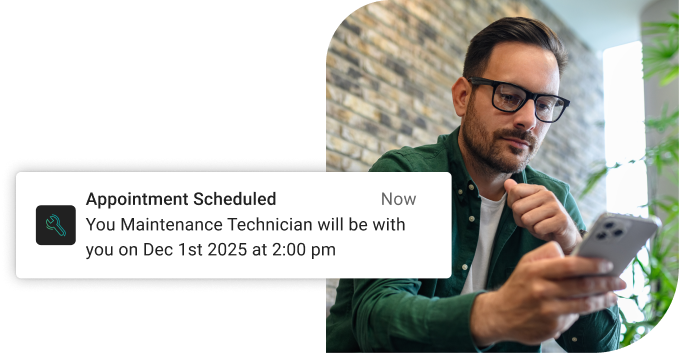
Stop Losing Hours to Scheduling Chaos
osapiens HUB eliminates costly mistakes through AI-powered scheduling that matches skills with job requirements, optimizes routes automatically, and provides real-time visibility into all field operations.
Start with field scheduling software
Popular Examples: Scheduling Software For Field Service
- osapiens HUB for Maintenance: SAP-certified field service and maintenance platform combining enterprise functionality with user-friendly design. Freemium model available, drag-and-drop scheduling, mobile-first approach with offline capabilities.
- OverIT: Enterprise-level FSM focused on utilities, energy, and telecom. Good GIS integration, augmented reality capabilities, and hands-free operation for linear asset management.
- Salesforce Field Service: Enterprise solution with AI-powered scheduling, deeply integrated with Salesforce CRM ecosystem. Best for organizations already using Salesforce.
- Praxedo: AI-driven SmartScheduler for automated route optimization. Strong fit for telecom, energy, and HVAC industries.
- Fieldcode: Modern FSM platform with Zero-Touch automation and AI voice agents. Features 90-day free trial and intuitive setup for mid-sized service organizations.
- SAP Field Service Management: Comprehensive enterprise solution with AI-assisted scheduling (Joule) and deep SAP ERP integration. Powerful but complex implementation requiring substantial resources.
How osapiens HUB for Maintenance Transforms Field Service Scheduling
osapiens HUB combines comprehensive CMMS capabilities with powerful field service management in a single platform. Unlike fragmented tools that require multiple systems, osapiens creates a unified hub for scheduling, asset management, work orders, and field operations. This integration eliminates data silos and gives your service teams complete context for every job.
Intelligent Scheduling and Workforce Planning
osapiens HUB uses AI-supported planning to optimize technician schedules automatically. The system considers skills, certifications, location, current workload, and travel time to assign the most appropriate technician to each job. This intelligent approach increases first-time fix rates to 89% while distributing work evenly across your field service teams.
The visual planning interface provides real time visibility into all field operations. Dispatchers see live updates as technicians progress through their schedules, making it simple to handle urgent service requests or adjust for delays. Route optimization ensures technicians take the most efficient routes, reducing fuel costs and increasing the number of jobs completed daily.
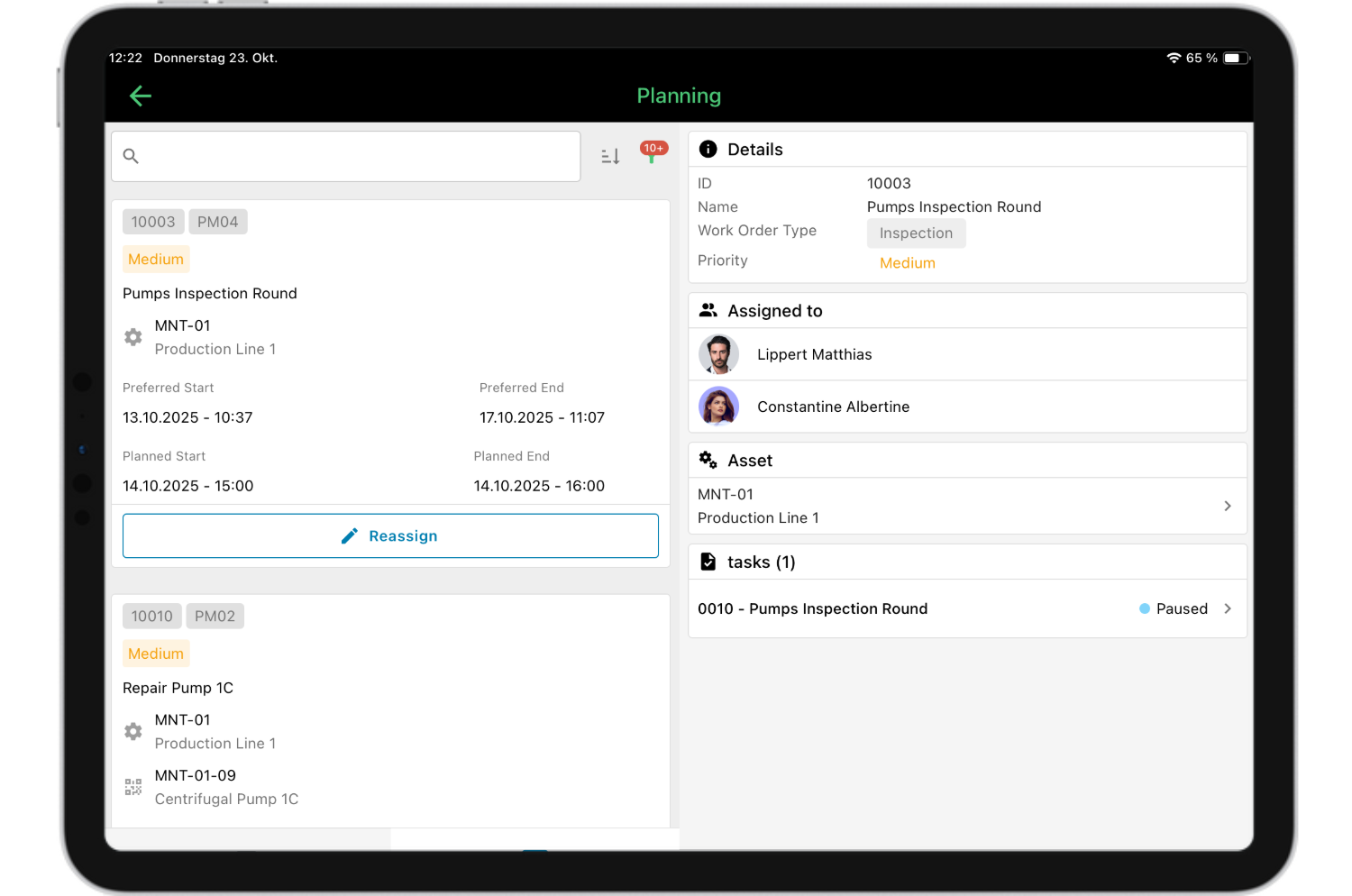
Mobile App for Field Technicians with Offline Functionality
The osapiens HUB mobile app works seamlessly online and offline, ensuring field technicians always have access to critical information. Even in basements, tunnels, or remote locations without connectivity, technicians can view job details, access equipment history, and document their work. Data synchronizes automatically when connection returns.
Field technicians receive all necessary information directly on their smartphones or tablets: customer info, asset specifications, service history, safety requirements, and step-by-step checklists. They can capture photos, record time and materials, and collect digital signatures on-site. This eliminates paperwork and ensures accurate records for every service call.
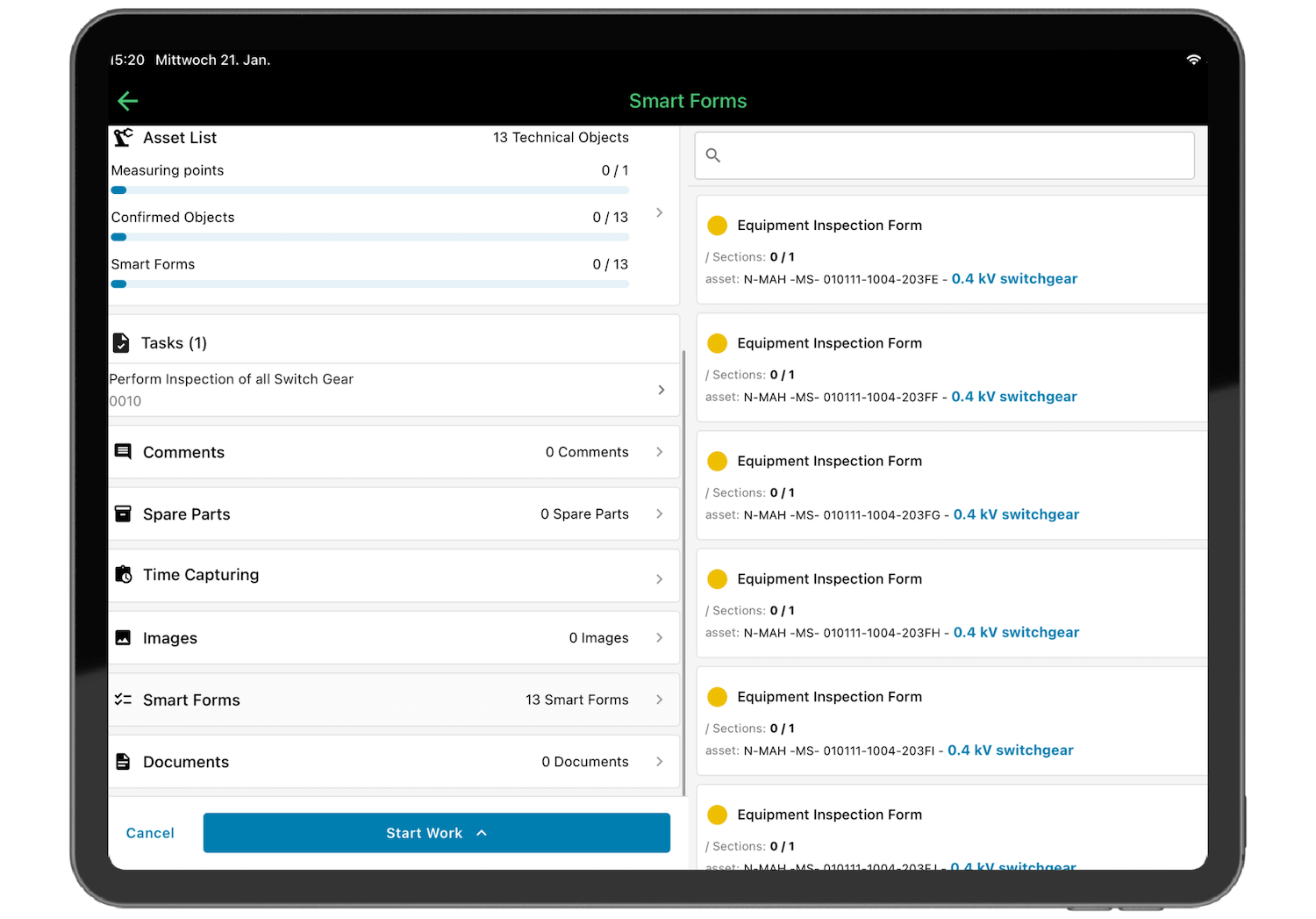
Smart Forms and Automated Service Reports
osapiens reduces errors by 21% through validated, guided smart forms that walk field technicians through each task step-by-step. These digital checklists ensure nothing gets missed – from safety inspections to required measurements and customer data verification. The system only accepts properly formatted entries, eliminating the illegible handwriting and incomplete information that plague paper-based processes.
Service reports generate automatically from completed forms, incorporating photos, digital signatures, timestamps, and all recorded data without manual data entry. These comprehensive reports flow directly to customers and into your billing system the moment technicians finish on-site. For multi-day projects, osapiens supports partial billing, allowing you to invoice for completed work as it progresses rather than waiting until full job completion.
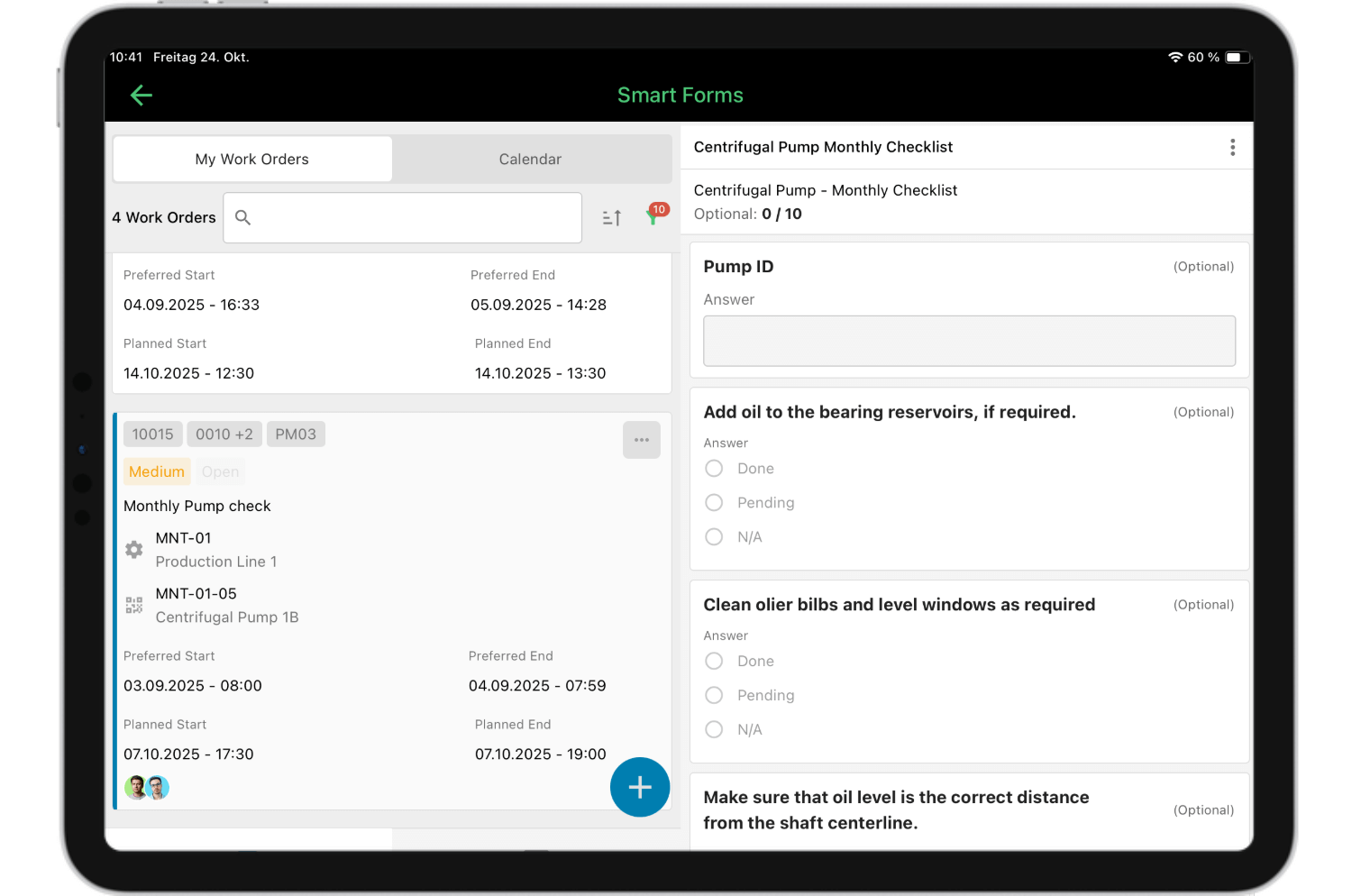
This end-to-end automation, from intelligent dispatching through mobile documentation to seamless billing, creates seamless communication across your field service operations and accelerates payment cycles significantly.
Common Challenges in Field Service Management – And How Software Solves Them
Field service businesses face predictable obstacles that drain profitability and frustrate customers. Scheduling software for field service addresses these pain points systematically:
| Challenge | Impact | Software Solution |
|---|---|---|
| Inefficient route planning | Wasted fuel, fewer jobs completed, exhausted technicians | Automated route optimization creates most efficient routes, reducing drive time |
| Poor first-time fix rates | Costly truck rolls, unhappy customers, revenue loss | Skill-based assignment and complete service history access increases resolution |
| Manual scheduling and dispatching | Time-consuming coordination, frequent errors, limited scalability | Automated task assignment and real time visibility eliminate phone tag and manual processes |
| Disconnected systems | Duplicate data entry, information gaps, coordination failures | Integrated platform connects scheduling, work orders, inventory management, and billing in centralized system |
| Limited customer communication | No-shows, complaints, poor reviews | Automated reminders, GPS tracking, and instant service reports keep customers informed |
| Paper-based documentation | Lost records, delayed billing, compliance risks | Digital forms and automated reports create accurate records and faster invoicing |
Each challenge compounds the others in manual systems. Field service software breaks this cycle by connecting scheduling with execution, documentation, and customer management in one seamless flow.
One Platform for Scheduling, Maintenance, and Field Service
Stop juggling disconnected tools for scheduling, work orders, and asset management. osapiens HUB unifies everything in one intelligent platform: drag-and-drop scheduling with real-time updates, mobile apps with full offline functionality, automated service reports.
Start with field service software
Conclusion: Streamline Your Field Service Operations with the Right Scheduling Software
Scheduling software for field service transforms chaos into predictable, profitable field operations. By automating task assignment, optimizing routes, and providing real time visibility, you eliminate the coordination headaches that waste time and money. Your field technicians arrive prepared with complete job details and service history, increasing first-time fix rates and customer satisfaction.
The right field service management software integrates scheduling with work order management, inventory management, and billing – creating one centralized system that supports your entire operation. Mobile access with offline mode ensures technicians work efficiently regardless of connectivity, while automated service reports and customer notifications enhance transparency and professionalism.
osapiens HUB for Maintenance delivers all these capabilities in a single, intuitive platform designed specifically for maintenance and field service teams. With intelligent scheduling, comprehensive mobile functionality, and seamless integration, osapiens helps you increase technician productivity while reducing operational costs.
FAQ
What is scheduling software for field service?
Scheduling software for field service is a digital platform that automates technician assignment, dispatch, and tracking for on-site jobs. It replaces manual scheduling methods like phone calls and spreadsheets with intelligent automation that considers technician skills, availability, location, and job requirements. The software provides real time visibility into all field operations and typically includes mobile apps for technicians to access job details and document work on-site.
How does field service management software improve technician productivity?
Field service management software improves technician productivity by 25-40% through three mechanisms:
- Route optimization reduces drive time by up to 25%, enabling more daily jobs
- Mobile access to service history increases first-time fix rates to 89%
- Digital automation eliminates paperwork, saving 2–3 hours per technician every week
These improvements allow technicians to focus on service delivery rather than administrative tasks or travel inefficiencies.
What are the key features of field service scheduling software?
Essential features include drag-and-drop scheduling interfaces with real time visibility, automated task assignment based on skills and technician availability, mobile apps with offline functionality, and integration with work order management and inventory management systems. Route optimization for efficient routes, customer notification capabilities, digital forms and service reports, GPS tracking, and comprehensive analytics complete the package. The best solutions combine these features in one centralized system rather than requiring multiple disconnected tools.
Can field service software work offline for technicians in remote areas?
Yes, quality field service software includes offline mode that allows technicians to access job details, view service history, complete digital forms, capture photos, and record work even without internet connectivity. All data synchronizes automatically when connection returns. This offline functionality is essential for field technicians working in basements, rural areas, or locations with poor signal strength, ensuring they can always complete tasks and document their work to create accurate records.
How much does field service scheduling software cost?
Field service scheduling software costs range from €29–150 per user/month, depending on features and company size. Some providers like osapiens offer freemium models with basic functionality at no cost, allowing businesses to test the platform before committing.
Maintenance Schedule Template
Use our template with asset overview, task catalog, and annual plan. Ready to use for your maintenance planning.
Download for free
ENTERPRISE CAPABILITIES
- SAP ECC & S/4HANA Certified
- Infor & MS Dynamics
- Microsoft Entra ID / Okta
- ISO 27001 & 9001
- EU Cloud · Data Sovereignty
- Development, Test, and Production Environments
- Multi-Entity & Multi-Site
- Power BI Integration
- Audit Trail & Compliance
Related content

January 1, 2026
Electric Generator Maintenance Checklist – Tasks, Tips & Best Practices
January 1, 2026
Power Cable Maintenance Checklist – Tasks, Tips & Template
January 1, 2026
Elevator Preventive Maintenance Checklist – Tasks, Safety & Digital Execution
January 1, 2026
Laboratory Equipment Maintenance Checklist – Tasks, Best Practices & Digital Solution
January 1, 2026
Busbar Maintenance Checklist: What to Inspect & When
January 1, 2026
Cooling System Maintenance Checklist – Tasks, Tips & Template
January 1, 2026
Pharmaceutical Mixer Maintenance Checklist – GMP Tasks, Safety & Digital Execution
July 22, 2025
Simplify Maintenance with SAP and osapiens
January 1, 2026
Excavator Maintenance Checklist: What to Inspect, When & How
January 1, 2026
Bulldozer Maintenance Checklist – Tasks, Intervals & Digital Execution
January 1, 2026
Emergency Lighting System Maintenance Checklist – Tasks, Compliance & Digital Execution
January 1, 2026