osapiens CMMS
AI agents for maintenance: the CMMS that runs the work
Planners write work orders by hand, technicians look up manuals on the way to the asset, and every finished job still has to be documented. That admin time is missing at the machine. In osapiens HUB for Maintenance, AI agents prepare the work and your team approves it.


faster repairs. History, manual and part are ready before the technician arrives.

preventive maintenance compliance. Plans that keep themselves up to date.
Maintenance teams lose a large share of their day to admin. A classic CMMS records that work. osapiens HUB for Maintenance prepares it: AI agents plan, prepare, document and report, and your team approves where it matters. Planners spend less time chasing, technicians have history, manual and part ready before they arrive, and managers get an answer when they ask.
How it works
From fault report to fixed, in one shift
Here is how one jammed labeller moves through osapiens HUB. All figures in this example are sample data.
Approve work orders instead of writing them
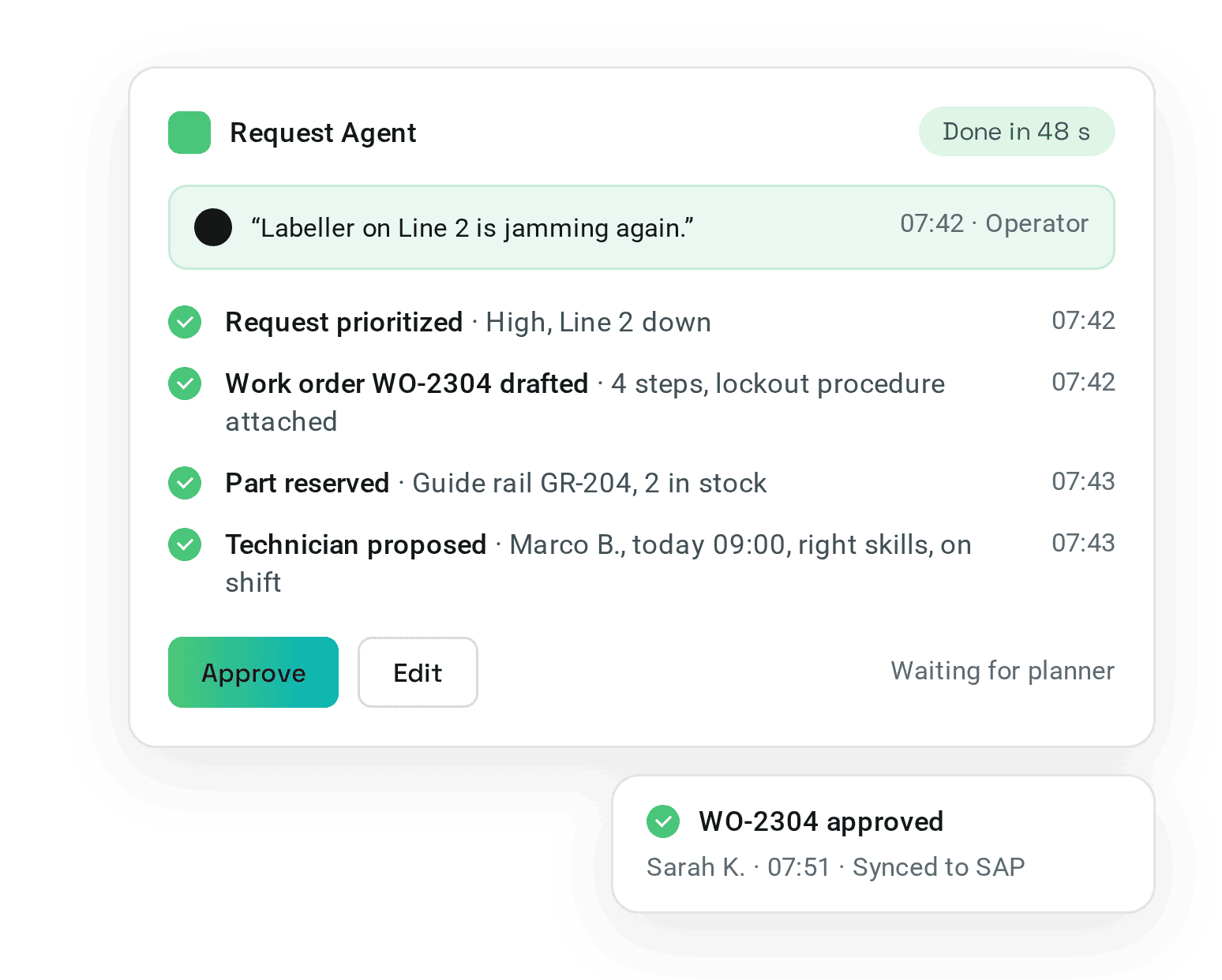
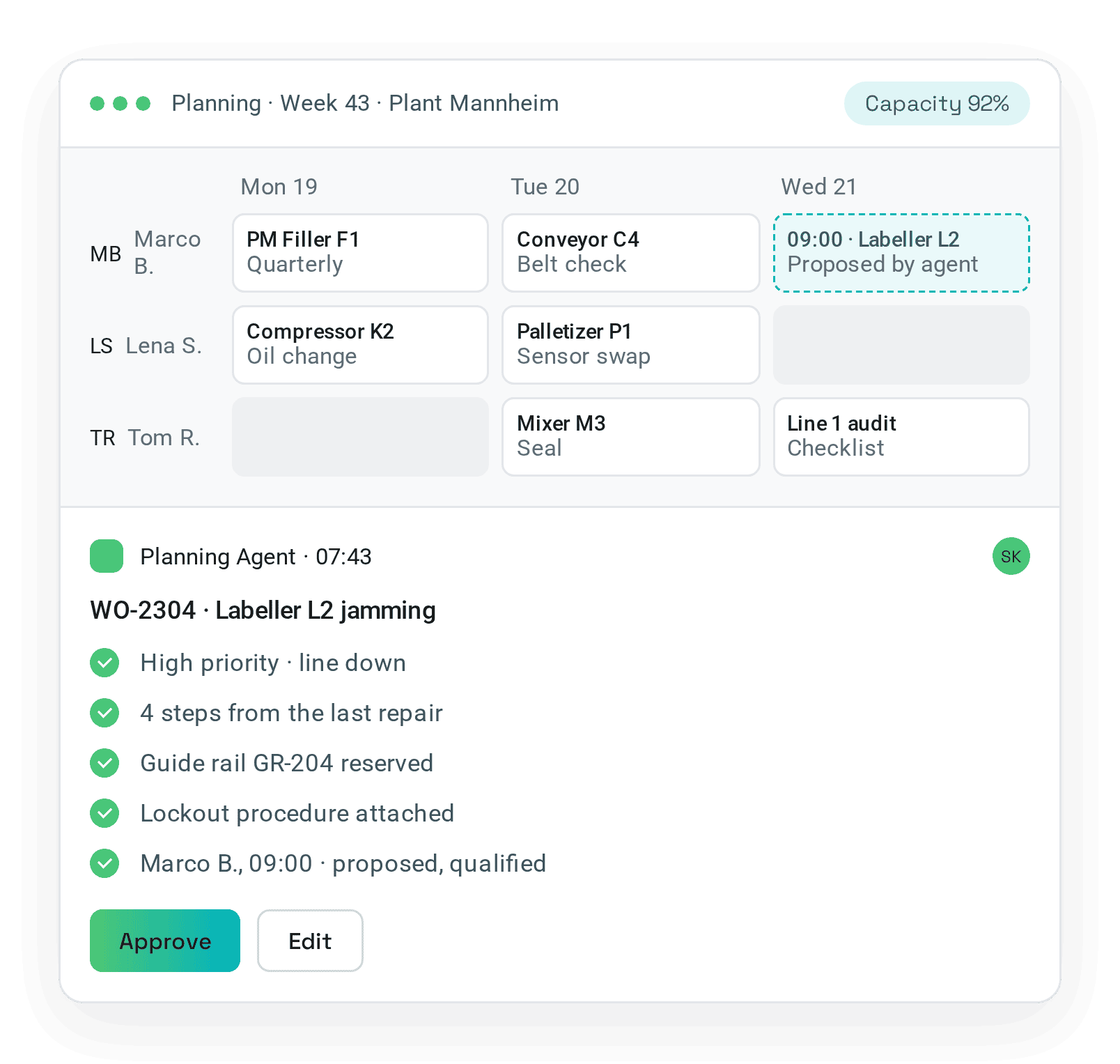
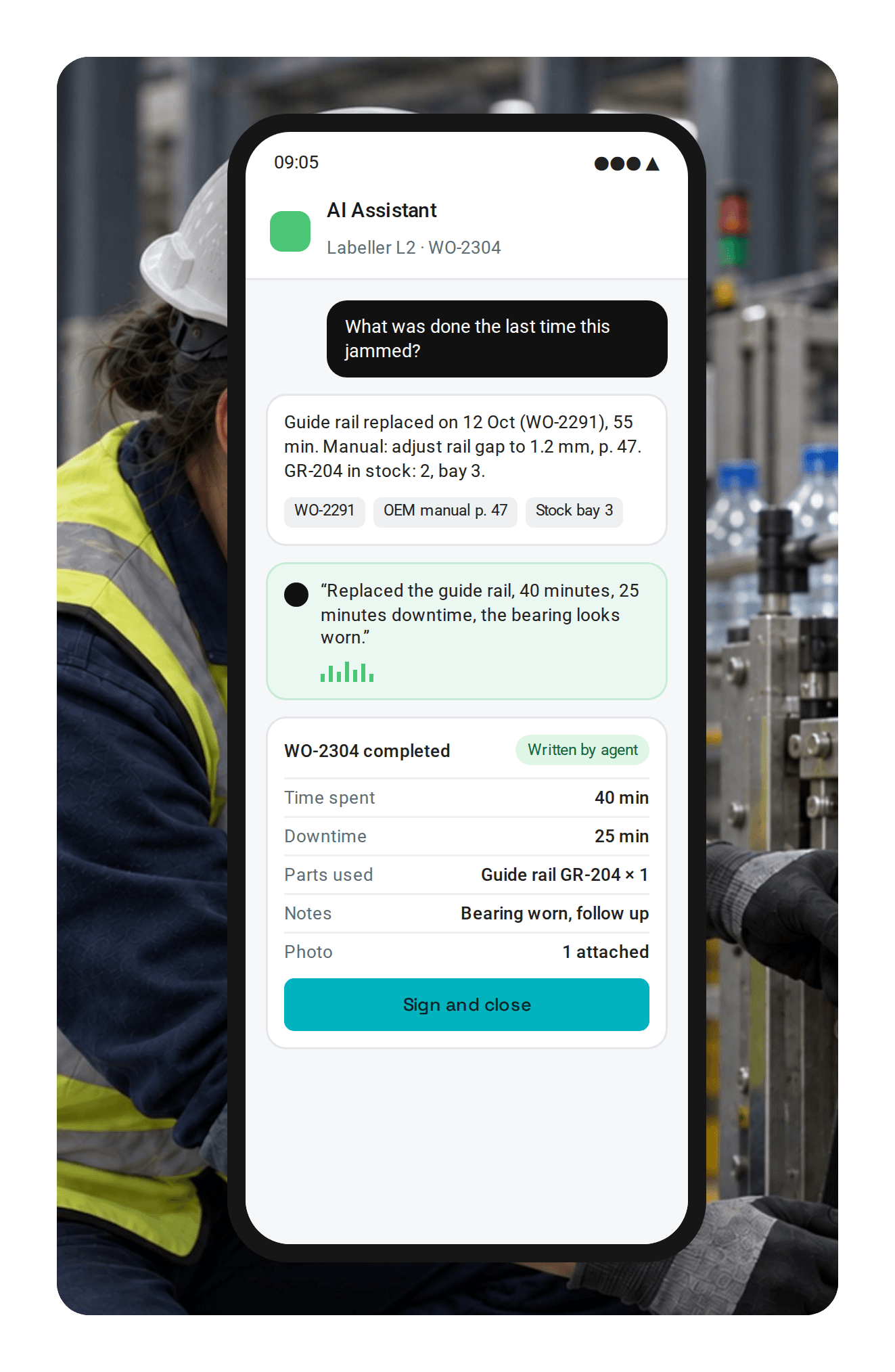
An operator says it into the app: “Labeller on Line 2 is jamming again.” Within a minute the agent has drafted the work order, reserved the part, attached the lockout procedure and proposed a technician. The planner checks it and clicks Approve.
- Every request becomes a work order. Voice, app, email or machine alarm: each arrives prioritized.
- Agents draft the work order. Steps, parts and procedures are ready for approval.
- Technicians are proposed by skills, shifts and workload. The planner confirms the assignment on the planning board.
- Approve, or let routine jobs run. Autopilot within your rules.
Get answers at the asset and document by voice
At the labeller, Marco opens the mobile app and asks: “What was done the last time this jammed?” He gets the last work order, the manual page and the part in stock. After the fix he says what he did, even without a connection. The work order is complete with time, downtime, parts used, notes and photo. He signs and moves on.
- The AI Assistant at the asset: history, OEM manuals, drawings and stock, by asking.
- Voice completes the work order: notes, time, downtime and parts used.
- Photo, QR code or voice. Offline, synced when back online.
- Smart forms with validation. Checklists that check as you go, signed on site: 25% fewer faulty work orders.
Get the KPIs you need without building a dashboard
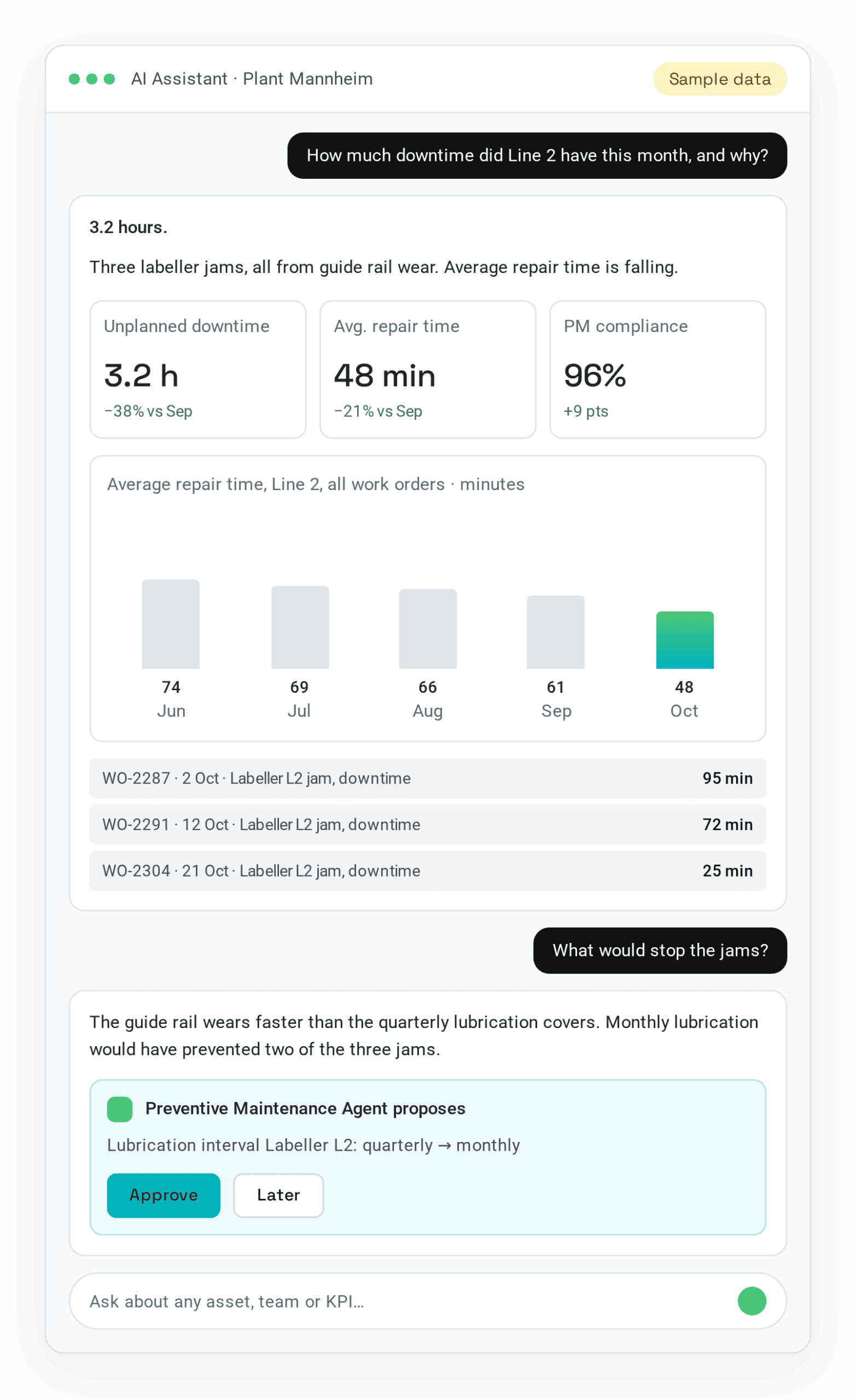
“How much downtime did Line 2 have this month, and why?” The answer: 3.2 hours, three labeller jams, guide rail wear, with the work orders behind it. The assistant also proposes a change: lubrication interval from quarterly to monthly. Approve, and the plan is updated.
- Any KPI in plain language: downtime, repair time, PM compliance, backlog.
- The reason behind the number, down to the work orders.
- Reports on request for the shift, the site or the board.
- Proposals that improve the plan. You approve.
Bring a real fault. We run it through the agents, from first report to approved work order.
Book a demo on a real faultHow far agents go
Assist, Approve, Autopilot: you decide
Each customer decides, agent by agent, how far it goes.
LEVEL 1
Assist
Agents find, draft and suggest. People do the work.
Still plans. The agent suggests.
LEVEL 2
Approve
Agents prepare the whole job. People approve with one click.
Approves what the agents build.
LEVEL 3
Autopilot
Routine work runs within your rules. People handle the exceptions.
Sets the rules. Agents run the routine.
Start with Assist and move up agent by agent, once the results convince you.
osapiens HUB Agent Factory
AI agents for the core maintenance workflow
Configure, instruct and monitor every agent in one place. Start with ready agents, adapt them to your plant or build your own. Your team keeps the decisions, the agents take the repetitive work.
Request Agent
ReadyA sentence becomes a request with asset and priority.
Planning Agent
ReadyWork orders drafted, parts reserved, technicians proposed.
Documentation Agent
ReadyVoice and photo become the completed work order.
Reporting Agent
ReadyAny KPI with the reason behind it.
Preventive Maintenance Agent
Build your ownRepeat failures become updated maintenance schedules.
Parts Agent
Build your ownReorders and minimum stock levels from parts used.
Safety Agent
Build your ownLockout procedures attached before work starts.
Shift Handover Agent
Build your ownOpen items summarized for the next shift.
Asset Onboarding Agent
Build your ownNameplate and manual become an asset with its parts list.
Procedure Agent
Build your ownThe OEM manual becomes procedures and checklists.
Built for IT
Guardrails, EU hosting and your existing systems
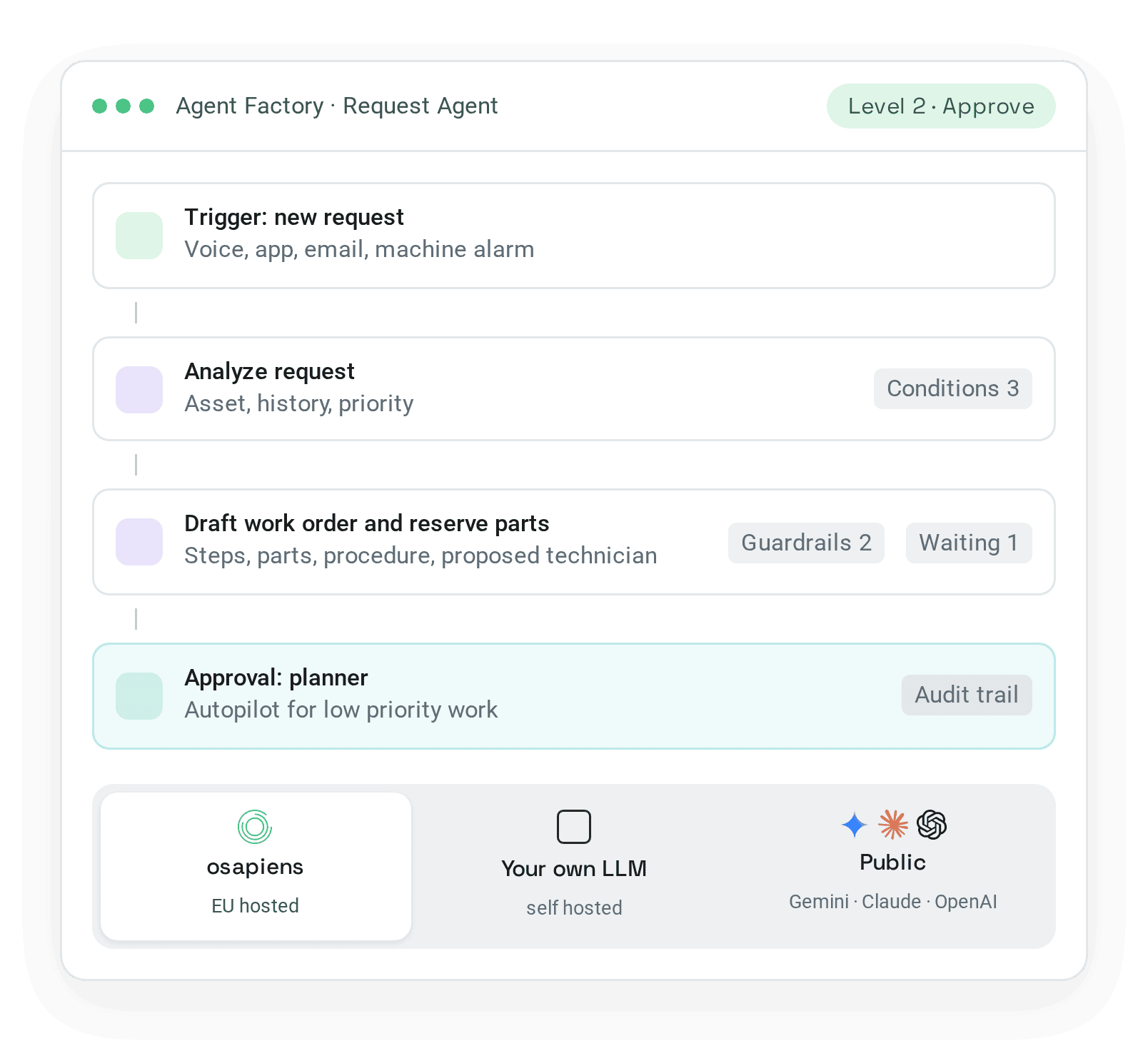
Every agent carries its guardrails, its approval step and its audit trail. The HUB is hosted in the EU and connects to the ERP you already run.
Guardrails and approvals
Conditions, limits and an approval step per agent.
Full audit trail
What was done, by which agent, approved by whom.
EU hosted, AI included
GDPR, ISO 27001 and ISO 9001.
Your model
osapiens models or your own LLM.
Certified for SAP
SAP ECC and S/4HANA. SAP stays the system of record.
Open to any ERP, or standalone
30+ connectors and an open API for other ERP systems, or no ERP at all.
Single sign-on and roles
Permissions per role.
Live in weeks
Standalone in 1 to 3 weeks, with SAP integration in 4 to 12 weeks.
Trusted by more than 1,700+ businesses

CONA on the collaboration with osapiens and increasing spare parts visibility and inventory control
Baron D. Jordan
Chief Product Officer