

Field Service

Nastja Pressler, osapiens Expert | 2. February 2026 | Lesezeit 7 min.
Define priorities not only on paper, but directly in the ticket. When impact and urgency are clearly visible in the system, discussions are eliminated and decisions are made consistently.
Book a demo













TRUSTED BY LEADING COMPANIES




ENTERPRISE-READY
 SAP Certification
 ISO 27001
 EU Hosting
 Entra ID & Okta
 Multi-Entity
Table of Contents
- Key Facts
- From ticket to deployment: The difference determines service efficiency
- Record service tickets in such a way that prioritization is possible in the first place
- Clear prioritization based on impact and urgency
- Dispatching based on qualifications, availability, and location
- How osapiens HUB for Service makes ticket management predictable
- FAQs
When things constantly get in the way in field service, teams quickly fall into a vicious circle. A customer calls, a system breaks down, someone sends an email marked “urgent,” and a reasonably predictable day turns into nonstop rescheduling. Without structured field service management, technicians make unnecessary trips, teams overlook critical service tickets, and the back office drowns in manual tracking. Short-term scheduling and reactive follow-ups replace active control.
Teams rarely struggle because they lack commitment. Most of the time, they lack a reliable framework that structures service tickets so the team doesn’t debate priorities but executes them consistently. Modern field service management solves exactly that. It brings ticket entry, scheduling, planning, and mobile execution into one clear process that stays stable even under pressure.
Key Facts
- Unplanned assignments usually arise from a lack of structure, not a lack of commitment.
- Unclear or incomplete service tickets make prioritization difficult and lead to queries.
- Turning tickets into assignments immediately leads to more unplanned additional trips.
- A clear distinction between tickets and assignments creates transparency and predictability.
- Prioritization based on impact and urgency replaces subjective urgency with clear criteria.
- A consistent field service process reduces surprises and increases service efficiency.
Unplanned assignments cost money because they create multiple problems at once. Travel times rise when planners change routes at short notice. The first-time fix rate drops when technicians arrive without the right information or spare parts. Teams skip documentation because nobody wants to “quickly” fill out forms while the next call already waits. In the end, one ticket often triggers two or three follow-up assignments that no one planned.
When teams treat everything as urgent, they stop trusting priorities. They base decisions on volume and escalation instead of impact and risk. A clean ticket and prioritization process in osapiens HUB for Service prevents exactly this.
From ticket to deployment: The difference determines service efficiency
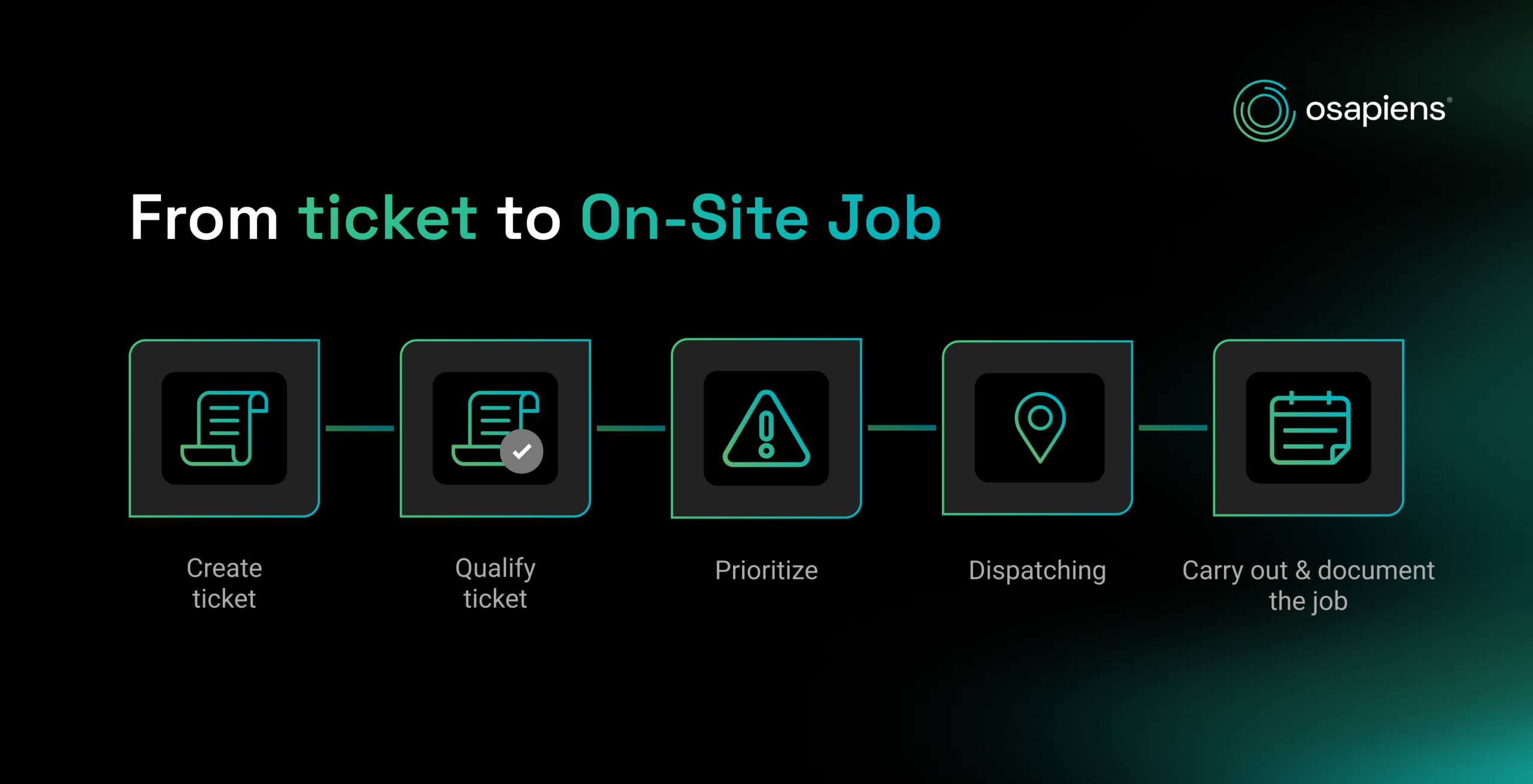
A ticket is initially a structured request. It describes a problem, the context, the affected asset, the impact, the desired time frame, and, if applicable, the contractual framework such as SLA or service level. An assignment, on the other hand, is the planned execution, i.e., who is going where, when, with what equipment, which checklist, and which safety instructions.
When companies treat tickets as jobs immediately, they often send technicians out before it is clear whether all the information is available. This leads to queries, missing parts, and additional trips. If teams qualify tickets first, they noticeably reduce unplanned jobs because they avoid blind dispatches.
Record service tickets in such a way that prioritization is possible in the first place
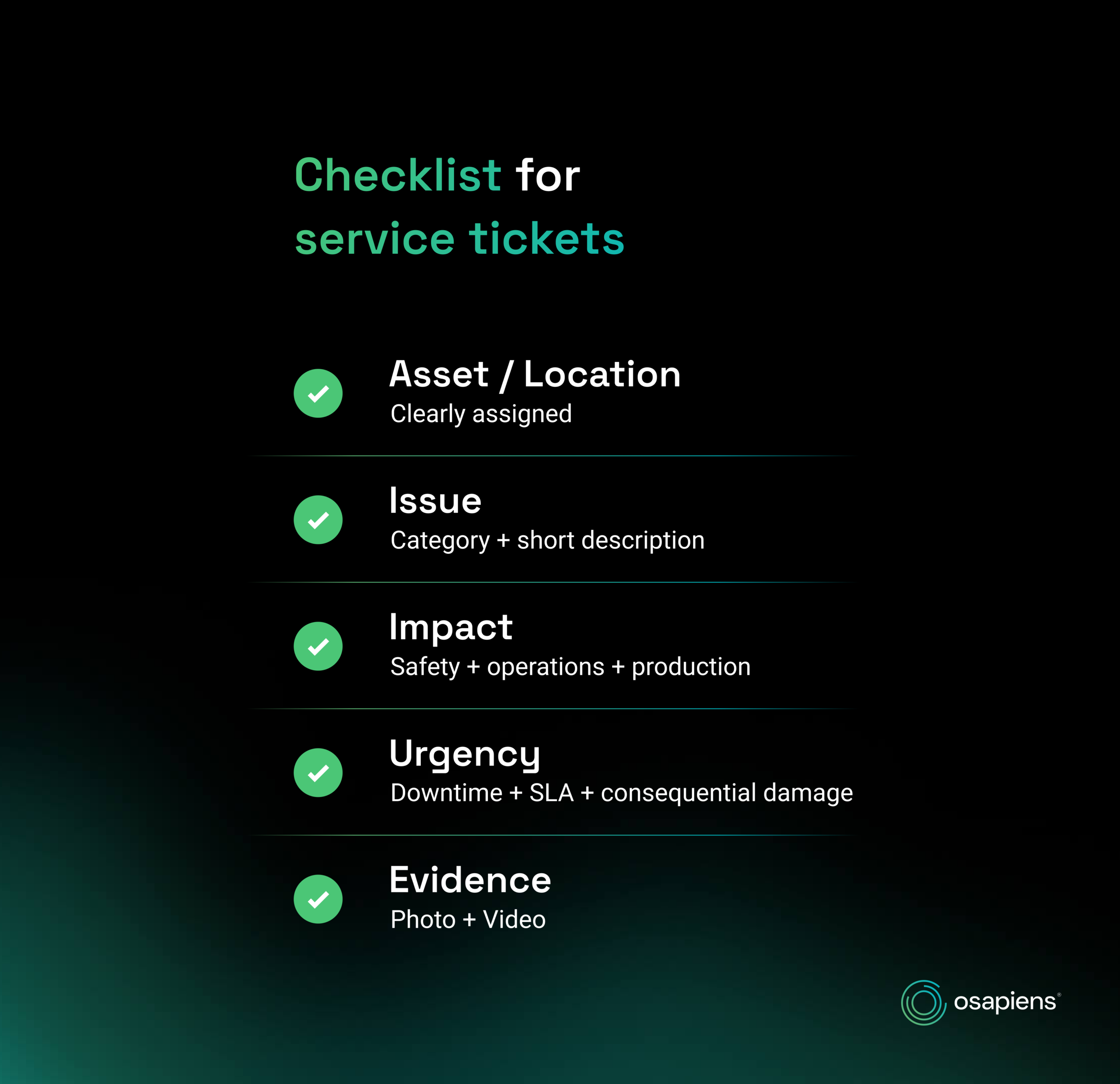
Priorities only work if tickets are comparable. In practice, this often fails due to incomplete information. A ticket such as “Pump is making strange noises” is difficult to classify without location, asset history, photo, or degree of impact.
A solid standard: teams record the affected asset or location for every ticket. They categorize the error pattern with a short description and confirm whether the issue impacts safety, production, or customer operations. If technicians or operators can directly add photos, videos, or measurements, this saves a lot of queries later on.
This is precisely the idea behind osapiens HUB for Service: Teams should stop submitting requests via phone calls, shout-outs, or notes. Instead, they should log every request in a system that provides real-time visibility and sorts tickets clearly.
Clear prioritization based on impact and urgency
Most teams are familiar with the problem that “urgent” is subjective. What is an emergency for the plant operator may be a case for maintenance that could wait until the next maintenance window. That’s why prioritization needs a clear logic that everyone understands and applies in the system.
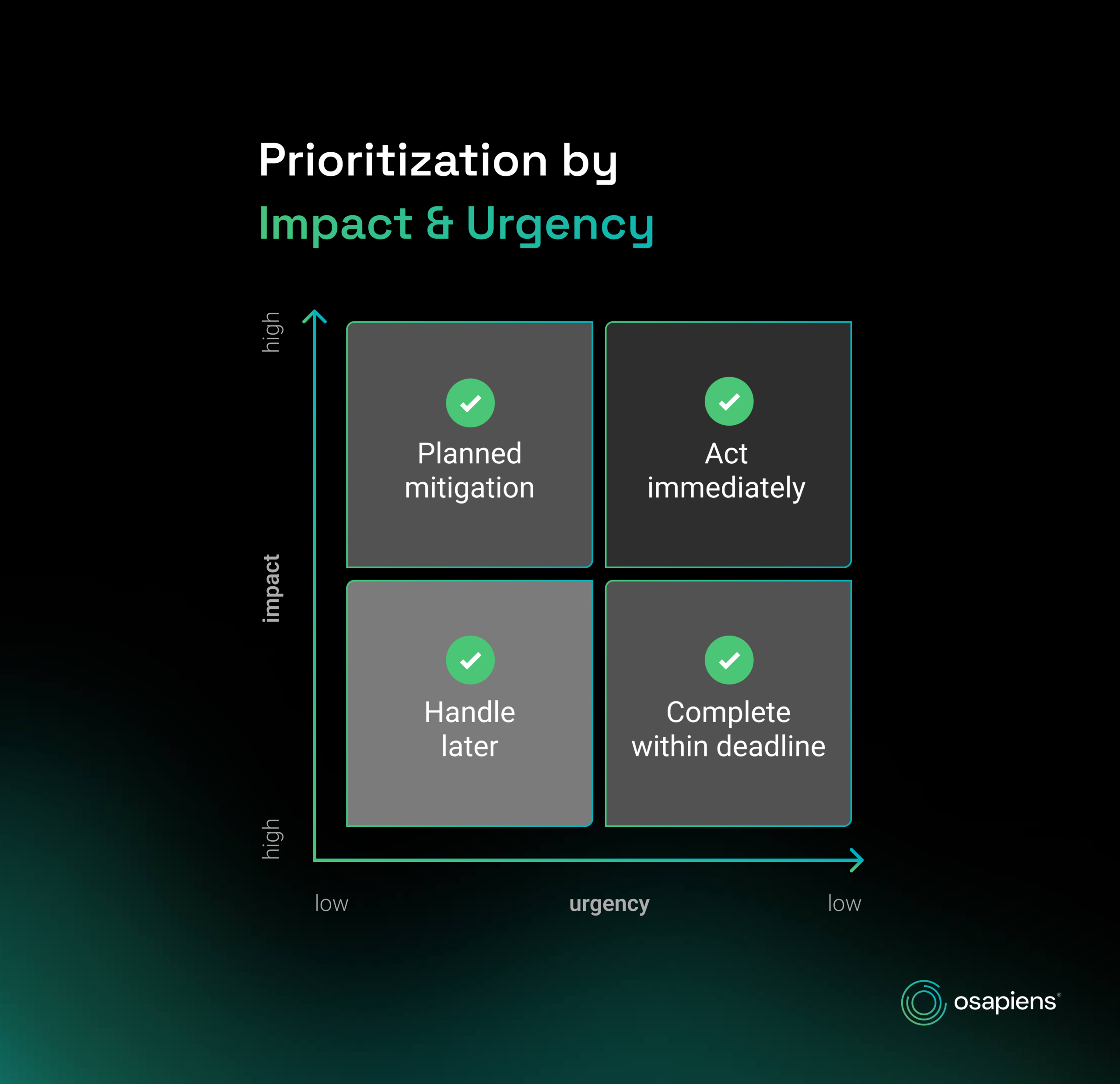
A combination of impact and urgency delivers reliable results. Impact shows how severely the issue disrupts operations, for example downtime, safety risk, quality risk, or the number of affected assets. Urgency shows how quickly action is required, for example because an SLA clock runs, further damage is imminent, or a tight production window is approaching.
When you define impact and urgency clearly and turn them into one consistent processing logic, clarity increases immediately. High priority no longer means “feels important.” It follows clear criteria such as high impact and high urgency. Less critical cases stay deliberately plannable and can be bundled when it makes sense. Make these rules visible and usable inside the ticket process, not just in internal documentation, so nobody has to guess or debate.
Dispatching based on qualifications, availability, and location
Unplanned assignments arise not only from poor prioritization, but also from incorrect assignment. If dispatch sends the wrong technician, the job takes longer, the fix fails because skills or materials don’t match, and the issue forces a second visit. This is the classic first-time fix killer.A modern FSM solution therefore relies on appropriate job assignment. The system should know what qualifications are available, who works in which shift model, who is on the road in which region, and how high the current utilization is. This is exactly how the osapiens Field Service Management solution works, enabling skill-based resource planning. The system assigns tasks based on skills, shifts, and availability. Planners no longer rely on Excel spreadsheets. Large organizations also need the solution to handle complex structures. It must cover multiple locations, roles, country specific units, and integration requirements.
How osapiens HUB for Service makes ticket management predictable
For teams that have many unplanned assignments, the biggest difference is a consistent process. Tickets are recorded centrally, enriched with asset and history context, prioritized according to clear rules, and then scheduled so that skills, availability, and location match. During execution, mobile workflows and checklists ensure that quality and documentation are not optional, but happen automatically. At the same time, integration requirements in larger environments can be reliably mapped, for example through a close SAP connection and design for enterprise structures with multiple locations, roles, and complex service processes.
When you set up field service in this way, the proportion of unplanned assignments does not decrease because less is happening, but because there are fewer surprises. And that is the crucial difference in practice.
Find out how osapiens automatically supports your scheduling based on location, availability, and skills.

Alberto Ecre, Group Lead Service Digitalization Department
★ ★ ★ ★ ★Nordex
“We were looking for a cloud platform solution that supports all of our regions. Our technicians have to visit the wind turbines every day to fix problems—we need stable solutions that make their work easier. The key was the very simple integration with our ERP system. Now we are gradually expanding: subcontractor management, tool management, and more.”
FAQs
What are service tickets?
Service tickets are structured processes used to record and track service requests, malfunctions, or repair needs. Ideally, a ticket contains information such as location, affected system or component, error description, urgency, impact on operation and safety, and relevant attachments such as photos or documents. This turns a single report into a traceable process that remains transparent from acceptance to resolution.
How do I prioritize service tickets correctly?
Practical prioritization is not based on gut feeling, but on clear criteria. A combination of impact and urgency has proven to be effective. The impact describes how severely operations are affected, such as downtime, quality risk, safety relevance, or the number of users affected. Urgency indicates how quickly teams need to act, for example, due to ongoing SLA requirements or the threat of consequential damage. If you derive fixed priority levels from this and define them uniformly within the team, you avoid discussions and ensure that critical cases are consistently dealt with first.
How can I get a better handle on unplanned assignments?
Unplanned assignments often arise because teams treat tickets as immediate field service appointments too early, even though important information is missing. A quick ticket qualification process can remedy this situation before dispatch triggers a callout. Teams check whether they can solve the problem remotely, whether all the necessary data is available, whether spare parts are available, and whether the case can be grouped with others. Standardized checklists and clear feedback from the callout further reduce the number of follow-up visits because technicians document diagnoses, measures, and results in full.
What software helps to manage service tickets and priorities efficiently?
Digital field service solutions combine ticket entry, prioritization, planning, and mobile execution in a continuous workflow. This allows teams to enter tickets uniformly, prioritize them according to clear rules, and assign them to the appropriate technicians based on qualifications, availability, and region. The osapiens HUB for Service supports this approach with clear order management, mobile processing on site, digital forms, and transparent tracking. This helps reduce unplanned visits, keep response times stable, and measurably improve service quality.
Process more service orders in less time
Your technicians are on the road visiting customers – efficiency determines your margin. With osapiens HUB for Maintenance, you can optimize route planning, spare parts logistics, and order processing. Your teams work with a mobile app, and you control everything centrally via real-time dashboards.
Optimize your service processes
Related content

January 1, 2026
Battery Bank Maintenance Checklist: Essential Tasks & Digital Execution
January 1, 2026
Die Casting Machine Maintenance Checklist – Tasks, Best Practices & Digital Execution
January 1, 2026
Industrial Mixer Maintenance Checklist – Tasks, Tips & Template
January 1, 2026
Roof Coating Maintenance Checklist – Tasks, Best Practices & Digital Execution
January 1, 2026
Injection Mold Maintenance Checklist – Tasks, Systems & Digital Execution

November 27, 2025
Condition Based Maintenance: Real-Time Monitoring That Keeps Your Critical Equipment Running
January 1, 2026
Laboratory Equipment Maintenance Checklist – Tasks, Best Practices & Digital Solution
January 1, 2026
Control Panel Maintenance Checklist – Tasks, Tips & Template
January 1, 2026
Turret Punch Press Maintenance Checklist – Tasks, Tips & Template
January 1, 2026
Gas Boiler Maintenance Checklist – Tasks, Safety & Digital Execution
January 1, 2026
Automated Guided Vehicle Maintenance Checklist – Tasks, Safety & Digital Execution
January 1, 2026