

CMMS

Florian Bartholomäus, osapiens Expert | 28. November 2025 | Lesezeit 15 min.
Small companies don't need dedicated maintenance departments to prevent costly equipment breakdowns. Modern preventive maintenance software delivers enterprise-level protection through simple, affordable tools designed specifically for smaller operations.
Start with preventive maintenance software













TRUSTED BY LEADING COMPANIES




ENTERPRISE-READY
 SAP Certification
 ISO 27001
 EU Hosting
 Entra ID & Okta
 Multi-Entity
Table of Contents
- Key Facts
- Why Small Companies Need Preventive Maintenance Software
- Key Features of Preventive Maintenance Software for Small Companies
- Benefits of Preventive Maintenance Software for Small Companies
- Comparative Analysis of Preventive Maintenance Software
- Implementing Preventive Maintenance Programs
- Conclusion: How osapiens HUB for Maintenance Supports Small Companies
- FAQ
Preventive maintenance software transforms how small companies manage their equipment maintenance. Instead of waiting for failures, you can schedule maintenance activities automatically, monitor asset performance in real-time, and extend equipment lifespan through data-driven decisions. Modern CMMS software solutions are specifically designed for small businesses, offering enterprise functionality through user-friendly interfaces and affordable pricing models – including freemium options that let you start protecting your assets today without upfront investment.
Key Facts
- Downtime reduction: Small businesses using preventive maintenance software reduce equipment downtime, directly protecting revenue and production schedules while preventing costly emergency repairs.
- Cost savings & extended lifespan: Companies implementing preventive maintenance strategies lower maintenance costs compared to reactive approaches while extending equipment reliability and asset lifespan, delaying expensive replacement investments.
- Fast implementation & productivity gains: Modern CMMS software can be implemented in 1–2 weeks, with maintenance teams saving time per work order through streamlined workflows and mobile access.
- osapiens delivers enterprise results for small businesses: The osapiens HUB for Maintenance offers a free plan (up to 5 users, unlimited assets) with comprehensive preventive maintenance scheduling, mobile access, and work order management.
Why Small Companies Need Preventive Maintenance Software
Small companies often rely on reactive maintenance and fixing equipment only when it breaks. This approach seems practical with limited resources, but it actually costs more through emergency repairs, unplanned equipment downtime, expedited parts shipping, and lost production. When critical assets fail unexpectedly, operations halt, customer orders get delayed, and reputations suffer.
Without preventive maintenance software, small teams struggle to track maintenance history across assets. Technicians waste time searching for equipment information and past repair records. Planning maintenance around production schedules becomes nearly impossible when everything lives in spreadsheets or someone’s memory.

The osapiens HUB for Maintenance makes enterprise-level functionality accessible through user-friendly interfaces that small teams can implement quickly without extensive training.
Key Features of Preventive Maintenance Software for Small Companies
Small companies need preventive maintenance software that delivers enterprise-level capabilities without enterprise-level complexity. The right solution combines powerful functionality with simplicity and affordability, enabling your team to manage maintenance activities effectively without dedicated IT support or lengthy implementations.
Ease of Use & Fast Onboarding
Small companies don’t have time for lengthy implementations. The right CMMS software must be intuitive enough that teams start using it within days, not months. User-friendly software means creating a work order takes 2–3 clicks, visual workflows with drag-and-drop scheduling make planning maintenance activities intuitive, and mobile-first design ensures technicians access everything from smartphones without desktop bottlenecks.
The osapiens HUB for Maintenance typically implements in 1–2 weeks for small companies, with intuitive design requiring minimal training while delivering comprehensive preventive maintenance capabilities.
Mobile Access for Field Technicians
Mobile access is essential when technicians spend most time on the production floor or in the field – desktop-only solutions force office trips for every update, creating delays that undermine maintenance management. Mobile CMMS apps enable technicians to
- receive work orders instantly,
- update status in real-time,
- capture photos,
- access equipment manuals on-site,
- and log maintenance activities immediately upon completion.
Offline functionality ensures work continues in areas with poor connectivity, automatically syncing data when connection returns.
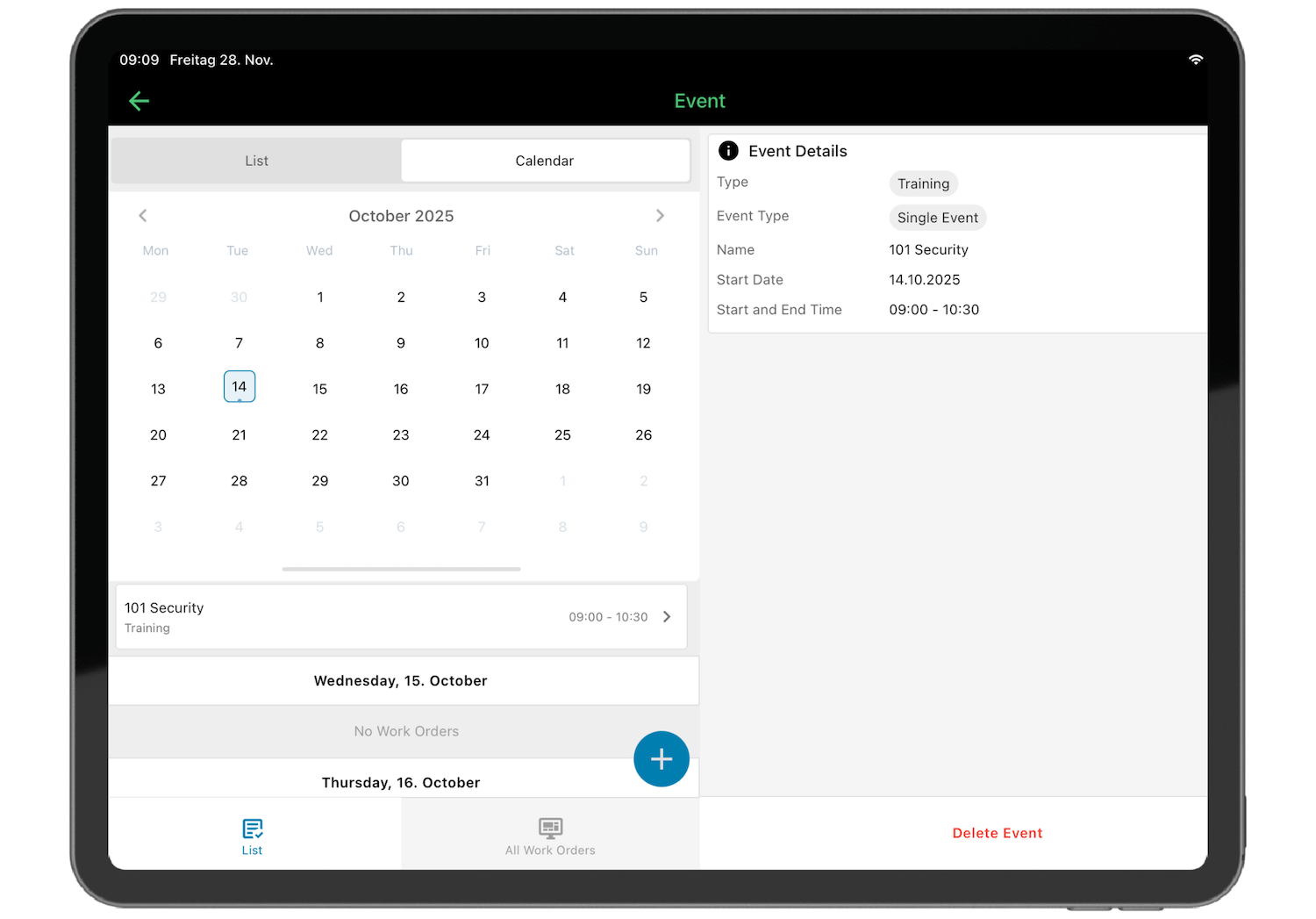
The osapiens HUB for Maintenance delivers full mobile functionality with online and offline access, ensuring technicians stay productive in basements, remote facilities, or industrial sites with poor connectivity. The mobile app enables complete execution tracking and documentation – technicians document work performed, capture condition data through photos, report feedback on task completion, and build comprehensive maintenance history that continuously improves future maintenance planning and interval optimization.
Preventive Maintenance Scheduling
Automated preventive maintenance scheduling transforms maintenance from reactive firefighting to proactive planning by creating schedules based on time intervals, usage metrics, or condition-based triggers. Once configured, the system automatically generates work orders, assigns them to technicians, and sends reminders before due dates.

The osapiens HUB for Maintenance goes beyond basic scheduling by capturing equipment conditions, failure patterns, and manufacturer specifications to automatically derive preventive tasks based on identified risks and operational needs. The system allows you to define maintenance intervals, step-by-step procedures, required parts, necessary tools, and estimated time per asset centrally. Work orders are then automatically generated based on calendar dates, meter readings (operating hours, production cycles), or condition thresholds – ensuring critical equipment receives timely servicing while giving small teams flexibility to manage changing priorities. This intelligent scheduling adapts to your operational reality rather than forcing rigid maintenance windows.
Work Order Management
Effective work order management eliminates the chaos of verbal requests, sticky notes, and lost paperwork through easy creation from anywhere. Assignment to specific technicians with clear responsibility, and priority levels focus teams on what matters most.
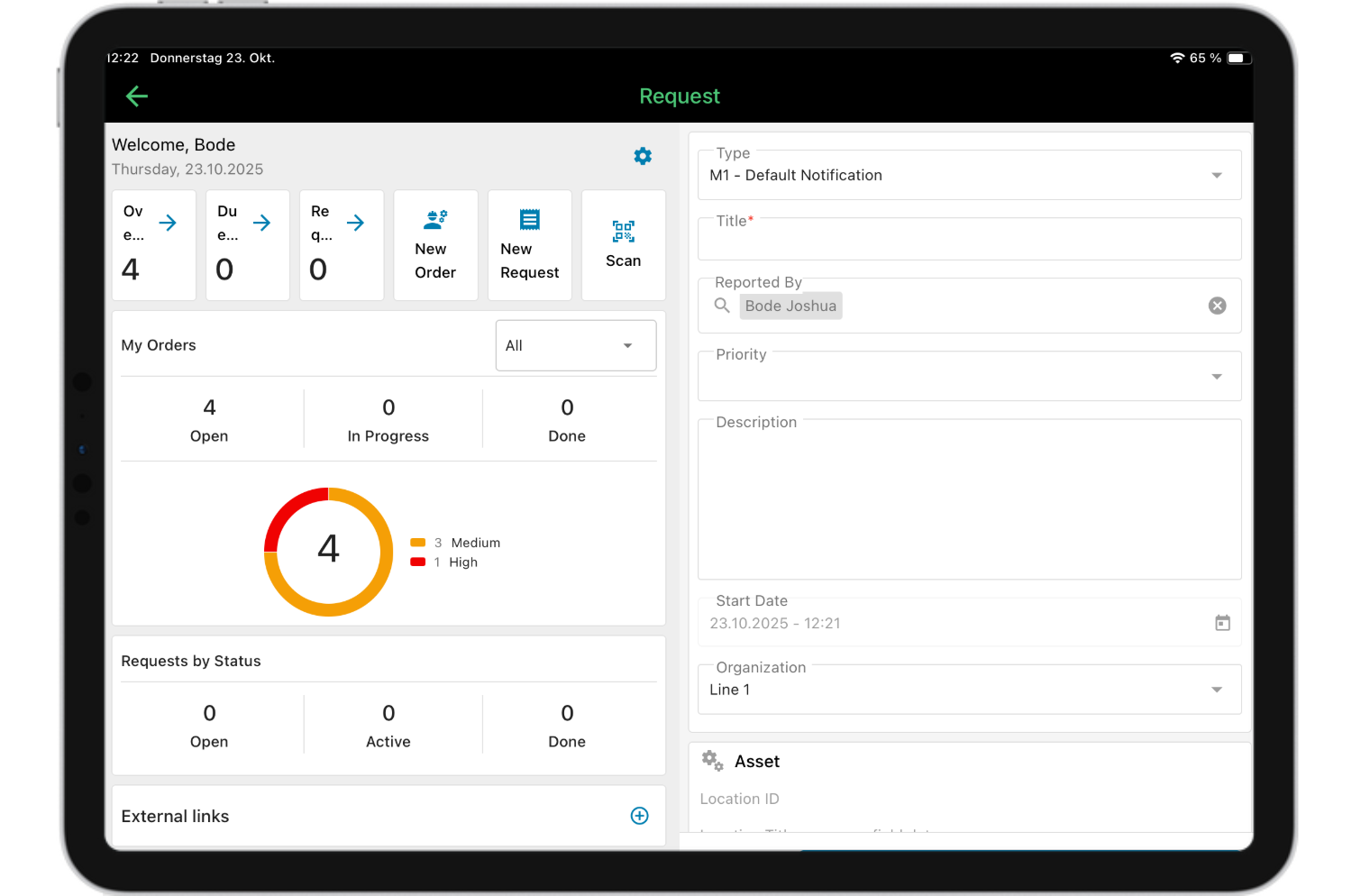
The osapiens HUB for Maintenance streamlines work order management with customizable forms and checklists ensuring technicians complete every required step. Step-by-step instructions guide less experienced workers through complex tasks, while the mobile app enables complete execution tracking – technicians log work performed, document conditions through photos, record parts and time used, and provide feedback that feeds into continuous improvement. The system tracks all maintenance data automatically, building a comprehensive history that reveals KPIs like completion rates, response times, and cost trends, enabling you to optimize maintenance intervals and plans based on actual performance data rather than assumptions.
Asset Management & Tracking
Asset management transforms maintenance from guesswork into data-driven decision-making by tracking equipment specifications, location, complete maintenance history, warranty information, and asset performance metrics in one centralized system. Maintenance data reveals when repair costs exceed replacement value, helping you decide whether to fix aging equipment or invest in new assets.
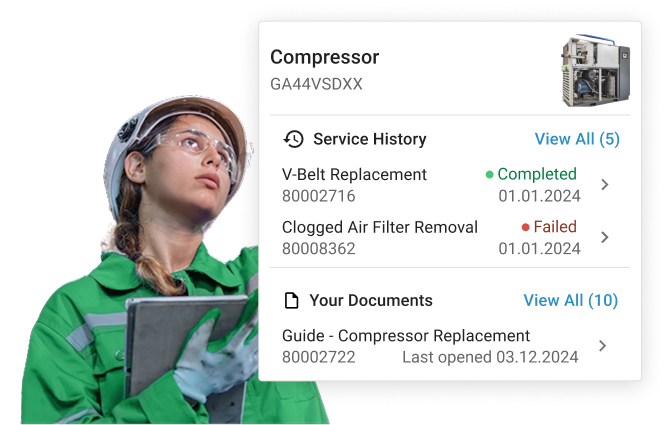
The osapiens HUB for Maintenance enables QR code labels that link physical assets to digital records. Technicians simply scan equipment with their smartphones to access complete asset details, maintenance history, and current work orders instantly. This eliminates scattered spreadsheets and ensures all equipment maintenance information is accessible at the point of work.
Spare Parts & Inventory Management
Inventory management prevents maintenance delays caused by missing parts by tracking spare parts across storage locations, automatically updating stock levels when used, and triggering reorder alerts when inventory runs low. This eliminates emergency orders with expedited shipping costs, reduces excess inventory tying up capital, and prevents maintenance delays waiting for critical components.
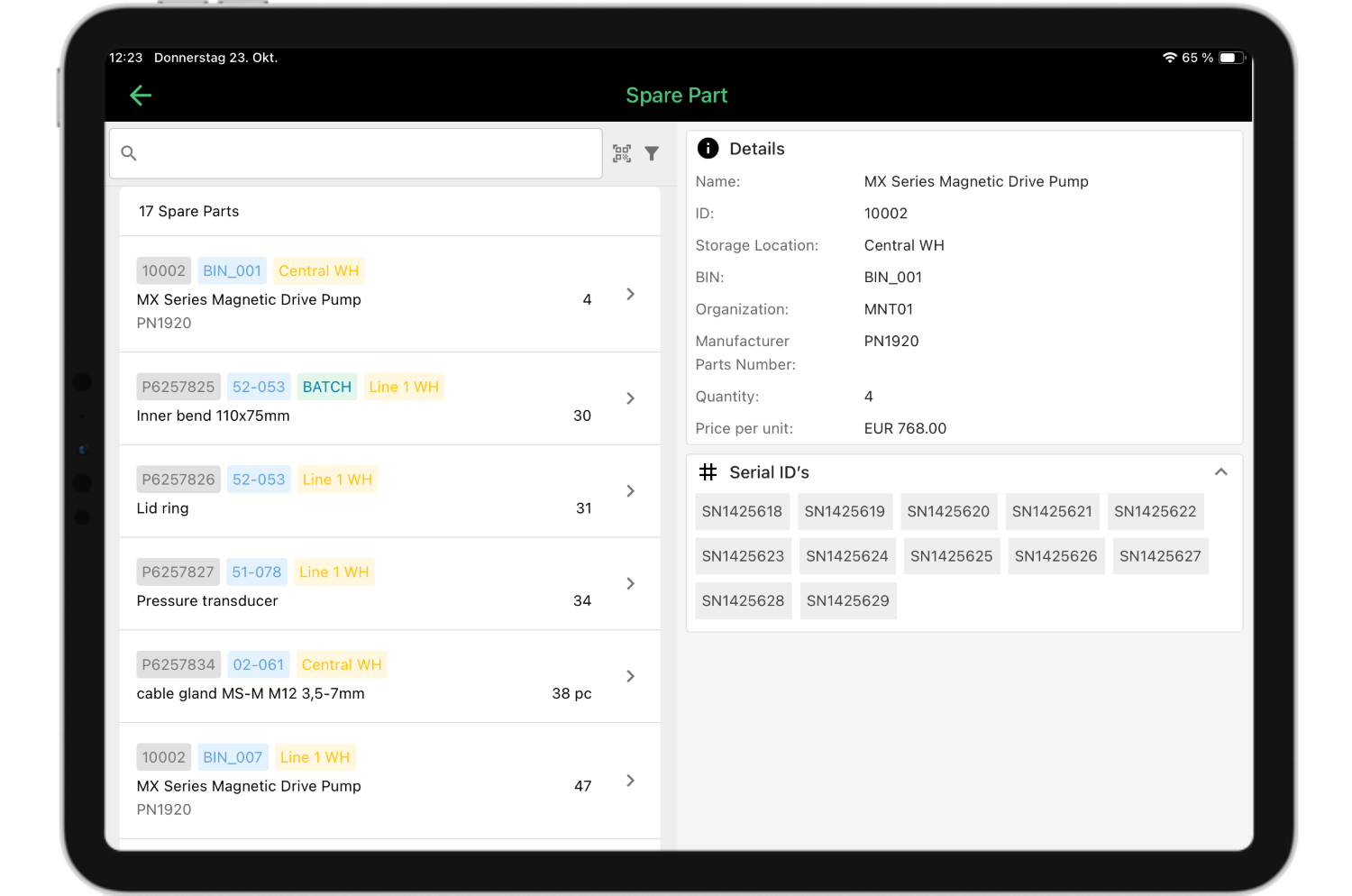
The osapiens HUB for Maintenance provides comprehensive spare parts management that tracks parts usage by work order and asset, manages multiple storage locations, and provides real-time visibility into stock levels. The system links parts directly to specific equipment and maintenance activities, ensuring technicians know exactly what’s available and where to find it.
Affordable Entry & Scalability
Budget restrictions are usual for small companies evaluating preventive maintenance software. Modern cloud-based solutions democratize access to enterprise functionality through affordable subscription models that align costs with actual usage.
Look for free trials or freemium options allowing you to test the software before committing, per-user pricing enabling you to start small and add users as you grow, transparent pricing without hidden implementation costs, and the ability to scale features as your company expands.
The osapiens HUB for Maintenance exemplifies this approach through its freemium model. Small companies start for free with up to 5 users and unlimited assets, then upgrade as maintenance operations grow. This eliminates financial barriers while providing a clear path to advanced capabilities as business needs evolve.
Benefits of Preventive Maintenance Software for Small Companies
Implementing preventive maintenance software delivers measurable ROI that directly impacts your bottom line. Small companies see results within weeks because they’re transitioning from reactive, manual processes – meaning efficiency gains and cost reductions become evident immediately.
The transformation from reactive to proactive maintenance creates measurable improvements:
- Reduced equipment downtime: Automated preventive maintenance scheduling prevents failures before they occur, reducing unplanned equipment downtime and eliminating costly emergency repairs.
- Lower maintenance costs: Emergency repairs cost 3–5 times more than planned maintenance due to overtime labor, expedited parts, and production losses. Preventive maintenance software helps avoid these premium costs while extending equipment reliability.
- Enhanced asset performance: Consistent, scheduled maintenance keeps equipment operating at peak efficiency, reducing energy consumption and improving production quality while maximizing return on your asset management investments.
- Increased team efficiency: Mobile CMMS apps eliminate office trips for updates, with technicians saving time per work order by accessing all maintenance data, equipment manuals, and work instructions directly from smartphones.
- Better inventory control: Connecting preventive maintenance schedules with inventory management prevents stockouts that extend downtime while reducing excess inventory that ties up cash. You order parts proactively at standard rates rather than paying premiums for emergency shipments.
The osapiens HUB for Maintenance delivers these benefits through automated workflows, mobile access, and comprehensive spare parts management – giving small companies enterprise-level capabilities that drive immediate operational improvements and measurable cost savings. Calculate your ROI.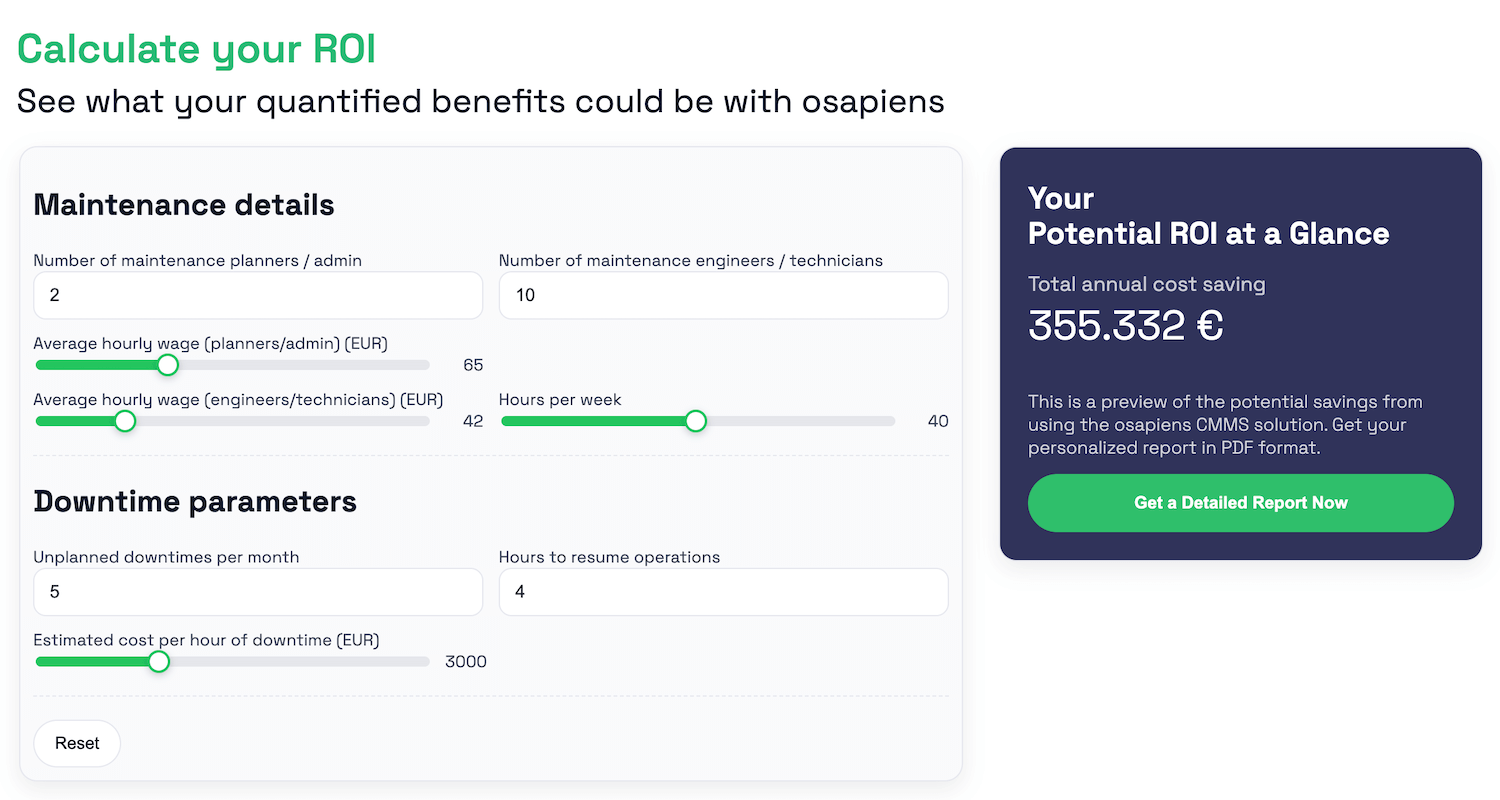
Comparative Analysis of Preventive Maintenance Software
Choosing the right preventive maintenance software depends on your specific priorities, with each solution offering different strengths that match particular operational needs and company sizes.
osapiens HUB for Maintenance
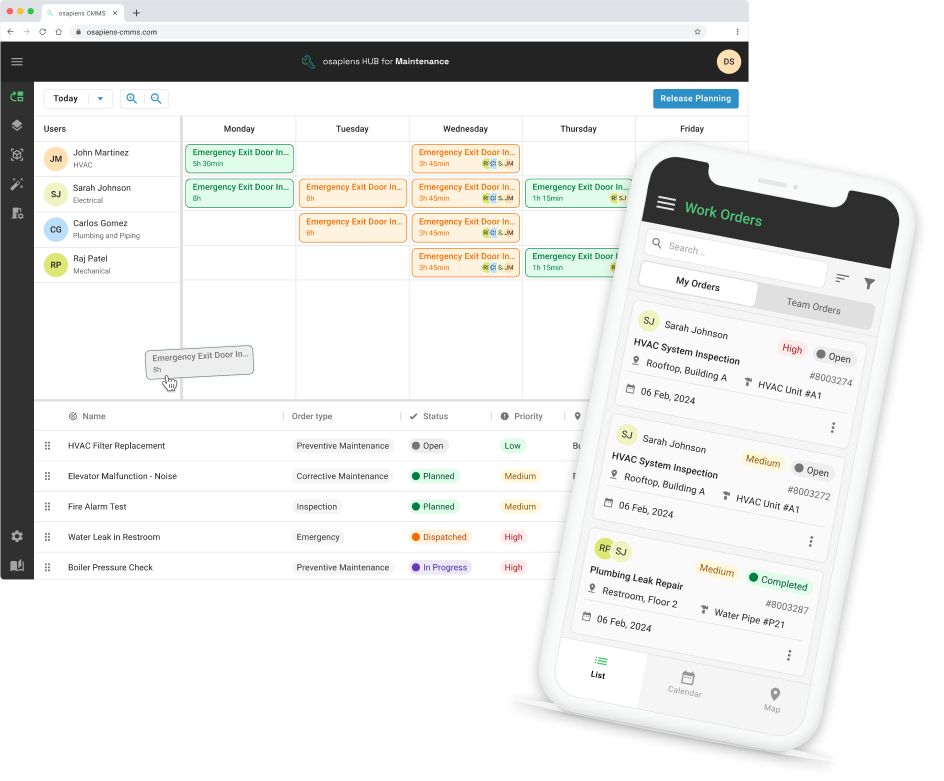
The osapiens HUB for Maintenance is a cloud-based CMMS software designed for scalability from single locations to global operations, yet accessible to small companies through a freemium model that eliminates financial barriers. Unlike traditional solutions that force small businesses to choose between limited functionality or enterprise costs, osapiens delivers enterprise-level preventive maintenance capabilities through an intuitive, modern interface specifically designed for teams without dedicated IT departments.
Key Benefits & Features:
- Fast implementation: 1–2 weeks for small businesses, delivering quick time-to-value without lengthy setup processes
- Mobile-first design: Technicians become productive within days, with offline functionality ensuring work continues in areas with poor connectivity
- Comprehensive preventive maintenance: Automated scheduling ensures equipment maintenance receives timely servicing without manual intervention
- Complete asset management: Maintenance data and history tracking provide visibility for informed equipment decisions
- Advanced spare parts management: Real-time inventory management tracks stock levels, prevents stockouts, and optimizes parts investment
- Customizable work orders: Forms and checklists ensure consistent maintenance activities even with small teams handling unfamiliar equipment
- Real-time analytics: Data-driven insights help identify trends and optimize maintenance strategies
- SAP integration capability: SAP-certified connectors ensure scalability as your business grows into enterprise systems
Pricing: Freemium model or 29–49 € per user/month
Best for: Small to medium-sized companies seeking enterprise-level functionality with freemium entry, strong mobile capabilities, and proven scalability for growth.
Fiix CMMS
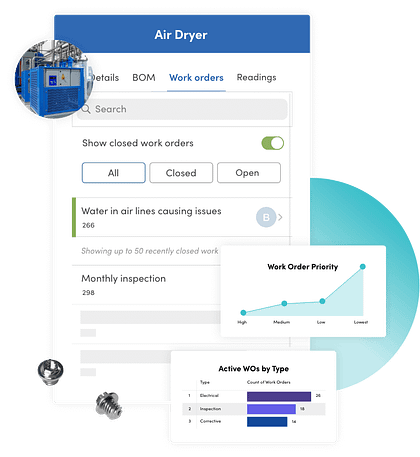
Fiix CMMS is a cloud-based maintenance management solution that combines automation, AI-powered scheduling, and IoT integration to help companies optimize preventive maintenance operations. The platform scales from basic preventive maintenance for small teams to advanced predictive maintenance strategies for companies with more sophisticated technical requirements.
Key Benefits & Features:
- AI-based scheduling: Analyzes historical maintenance data, equipment performance patterns, and failure trends to suggest optimal preventive maintenance timing (premium tier only)
- Automated workflows: Reduces manual administrative tasks, enabling technicians to focus on actual equipment maintenance rather than paperwork
- Sensor integration: Supports condition monitoring and tracks equipment health indicators to identify potential issues before equipment failures occur
- IoT connectivity: Integrates with equipment sensors for real-time monitoring and condition-based maintenance approaches
- Free plan available: Limited preventive maintenance tasks allow testing the platform before financial commitment
Pricing: Free plan or $45–$75 per user/month
Limble
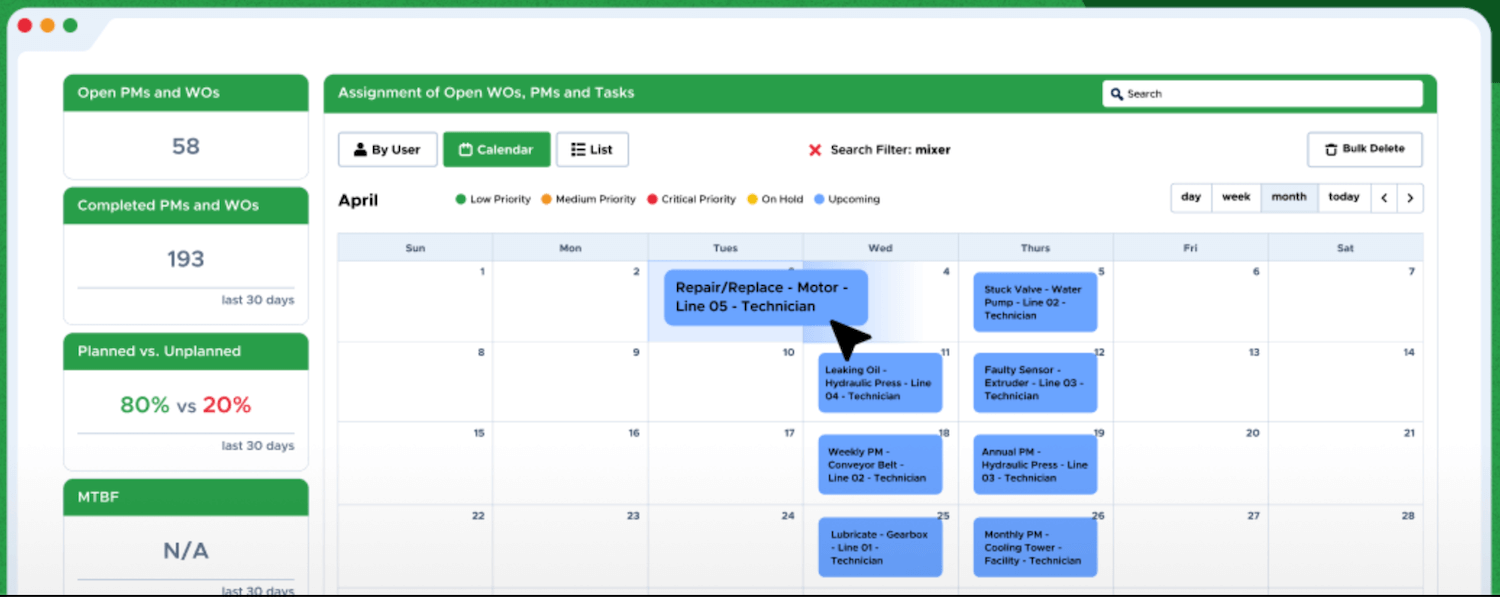
Limble CMMS delivers powerful preventive maintenance capabilities through an interface so intuitive that teams become productive within hours, making it particularly attractive for small companies without dedicated IT support.
Key Benefits & Features:
- Intuitive interface: Technicians start creating work orders and accessing equipment information almost immediately after first login
- Strong mobile functionality: Full access to work orders, asset management data, and maintenance procedures from smartphones or tablets for field productivity
- Automated preventive maintenance: Eliminates manual tracking and ensures equipment maintenance receives timely servicing without administrative burden
- Comprehensive work order management: Customizable forms and checklists ensure consistency across maintenance activities
- Pre-built integrations: Connects with accounting systems, inventory management tools, and communication platforms without custom development
Pricing: On request
UpKeep
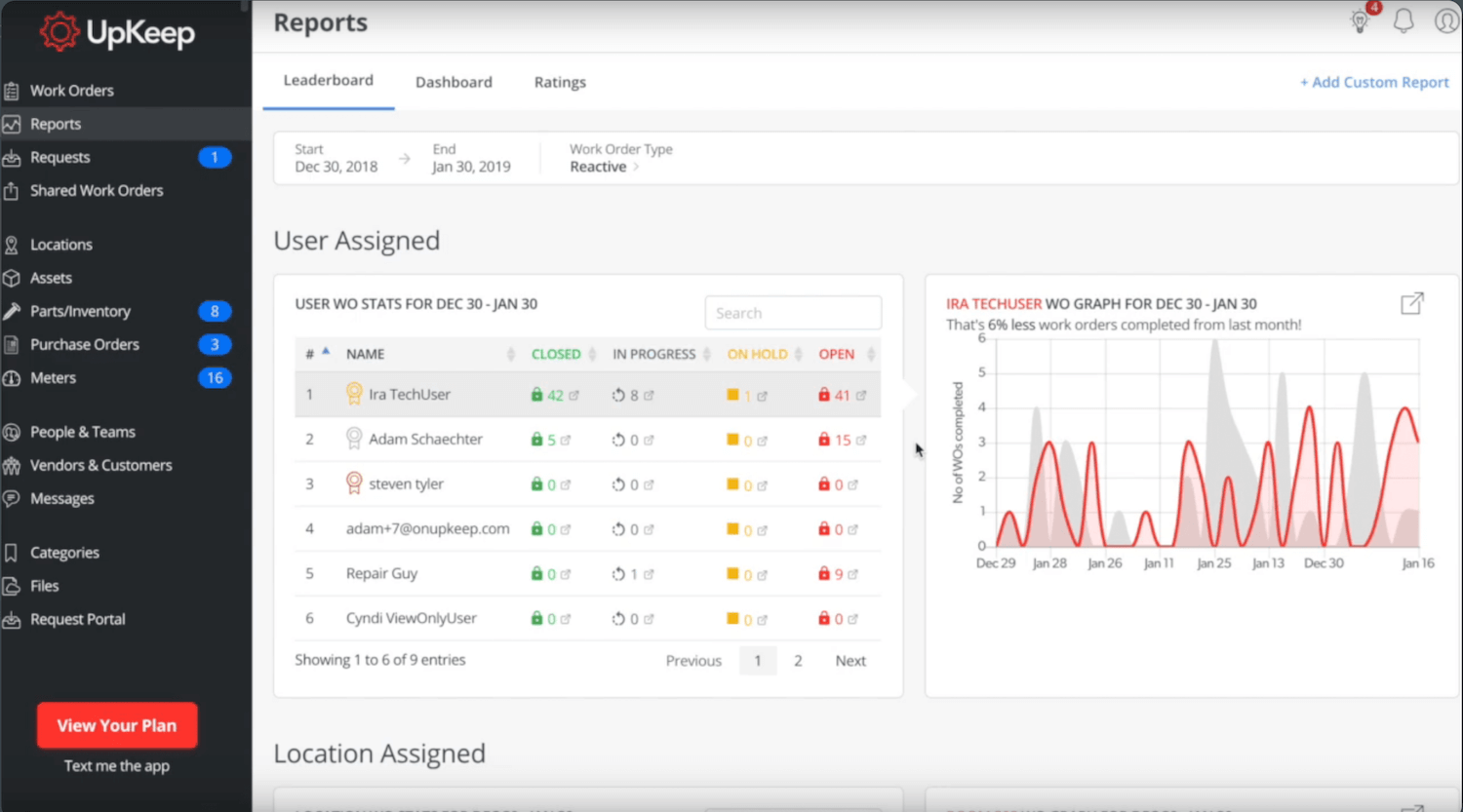
UpKeep is a mobile-first CMMS software designed for maintenance teams that prioritize flexibility and field accessibility above all else. The platform built its reputation on mobile functionality that enables technicians to manage their entire workday from smartphones or tablets, making it valuable for small companies where maintenance personnel spend most time away from desks.
Key Benefits & Features:
- Good Mobile Experience: Intuitive native app with QR code scanning, photo annotation, signature capture, and real-time notifications keeps technicians productive in the field
- User-Friendly Interface: Clean design and simple navigation minimize training requirements – particularly valued by teams with varied technical skill levels
- Requester Portal: Unique feature allows non-technical staff to submit maintenance requests easily, streamlining communication between departments
Pricing: $20–$55 per user/month
eMaint CMMS
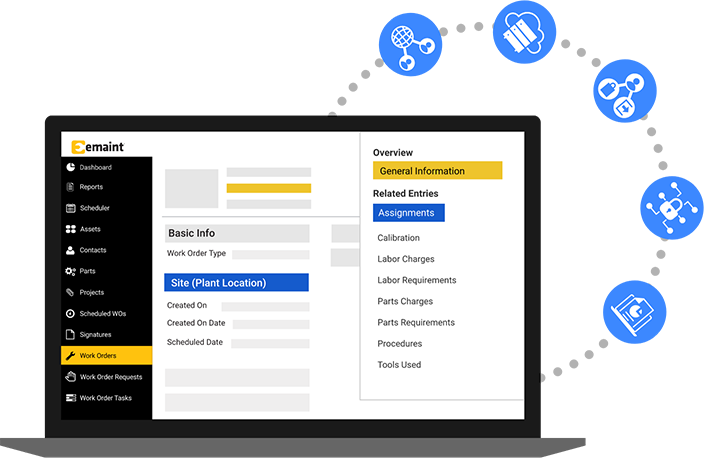
eMaint CMMS is a cloud-based, feature-rich maintenance management solution offering extensive tools for preventive maintenance, work orders, and asset tracking. The platform can handle complex maintenance requirements across multiple industries, from manufacturing and healthcare to facilities management and utilities, with enterprise-level functionality that supports growth and operational complexity.
Key Benefits & Features:
- Flexibility and scalability: Accommodates additional locations, equipment, and team members as business needs evolve without platform limitations
- Compliance-focused: Audit trail functionality and documentation capabilities support regulatory requirements in healthcare, food processing, and pharmaceutical industries
- Enterprise-ready: Handles sophisticated workflows and regulatory obligations that simpler solutions can’t adequately support
Pricing: From $69 per user/month
MaintainX
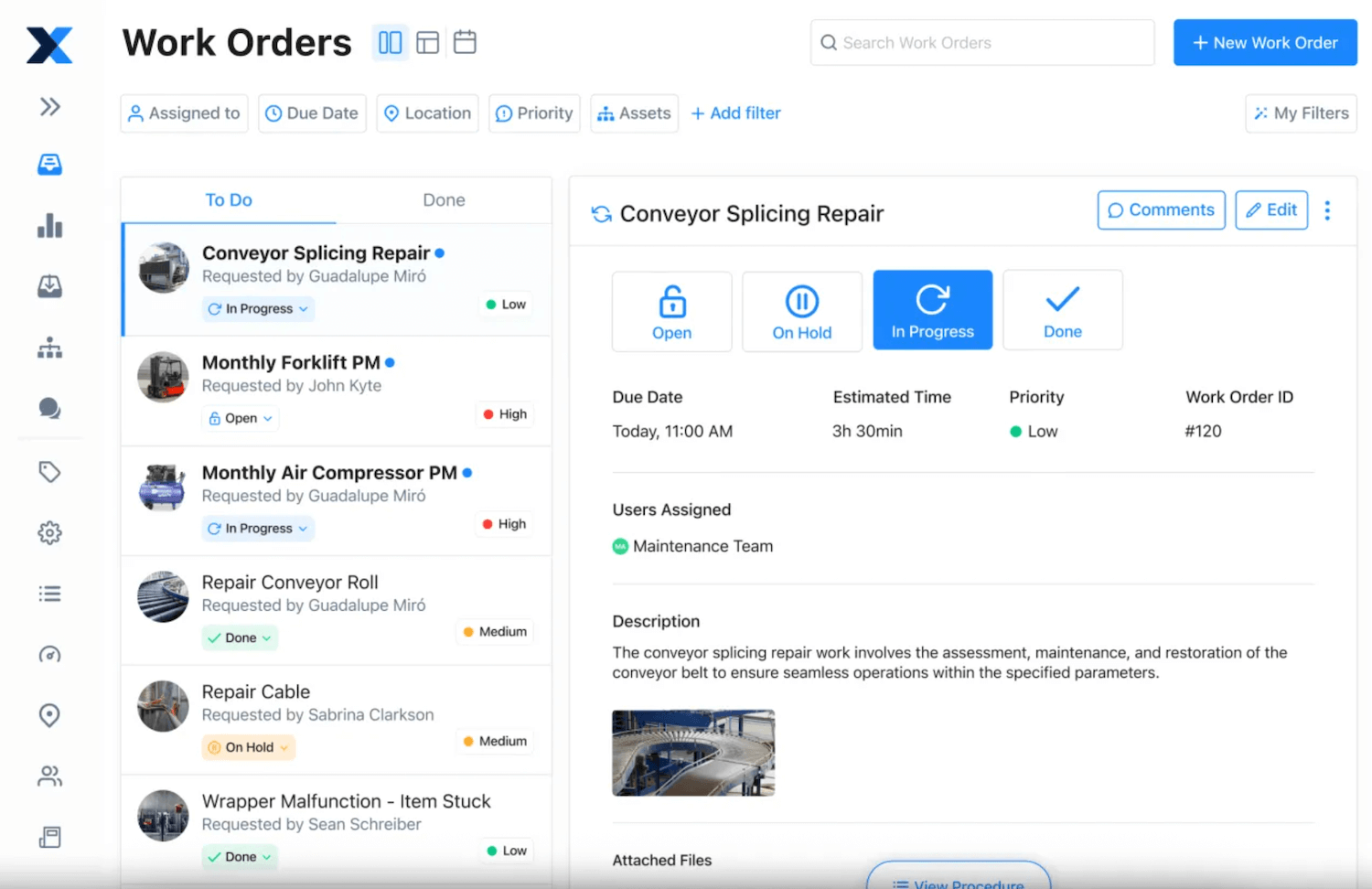
MaintainX is a user-friendly CMMS software designed for straightforward maintenance management with strong mobile accessibility that keeps maintenance teams productive regardless of location. The platform delivers essential preventive maintenance capabilities through an intuitive interface that requires minimal training, making it attractive for businesses just beginning their digital maintenance transformation.
Key Benefits & Features:
- Mobile-First Design with Chat: Native mobile app designed specifically for smartphone use, featuring unique in-app messaging and work order commenting for real-time team collaboration
- Support focussed on US/Canadian market
- Integration costs increase license pricing
Pricing: Free basic plan or 20–65$ per user/month
Implementing Preventive Maintenance Programs
Successful implementation requires planning and focus. For small companies, start strategically with high-impact areas and expand gradually as your team gains confidence.
1) Start with Asset Inventory: Create a list of critical equipment whose failure would halt production, delay orders, or create safety hazards. Focus on business-critical assets first, not everything at once.
2) Identify Current Maintenance Activities: Document existing maintenance tasks and gather manufacturer recommendations. This often reveals inconsistent activities that preventive maintenance software solves through automated scheduling.
3) Choose the Right Software: Select CMMS software matching your budget, technical capability, and growth plans. Consider ease of use, mobile accessibility, and scalability alongside price. Test usability with free trials.
4) Set Up Basic Schedules: Start simple with time-based schedules (weekly, monthly, quarterly) for critical equipment. Use manufacturer recommendations, then adjust based on operating conditions.
5) Train Your Team: Keep training minimal with 30–60 minute sessions covering core workflows: receiving notifications, viewing procedures, logging time and parts, and closing tasks.
6) Start Small and Expand: Begin with one department or equipment type, prove value, then expand. Success breeds adoption when other teams see early benefits.
7) Monitor and Optimize: Track completion rates, downtime trends, and costs. Adjust schedules based on maintenance data to continuously improve strategies.
Conclusion: How osapiens HUB for Maintenance Supports Small Companies
For small companies, the right preventive maintenance software prevents costly equipment failures, reduces equipment downtime, and transforms limited maintenance resources into a competitive advantage. The challenge lies in finding a solution that’s powerful enough to deliver enterprise-level results yet simple and affordable enough for small teams and tight budgets.

osapiens HUB for Maintenance solves this challenge with a freemium model that removes financial barriers – you can start using comprehensive CMMS software today without budget approval. Fast implementation (1–2 weeks) delivers operational improvements within the first month, while the intuitive, mobile-first interface requires minimal training and keeps technicians productive in the field.
Companies using osapiens report measurable results: 17 minutes saved per work order, 8 % reduction in equipment downtime, and 14 % productivity increases. Over 2,000 businesses – from small companies to enterprises like Coca-Cola and Nordex – rely on osapiens for their maintenance management operations.
FAQ
What is the best software for managing a small business?
The “best” maintenance reporting software depends on your specific needs, but for maintenance management, look for solutions offering ease of use, mobile access, preventive maintenance scheduling, and affordable pricing. osapiens HUB for Maintenance is a popular choice among small companies. Take advantage of free trials to test the software with your actual team.
Can small companies really benefit from CMMS software?
Yes, small companies often benefit more than large organizations because they’re typically starting from manual, spreadsheet-based processes. CMMS software helps small teams work more efficiently, prevents costly equipment failures, reduces equipment downtime by up to 32 %, and provides maintenance data visibility that was previously impossible.
Is there a free CMMS software?
Yes, several CMMS solutions offer free plans or freemium models that allow small companies to get started without financial investment. osapiens HUB for Maintenance offers a free option with varying limitations on users, work orders per month, or advanced features. These free plans are excellent for testing the software with your team and demonstrating operational improvements before committing to paid plans as your company grows.
What is preventive maintenance software?
Preventive maintenance software is a digital tool that helps companies schedule, track, and manage regular maintenance activities to prevent equipment failures before they occur. It automates scheduling, creates work orders automatically, tracks complete maintenance history for every asset, manages spare parts inventory, and provides real-time visibility through reporting and analytics.
How to reduce equipment downtime in manufacturing plants?
Implement preventive maintenance software to schedule regular equipment servicing automatically, maintain adequate spare parts inventory for critical components, and track downtime causes to address root issues systematically. Preventive maintenance software serves as the foundation by providing scheduling automation, maintenance data visibility, and process standardization. Small manufacturing plants using CMMS software typically see 25–30 % downtime reduction within the first few months of implementation.
Maintenance Schedule Template
Use our template with asset overview, task catalog, and annual plan. Ready to use for your maintenance planning.
Download for free
ENTERPRISE CAPABILITIES
- SAP ECC & S/4HANA Certified
- Infor & MS Dynamics
- Microsoft Entra ID / Okta
- ISO 27001 & 9001
- EU Cloud · Data Sovereignty
- Development, Test, and Production Environments
- Multi-Entity & Multi-Site
- Power BI Integration
- Audit Trail & Compliance
Related content
December 19, 2025
Best MRO Asset Management Software: Top 6 Comparison 2026

March 17, 2026
GxP Compliance Software: What Pharma and Life Sciences Industries Need to Know

January 1, 2026
Welding Machine Maintenance Checklist – What to Inspect, When & How
January 1, 2026
Ventilation System Maintenance Checklist – Tasks, Tips & Template

December 16, 2025
Top MaintainX Alternatives: Find the Best CMMS for Your Maintenance Teams in 2026
January 1, 2026
Lorry Maintenance Checklist – Tasks, Tips & Template
January 1, 2026
Laboratory Equipment Maintenance Checklist – Tasks, Best Practices & Digital Solution
January 1, 2026
Relay Protection System Maintenance Checklist – Tasks, Standards & Digital Execution
January 1, 2026
Heavy Duty Truck Preventive Maintenance Checklist – Tasks, Compliance & Digital Execution
January 1, 2026
Pneumatic System Maintenance Checklist – Essential Tasks & Best Practices
January 1, 2026
Coating Machine Maintenance Checklist – Tasks, Tips & Best Practices
January 1, 2026