

Pharma

Daniel Schwarz, osapiens Expert | 4. February 2026 | Lesezeit 13 min.
The biggest time drain in cleanroom maintenance isn't the work itself – it's the repeated entry/exit cycles when technicians forget tools or discover missing spare parts mid-task. Equip your team with mobile CMMS access that shows real-time inventory levels, equipment manuals, and complete work instructions before they gown up. This single change can reduce maintenance window time while improving first-time-right completion rates.
Start with clean room maintenance













TRUSTED BY LEADING COMPANIES




ENTERPRISE-READY
 SAP Certification
 ISO 27001
 EU Hosting
 Entra ID & Okta
 Multi-Entity
Table of Contents
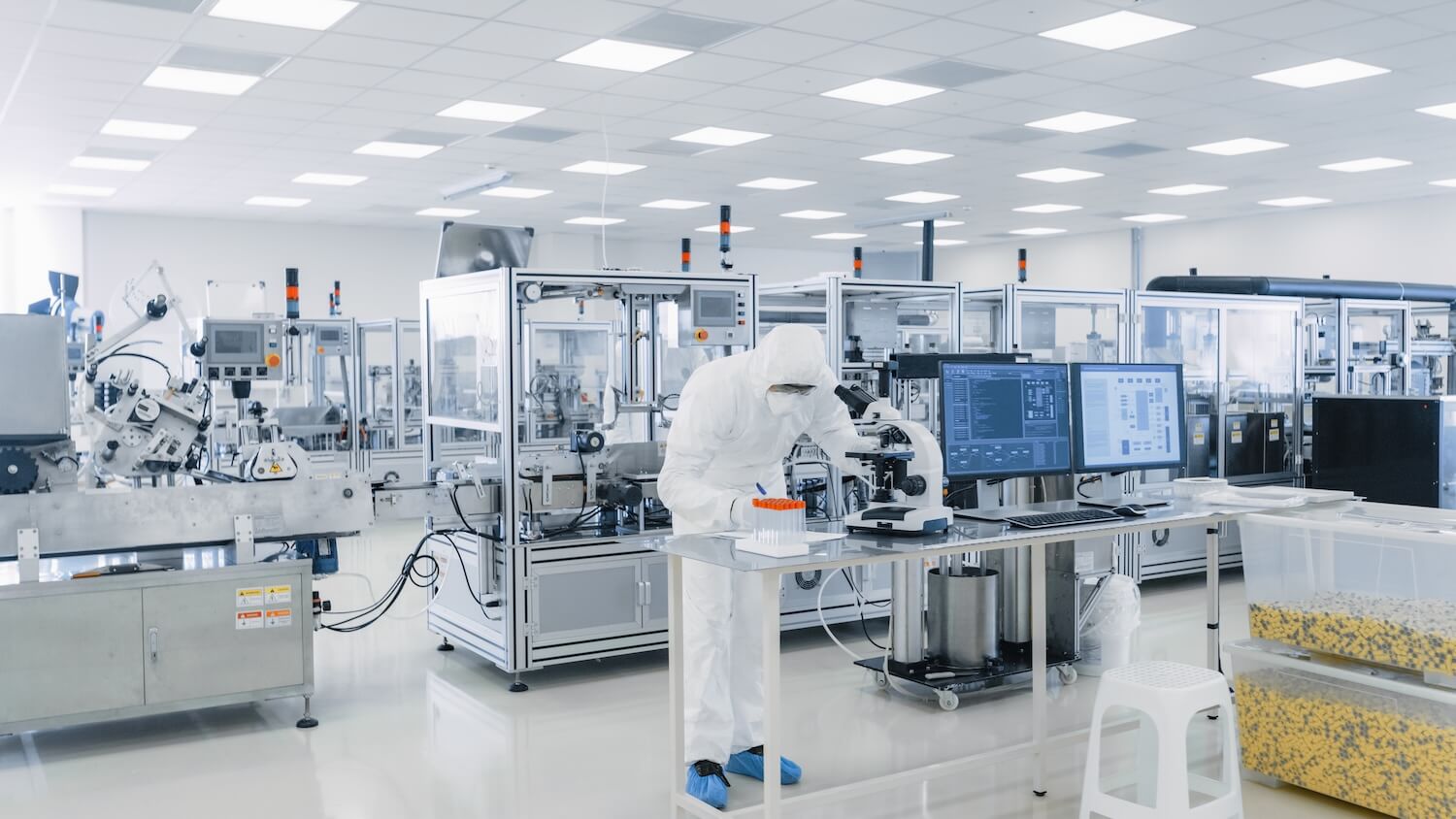
This scenario plays out daily in pharmaceutical, semiconductor, and medical device cleanrooms worldwide. Clean room maintenance demands absolute precision, but the operational realities – strict gowning procedures, narrow maintenance windows between production batches, and extensive documentation requirements – create constant pressure on technicians. Every forgotten tool, unclear procedure, or missing spare part doesn’t just waste time, it triggers production shutdowns costing thousands per hour and compromises GMP compliance.
Key Facts
- Gowning protocols cost 15–20 minutes per entry: Every forgotten tool or missing spare part requires complete re-gowning – changing garments, hand washing, airlock passage, and documentation. Mobile CMMS access before entering lets you verify parts availability, review procedures, and check equipment histories, eliminating costly re-entries and maximizing your limited maintenance window.
- Maintenance windows are brutally short: Most cleanroom maintenance happens during 4–8 hour gaps between production batches. Late starts, unclear procedures, or equipment surprises can blow your entire window. Digital work orders with pre-loaded SOPs, equipment histories, and step-by-step checklists help you execute first-time-right, every time.
- Documentation requirements don’t pause for production pressure: GMP compliance demands complete records of every maintenance activity – what you did, when, with which materials, and what results you achieved. Paper checklists mean exiting the cleanroom to complete documentation. Mobile apps let you capture photos, log readings, and complete digital checklists without removing gloves, maintaining compliance without workflow interruptions.
- osapiens HUB empowers cleanroom technicians: The osapiens HUB for Maintenance provides offline-capable mobile access to work orders, real-time spare parts visibility, and digital SOPs directly at your work location. Verify inventory levels, review equipment manuals, complete compliance documentation, and capture photos of completed work – all within the cleanroom, maximizing productivity while ensuring GxP compliance.
What is Clean Room Maintenance and Why Does It Matter?
Cleanroom maintenance isn’t just regular facility work in a controlled environment – it’s fundamentally different work that demands precision under pressure. Unlike conventional maintenance where you can quickly grab a forgotten tool, cleanroom protocols turn every entry and exit into a significant time investment.
The core challenges technicians face daily:
Gowning procedures create a time barrier: Entering an ISO 5 or ISO 6 cleanroom requires 15–20 minutes of preparation – changing garments, hand washing protocols, airlock passage, and documentation. Forgot a torque wrench? Need replacement gaskets? You’re looking at 30+ minutes lost in complete re-gowning, or rescheduling the entire maintenance window.
Maintenance windows create relentless pressure: Most facilities limit cleanroom maintenance to 4–8 hour gaps between production batches. Miss your window because of unclear procedures or unexpected equipment issues, and you’re not just delaying your own work – you’re holding up production schedules worth thousands per hour and potentially triggering regulatory deviations.
Documentation compounds every challenge: GMP compliance demands complete records with cleaning agent lot numbers, equipment readings, procedures followed, and results achieved. Traditional paper-based checklists mean exiting the cleanroom to complete documentation, adding 20–30 minutes of administrative work after the technical task is done.
Modern CMMS solutions like the osapiens HUB for Maintenance address these challenges by bringing digital capabilities directly to the point of work. Mobile access to inventory levels, equipment histories, and digital SOPs eliminates guesswork before you gown up. Offline-capable checklists and photo documentation let you complete compliance requirements without removing gloves or exiting the cleanroom.
Stop Wasting 30 Minutes on Re-Gowning
Every forgotten tool or missing spare part means 30+ minutes lost to complete re-gowning. osapiens HUB lets you verify inventory levels, review equipment-specific tool lists, and access complete SOPs before you enter the cleanroom.
Start with clean room maintenance
The Technician’s Daily Workflow in Clean Room Maintenance: Before, During, After
Successful cleanroom maintenance starts long before you enter the controlled environment and extends well after you exit. For technicians, the difference between a smooth maintenance window and a chaotic scramble often comes down to preparation, execution, and documentation discipline across three distinct phases.
Before Entering: Preparation Is Everything
The 10 minutes you spend preparing before gowning up can save you 30 minutes of wasted time inside the cleanroom. Yet many technicians still rely on memory or outdated paper work orders, discovering missing information only after they’ve already gowned up.
Your pre-entry checklist should answer four critical questions:
- Is the spare part actually in stock? Check real-time inventory levels, not last week’s spreadsheet. Verify the part number matches your equipment model and confirm physical location (which storage room, which shelf).
- Do I have all necessary tools? Review the complete tool list for this specific task. For filter replacements, that might include pressure gauges, airflow meters, specific torque wrenches, and cleaning materials – not just the replacement filter itself.
- What’s the exact procedure? Access the current SOP version with any recent revisions. Check if there are equipment-specific notes, safety warnings, or acceptance criteria you need to know before starting work.
- What’s my maintenance window? Confirm production has actually stopped and you have the agreed timeframe. Verify with operations that no unexpected batch extensions will compress your access time.
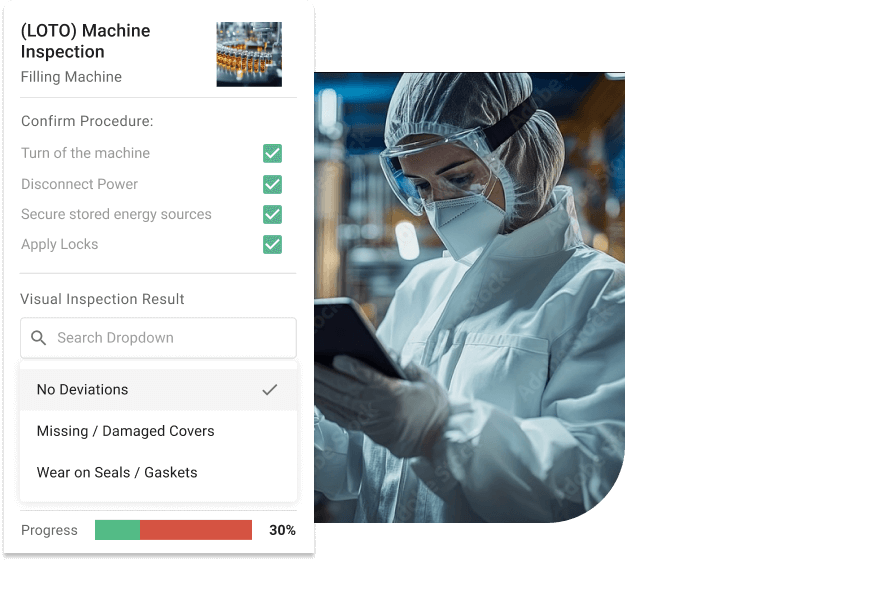
The osapiens HUB mobile app lets you answer all four questions before you change into cleanroom garments. Review work orders with complete equipment histories, verify spare parts availability in real-time, and download offline-accessible SOPs to your device. If something’s missing, you discover it while you can still act – not after 15 minutes of gowning procedures.
Inside the Cleanroom: Working Under Pressure
Once you’re inside the cleanroom, efficiency isn’t optional – it’s essential. Your maintenance window is fixed, production is waiting, and every unexpected issue consumes precious minutes you can’t recover.
Digital SOPs at your fingertips: Access step-by-step procedures directly on your mobile device without removing gloves or leaving your work location. Need to verify the correct cleaning agent for a specific surface? Check the validated materials list instantly. Unsure about acceptance criteria for a differential pressure reading? The SOP shows exact thresholds with photos of correct gauge readings.
Document as you work, not after: Capture photos of completed tasks, log equipment readings, and check off procedure steps in real-time using mobile checklists. When you discover unexpected corrosion on a gasket or notice unusual wear patterns, photograph the evidence immediately while you’re there – not “later when you have time to write it up.”
Handle surprises without panic: Equipment issues that weren’t in the original work order happen. When they do, mobile access to complete equipment histories helps you understand if this is a recurring problem, check previous repair notes, and make informed decisions about whether to continue or escalate. You’re not guessing – you’re working with data.
Common scenarios the osapiens HUB handles smoothly:
- Unexpected part failure: Check if replacement is in stock, create follow-up work order, photograph failed component
- Reading outside specification: Document exact values, capture photo evidence, trigger escalation workflow
- Procedure unclear: Access equipment manual, review previous maintenance notes, check manufacturer recommendations
- Additional work needed: Extend work order scope, document time spent, ensure proper change control
The mobile app works offline, so network connectivity issues inside the cleanroom don’t stop your progress. All documentation syncs automatically once you return to network coverage.
After Completion: Documentation Without Delays
Traditional paper-based workflows force technicians into a frustrating choice: complete documentation immediately (extending time in the cleanroom) or handle it later (risking forgotten details and compliance gaps). Digital documentation eliminates this trade-off entirely.
Your work is already documented: Because you logged readings, captured photos, and completed checklist steps during the work itself, your maintenance record is 80% complete before you exit the cleanroom. Review the digital work order, add any final notes about equipment condition or follow-up needs, and mark it complete – all within the mobile app while you’re de-gowning.
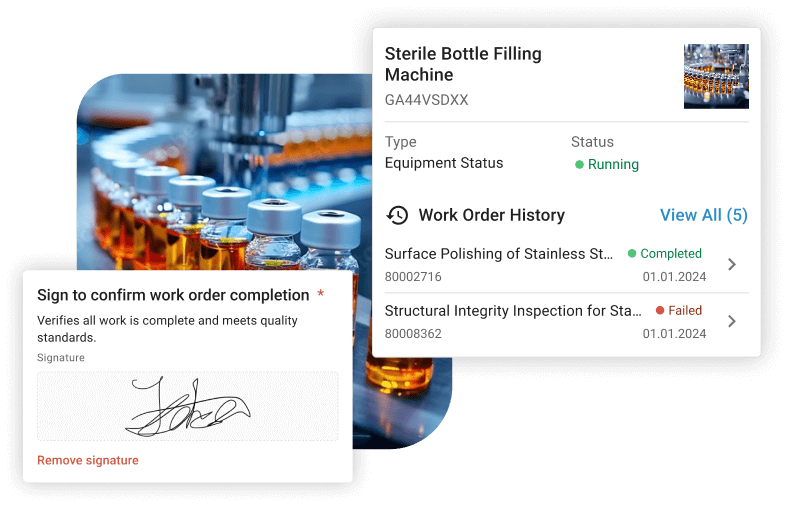
Automatic compliance trails: The osapiens HUB automatically timestamps every action, captures your digital signature, and links all documentation (photos, readings, checklist completions) to the specific work order. No manual filing, no separate documentation systems, no risk of missing records during regulatory audits.
Seamless handoffs for follow-up work: Discovered an issue that needs attention but couldn’t address it during your window? Create a linked work order directly from your current task, attach photos of the problem, and assign it to the appropriate team – ensuring nothing falls through the cracks between shifts or departments.
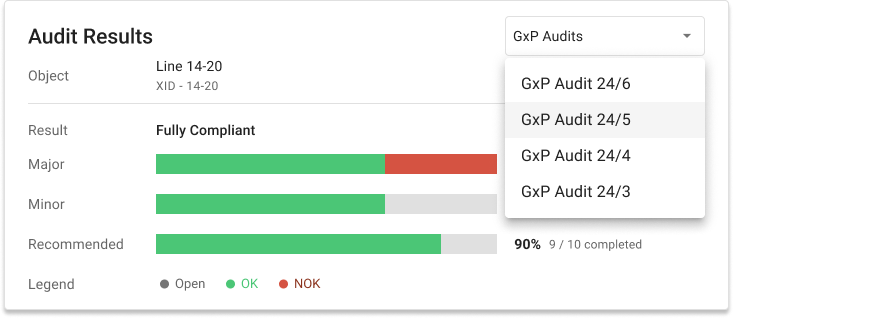
For GxP compliance, the system maintains complete audit trails showing who accessed which cleanroom, when, for which work order, what they documented, and when they signed off – meeting 21 CFR Part 11 electronic signature requirements without additional administrative burden on technicians.
Common Technician Pain Points – And How to Solve Them
Every cleanroom technician knows the frustrations that slow down work and extend maintenance windows. These aren’t rare edge cases – they’re daily realities that cost time, create stress, and risk compliance. The good news? Most of these pain points have straightforward digital solutions that eliminate the root causes rather than just managing symptoms.
Technician forgot a tool and has to re-gown
The scenario: You’re halfway through a filter replacement when you realize you need a specific torque wrench that wasn’t on the original tool list. Now you face 30+ minutes of complete re-gowning just to retrieve one tool – or attempting the job with the wrong equipment and risking procedure violations.
Why this happens: Tool lists are generic, outdated, or incomplete. Equipment-specific requirements aren’t documented in accessible formats. Previous technicians made do with substitute tools and never updated the procedure.
The solution: Mobile checklists with equipment-specific tool requirements that you review before gowning up. The osapiens HUB lets you access complete work orders showing exactly which tools this specific equipment model requires, including photos of specialized tools and notes from previous maintenance cycles. If the checklist shows you need a calibrated torque wrench rated for 45 Nm, you know to stage it before entering – not after.
Still working in Excel and on paper?
Many teams start with spreadsheets and get stuck there. Our free Excel work order template gives your current process instant structure, with order number, asset ID, assignment, scope of work, and a safety checklist. A solid foundation before you make the move to a CMMS.Get your free work order template
The spare part isn’t in stock
The scenario: The work order says “replace gasket” and the inventory spreadsheet shows three units in stock. You gown up, open the equipment, remove the failed gasket – and discover the replacement parts bin is empty. Someone used the last gasket yesterday and didn’t log the withdrawal.
Why this happens: Inventory systems aren’t updated in real-time. Paper-based withdrawal logs create delays between part usage and record updates. Multiple storage locations create confusion about where parts are actually located.
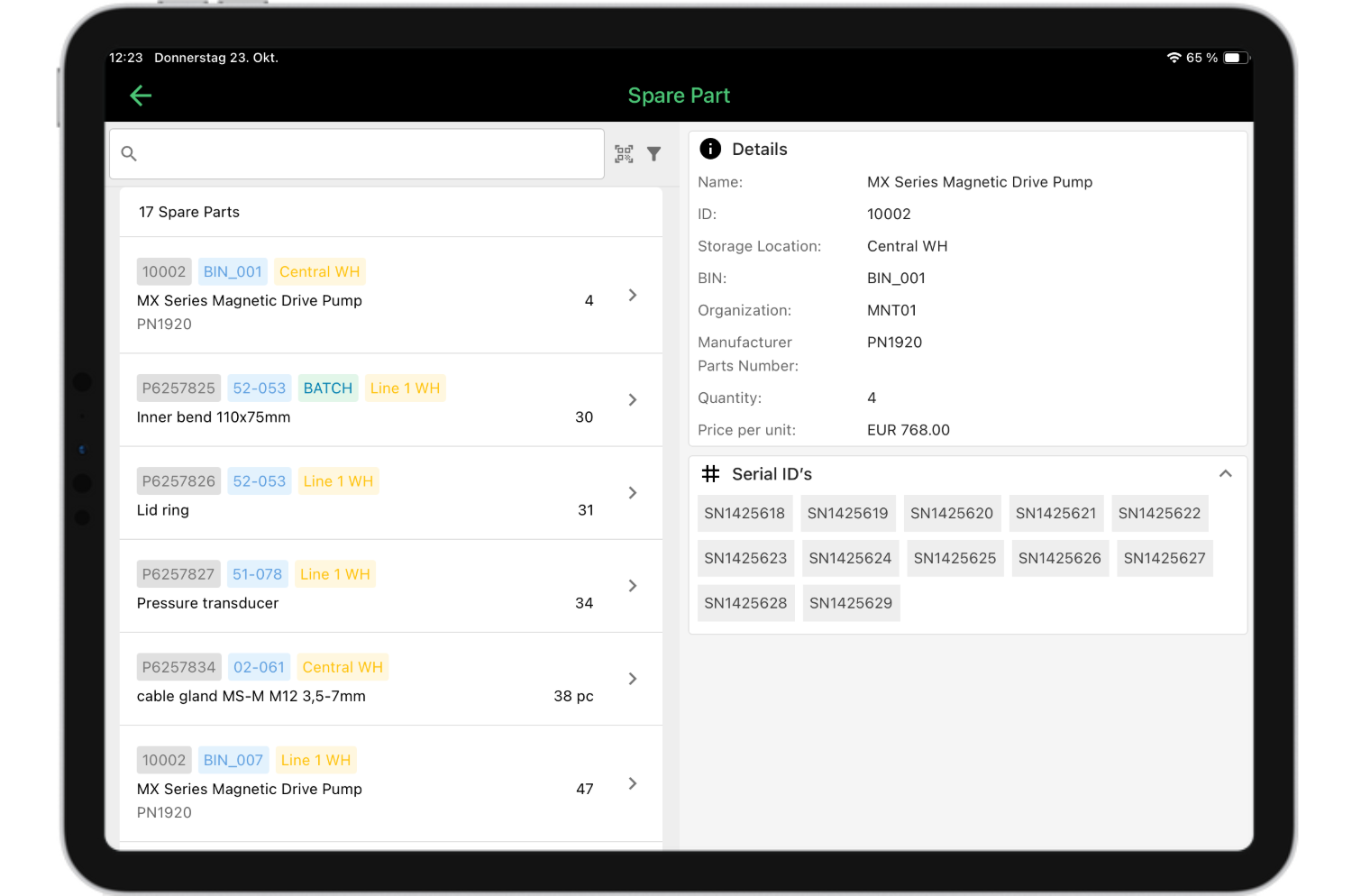
The solution: Real-time inventory management integrated directly into work orders. The osapiens HUB shows live stock levels updated the moment parts are withdrawn, with physical location details (building, room, shelf). Before you gown up, you verify that the gasket exists, see exactly where it’s stored, and can even reserve it for your work order so it’s not used by another technician in the meantime.
Documentation takes longer than the actual work
The scenario: You completed a 20-minute filter inspection. Now you face 30+ minutes of documentation: filling out paper checklists, recording serial numbers and readings, writing up observations, getting signatures, and filing everything in the correct quality binders. The administrative burden takes longer than the technical work itself.
Why this happens: Paper-based documentation requires manual data entry, duplicate record-keeping, and physical filing. Compliance requirements demand detailed records but paper systems make capture time-consuming. Technicians often complete work first and document later, risking forgotten details and incomplete records.
The solution: Capture documentation as you work using mobile checklists and photo evidence. The osapiens HUB lets you log equipment readings, check off procedure steps, photograph completed work, and add notes directly within the work order – all without removing gloves or exiting the cleanroom. The system automatically timestamps every action, captures digital signatures, and generates complete audit trails that meet 21 CFR Part 11 requirements.
Expert tip from osapiens
The biggest time drain in cleanroom maintenance isn't the work itself – it's the repeated entry/exit cycles when technicians forget tools or discover missing spare parts mid-task. Equip your team with mobile CMMS access that shows real-time inventory levels, equipment manuals, and complete work instructions before they gown up. This single change can reduce maintenance window time while improving first-time-right completion rates.
Daniel Schwarz, osapiens Expert
How osapiens HUB Empowers Technicians for Clean Room Maintenance
Managing cleanroom maintenance complexity demands more than spreadsheets and paper checklists. Modern CMMS platforms transform maintenance from administrative burden into streamlined workflows, giving technicians the mobile access, real-time data, and digital documentation they need to work efficiently within tight maintenance windows.
For cleanroom technicians, the osapiens HUB delivers practical tools that solve daily frustrations:
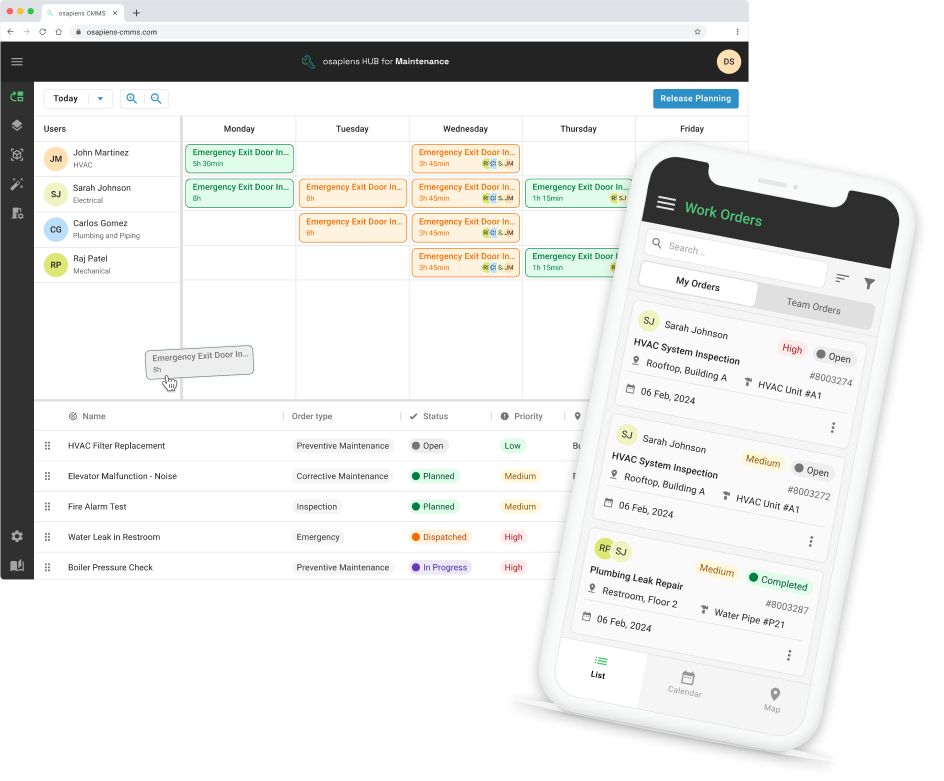
- Mobile-first access, even offline: Access complete work orders, equipment histories, and SOPs directly on your mobile device – before, during, and after cleanroom entry. The app works offline, so network connectivity issues inside controlled environments don’t interrupt your progress. All documentation syncs automatically once you return to network coverage.
- Real-time inventory visibility: Verify spare parts availability before gowning up, eliminating the most common cause of mid-maintenance exits. See exact stock levels updated the moment parts are withdrawn, check physical locations (building, room, shelf), and reserve components for your work order so they’re not used by other technicians during your maintenance window.
- Digital SOPs at the point of work: Access step-by-step procedures showing validated cleaning agents, equipment-specific tool requirements, and acceptance criteria – all without removing gloves or leaving your work location. Need to verify a differential pressure threshold? Check manufacturer recommendations? Review previous maintenance notes? Everything’s in the app, indexed by equipment and accessible in seconds.
- Documentation that happens during work: Capture photos of completed tasks, log equipment readings, and check off procedure steps in real-time using mobile checklists. The system automatically timestamps every action, captures digital signatures, and generates complete audit trails meeting 21 CFR Part 11 requirements – without additional administrative burden after you exit the cleanroom.
- Automated scheduling for predictable workflows: Never miss critical maintenance windows with intelligent preventative maintenance calendars. The system automatically generates work orders for filter replacements, equipment servicing, and required inspections based on your maintenance schedule and usage patterns, giving you advance notice to stage materials and coordinate with production teams.
- Seamless escalation and handoffs: Discovered an equipment issue that needs immediate attention? Create linked work orders directly from your current task, attach photos of the problem, and assign them to appropriate teams – ensuring nothing falls through the cracks between shifts, departments, or maintenance windows.
Document Compliance Without Leaving the Cleanroom
Capture photos, log equipment readings, and complete digital checklists without removing gloves – all with automatic 21 CFR Part 11-compliant audit trails. Mobile-first design with full offline functionality ensures your documentation happens during work, not after.
Start with osapiens
FAQ
What is the maintenance of a cleanroom?
Cleanroom maintenance encompasses systematic activities preserving controlled environment conditions, including HVAC system care, surface cleaning with appropriate cleaning agents, HEPA filter replacement, equipment calibration, and environmental monitoring. It ensures consistent air quality, particle control, and regulatory compliance through documented protocols and regular maintenance schedules.
How to maintain a clean room?
Maintain cleanrooms through daily surface cleaning with validated agents, regular air filter inspections and replacements, continuous environmental monitoring using particle counters, preventative equipment maintenance, and strict personnel protocols. Regularly check differential pressure, document all activities, and conduct periodic re-certification to ensure cleanroom classification compliance.
What are the OSHA requirements for clean rooms?
OSHA doesn’t specify cleanroom standards directly but requires safe working conditions including proper ventilation, hazardous material handling, personal protective equipment, and emergency procedures. Cleanrooms must comply with general OSHA workplace safety regulations while meeting industry-specific standards like ISO classifications or FDA GxP requirements for pharmaceutical manufacturing.
How do you maintain a clean room?
Maintain cleanrooms by implementing preventative maintenance programs covering air filtration systems, environmental controls, and surfaces. Use appropriate cleaning agents, follow documented protocols, train personnel properly, schedule regular equipment servicing, monitor air quality continuously, and maintain detailed records. Digital CMMS solutions like osapiens streamline scheduling, documentation, and compliance tracking for comprehensive cleanroom maintenance management.
Start using osapiens for free
Improve your uptime, extend the life of your equipment, and simplify work order management.
Book a demo
ENTERPRISE CAPABILITIES
- SAP ECC & S/4HANA Certified
- Infor & MS Dynamics
- Microsoft Entra ID / Okta
- ISO 27001 & 9001
- EU Cloud · Data Sovereignty
- Development, Test, and Production Environments
- Multi-Entity & Multi-Site
- Power BI Integration
- Audit Trail & Compliance
Related content

January 1, 2026
Roof Coating Maintenance Checklist – Tasks, Best Practices & Digital Execution

November 24, 2025
Benefits of Predictive Maintenance in Manufacturing
January 1, 2026
Autoclave Maintenance Checklist – Tasks, Tips & Template

April 7, 2026
IFS Ultimo Alternatives: Top 5 Comparison 2026
January 1, 2026
Compactor Maintenance Checklist – Essential Tasks & Digital Execution
July 27, 2026
Salesforce Field Service Alternative: Top 7 Comparison 2026
January 1, 2026
Chromatography System Maintenance Checklist – Tasks, Best Practices & Digital Execution
January 1, 2026
Pharmaceutical HVAC Cleanroom Maintenance Checklist – Tasks, Standards & Digital Execution
January 1, 2026
Gas Compressor Station Maintenance Checklist – Tasks, Tips & Best Practices
January 1, 2026
Cooling Tower Maintenance Checklist – Tasks, Safety & Digital Execution

June 11, 2026
How to Improve First Time Fix Rate in Maintenance
January 1, 2026