

CMMS

Florian Bartholomäus, osapiens Expert | 3. March 2026 | Lesezeit 15 min.
What separates a CMMS implementation that delivers measurable results from one that stalls after go-live? In most cases, it comes down to the approach. A structured, phased approach is what separates a successful rollout from a costly setback.
Start your CMMS implementation













TRUSTED BY LEADING COMPANIES




ENTERPRISE-READY
 SAP Certification
 ISO 27001
 EU Hosting
 Entra ID & Okta
 Multi-Entity
Table of Contents
- Key Facts
- Benefits of CMMS Implementation
- Common Reasons for CMMS Implementation Failures
- CMMS Implementation for SMEs: Go Live Within Few Weeks
- CMMS Implementation for Enterprises: The 5-Phase Approach
- Not Ready for a Full Implementation? Start with a PoC
- CMMS Implementation Made Easy With osapiens HUB
- Conclusion: Your Roadmap to CMMS Implementation Success with osapiens HUB
- FAQ
Most CMMS implementations fail because of poor planning, inadequate user training, and unrealistic timelines. The osapiens HUB for Maintenance addresses these challenges head-on through a guided implementation methodology designed specifically for maintenance operations, whether you’re transitioning from paper-based systems, legacy CMMS solutions, or seeking better integration with existing SAP environments. Read on to find out what a successful CMMS implementation looks like in practice.
Key Facts
- User adoption is the foundation of a successful CMMS implementation: No matter how well a system is configured, it only delivers value if the people using it actually embrace it. Every decision in the implementation process should serve one overarching goal: getting your team to use the system consistently and confidently.
- CMMS implementation failure is preventable: Most CMMS implementations fail due to inadequate user training, lack of executive sponsorship, and unrealistic timeline expectations, not software limitations. The implementation approach makes the difference.
- A structured implementation ensures success: From pilot scoping to ongoing optimization, a phased process prevents overwhelming users and allows continuous refinement based on real-world feedback.
- With osapiens, implementation is faster and simpler than you think: No lengthy setup, no third-party consultants, no separate contracts. osapiens HUB deploys as a cloud solution, is productive within weeks, and guides you through every step with a single point of contact.
Benefits of CMMS Implementation
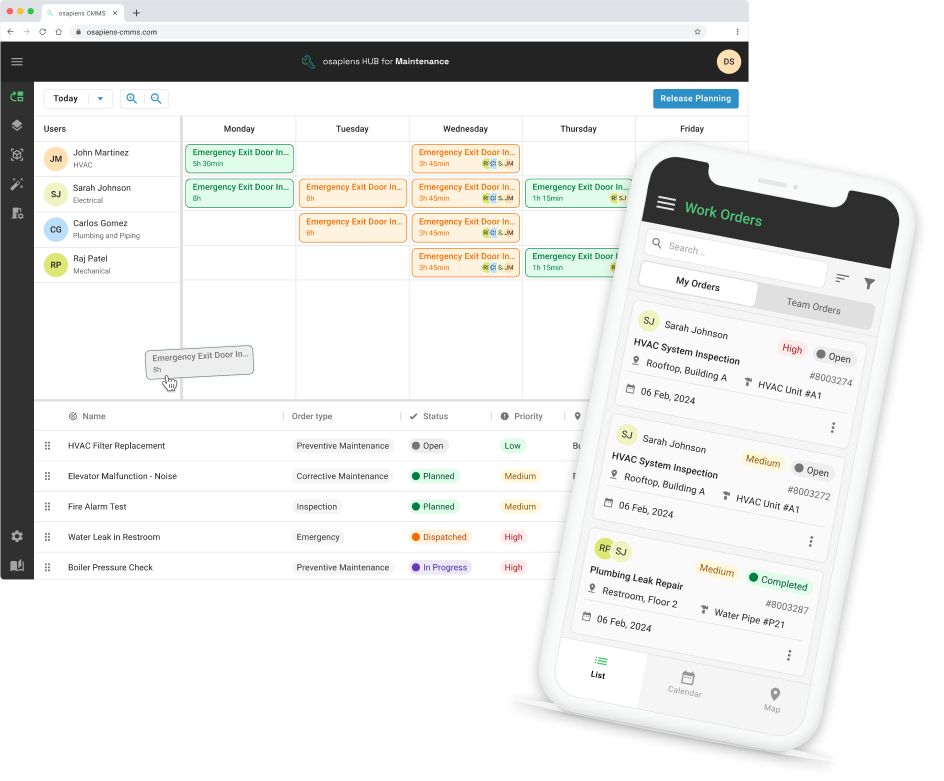
Proper CMMS implementation transforms maintenance operations from reactive firefighting to proactive asset management. When maintenance teams shift from scattered spreadsheets and paper-based systems to a centralized digital platform, they gain real-time visibility into asset performance, maintenance history, and resource allocation.
- Time and Cost Savings: Streamlined workflows eliminate duplicate data entry and administrative overhead. Automated work order generation, mobile access to asset information, and accurate documentation free up maintenance teams to focus on actual repair work instead of paperwork. Optimized scheduling reduces overtime costs and improves resource allocation.
- Reduced Unplanned Downtime and Longer Asset Lifespan: Proactive maintenance prevents equipment failures before they occur. By scheduling interventions based on condition data and usage patterns rather than waiting for breakdowns, teams keep production running smoothly, avoid costly emergency repairs, and extend the lifespan of critical assets.
- Enhanced Inventory Control: Accurate spare parts tracking prevents both stockouts and excess inventory, ensuring parts are available when needed without emergency orders that inflate costs.
- Centralized Data Management: Every asset maintains a complete maintenance history in one accessible location, giving managers instant visibility into asset status, open tasks, and team availability.
Puratos, an international food ingredients manufacturer with 76 production sites in 52 countries, used the osapiens HUB to standardize maintenance globally, integrated directly with their existing SAP environment. Within the first year, the results were clear: 12 minutes saved per work order, 5 minutes per planning activity, and a full transition from reactive to preventive maintenance. Today, the platform is live in 65 of 76 production sites worldwide.
Common Reasons for CMMS Implementation Failures
Most implementations fail because of how they’re executed. Understanding the following common pitfalls helps maintenance managers and project teams avoid the costly mistakes that derail CMMS adoption.

- Inadequate Planning and Unclear Goals: Teams rush implementation without defining measurable objectives or mapping current maintenance workflows. Without clear goals tied to operational outcomes like reduced downtime or improved PM completion rates, the project loses direction and stakeholders can’t assess whether the system delivers value.
- Poor Data Quality and Migration Issues: Inconsistent naming conventions, incomplete historical records, and inaccurate asset information poison the new system from day one. When maintenance data isn’t cleaned and standardized before migration, technicians lose trust in the CMMS and revert to old workarounds rather than relying on system information.
- Unrealistic Timeline Expectations: Organizations underestimate the transition period needed between old and new systems. Teams need buffer time to validate data migration, conduct proper user testing, and allow technicians to become comfortable with new processes while still having access to legacy system information for reference.
- Shadow processes that go undetected: One of the most underestimated implementation risks is that employees have often developed their own workarounds outside of the official system. What the IT department believes is the current process frequently differs from how technicians actually work day to day. A successful implementation requires uncovering these shadow processes and building the new system around real workflows, not theoretical ones.
- Insufficient User Training and Change Management: Technicians and maintenance managers resist the new system when they don’t understand how it improves their daily work. Generic training sessions that don’t reflect actual workflows leave users confused and disengaged, leading to low user adoption rates that undermine the entire implementation.
CMMS Implementation for SMEs: Go Live Within Few Weeks
For smaller teams, getting started with a CMMS is simpler than you might think. With the osapiens HUB, you can import your assets via Excel upload, and start managing work orders on the same day. There’s no server infrastructure to provision, no third-party consultant to coordinate, and no lengthy configuration process to get through before you can do actual work.
How the onboarding process works for SMEs:
The osapiens HUB deploys as a cloud solution with a ready-to-use base configuration. That means there’s no blank slate to start from. Once registered, small teams typically move through three straightforward steps:
- Import your asset data: Upload your existing equipment list via Excel. No custom data format required.
- Configure your workflows: Set up work order templates, maintenance schedules, and user roles with guided in-app tutorials and video walkthroughs.
- Go live with your team: Technicians access their work orders via the mobile app from day one. No classroom training needed.
Most teams with five to ten users are fully productive within one to two weeks. If anything is unclear along the way, the osapiens customer success team is available to help, included from day one, at no additional cost.
Start for free, scale when ready: The osapiens HUB for Maintenance offers a free entry point specifically designed for smaller teams that want to test the system in real operations before committing. There are no upfront license fees, no implementation contracts, and no consultants to budget for separately. As your team grows or your requirements become more complex, the platform scales with you.
Start Managing Maintenance Today
Register for free, import your assets, and start managing work orders on the same day. No contracts, no consultants, no upfront costs.
Start with osapiens
CMMS Implementation for Enterprises: The 5-Phase Approach
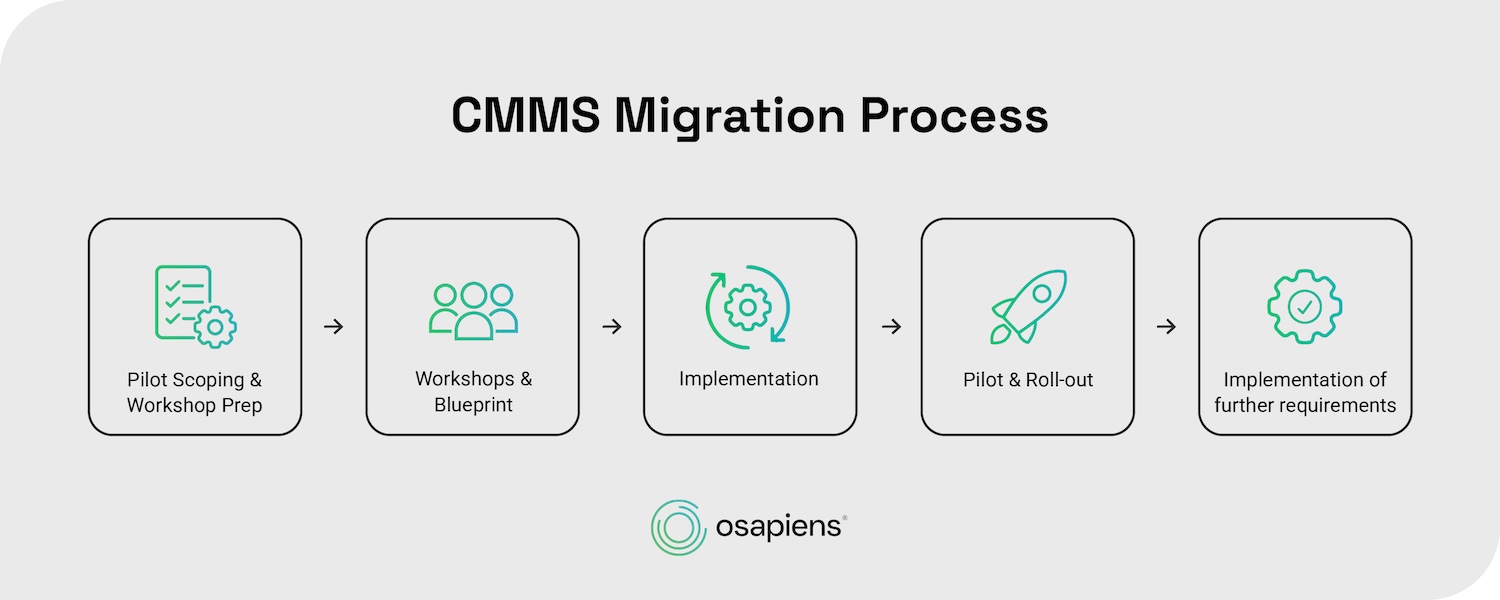
For enterprise environments, the osapiens HUB for Maintenance follows a structured 5-phase implementation methodology. This phased approach minimizes risk, maximizes user adoption, and allows continuous refinement based on real-world feedback.
Step 1: Pilot Scoping & Workshop Prep
Before any configuration begins, the osapiens team takes the time to understand how your maintenance operation actually works. That means reviewing your existing systems, whether paper-based work orders, a legacy CMMS, or SAP PM modules, and identifying the assets and workflows that matter most for the pilot. Together with your maintenance managers and key stakeholders, we define clear objectives and measurable KPIs.
A realistic project timeline is agreed upon from the start, with buffer periods built in to avoid the rushed transitions that so often cause implementations to fail.
Step 2: Workshops & Blueprint
In this phase, workshops bring together maintenance managers, technicians, and IT teams to map out how work actually flows on the factory floor, not how it looks on paper.
The output is a business blueprint: a shared document that defines the target state, specifies which data lives where, and outlines the rollout sequence for each team or site. The blueprint serves an important practical purpose beyond documentation. When new feature requests come up later in the project, both sides can refer back to it to assess the impact on timeline and scope. This keeps the project on track and avoids the late-stage surprises that derail so many rollouts.
For enterprise projects with SAP integration, this phase also includes alignment with the relevant SAP module owners to define exactly which data objects are synchronized.
Step 3: Implementation
With the blueprint signed off, the technical setup begins. The osapiens HUB is configured to match your agreed workflows: preventive maintenance schedules are set up with the right triggers, task templates are created for routine inspections, and work orders are configured with the appropriate notification rules. Mobile app access is set up for field technicians so they can work directly from the mobile app from day one.
For SAP customers, the certified SAP connector automatically synchronizes assets, work orders, and maintenance plans without any manual export and import steps. Teams without SAP can import their existing data via Excel upload, which requires no dedicated IT resources. Historical records can be attached as PDFs so nothing gets lost in the transition.
Step 4: Pilot & Roll-out
Rather than flipping the switch for the entire organization at once, osapiens HUB starts with a controlled pilot group, typically a single department, maintenance shift, or facility wing. This group works fully in the new system while feedback is collected on real-world usage patterns. Any pain points or configuration gaps are addressed before the rollout scales to additional teams.
To keep technicians from feeling overwhelmed, features are activated gradually. In the beginning, users see only their work order queue. Asset information and inventory management are added in later steps, each accompanied by a focused training session on the practical tasks that matter most: viewing assignments, logging time, completing checklists, and closing out jobs.
Before the system goes fully live, every osapiens project goes through a dedicated Hypercare phase. The osapiens project manager and the customer stay in close contact during this period, resolving any open items quickly and making final adjustments until both sides are confident the team is ready. Only then does the old system get retired and the new one go into production.
Step 5: Implementation of Further Requirements
Go-live is not the finish line. Once the team is comfortable with the core features, the osapiens HUB expands to cover additional functionality: advanced reporting, planning and scheduling tools, vendor management, and integrations with ERP systems, SCADA platforms, or IoT sensors for condition-based monitoring. Additional sites and departments follow the same proven pilot methodology to ensure consistent quality across the organization.
Regular check-ins keep the system aligned with evolving operational needs, turning what started as a rollout project into a long-term foundation for proactive maintenance.
CMMS Implementation Timeline for Enterprises
The example below shows what a typical enterprise implementation timeline looks like in practice.
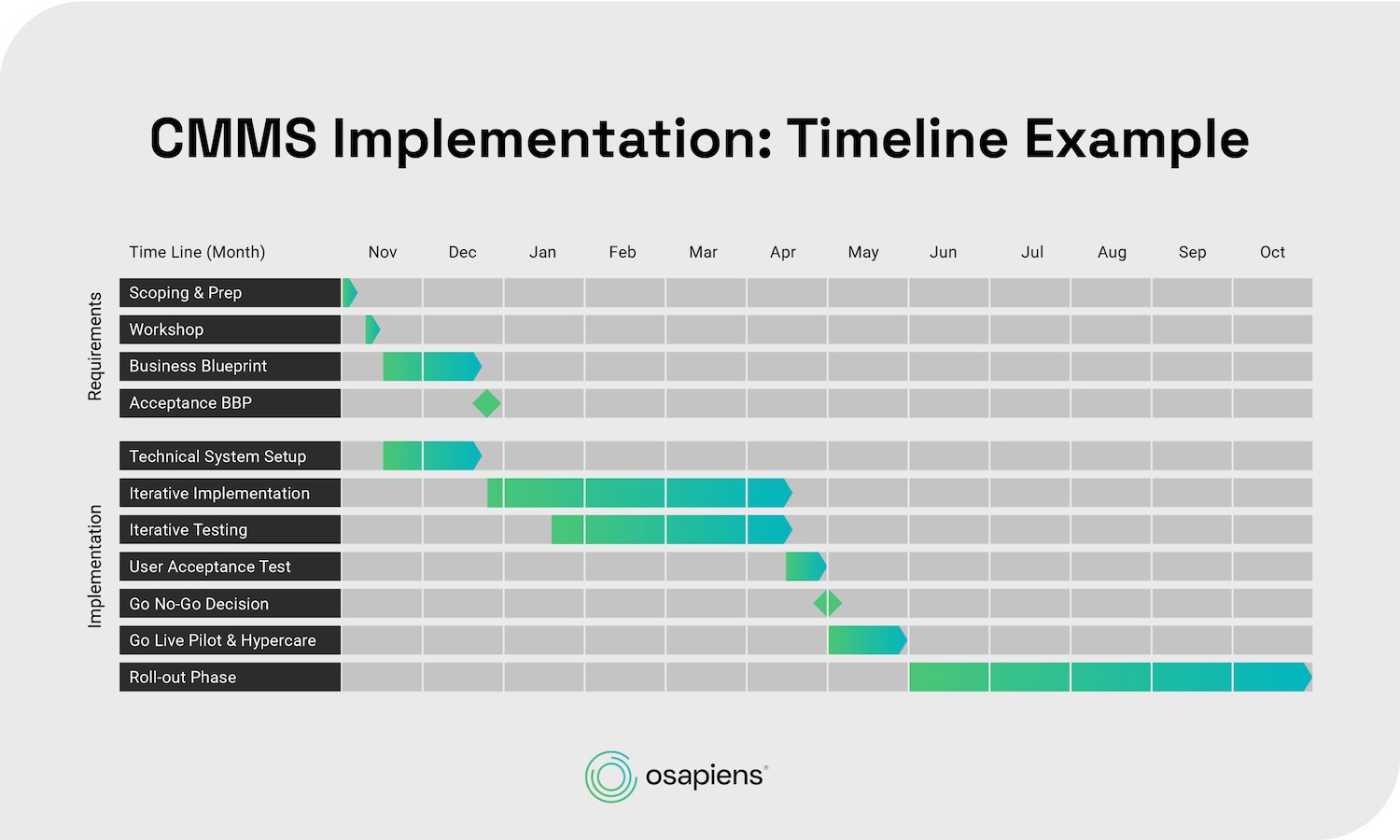
Starting with Pilot Scoping and Workshop in November, the project moves through Business Blueprint, iterative system configuration, and testing before reaching Go Live Pilot in May – with the full roll-out phase scaling across additional sites from June onwards. Every phase builds on the previous one, which is what keeps the project on track and prevents the late-stage surprises that derail so many CMMS rollouts. Depending on scope and complexity, enterprise projects with SAP integration typically go live within three to twelve months, a fraction of the time required by a traditional SAP PM rollout.
Not Ready for a Full Implementation? Start with a PoC
For organizations that want to validate the osapiens HUB before committing to a full rollout, a Proof of Concept offers a structured, low-risk way to test the solution in real operations. The PoC runs over a maximum of 12 weeks and is divided into three phases.
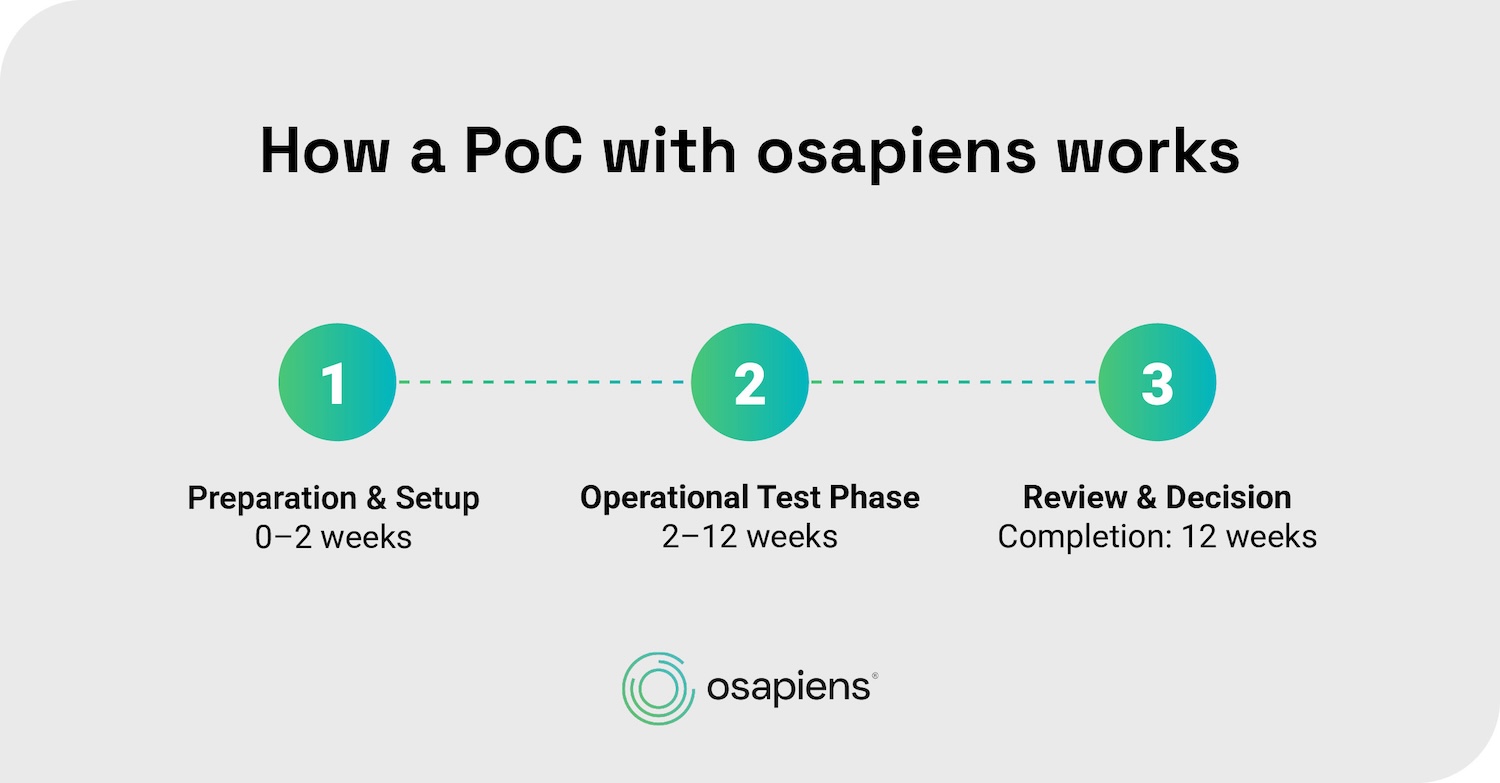
The process starts with a Preparation & Setup phase of 0–2 weeks, where framework conditions, use cases, and success criteria such as maintenance KPIs and adoption targets are defined and the system is configured for first use.
During the Operational Test Phase of 2–12 weeks, technicians use the solution in real daily operations, both mobile and web-based. Defined maintenance plans and checklists are used in live operations, work orders are tracked transparently, and repeated use over several weeks allows both sides to evaluate system stability and user acceptance.
The PoC concludes with a Review & Decision, where results are compared against the defined success criteria and next steps, including a potential full rollout, are discussed.
osapiens HUB for Maintenance has proven successful across diverse organization sizes and industries. The platform serves established enterprise customers including Coca Cola North America with 35 facilities and 1,500 users, plus Nordex for wind energy maintenance operations. These implementations span manufacturing, energy, facilities management, and technical service providers, proving the platform’s flexibility across different maintenance strategies and operational requirements.
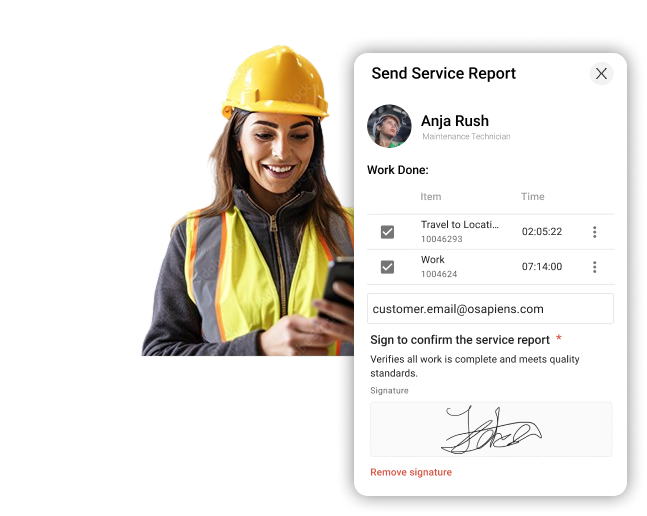
CMMS Implementation Made Easy With osapiens HUB
The osapiens HUB for Maintenance combines modern cloud technology with deep SAP expertise and a guided implementation methodology to simplify CMMS implementation and accelerate time-to-value. Unlike legacy systems requiring extensive customization and dedicated IT resources, osapiens HUB is designed for rapid deployment and high user adoption.
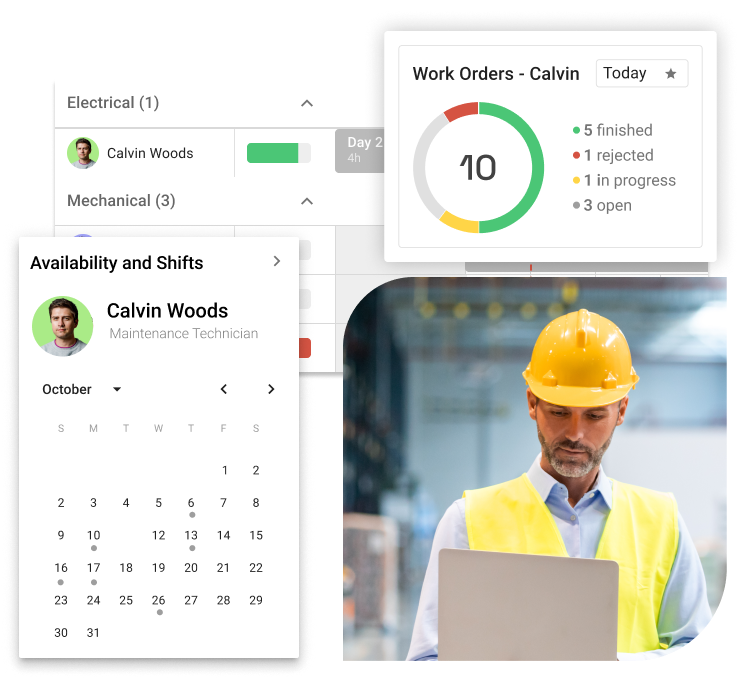
All-in-one: Product and Implementation Partner in One
With traditional enterprise vendors, organizations typically work with a software provider on one side and a separate consulting firm on the other. Those consultants have no influence over the product roadmap, feature requests get lost in procurement cycles, and accountability is split.
With osapiens HUB, that changes. Software and implementation come from the same team. What works in the field feeds directly back into product development. And if something needs to be adjusted mid-project, it gets done fast.
What that means in practice:
- One point of contact from scoping to go-live
- No coordination overhead between vendor and consultant
- Implementation insights that directly shape the product roadmap
- Dedicated customer success managers throughout the project
Cloud Advantage: No Local Installation Needed
osapiens HUB for Maintenance is a cloud-based SaaS solution. There is no server hardware to buy, no software to install locally, and no manual update cycles to manage. The platform is available from any device with an internet connection, including smartphones and tablets in the field.
For maintenance teams, this matters: technicians can access their work orders, checklists, and asset information remotely, without ever returning to a desktop workstation. For IT teams, it means implementation doesn’t get blocked by infrastructure provisioning across multiple sites.
Speed vs. SAP: Productive in Weeks, Not Years
SAP PM implementations typically take 6 months to several years to reach full productivity. osapiens implementations range from 1–2 weeks for small teams to 1–3 months for enterprise deployments with SAP integration.
The key differentiator: osapiens doesn’t replace SAP. It integrates with existing SAP PM environments via certified connector technology, automatically pulling asset data and work orders. SAP remains the system of record for financial and procurement processes. Technicians get a user-friendly mobile interface they’ll actually use.

Roger Büchler, Head of SAP CRM/CX & SAP for Utilities
★ ★ ★ ★ ★ewz
"The support provided by osapiens in implementing our digitization projects in the areas of meter reading, meter replacement, and smart meter rollout was very beneficial for us. The team demonstrated a deep understanding of these complex processes, which led to the success of our projects. Thanks to the developments made by osapiens, we were able to automate and optimize processes."
Lower Total Cost of Ownership
Traditional CMMS vendors charge separately for software licenses, implementation services, training, support contracts, and major upgrades. The final bill is rarely what was quoted.
osapiens works differently:
- Subscription pricing with no large upfront license fees
- Implementation support included in the subscription
- No hidden fees for ongoing support or system updates
- Free onboarding support from day one
- Cloud infrastructure with no server or IT maintenance costs
Ready to Implement the Right Way?
From pilot scoping to enterprise-wide rollout, osapiens guides you through every step with a single point of contact, at a fraction of traditional implementation costs.
Start with osapiens
Conclusion: Your Roadmap to CMMS Implementation Success with osapiens HUB
Successful CMMS implementation requires a structured methodology, user-centered system configuration, comprehensive training, and ongoing optimization. The most common failure points are all preventable when you follow a structured process and choose a partner who understands both the software and the operational reality of maintenance teams.
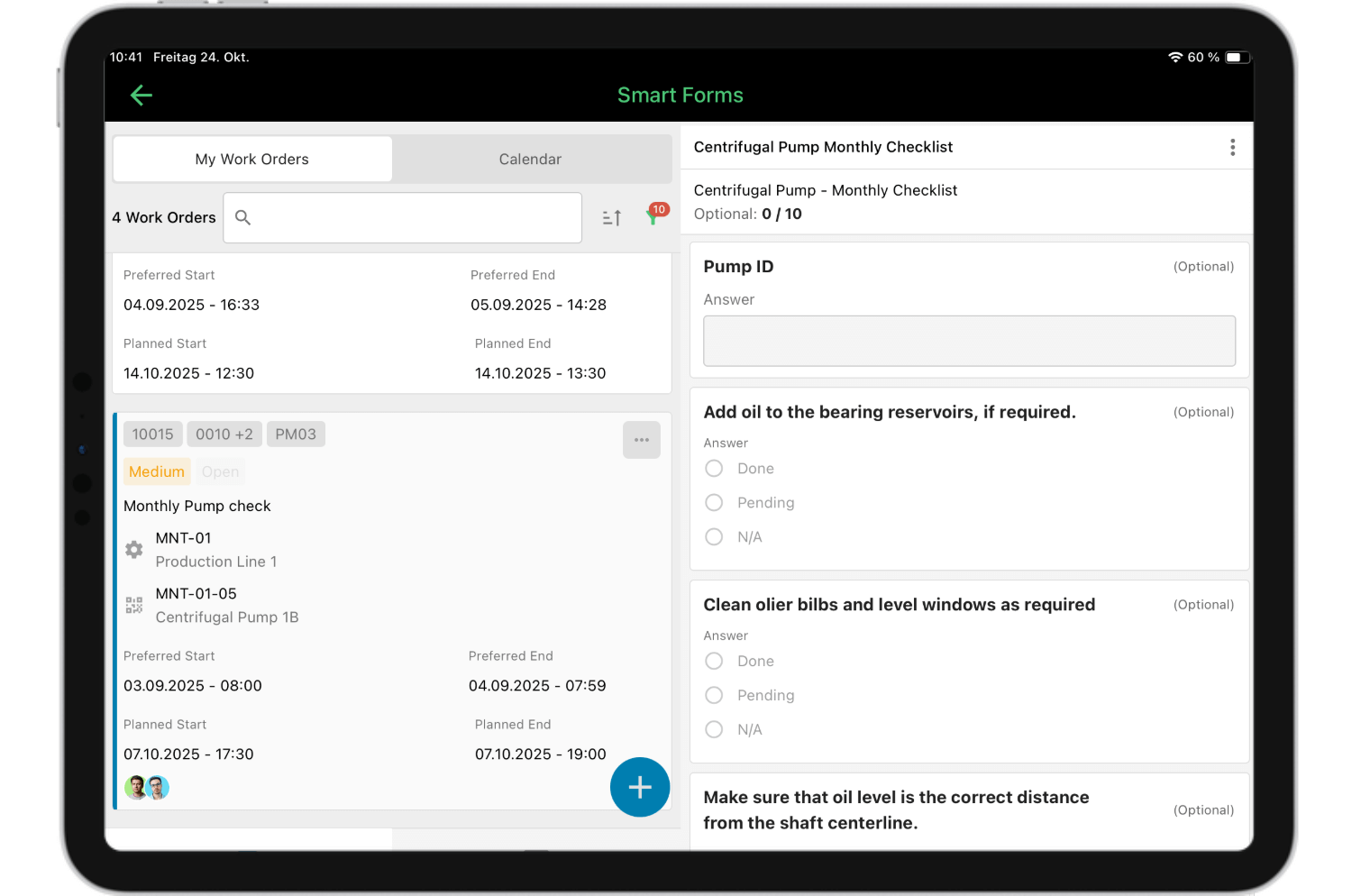
The osapiens HUB for Maintenance is designed specifically to accelerate successful implementation through cloud-based deployment, deep SAP integration capabilities, and guided onboarding with dedicated customer success support. Whether you’re ready for a full enterprise rollout or want to validate ROI with a focused Proof of Concept first, osapiens HUB provides the methodology and ongoing partnership to turn CMMS software from just another tool into the operational backbone of your maintenance organization.
FAQ
How long does a typical CMMS implementation take?
Implementation timelines vary by organization size and complexity. A small maintenance team can be up and running within days. A global enterprise integrating with SAP across multiple sites may need up to 12 months to complete a structured rollout. Both are valid paths, and the osapiens HUB is built to support both, without the overhead that traditional CMMS vendors bring to either. Osapiens implementation timelines are significantly faster than traditional CMMS or SAP PM implementations, which can take 6 months to many years to reach full productivity.
Can we implement a CMMS without disrupting current operations?
Yes, through a phased implementation approach that minimizes operational disruption. Start with a controlled pilot in one department or facility while maintaining existing systems. A buffer period allows maintenance teams to reference the old system in read-only mode while actively working in the new CMMS. Gradual feature activation prevents overwhelming technicians and allows validation before full rollout.
How does osapiens compare in cost to traditional implementations?
The osapiens HUB for Maintenance offers lower total cost of ownership through subscription pricing that eliminates large upfront license fees, included implementation support that reduces consulting expenses, cloud infrastructure that removes server costs, and faster deployment that minimizes internal resource drain. Transparent pricing with no hidden fees for ongoing support or system updates makes enterprise functionality accessible to mid-market budgets, with free onboarding support included.
Can osapiens be used without SAP?
Absolutely. osapiens works fully as a standalone CMMS. For organizations that do use SAP, the certified SAP connector enables seamless synchronization of assets, work orders, and maintenance plans, without replacing SAP as the system of record.
Start using osapiens for free
Improve your uptime, extend the life of your equipment, and simplify work order management.
Book a demo
ENTERPRISE CAPABILITIES
- SAP ECC & S/4HANA Certified
- Infor & MS Dynamics
- Microsoft Entra ID / Okta
- ISO 27001 & 9001
- EU Cloud · Data Sovereignty
- Development, Test, and Production Environments
- Multi-Entity & Multi-Site
- Power BI Integration
- Audit Trail & Compliance
Related content

January 1, 2026
Lyophilizer Maintenance Checklist – Tasks, Tips & Template
January 1, 2026
Solar Inverter Maintenance Checklist – Tasks, Tips & Template
January 1, 2026
Vehicle Maintenance Checklist – Essential Tasks, Compliance Tips & Digital Template
January 1, 2026
Screw Compressor Maintenance Checklist – Tasks, Intervals & Digital Execution
January 1, 2026
Air Handling Unit Maintenance Checklist – Tasks, Safety & Digital Execution
May 26, 2026
SAP Service and Asset Manager Alternatives 2026: The Best Solutions for Mobile Maintenance Compared
January 1, 2026
Genset Maintenance Checklist – Tasks, Tips & Best Practices

October 23, 2025
Industrial Maintenance in Transition: From Manual to Predictive in the Age of AI
July 7, 2026
IFS Field Service Management Alternatives: 5 Options Worth Considering in 2026

July 4, 2025
Making pharma maintenance efficient and compliant with a modern CMMS
March 11, 2026
The Best Maintenance Reporting Software in 2026: A Practical Comparison
October 30, 2025