

Blog

Florian Bartholomäus, osapiens Expert | 7. April 2026 | Lesezeit 15 min.
Coca-Cola does not manage 35 bottling sites in North America as 35 independent facilities. They run one system: same processes, same templates, and consistent quality and performance at every location. A modern CMMS and a fully digital process are what make it achievable.
Start your Enterprise CMMS Implementation













TRUSTED BY LEADING COMPANIES




ENTERPRISE-READY
 SAP Certification
 ISO 27001
 EU Hosting
 Entra ID & Okta
 Multi-Entity
Table of Contents
- Key Facts
- Why Most CMMS Enterprise Implementations Fail and How to Break the Pattern
- The CMMS Rollout Process for Enterprise
- CMMS Enterprise Rollout Checklist
- How to Solve the ERP Integration Challenge
- The Importance of Change Management in CMMS Rollout
- How osapiens Simplifies Enterprise CMMS Rollouts
- Conclusion: Successful CMMS Rollout with osapiens
- FAQ
Rolling out a CMMS across 15, 25, or even 35 sites is a fundamentally different challenge than digitizing a single plant. Each location brings its own legacy systems, tribal knowledge, and SAP configurations. What worked at the pilot site does not automatically transfer, and the gap between a successful proof of concept and a scalable global standard is where most enterprise implementations quietly fail. This guide covers the most common failure points of a CMMS enterprise rollout, a proven five-phase framework, and how the osapiens HUB for Maintenance turns a single-site win into an operational standard across your entire organization.
Key Facts
- A CMMS enterprise rollout requires a structured plan: Timelines range from one to two weeks for core functions to several months for complex multi-site SAP integrations.
- The implementation approach makes the difference: Most CMMS implementations fail because the system is never properly adapted to the company’s actual processes, compounded by inadequate user training, lack of executive sponsorship, and unrealistic timeline expectations.
- Change management is decisive: Role-based training and visible site champions are what turn a deployment into lasting operational change.
- Implementation without the overhead with osapiens: The osapiens HUB deploys as a cloud solution and is productive within weeks, with a single point of contact supporting your team throughout. It combines deep ERP integration with an intuitive interface that drives technician adoption from the first pilot site to global deployment.
Ready to scale your maintenance operations?
See how the osapiens HUB for Maintenance turns a single-site pilot into a global rollout standard for enterprise environments.
Book a free demo
Why Most CMMS Enterprise Implementations Fail and How to Break the Pattern
Many CMMS implementations fail. That may sound alarming, but it tells a more nuanced story than it appears to at first glance. The technology is rarely the problem. Poor data quality, missing executive sponsorship, and underinvested change management account for the vast majority of failed projects. Understanding these root causes is the first step toward avoiding them.
| Failure Root Cause | What It Looks Like in Practice | How to Counteract It |
|---|---|---|
| Poor data quality | Inconsistent naming conventions, incomplete asset records, and outdated inventory data make the new system unreliable from day one. | Run a comprehensive data audit and standardize naming conventions before any migration begins. |
| Missing executive sponsorship | Budget gets cut mid-project, competing priorities push the rollout down the to-do list, and maintenance teams sense a lack of commitment. | Frame the CMMS as an operations transformation, not an IT project. Secure a named executive sponsor with budget authority. |
| Inadequate training | Generic training sessions weeks before go-live leave technicians unprepared when the system actually launches. | Deliver role-based, hands-on training 1–2 days before go-live, tailored to technicians, planners, and supervisors separately. |
| User resistance and shadow processes | Technicians who see the CMMS as added paperwork or a surveillance tool will revert to familiar workarounds within weeks. | Map real working habits during implementation. Involve skeptics as co-designers rather than passive recipients. |
| Unrealistic timelines | Rushing past data migration and pilot validation creates a fragile foundation that collapses under the weight of multi-site scaling. | Build realistic, phase-based timelines with buffer periods and define clear milestones per wave. |
| Competing transformation initiatives | The CMMS rollout collides with an ERP upgrade, safety system overhaul, or organizational restructuring, exhausting the team’s capacity for change. | Conduct a change fatigue assessment before committing to a rollout timeline. |
One pattern stands out across all of these: organizations that treat a CMMS rollout as an IT project rather than an operations transformation consistently underestimate what it takes.
The CMMS Rollout Process for Enterprise
A successful CMMS enterprise rollout follows sequential phases, each building on the outcomes of the previous one. Here is how osapiens guides enterprise customers through every step, from the first scoping workshop to sustained adoption across every site.
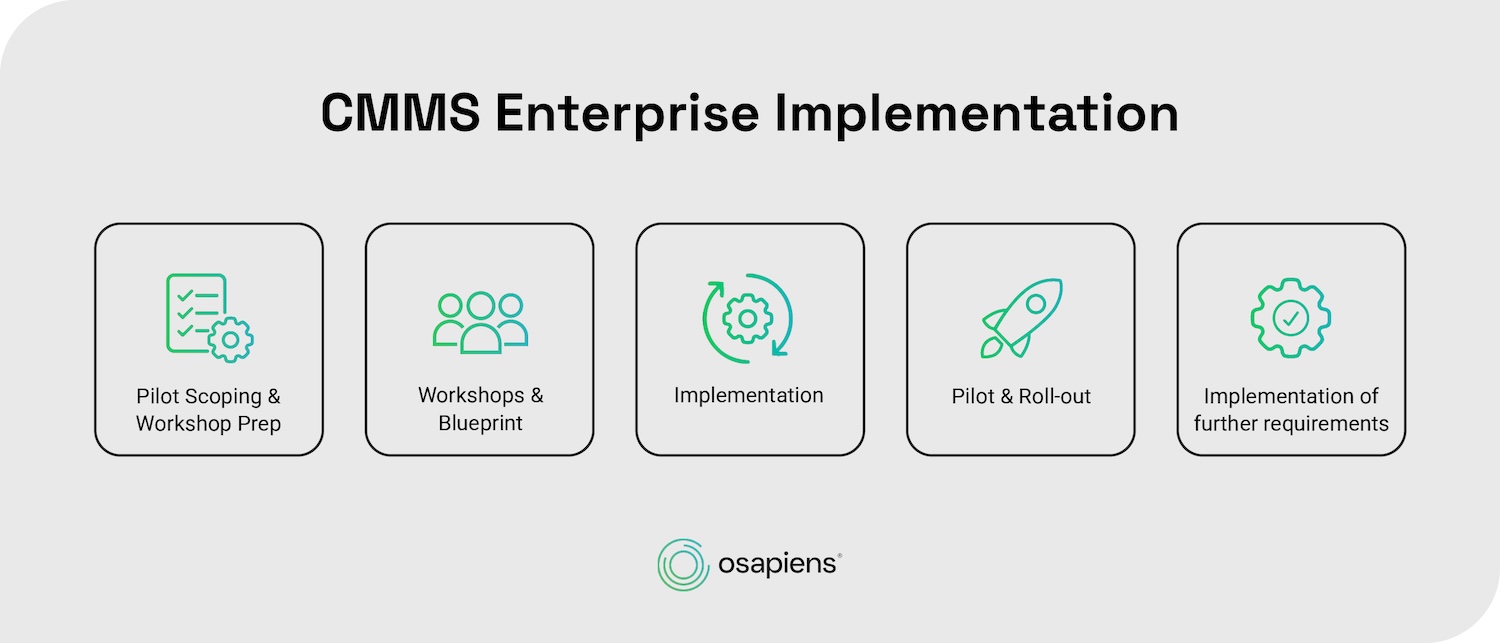
Phase 1: Pilot Scoping and Workshop Prep
Before a single configuration decision is made, the groundwork has to be right. The first step is a comprehensive audit across all systems: ERP platforms, spreadsheets, and the shadow systems that teams have quietly built around official tools. These informal workarounds often hold the most critical asset management history and are rarely visible to IT or management. Mapping them early prevents the kind of surprises that derail go-lives.
Rollout objectives need to go beyond “switching systems.” Concrete goals like improving work order completion rates across sites, enabling mobile access for field technicians, or connecting to SAP, give the project a measurable definition of success. A cross-functional team from maintenance, operations, and IT ensures all perspectives are covered from the start.
The creation of a realistic timeline with buffer periods prevents the unnecessary pressure that causes teams to cut corners during execution.
Phase 2: Workshop and Blueprint
With the data landscape mapped and objectives defined, requirements can now be translated into a concrete implementation plan. This happens process by process, working through each workflow in detail rather than configuring the system in bulk.
For each process, osapiens proposes a screen design based on the osapiens HUB standard, then adjusts it to the specific operational needs of the customer. Once all screen designs have been reviewed and finalized together, a business blueprint is created and formally accepted. This blueprint becomes the binding foundation for everything that follows in implementation, ensuring that what gets built reflects actual maintenance realities rather than theoretical process maps.
The value of this step goes beyond documentation. A formally accepted blueprint eliminates the ambiguity that typically causes rework later and gives both the implementation team and the customer a shared reference point when decisions need to be made under time pressure during the later phases.
Phase 3: Implementation
This is where the CMMS takes shape. Rather than building everything at once and deploying it in a single release, the implementation works in iterative cycles that cover configuration, development, and testing in recurring rounds. Each increment is delivered to the customer for testing before the next cycle begins, which means issues surface early rather than after full deployment. This iterative approach has a practical consequence that is easy to underestimate: by the time the system goes live, the customer team has already tested multiple increments. Go-live is not a leap into the unknown. It is the next step in a process the team already knows.
Data migration should follow a clear priority order. Active assets, spare parts, and failure codes move first, keeping the new system focused on what maintenance teams need from day one.
Phase 4: Pilot (+ Hypercare) & Rollout
The pilot site is where your implementation process gets tested against reality. Choosing the right location matters enormously. Look for a site that meets these criteria:
- Engaged local leadership willing to actively support the rollout
- Representative asset mix that reflects the broader organization
- Manageable complexity so problems are solvable, not overwhelming
- Willingness to provide honest feedback rather than just confirming everything works
The osapiens approach deliberately selects tech-savvy employees as first pilot users. These individuals become internal champions and points of contact during the broader rollout, helping collect feedback and accelerate adoption across maintenance teams.
With osapiens, a hypercare phase follows immediately after go-live. During this period, the osapiens team provides intensive day-to-day support, catching issues quickly and reinforcing correct usage before habits form around workarounds.
Once the pilot site is stable, the rollout expands iteratively to further user groups and additional sites. Each wave covers 2–4 locations with staggered go-live dates, giving the implementation team enough bandwidth to support each site properly rather than spreading attention too thin.
Phase 5: Implementation of Further Requirements
Go-live is not the finish line. The requirements that were deliberately deprioritized during the initial rollout move into a structured backlog that gets picked up in this phase. Each requirement is prioritized, implemented, and tested before being activated in the production environment, following the same iterative logic as the earlier implementation cycles.
Regular check-ins during the first months after go-live serve two purposes. They surface issues quickly before they become embedded in working habits, and they reinforce adoption across the team by keeping the system visible as a living tool rather than a completed project. This ongoing cycle of improvement is what separates organizations that extract lasting value from their preventive maintenance investment from those that see usage quietly decline six months after launch.
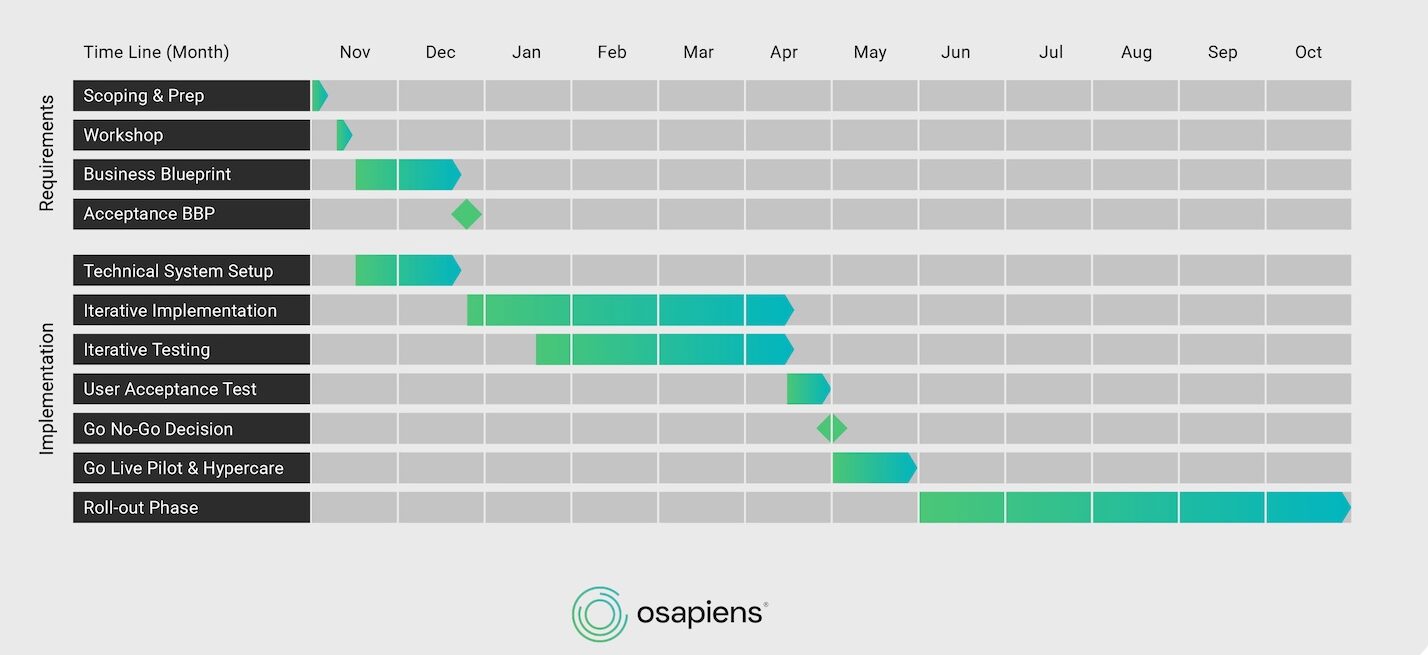
This is what a typical enterprise project timeline might look like in practice:
CMMS Enterprise Rollout Checklist
Use this checklist to make sure nothing falls through the cracks before you move forward.
| Phase | Key Actions |
|---|---|
| Phase 1 Pilot Scoping & Workshop Prep |
☐ Data audit across all systems including shadow systems ☐ Concrete rollout objectives defined ☐ Cross-functional team assembled ☐ Realistic timeline with buffer periods set |
| Phase 2 Workshops & Blueprint |
☐ Configuration gaps identified and adjustments defined ☐ Integration into enterprise architecture specified, including data synchronization requirements ☐ Business blueprint formally accepted |
| Phase 3 Implementation |
☐ Iterative cycles with customer testing at each increment ☐ Active assets, spare parts, and failure codes migrated first ☐ Closed work orders archived separately |
| Phase 4 Pilot & Roll-out |
☐ Pilot site selected based on readiness ☐ Tech-savvy employees identified as first pilot users ☐ Hypercare phase defined and resourced ☐ Wave rollout plan with 2–4 sites per wave confirmed |
| Phase 5 Further Requirements |
☐ Deprioritized requirements captured in backlog ☐ Regular check-ins scheduled post go-live ☐ Continuous improvement cycle established |
How to Solve the ERP Integration Challenge
For most enterprise organizations, ERP is the operational backbone. Financials, procurement, and cost center accounting all run through it, whether that is SAP, Microsoft Dynamics, or another platform. Yet when it comes to daily maintenance work in the field, native ERP maintenance modules consistently fall short. Transaction codes are complex, navigation non-intuitive, and workflows were never designed for mobile use. The result is low technician adoption.
The right architecture does not force a choice between your ERP and a modern CMMS, but it combines both: the ERP remains the system of record for financials, procurement, and material management, while the CMMS becomes the execution layer where technicians and planners do their daily work. Every data point flows back automatically, so nothing is lost and no parallel systems need to be maintained.
For this to work without custom development or fragile workarounds, several data objects need to sync bidirectionally in real time:
- Assets and functional locations mapped to the correct ERP structure
- Work orders including status updates, completion confirmations, and time entries
- Spare parts inventory with live stock levels and consumption tracking
- Purchase orders triggered from the CMMS and processed through ERP procurement
- Maintenance plans keeping preventive maintenance schedules synchronized across both systems
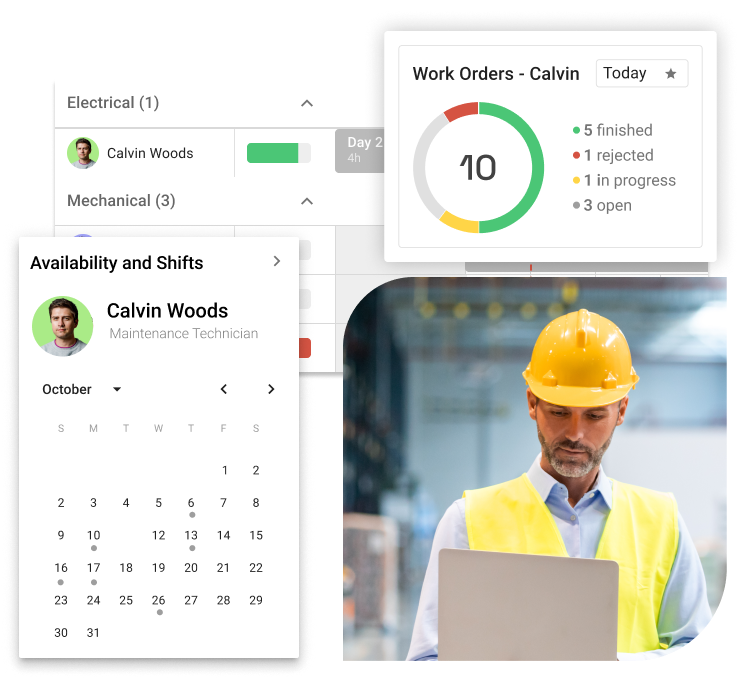
With the osapiens HUB for Maintenance, technicians get a consumer-grade app experience through a mobile-first CMMS layer, managers get data that flows back to the ERP in real time, and the organization gets a maintenance operation that actually runs the way it was designed to.
The osapiens HUB for Maintenance saves 17 minutes per work order on average: 12 minutes on execution and documentation, 5 minutes on planning. This directly translates into higher technician productivity and lower operational costs.
The Importance of Change Management in CMMS Rollout
Change management is the most decisive factor for rollout success. McKinsey research shows that companies’ transformation success rate has remained stuck at around 30 % for years, with frontline employee involvement identified as the single most critical differentiator between success and failure. Yet most organizations invest heavily in software configuration and barely plan for the human side. A structured approach across three dimensions changes that equation entirely.
Build a Champion Network Across Shifts and Trades.
The first dimension is visibility at the ground level. Establish champions per shift and trade, covering mechanical, electrical, and utilities teams. These are not managers; they are respected peers who receive early access and training. The osapiens approach selects tech-savvy employees as first pilot users who then become internal points of contact, building credibility through peer influence rather than top-down mandates.
Design Training Around How Each Role Actually Works.
Generic training delivered weeks before go-live is one of the most reliable predictors of poor adoption. By the time the system launches, most of what was covered has been forgotten. Role-based, hands-on training timed 1–2 days before go-live consistently outperforms longer lead times, because people learn best when they can immediately apply what they have just practiced.
- Technicians: Hands-on mobile app workshops focused on work order execution and PM checklists (2–4 hours, timed 1–2 days before go-live)
- Planners: Scheduling, spare parts management, and work order creation workflows (half-day session)
- Supervisors: Dashboards, KPI monitoring, and team workload views (2-hour session)
- Management: Reporting, cross-site benchmarking, and ROI tracking (1-hour executive briefing)
Address psychological barriers directly
Technicians often fear that CMMS data will be used for performance surveillance or to justify staff reductions. Ignoring this concern does not make it disappear; it simply drives it underground, where it quietly fuels workarounds and disengagement. Acknowledge it directly. Reframe the system as a tool that removes administrative burden, rather than adding oversight. The goal is to make technician expertise visible and valued, not to monitor keystrokes. When people believe the system works for them, not against them, adoption follows naturally.
Avoid the Most Common CMMS Enterprise Rollout Mistakes
Our Customer Success team supports you from the first scoping session to go-live, with a proven methodology built across 2,000+ implementations.
Start now with osapiens
How osapiens Simplifies Enterprise CMMS Rollouts
Every challenge covered in this guide points to the same conclusion: enterprise CMMS rollouts fail when the platform either overwhelms users with complexity or lacks the depth to handle real operational demands. The osapiens HUB for Maintenance was built to bridge that gap, delivering enterprise-grade capability through an interface technicians actually want to use.
Mobile-First Design That Drives Technician Adoption
An interface that mirrors consumer app experiences means less training and less resistance. The results speak for themselves: 17 minutes saved per work order (12 minutes on execution and documentation, 5 minutes on planning), an 8 % downtime reduction through preventive and condition-based maintenance, and a 14 % productivity increase through end-to-end automation. Across a maintenance team handling hundreds of work orders per month, these numbers compound quickly into significant operational savings.
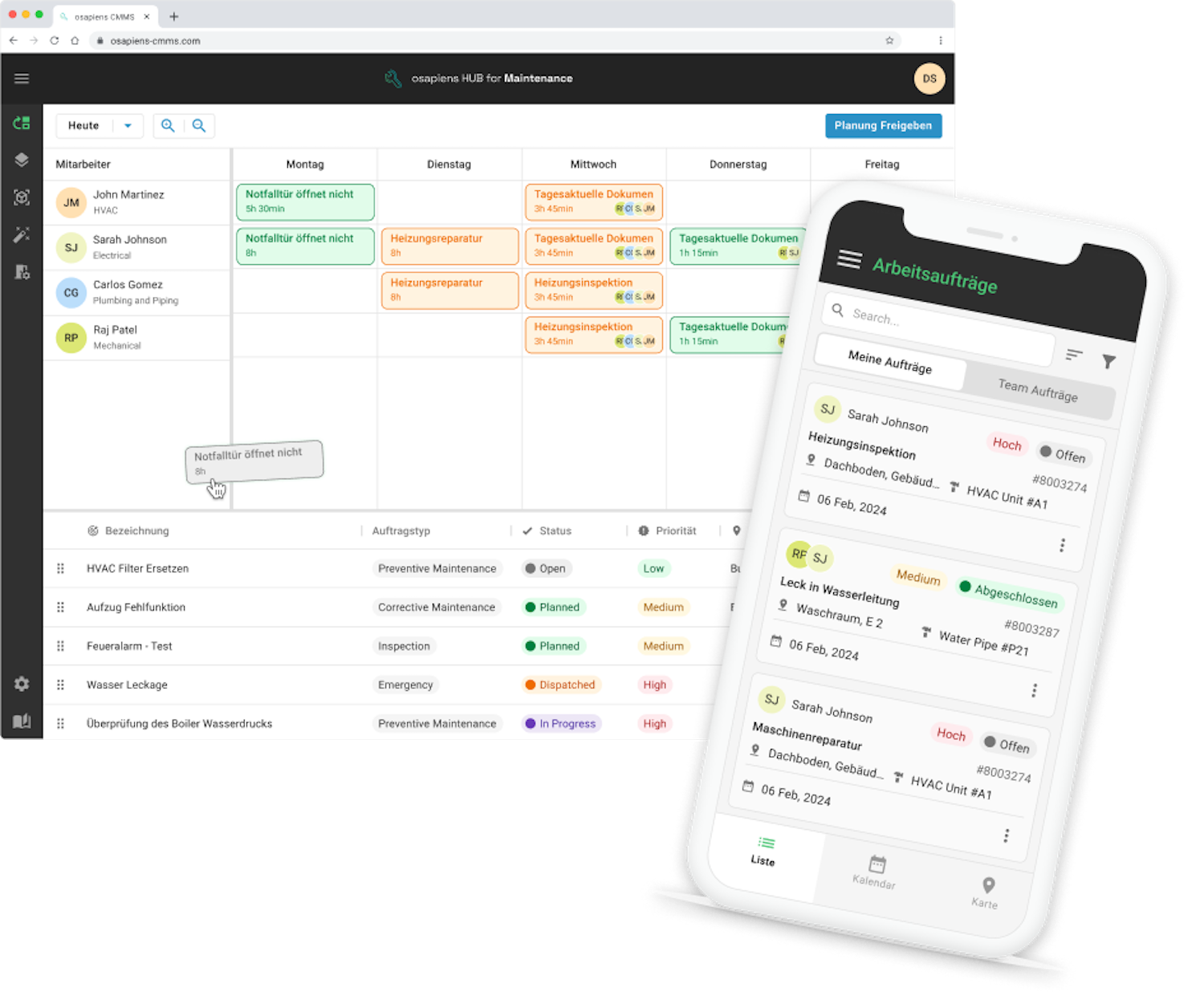
Proven Scalability from Single Sites to Global Deployments
The osapiens HUB was not designed for pilot projects. It was built to scale. Puratos runs 65 of 76 production sites across 52 countries on the osapiens HUB. Coca-Cola North America operates more than 30 locations with 1,500 users. Nordex maintains over 11,400 wind turbines worldwide. Enterprise-grade features include work order management, preventive maintenance scheduling, spare parts and inventory management, and planning and scheduling.
ERP Integration That Reduces Implementation Complexity
The osapiens HUB connects to your existing ERP environment without months-long integration projects or custom development. For SAP environments, a certified connector running directly in the ABAP stack synchronizes assets, work orders, spare parts, and maintenance plans in real time, staying stable across SAP updates. For Microsoft Dynamics 365, the osapiens HUB uses two native integration patterns: Push-Sync via Business Events for near-real-time updates and Pull-Sync via OData for job-based polling. Both approaches keep your ERP as the system of record while the osapiens HUB becomes the execution layer technicians work in every day. Typical integration setup takes 2–4 weeks.
Every enterprise implementation is supported by a dedicated Customer Success Manager who guides your team from the first workshop through global scaling.

Pradeep Dalal, Product Director – Planning & Execution
★ ★ ★ ★ ★CONA Services
“Working with osapiens has been a positive experience for our company. Their innovative solutions and exceptional support have not only met but exceeded our expectations, paving the way for a successful partnership.”
Conclusion: Successful CMMS Rollout with osapiens
A successful CMMS enterprise rollout is an operations transformation, not a technology project. The organizations that get it right share three things in common: a phased, wave-based deployment that reduces risk with every cycle, rigorous change management that turns skeptics into champions, and deep ERP integration that preserves existing system investments while giving technicians a modern interface they actually use.
What separates the winners from the rest is rarely the software itself. It is the discipline to build the right foundations before go-live, the commitment to support people through the transition, and the methodology to learn from each site and apply those lessons to the next.
The osapiens HUB for Maintenance was built for exactly this challenge, combining enterprise-grade functionality with the usability that drives adoption from the first pilot site to global scale. Organizations that get the rollout right unlock compounding value: better maintenance data, smarter decisions, and measurable reductions in downtime and cost.
Ready to Make Your CMMS Enterprise Rollout a Success?
The osapiens HUB for Maintenance combines enterprise-grade functionality with the usability that drives adoption from day one, backed by a proven implementation methodology and a team that stays with you every step of the way.Book a free demo
FAQ
How long does a typical CMMS enterprise rollout take across multiple sites?
Timelines vary by complexity. A single site can go live with core functions like work orders and preventive maintenance in one to two weeks. Enterprise deployments with SAP integration typically take 1–3 months. Large multi-site organizations should plan for three or more months. The wave-based approach means individual sites go live incrementally, delivering value continuously rather than after one massive launch.
Do we need to replace SAP PM to roll out a modern CMMS?
No. A modern CMMS like the osapiens HUB for Maintenance works as an execution layer alongside SAP PM. SAP remains the system of record for financials, procurement, and organizational structure, while the CMMS provides a mobile-first, user-friendly interface for technicians. Data syncs bidirectionally through SAP-certified connectors.
How do we get technicians to actually use the new CMMS system?
Adoption depends on four drivers: a mobile-first design that mirrors consumer app experiences, role-based training timed 1–2 days before go-live rather than weeks in advance, visible site champions per shift and trade who build peer credibility, and honest framing of the system as a tool that reduces paperwork. Communicate tangible benefits directly. The osapiens HUB for Maintenance saves 17 minutes per work order, a concrete improvement technicians feel immediately.
Start using osapiens for free
Improve your uptime, extend the life of your equipment, and simplify work order management.
Book a demo
ENTERPRISE CAPABILITIES
- SAP ECC & S/4HANA Certified
- Infor & MS Dynamics
- Microsoft Entra ID / Okta
- ISO 27001 & 9001
- EU Cloud · Data Sovereignty
- Development, Test, and Production Environments
- Multi-Entity & Multi-Site
- Power BI Integration
- Audit Trail & Compliance
Related content

January 1, 2026
Press Machine Maintenance Checklist – Tasks, Tips & Template
January 1, 2026
HPLC Maintenance Checklist – Tasks, Tips & Template

November 28, 2025
Preventive Maintenance Software for Small Companies: Top 6
January 1, 2026
Electrical Preventive Maintenance Checklist – Tasks, Safety & Digital Execution
January 1, 2026
Injection Molding Machine Maintenance Checklist – Tasks, Systems & Digital Execution
January 1, 2026
Excavator Maintenance Checklist: What to Inspect, When & How
January 1, 2026
Laser Cutting Machine Maintenance Checklist: Prevent Downtime & Extend Equipment Life
January 1, 2026
Switchgear Maintenance Checklist – Tasks, Tips & Template
January 1, 2026
Arc Welding Machine Preventive Maintenance Checklist – Tasks, Safety & Digital Execution
January 1, 2026
Air Compressor Maintenance Checklist – Tasks, Tips & Template
January 1, 2026
Vehicle Maintenance Checklist – Essential Tasks, Compliance Tips & Digital Template
January 1, 2026