

CMMS

Florian Bartholomäus, osapiens Expert | 26. February 2026 | Lesezeit 13 min.
Switching maintenance software feels daunting, but staying with a system that no longer works comes with its own costs. With the right framework, clean data, and a migration-friendly platform, switching CMMS systems is more manageable than most organizations expect.
Switch CMMS without losing data
More than 2200 companies place their trust in osapiens













You know your current system isn’t working. Technicians avoid using it, data entry feels like punishment, and you’re still tracking critical assets in spreadsheets. You’ve researched modern CMMS platforms that promise mobile access, intuitive interfaces, and real integration with your existing systems. But every time you consider making the switch, one question stops you cold: How do we migrate without losing years of maintenance data or disrupting operations? The truth is, with careful planning and the right approach, CMMS migration doesn’t have to be risky or overwhelming. This guide walks you through exactly how to transition systems successfully.
Key Facts
- The real benefits of CMMS migration go beyond a better interface: Organizations that make the switch report higher technician productivity, fewer unplanned downtimes, cleaner asset data, and, most importantly, a system their team actually uses.
- Most CMMS migrations fail because of planning, not technology: Dirty data, missing naming conventions, underestimated timelines, and poor user training are the real culprits, and all of them are avoidable with the right planning.
- Your starting point shapes your strategy: Whether you’re coming from spreadsheets, a legacy CMMS, a custom-built system, or SAP PM, each scenario comes with its own challenges and the right migration method differs accordingly.
- osapiens makes the switch straightforward: From Excel bulk upload templates and a SAP-certified connector to dedicated implementation support and phased feature activation, the osapiens HUB is built to reduce migration friction and get your team productive fast.
Why Organizations Migrate Their CMMS
The decision to switch maintenance software rarely happens without compelling reasons: most organizations tolerate existing systems until pain points become too costly to ignore. The most common reasons usually are:
- Outdated legacy systems with poor user interfaces: Many organizations struggle with legacy systems from providers like Oracle, IBM Maximo, or older German and European vendors that feature clunky interfaces requiring desktop installation rather than modern web-based access. These systems often frustrate users and lead to low adoption rates.
- Lack of mobile accessibility for technicians: Current systems may not offer mobile apps or provide such poor mobile experiences that technicians resort to paper notes and later data entry, defeating the purpose of digital maintenance management.
- Limited integration capabilities: Existing CMMS platforms may not integrate with critical systems like SAP, ERP platforms, or OEE sensors, creating data silos and requiring duplicate data entry across multiple systems.
- Prohibitively expensive licensing models: Some vendors charge excessive per-user fees that make scaling the system across all maintenance team members financially impractical, limiting system value.
- Insufficient functionality for growing operations: As maintenance operations expand, organizations outgrow systems that lack asset management hierarchy, advanced reporting, or inventory management capabilities needed for complex maintenance operations.
These pain points make clear that staying with an inadequate system carries its own costs and risks. Recognizing these drivers helps organizations approach CMMS migration not as a disruptive project to fear, but as a strategic opportunity requiring careful planning to address longstanding maintenance management challenges.
The CMMS Migration Framework for SME
Successful CMMS migration should follow a structured approach with distinct phases that ensure completeness and reduce risk. For most small and mid-sized companies, migration follows a straightforward sequence:
- Define the goal: What do you want to achieve? Fewer missed maintenance tasks, better documentation, or a move away from scattered Excel files?
- Identify what data you need: Not everything needs to be migrated. Focus on active assets, open work orders, and critical maintenance history.
- Extract your data: Pull records from Excel, old tools, emails, or paper documents and prepare them for import.
- Import into osapiens HUB: Clean data goes in, and you’re ready to work from day one.
- Go live and train your team: A short onboarding session is usually enough to get technicians up and running.
The 5-Phase Enterprise CMMS Migration Framework
For enterprise organizations with complex system landscapes, SAP integrations, or multiple sites, a more structured approach makes sense. In this case, osapiens follows a five-phase implementation framework that covers data audits, process blueprinting, iterative rollout, and a defined hypercare phase, ensuring nothing falls through the cracks at scale.
The following framework from osapiens provides a systematic roadmap that addresses critical tasks in the proper sequence, helping organizations transition to their new CMMS with confidence and minimal disruption to maintenance operations.
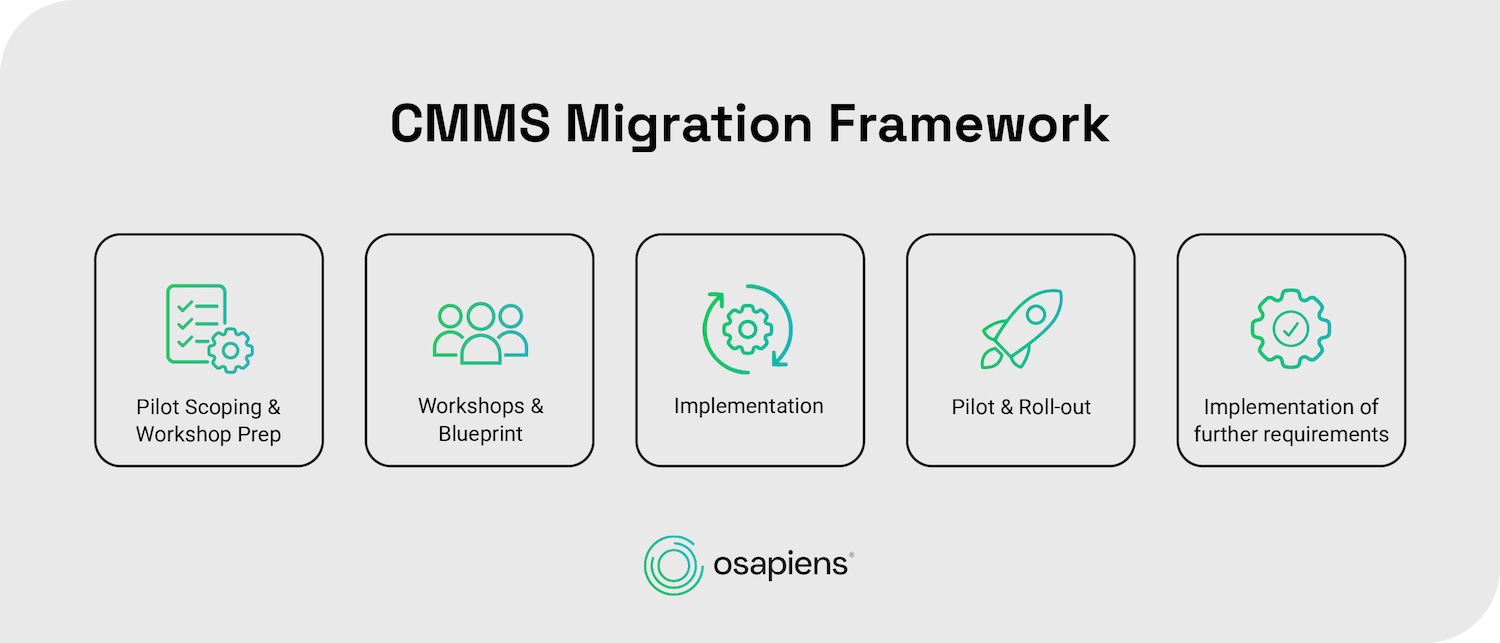
Phase 1: Pilot Scoping & Workshop Prep
The first step is a comprehensive data audit across all systems, including spreadsheets and shadow systems that often hold critical maintenance history. Beyond the audit, clear migration objectives need to be defined, not just “switching systems,” but concrete goals such as improving work order completion rates, enabling mobile access for technicians, or integrating with SAP. A cross-functional team from maintenance, operations, and IT ensures all perspectives are covered from the start, and a realistic timeline with buffer periods prevents unnecessary pressure during execution.
Employees often develop their own workarounds that neither IT nor management are aware of. osapiens maps these real working habits, not the theoretical processes defined on paper.
Phase 2: Workshops & Blueprint
Requirements are now translated into a concrete implementation plan. Working process by process, requirements are defined based on the osapiens HUB standard. For each process, osapiens provides a screen design suggestion that is then adjusted to the specific needs of the customer. Once all screen designs are finalized, a business blueprint is created, reviewed together, and formally accepted, serving as the binding foundation for everything that follows in implementation.
Phase 3: Implementation
This phase is where the CMMS-system comes to life. Processes are broken down into user stories and implemented iteratively, covering configuration, development, and testing in recurring cycles. Active assets, spare parts, and failure codes are migrated with the highest priority, while closed work orders are archived separately to keep the new system lean and focused. Crucially, the customer can test each increment as it is delivered, catching issues early rather than discovering them after full deployment.
Phase 4: Pilot & Roll-out
The solution goes then live at one site with a defined group of technicians, allowing the team to validate workflows, integrations, and data accuracy under real conditions. After a hypercare phase, where the osapiens team closely supports daily operations, the solution is rolled out to further user groups and sites iteratively. Role-specific training ensures that technicians, planners, and managers each understand how the system fits into their daily work, rather than receiving a generic system overview. osapiens deliberately selects tech-savvy employees as the first pilot users: they become internal points of contact for other departments during the broader rollout.
Phase 5: Implementation of Further Requirements
This phase ensures the system continues to evolve with the organization. Requirements that were deprioritized during the initial rollout are picked up from the backlog, prioritized, and added to the system in further cycles. Each addition is tested before activation in production. Regular check-ins during the first months surface issues quickly, reinforce adoption across the team, and ensure the osapiens HUB delivers lasting value not just at go-live, but long after.
Get a CMMS Migration Plan Tailored to Your Setup
Whether you're coming from spreadsheets, a legacy system, or SAP PM, our implementation specialists will walk you through a realistic migration roadmap for your organization.
Start with osapiens
The Common Mistakes in CMMS Migration
Many CMMS migration projects fail not because of technical limitations, but due to preventable planning mistakes. Understanding these common errors helps organizations avoid costly setbacks and ensures a smooth transition to the new system.
- Migrating all historical data without cleaning or archiving obsolete records: This “digital hoarder” problem clutters the new CMMS with assets sold years ago, spare parts for nonexistent equipment, and test work orders from former staff, making searches inefficient and reports unreliable.
- Failing to standardize asset naming conventions before migration: When asset names in the CMMS don’t match tags in production systems or on physical equipment, integration breaks down and technicians struggle to locate the correct assets for work orders.
- Underestimating the transition timeline: Many organizations fail to account for the time between canceling the old system contract and going live with the new one. Plan for a realistic overlap period where both systems run in parallel.
- Inadequate user training and change management: Without proper training on new workflows and features, maintenance teams resist the new system, continue using workarounds, and the organization fails to realize the investment value.
- Not having a clear data mapping strategy: Attempting to migrate without understanding how data fields in the old system correspond to the new CMMS results in lost information, misplaced data, and time-consuming corrections after go-live.
- Lacking proper backup protocols: Without secure backups of existing data before migration begins, organizations risk permanent data loss if errors occur during the data migration process, with no way to recover critical maintenance information.
- Ignoring shadow processes: Many organizations document how processes should work, but not how they actually work. Employees often develop their own workarounds that neither IT nor management are aware of. Migrating without uncovering these real workflows means building a new system around the wrong processes.
- Addressing integration too late: Many vendors avoid discussing integration in detail early in the process, only for it to become the biggest bottleneck later. Defining the integration setup from day one is critical to avoid delays and ensure data flows automatically between systems without manual intervention.
Recognizing these mistakes allows organizations to plan proactively, allocate sufficient time for data preparation, and approach CMMS migration with realistic expectations that set the foundation for long-term success.
Here is how osapiens directly addresses these common mistakes:
| Mistake | osapiens solution |
|---|---|
| Migrating all historical data without cleaning or archiving | Historical work orders are archived as searchable PDFs and attached directly to the relevant assets, preserving maintenance history without cluttering the new system |
| Failing to standardize asset naming conventions | Implementation specialists help define clear naming conventions and validate asset tags before any data is imported |
| Underestimating the transition timeline | Users retain read-only access to the old system while actively working in the new one, reducing pressure and avoiding knowledge gaps |
| Inadequate user training and change management | Phased feature activation and role-specific training for technicians, planners, and managers ensure a smooth transition without overwhelming users |
| Not having a clear data mapping strategy | The implementation team works process by process with each customer, documented in a formal business blueprint before implementation begins |
| Lacking proper backup protocols | A structured data export process from the existing system is completed before any migration step is taken, ensuring all critical data is secured first |
| Ignoring shadow processes | osapiens maps real working habits by observing how employees actually work before configuring the system |
| Addressing integration too late | Integration requirements are defined and specified from day one, ensuring data flows automatically between systems without manual intervention or late-stage delays |
CMMS Migrations for Different Scenarios
Your starting point significantly influences the specific approaches and considerations required for success. Understanding these scenario-specific factors helps you anticipate obstacles and plan accordingly for a smoother transition to your new CMMS.
- Migrating from Spreadsheets represents the biggest operational shift, but also the greatest opportunity. Rather than trying to digitize every historical spreadsheet, focus on importing only active assets and current spare parts. Establish clear naming conventions and data entry standards from day one to avoid recreating the same inconsistencies in the new system.
- Migrating from Legacy CMMS Systems is the most common scenario. Legacy systems often export data in formats (CSV, XML, or database dumps) that require transformation before import. Rather than migrating decades of closed work orders, archive historical records separately and migrate only the last 1–2 years of active maintenance data.
- Migrating from SAP PM comes with a unique advantage: organizations can either replace SAP PM entirely or complement it through integration. The SAP-certified connector syncs assets, work orders, and maintenance plans in real time, eliminating manual data migration and reducing setup time to as little as 1–2 weeks. Good to know: For organizations that use SAP MM but not SAP PM, osapiens can synchronize spare parts inventory specifically, providing immediate value without requiring a full SAP PM setup.
- Migrating from Custom-Built Systems is more common than many expect. Many organizations have built their own maintenance tools on Microsoft technologies that have served them well but no longer scale. The migration approach here is similar to legacy systems, with particular attention to data extraction, since there is often no standard export format available.
| Scenario | osapiens Advantage |
|---|---|
| Spreadsheets | Excel bulk upload templates and an intuitive mobile-first interface. No prior CMMS experience needed |
| Legacy CMMS | Flexible data mapping and dedicated implementation support ensure a clean, structured data transfer |
| SAP PM | SAP-certified connector syncs data in real time. Setup completed in as little as 1–2 weeks |
| Custom-Built Systems | Experienced implementation team guides extraction and restructuring of non-standard data formats |
Which Migration Scenario Fits Your Organization?
Spreadsheets, legacy CMMS, or SAP PM: every starting point comes with its own challenges. Let us show you how osapiens handles your specific situation.
Try osapiens now
Conclusion: Your Successful CMMS Migration Starts with the Right Partner
CMMS migration is the starting point for better maintenance operations. Organizations that approach it with a clear framework, clean data, and the right platform consistently see measurable gains: higher technician productivity, fewer unplanned downtimes, and a system their team actually wants to use.
What makes the difference is not just the technology, but it is having a partner who understands both sides of the equation. osapiens combines product and implementation in one, mapping real workflows instead of theoretical processes, and getting teams productive in weeks rather than months. From the first data import to enterprise-wide rollout, the osapiens HUB is built to make the transition as smooth as possible and to keep delivering value long after go-live.
Ready to make the switch? Schedule a consultation with our implementation specialists and get a migration plan tailored to your organization’s specific starting point.
FAQs
How long does a CMMS migration typically take?
Migration timelines vary significantly based on organization size and data complexity. Small organizations typically complete CMMS migration in 2-4 weeks, mid-size companies require 6-12 weeks, while enterprise implementations with multiple sites often take 3+ months. Data cleaning and preparation typically represents 80% of total migration effort, with the actual data transfer taking considerably less time once proper preparation is complete.
Will we lose historical maintenance data during migration?
Data loss is preventable with proper backups and planning. Rather than migrating all historical work orders, archive records older than 2-3 years as searchable PDFs for compliance while importing only recent active data. This archiving strategy preserves critical history for reference while keeping your new CMMS clean and focused on current maintenance operations, ensuring data integrity without system clutter.
Can we migrate from SAP PM without losing our existing data structure?
The osapiens HUB for Maintenance offers SAP-certified integration rather than traditional migration, maintaining SAP PM as your system of record while providing a modern user interface. Real-time synchronization of assets, work orders, and preventive maintenance schedules eliminates manual data migration entirely. This approach preserves your existing data structure and SAP investment while addressing poor mobile accessibility and user experience challenges.
How does osapiens handle employee resistance during migration?
Resistance is one of the most common challenges during any CMMS rollout. osapiens addresses this by mapping real working habits rather than theoretical processes, building the system around how employees actually work, not how management thinks they work. Combined with phased feature activation and hands-on workshops, technicians find the new system familiar from day one rather than feeling forced into a completely new way of working.
Start using osapiens for free
Improve your uptime, extend the life of your equipment, and simplify work order management.
Book a demo
Related content

January 1, 2026
Capacitor Bank Maintenance Checklist – Tasks, Safety & Digital Execution
January 1, 2026
Wheel Loader Maintenance Checklist – Tasks, Tips & Template
January 1, 2026
Overhead Crane Maintenance Checklist: What to Inspect & When
January 1, 2026
Asphalt Paver Maintenance Checklist – Tasks, Systems & Digital Execution
January 1, 2026
Press Machine Maintenance Checklist – Tasks, Tips & Template

January 20, 2026
Maintenance Schedule Template: Free CMMS Excel Template
January 1, 2026
Automatic Screw Machine Maintenance Checklist – Tasks, Components & Digital Execution

January 15, 2026
IBM Maximo Alternatives: The Best EAM & CMMS Platforms Compared
January 1, 2026
Plastic Injection Mold Maintenance Checklist – Tasks, Tips & Best Practices
January 1, 2026
Fire Extinguisher Maintenance Checklist – Tasks, Tips & Best Practices
January 1, 2026
Wire EDM Machine Maintenance Checklist – Tasks, Tips & Digital Execution
January 1, 2026