

CMMS

Florian Bartholomäus, osapiens Expert | 15. January 2026 | Lesezeit 16 min.
IBM Maximo offers powerful enterprise asset management, but many organizations struggle with high costs, complex implementation, and low user adoption. Modern alternatives now deliver comparable functionality with faster deployment, intuitive interfaces, and better ROI.
Find your IBM Maximo alternative
More than 2200 companies place their trust in osapiens













Table of Contents
- Key Facts
- What IBM Maximo Is and Who Typically Uses It
- Why Companies Search for IBM Maximo Alternatives
- Top IBM Maximo Alternatives
- How to Choose an IBM Maximo Alternative
- Migration Notes: How to Switch from IBM Maximo Without Breaking Operations
- Conclusion: osapiens as a Strong Alternative to IBM Maximo
- FAQs
How do you know when your enterprise asset management system has become the bottleneck rather than the solution? IBM Maximo is a standard choice for many maintenance teams. But while it’s a powerful tool, the reality on the ground is often different. Many users find it over-complicated and expensive, leading to a situation where the software actually slows the team down instead of helping them. Modern IBM Maximo alternatives now offer the functionality you need without the overhead you don’t: this means less complexity and faster deployment. Organizations across manufacturing, facilities management, and utilities are discovering that switching to a modern CMMS platform can reduce total cost of ownership while enhancing maintenance efficiency and user adoption rates.
Key Facts
- Why companies move away from IBM Maximo: Many organizations outgrow IBM Maximo due to high implementation costs, long deployment timelines, and low user adoption caused by complex interfaces and heavy customization requirements.
- Enterprise functionality without complexity: Some IBM Maximo alternatives deliver robust asset management with faster implementations and better user adoption across maintenance teams.
- Transparent, flexible pricing: The best alternatives support preventive maintenance, asset tracking, and inventory management with pricing models that scale with your organization rather than punishing growth.
- osapiens HUB for Maintenance combines SAP-certified integration, rapid implementation, and a modern user experience, making it a strong IBM Maximo alternative for organizations that need enterprise-grade asset management without complexity.
What IBM Maximo Is and Who Typically Uses It
IBM Maximo Application Suite represents one of the most established enterprise asset management platforms in the market, offering comprehensive capabilities for asset lifecycle management, work order management, and predictive maintenance. Originally developed in the 1980s and acquired by IBM in 2005, Maximo has evolved into a full-featured EAM (Enterprise Asset Management) solution that manages everything from asset tracking and maintenance schedules to MRO inventory management and regulatory compliance.
Large enterprises across utilities, manufacturing facilities, government agencies, and infrastructure-heavy organizations typically deploy IBM Maximo to manage complex asset portfolios. The platform’s depth of functionality and scalability make it particularly attractive to organizations managing thousands of assets across multiple locations. Its integration capabilities within the IBM ecosystem and support for IoT data have strengthened its position as a comprehensive enterprise solution.
Typical deployment scenarios include power generation facilities tracking critical infrastructure, manufacturing plants coordinating preventive maintenance across production lines, and municipalities managing public works assets. While IBM Maximo delivers robust asset operations capabilities, its enterprise-grade architecture often requires significant implementation resources and specialized expertise to configure and maintain effectively.
Why Companies Search for IBM Maximo Alternatives
Despite its comprehensive capabilities, many organizations seek alternatives to IBM Maximo when implementation realities don’t match initial expectations. Maintenance managers frequently discover that the platform’s complexity creates barriers rather than solutions, particularly when technicians struggle with daily workflows or when deployment timelines stretch far beyond projections. The gap between Maximo’s enterprise power and practical usability drives businesses seeking IBM Maximo alternatives that deliver similar functionality with better user adoption and lower total cost of ownership.
Some common issues companies face with IBM Maximo:
- Implementation costs exceeding budget: Licensing fees, consultants, customization, and infrastructure expenses create a significant barrier for mid-sized organizations and can strain even the budgets of large enterprises.
- Extended deployment timelines: Typical implementations require several months from planning to go-live, delaying operational benefits and requiring sustained commitment of internal resources that could address more immediate maintenance challenges.
- Steep learning curve: The interface requires extensive training for technicians and maintenance planners alike, leading to low user adoption, incomplete data entry, and teams reverting to spreadsheets despite expensive software investments.
- Limited mobile functionality: Mobile apps often lack offline capabilities and intuitive design, frustrating technicians who need quick asset access in facilities with poor connectivity or during equipment inspections in remote locations. A modern field service management solution can eliminate many of these mobile workflow bottlenecks.
- Integration complexity: Connecting Maximo with existing enterprise systems typically demands custom development work, creating ongoing maintenance overhead and dependencies on specialized consultants for even minor workflow adjustments.
These challenges have created demand for modern alternatives that maintain enterprise-grade asset management capabilities while addressing usability, deployment speed, and cost-effectiveness, proving that powerful functionality doesn’t require overwhelming complexity.
Enterprise Functionality Without Complexity
osapiens HUB delivers enterprise-grade asset management with intuitive interfaces that require minimal training, rapid deployment in 2-4 weeks instead of months, and full offline mobile capabilities.
Start with osapiens
Top IBM Maximo Alternatives
The market for IBM Maximo alternatives has matured significantly, with other CMMS tools now delivering enterprise-grade asset management without the complexity compared to traditional solutions. Today’s alternatives match Maximo’s core capabilities while addressing its key weaknesses – offering intuitive interfaces, rapid deployment, and transparent pricing that makes advanced functionality accessible to organizations beyond large enterprises.
osapiens HUB for Maintenance
osapiens bridges the gap between enterprise functionality and user-friendly design, delivering a comprehensive CMMS platform with native SAP PM integration that eliminates the implementation complexity typically associated with ERP-connected maintenance systems. As a SAP-certified solution, osapiens enables seamless data flow between maintenance operations and financial systems without requiring custom development or specialized consultants.
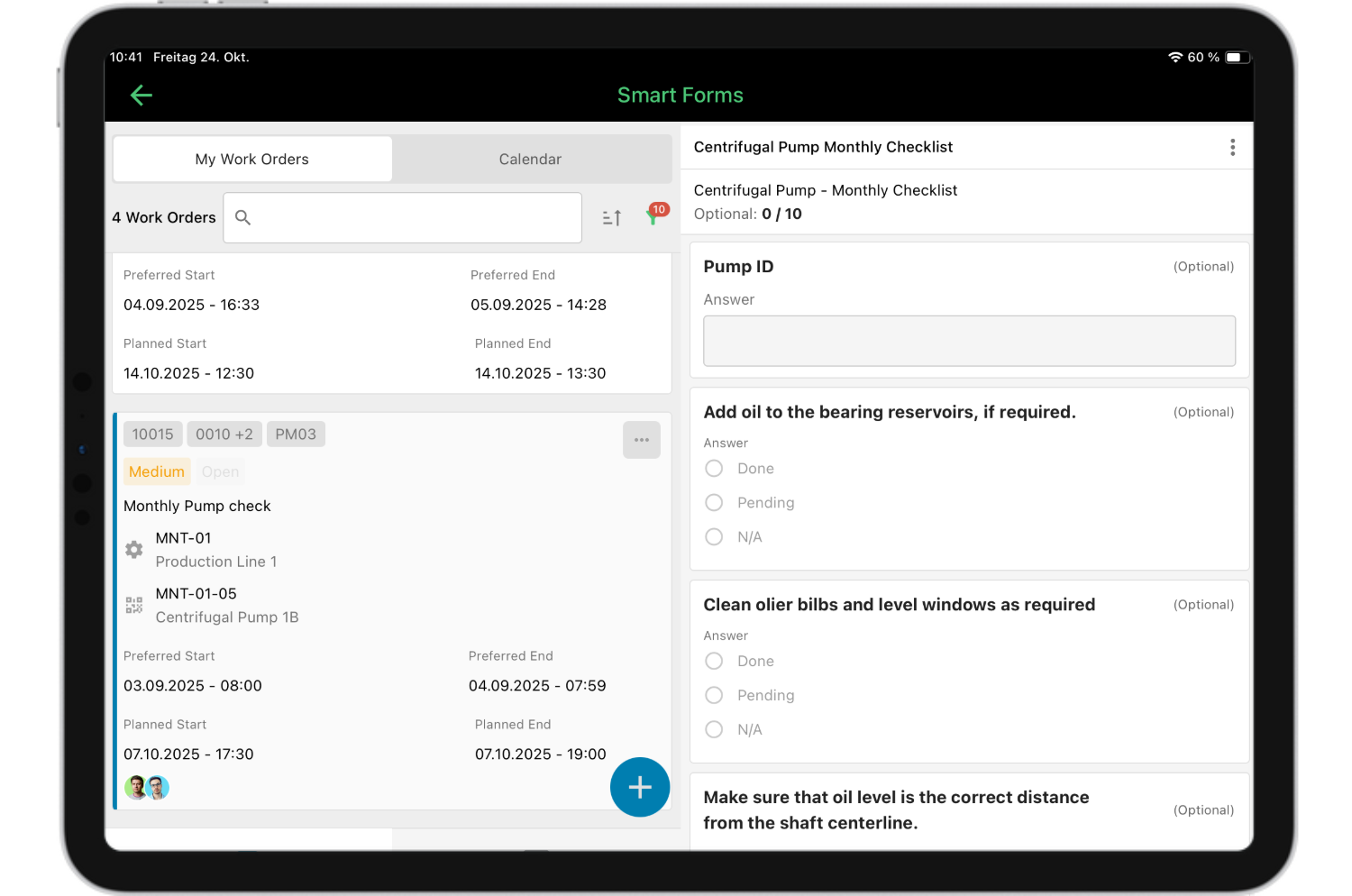
Best for: SAP-integrated environments, manufacturing facilities, mid-to-large enterprises seeking to optimize maintenance operations while maintaining existing ERP investments, and organizations requiring preventive maintenance with real-time visibility into asset conditions.
Strengths:
- Mobile-first design: Purpose-built mobile accessibility enables technicians to access work orders, update asset conditions, and manage maintenance tasks from any location with full offline functionality.
- SAP PM integration: Full SAP certification ensures bidirectional data synchronization between maintenance tasks and enterprise systems, eliminating manual data entry and reducing integration costs compared to custom-built connections.
- Intuitive user experience: Modern, user-friendly interface requires minimal training for service technicians and maintenance planners, driving higher adoption rates and more complete asset tracking data across operations.
- Rapid deployment: Implementation typically completes in weeks rather than months, with transparent pricing and straightforward configuration that reduces initial setup costs and accelerates time-to-value for maintenance teams.
- Predictive analytics: AI-driven insights support preventive maintenance strategies and optimize maintenance schedules based on actual asset performance rather than fixed intervals.
Watch-outs:
- Organizations with highly specialized industry-specific needs may require custom configuration during initial setup.
- osapiens is a solution with lots of configuration options, starter system from website may require configuration to suit uses cases in highly regulated industries.
Interested in seeing how osapiens compares to your current setup? Book a personalized demo to explore the platform’s capabilities for your specific maintenance operations.
IFS Ultimo
IFS Ultimo is a robust cloud-based EAM/CMMS platform designed to optimize maintenance, asset management, and safety operations across industries ranging from manufacturing and logistics to healthcare and infrastructure. Unlike simple CMMS tools, Ultimo provides a scalable enterprise asset management solution that combines preventive maintenance, work order tracking, inventory control, and cross-team collaboration to help organizations reduce downtime and streamline workflows.
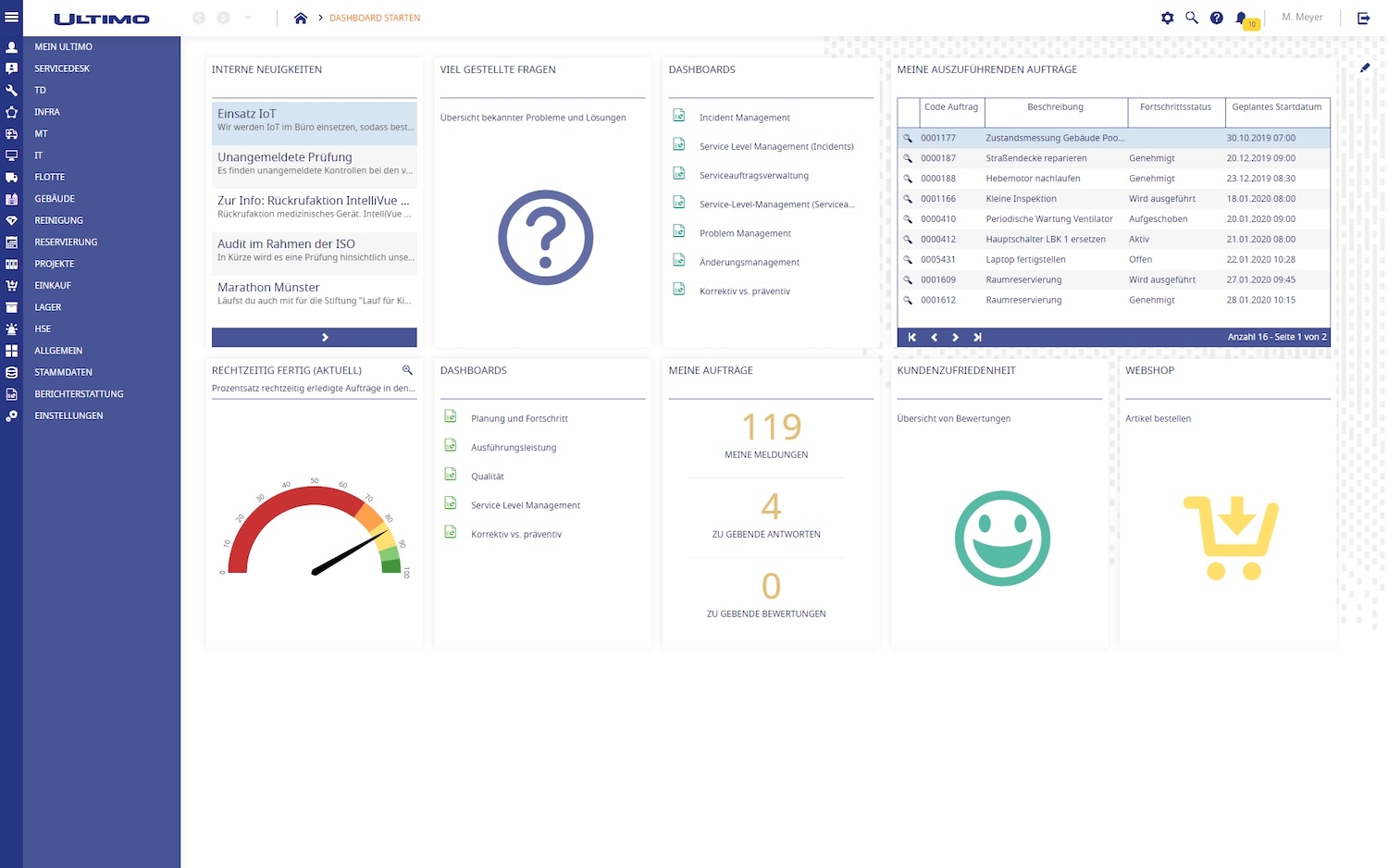
Best for: Mid-to-large organizations seeking a comprehensive EAM/CMMS solution that balances usability, flexibility, and enterprise functionality without the heavy custom-development burden typical of legacy platforms like IBM Maximo.
Strengths:
- Comprehensive asset & maintenance management: Offers full lifecycle tracking of assets, preventive maintenance scheduling, work order management, inventory control, and reporting.
- Cloud-based and scalable: Delivered as SaaS (with cloud or on-premise deployment options), Ultimo enables fast deployment and supports cross-site standardization without complex infrastructure.
- User-friendly with strong mobile support: Designed for intuitive use and mobility, allowing planners and technicians to access information in real time across devices.
- Integrated EHS and safety modules: Includes environmental, health, and safety management tools that help ensure compliance and enhance workplace safety within core maintenance workflows.
- Proactive and predictive capabilities: Supports transition from reactive to preventive and condition-based maintenance through data visibility and reporting tools that improve uptime and reliability.
Watch-outs:
- Pricing is typically custom-quoted and may be higher than simpler CMMS offerings due to the broader enterprise feature set.
- Organizations with basic maintenance needs may find the full EAM scope more than required, though modular editions can tailor functionality appropriately.
UpKeep
UpKeep is a mobile-first CMMS solution designed specifically for maintenance teams that prioritize accessibility and ease of use over enterprise complexity. The platform’s straightforward approach to work order management and comprehensive asset tracking makes it particularly appealing to facilities management teams seeking quick implementation without sacrificing essential maintenance functionality.
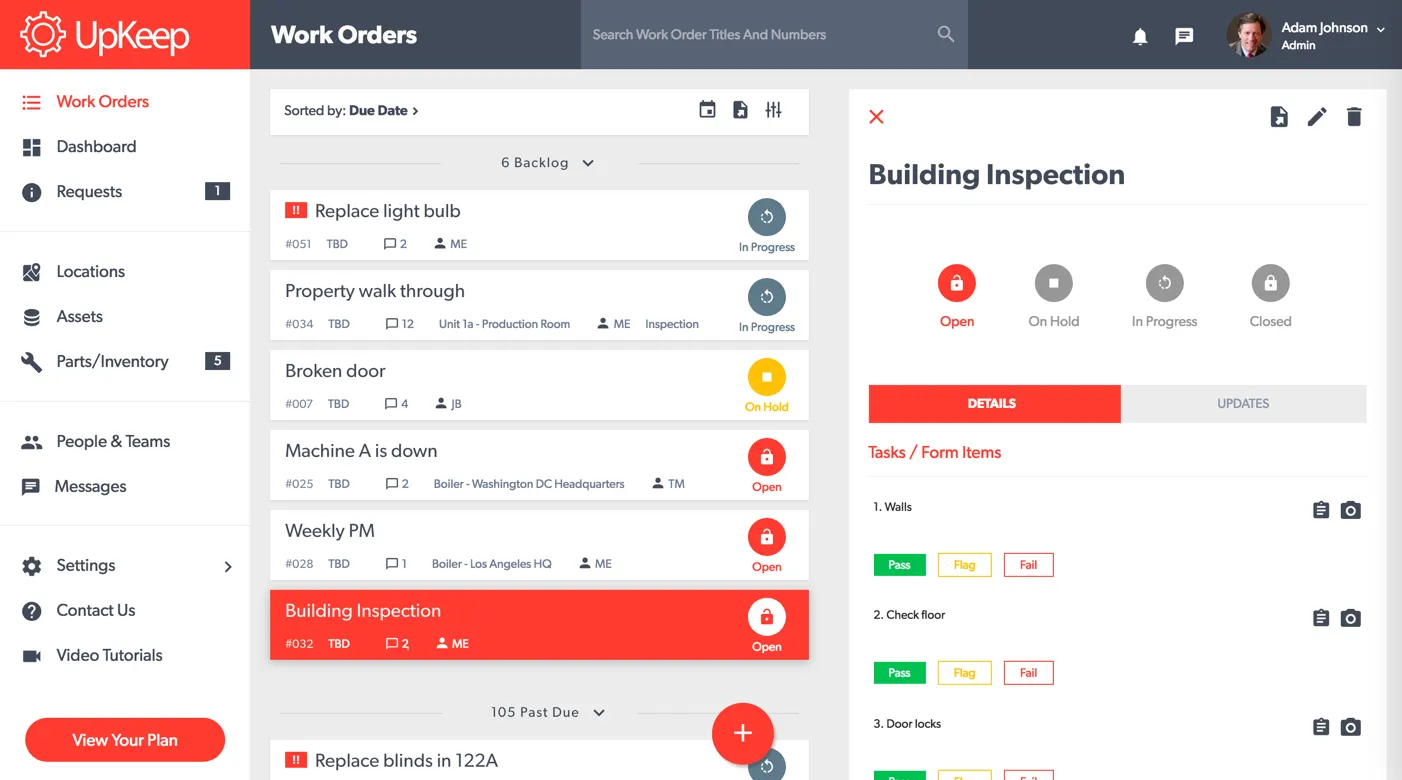
Best for: Small to mid-sized facilities, maintenance teams prioritizing mobile access, and organizations seeking rapid deployment with minimal training requirements for on-site technicians and maintenance planners.
Strengths:
- User-friendly interface: Intuitive design requires minimal training, enabling quick user adoption across maintenance teams and reducing the learning curve compared to traditional enterprise solutions.
- Quick implementation: Deployment typically completes in weeks rather than months, with straightforward configuration that accelerates time-to-value for maintenance operations.
- Strong mobile app: Purpose-built mobile functionality enables technicians to manage maintenance tasks, update asset conditions, and access work orders seamlessly from any location.
- Work order management: Streamlined workflows simplify task assignment, tracking, and completion while maintaining clear visibility into maintenance operations across facilities.
Watch-outs:
- Limited enterprise features may constrain larger organizations with complex asset hierarchies or multi-site operations requiring advanced workflow automation.
- Basic reporting capabilities lack the depth needed for sophisticated analytics and predictive maintenance strategies that enterprise-level organizations typically require.
Fiix CMMS
Fiix is a cloud-based maintenance management platform designed for organizations managing assets across multiple locations while prioritizing data-driven maintenance strategies. The platform combines AI-driven insights with multi-site management capabilities, making it particularly suitable for enterprises seeking to standardize maintenance operations across distributed facilities.
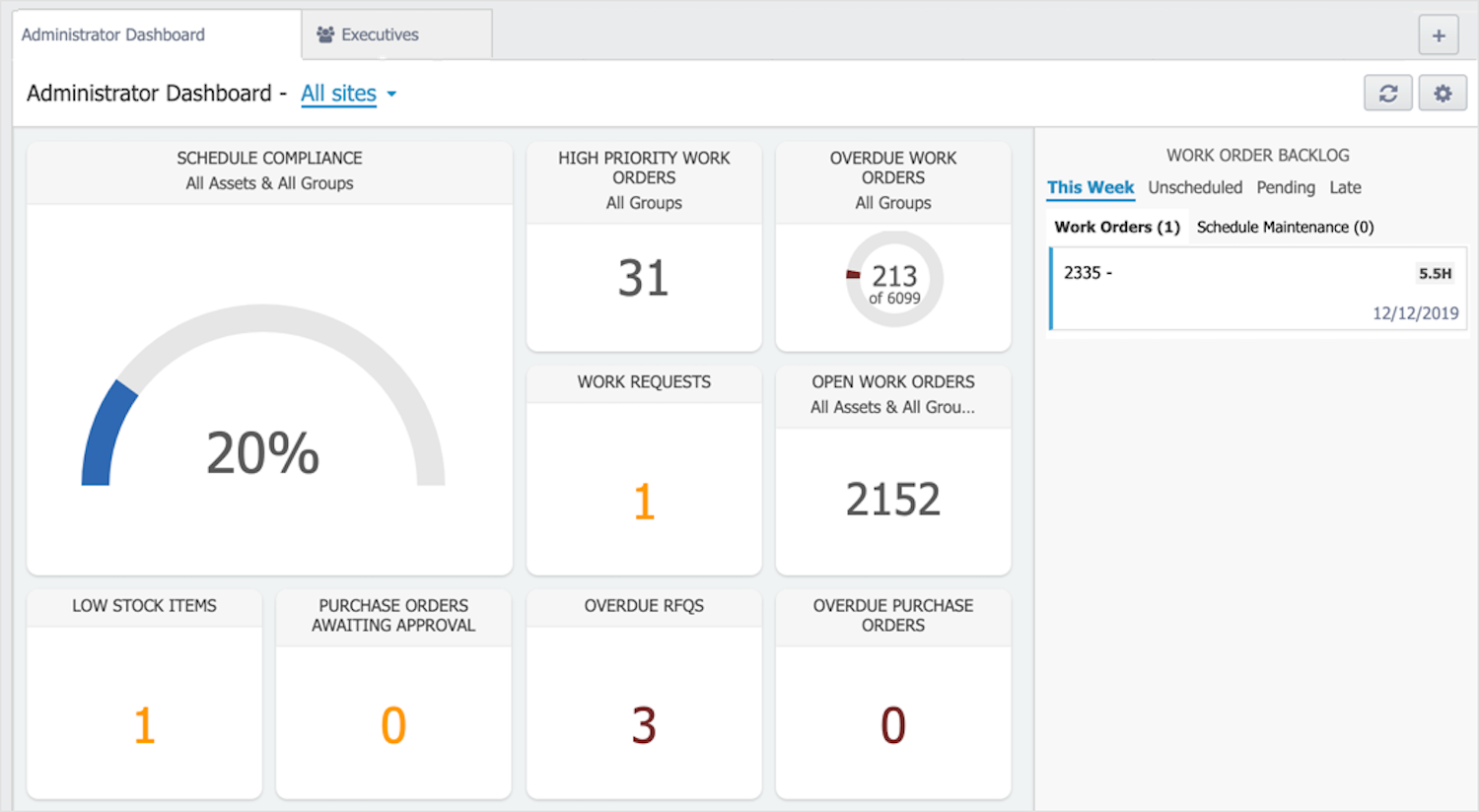
Best for: Organizations managing assets across multiple locations, data-driven maintenance teams, and businesses requiring centralized visibility into maintenance operations spanning regional or global facility networks.
Strengths:
- AI-driven insights: Advanced analytics support predictive maintenance strategies and optimize maintenance schedules based on actual asset performance data rather than fixed intervals.
- Cloud-based architecture: Modern infrastructure enables real-time visibility across all locations without requiring on-premises servers or complex IT infrastructure investments.
- Multi-site management: Centralized platform provides consistent workflows and reporting across facilities while allowing site-specific customization where needed.
- Predictive maintenance: Machine learning capabilities help anticipate equipment failures before they occur, reducing unplanned downtime across asset portfolios.
Watch-outs:
- Complexity compared to simpler CMMS tools increases as organizations scale and add locations, potentially requiring dedicated administrators.
- Subscription costs can accumulate significantly for big enterprises with extensive user bases across multiple facilities.
SAP EAM
SAP EAM represents a natural and solid choice for organizations already running SAP ERP systems, offering native integration that eliminates the data silos and synchronization challenges that plague standalone maintenance platforms. The solution provides comprehensive lifecycle management within the familiar SAP ecosystem, though it inherits many of the complexity challenges that drive organizations to seek alternatives to IBM Maximo in the first place.
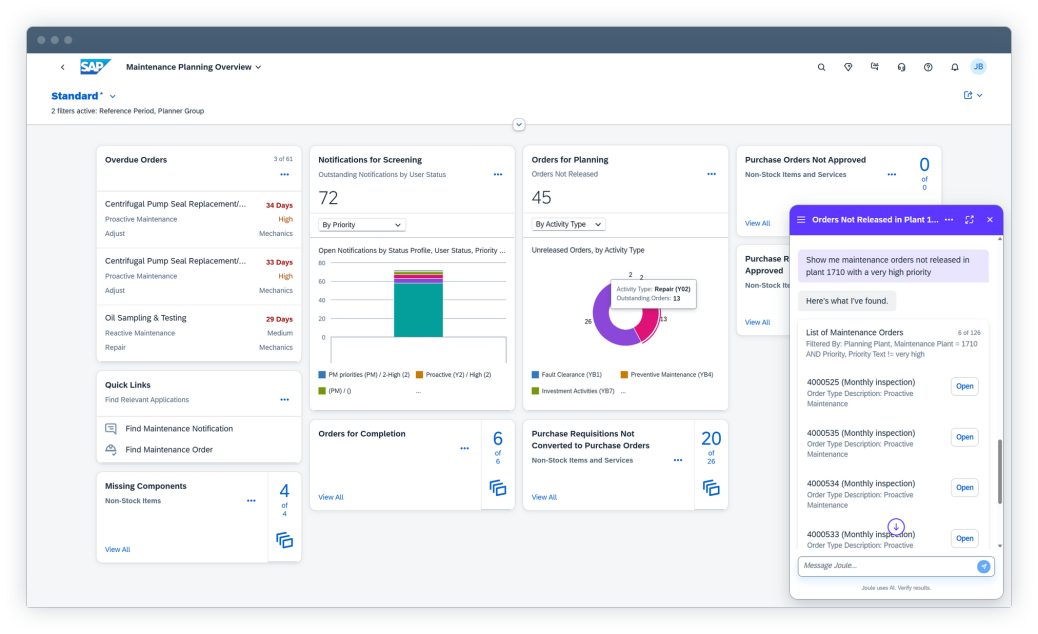
Best for: Organizations already running SAP ERP infrastructure, large enterprises requiring deep financial integration between maintenance operations and enterprise systems, and facilities management teams prioritizing regulatory compliance within existing SAP workflows.
Strengths:
- Native ERP integration: Seamless connection with SAP financial systems eliminates manual data entry and ensures maintenance costs flow directly into enterprise accounting without custom development.
- Comprehensive lifecycle management: Full asset tracking from procurement through disposal maintains complete visibility into total cost of ownership within the SAP environment.
- Financial integration: Direct connection to controlling and finance modules enables real-time cost tracking and budget management for maintenance operations across facilities.
- Regulatory compliance: Built-in support for industry-specific compliance requirements leverages SAP’s established frameworks for audit trails and documentation.
Watch-outs:
- Complexity compared to modern alternatives remains significant, with user interfaces requiring extensive training similar to Maximo.
- Implementation demands specialized SAP expertise and consultant support, driving costs that can exceed initial budget projections for mid-sized organizations.
Note: Organizations seeking SAP integration benefits without full ERP complexity should consider osapiens, which delivers SAP PM certification with more intuitive interfaces and faster deployment timelines.
| Criteria | osapiens | IFS Ultimo | UpKeep | Flix CMMS | SAP EAM |
|---|---|---|---|---|---|
| Deployment Speed | 2–4 weeks | 4–8 weeks | 2–3 weeks | 6–8 weeks | 6 months to multiple years |
| Starting Price Range | from € 29 per user/month Free plan available |
Custom pricing | from $ 20 per user/month | from $ 45 per user/month Free plan available |
Custom pricing |
| Mobile Experience | Excellent, offline capable | Good, mobile-enabled | Good, intuitive | Good, cloud-based | Limited functionality |
| SAP Integration | Native, SAP-certified | Via API | Limited | Via API | Native integration |
| Best For | Mid-to-large enterprises, SAP users | Mid-to-large enterprises, asset-intensive industries | Small facilities | Multi-site operations | Existing SAP users |
| Implementation Complexity | Low, minimal training | Moderate | Very low | Moderate, scales up | High, requires expertise |
| Enterprise Features | Comprehensive, scalable | Comprehensive EAM & EHS suite | Basic capabilities | Advanced analytics | Comprehensive suite |
← horizontal scrollen →
Modern CMMS platforms combine real-time insights, automated workflows, flexible pricing, and less complexity, enabling organizations to migrate with minimal disruption and make an informed decision when replacing IBM Maximo.
Need a detailed comparison tailored to your specific requirements? Contact osapiens to discuss how our platform addresses your unique maintenance challenges and integrates with your existing systems.
How to Choose an IBM Maximo Alternative
Selecting the right IBM Maximo alternative requires a structured evaluation that enables an informed decision beyond surface-level features and marketing claims. The platform you choose should support automated workflows that reduce manual coordination and administrative overhead. A structured decision framework helps you identify solutions that genuinely address your operational challenges while avoiding platforms that simply replicate Maximo’s complexity under a different brand.
The following criteria prioritize factors that directly impact user adoption, cost of ownership, and long-term maintenance efficiency.
- Integration capabilities: Assess how seamlessly the platform connects to your ERP landscape, particularly SAP, and whether integrations are certified out-of-the-box or require custom development, which increases implementation effort and long-term maintenance.
- User interface and adoption potential: Test the platform with actual technicians and maintenance planners to assess whether the intuitive interface requires minimal training, as user-friendly design directly determines data quality and system effectiveness across field teams.
- Mobile functionality: Verify that mobile access includes offline capabilities, quick asset lookup, and streamlined work order updates that field technicians can complete without frustration, even in areas with limited connectivity.
- Implementation timeline and complexity: Confirm realistic deployment schedules and whether the vendor provides structured onboarding support, as extended implementations delay operational benefits and strain internal resources needed for daily maintenance operations.
- Total cost of ownership: Calculate licensing, implementation, training, and ongoing maintenance costs over 3–5 years, ensuring transparent pricing without hidden fees that emerge as your organization scales or adds locations.
- Scalability, flexibility & long-term fit: Evaluate whether the platform can grow with your organization (sites, users, asset types) without expensive upgrades or re-implementations, and whether its workflows align with your industry needs to minimize customization.
The best alternative to IBM Maximo ultimately depends on matching solution capabilities to your specific organizational needs, existing enterprise systems, and maintenance team workflows rather than selecting the most feature-rich platform available.
osapiens HUB for Maintenance offers a SAP-certified integration trusted by over 500 companies worldwide, connecting seamlessly with your existing SAP system without complex custom development or expensive middleware.

Pradeep Dalal, Product Director – Planning & Execution
★ ★ ★ ★ ★CONA Services
“Working with osapiens has been a positive experience for our company. Their innovative solutions and exceptional support have not only met but exceeded our expectations, paving the way for a successful partnership.”
Migration Notes: How to Switch from IBM Maximo Without Breaking Operations
Migrating from IBM Maximo understandably creates anxiety for maintenance teams who worry about losing historical data or creating gaps in asset tracking during transition periods. However, modern platforms like Osapiens have refined migration processes to minimize risk and maintain operational continuity throughout the switch. With proper planning and phased implementation, organizations typically complete transitions in 8–16 weeks while keeping existing maintenance operations running smoothly.
- Assessment and planning phase: Begin by documenting current workflows, identifying which master and transactional data (typically asset data and locations, spare parts, work order templates) should be migrated. This foundation prevents surprises during migration and ensures the new platform supports existing processes without forcing disruptive changes to established maintenance tasks.
- Data cleanup and mapping: Clean legacy data before migration by removing duplicate records, standardizing asset naming conventions, and validating inventory information. Quality data migration prevents carrying forward years of accumulated inconsistencies that would undermine your new system’s effectiveness from day one.
- Go-Live with controlled transition: All new data is created and managed in the new platform, while maintaining IBM Maximo as a data-source for a while.
- Phased rollout approach: Start with a pilot location or asset group rather than enterprise-wide deployment, enabling teams to refine workflows and address challenges before scaling across facilities. Successful pilots create internal champions who accelerate adoption at remaining sites through peer influence and practical insights.
- Training strategies: Provide role-specific training for technicians, planners, and managers rather than generic sessions, focusing on daily workflows each group actually performs.
- Go-live support and optimization: Maintain dedicated support during the first 30 days post-migration when questions emerge most frequently. Monitor data quality, user adoption rates, and workflow completion times to identify optimization opportunities that maximize your investment in the new platform.
osapiens offers comprehensive CMMS migration support services including data import tools, dedicated implementation specialists, and structured change management frameworks that address common pitfalls such as incomplete data mapping or insufficient user training. Avoid rushing migration timelines or skipping parallel running periods, as these shortcuts typically create operational disruptions that damage user confidence and extend overall transition time.
Conclusion: osapiens as a Strong Alternative to IBM Maximo
While IBM Maximo remains a powerful enterprise asset management platform, it’s no longer the only option delivering enterprise-grade capabilities for organizations managing complex asset portfolios. Modern IBM Maximo alternatives now provide comparable functionality with significantly better user-friendliness, faster implementation timelines, and lower cost of ownership, proving that robust asset operations don’t require overwhelming complexity compared to traditional solutions.
Solutions like osapiens HUB for Maintenance specifically address Maximo’s core weaknesses while maintaining the enterprise capabilities large organizations require, particularly for SAP-integrated environments where seamless ERP connection eliminates costly custom development.
Ready to explore how osapiens can transform your maintenance operations?
SAP-Certified Integration That Actually Works
osapiens HUB offers SAP-certified bidirectional integration that eliminates manual data entry and maintains your ERP as the system of record – without expensive middleware or ongoing maintenance overhead.
Start with osapiens
FAQs
What exactly does IBM Maximo do?
IBM Maximo is an enterprise asset management platform that manages asset lifecycle operations, work order management, preventive maintenance scheduling, inventory management, and regulatory compliance. It tracks assets from procurement through disposal while coordinating maintenance tasks, spare parts, and technician assignments across facilities, though its complexity often requires extensive training and specialized expertise.
Is Maximo a CMMS or EAM?
Maximo functions as both a CMMS (Computerized Maintenance Management System) and EAM (Enterprise Asset Management) platform. While CMMS tools focus primarily on maintenance tasks and work orders, EAM systems like Maximo provide comprehensive asset lifecycle management including financial tracking, procurement, and strategic asset operations across enterprise-level organizations with complex requirements.
What are the best IBM Maximo alternatives?
The best alternatives to IBM Maximo are osapiens, IFS Ultimo, UpKeep, Fiix CMMS, and SAP EAM. While each solution reduces the complexity and high costs associated with Maximo, osapiens stands out by combining enterprise functionality with user-friendly adoption and the fastest implementation timeline.
How long does it take to migrate from Maximo to a modern CMMS?
Migration from Maximo to modern CMMS platforms typically requires 8–16 weeks including planning, data cleanup, parallel running, and phased rollout. Implementation timeline depends on data complexity, customization requirements, and organizational size. Platforms like osapiens offer migration support and structured change management that minimize disruption while maintaining operational continuity throughout transition.
Is osapiens a full replacement for IBM Maximo?
Yes, osapiens serves as a full replacement for most IBM Maximo use cases, particularly for organizations requiring SAP integration, preventive maintenance, tracking of assets, and work order management. The SAP-certified platform delivers enterprise-grade functionality with significantly better user adoption, faster implementation, and lower total cost while maintaining the comprehensive asset operations capabilities large companies require.
Start using osapiens for free
Improve your uptime, extend the life of your equipment, and simplify work order management.
Book a demo
Related content

January 1, 2026
Sump Pump Maintenance Checklist – Tasks, Tips & Best Practices
January 1, 2026
Automatic Screw Machine Maintenance Checklist – Tasks, Components & Digital Execution
January 1, 2026
Pharmaceutical HVAC Cleanroom Maintenance Checklist – Tasks, Standards & Digital Execution

January 20, 2026
Maintenance Schedule Template: Free CMMS Excel Template
January 1, 2026
Warehouse Maintenance Checklist – Tasks, Systems & Digital Execution
January 1, 2026
Hydraulic Power Pack Maintenance Checklist – Tasks, Tips & Best Practices
January 1, 2026
Heavy Duty Truck Preventive Maintenance Checklist – Tasks, Compliance & Digital Execution
July 22, 2025
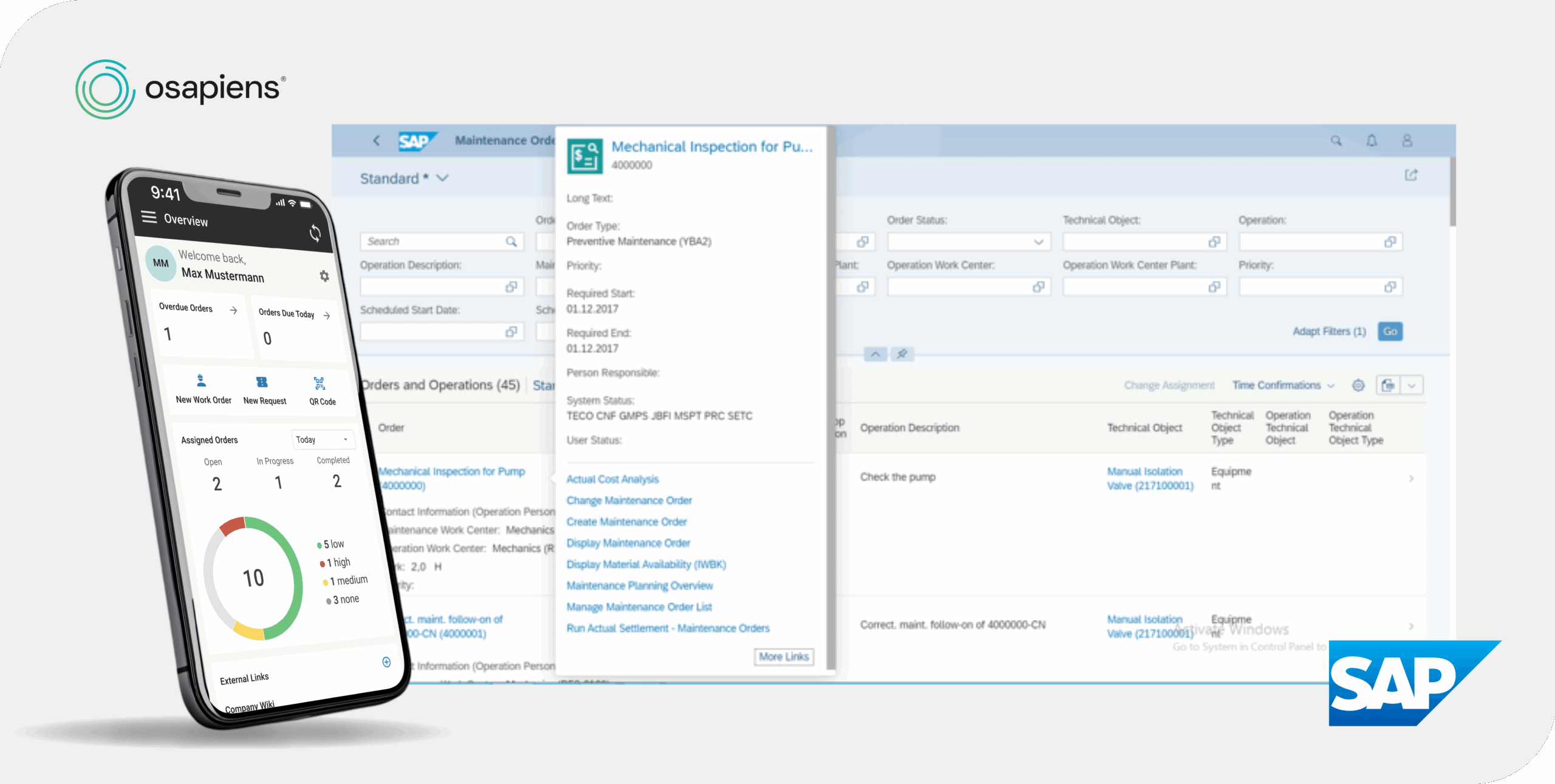
Simplify Maintenance with SAP and osapiens
January 1, 2026
Air Compressor Maintenance Checklist – Tasks, Tips & Template
January 1, 2026
Crane Maintenance Checklist – Essential Tasks, Safety Checks & Digital Template
January 1, 2026
Pump Maintenance Checklist: What to Inspect & When
January 1, 2026