

CMMS

Florian Bartholomäus, osapiens Expert | 6. July 2026 | Lesezeit 12 min.
Most maintenance teams don't fail because of missing tools – they fail because of missing structure. A standardized work order template brings consistency to every job, every shift, every technician. Download it free and start today.
Download template for free













TRUSTED BY LEADING COMPANIES




ENTERPRISE-READY
 SAP Certification
 ISO 27001
 EU Hosting
 Entra ID & Okta
 Multi-Entity
Table of Contents
- Key Facts
- What Is a Maintenance Work Order?
- What Every Maintenance Work Order Must Include
- The Completion Loop: Where Most Value Is Lost
- Five Practices That Determine Whether a Work Order Template Actually Works
- When a Template Reaches Its Structural Limits
- From Work Order Template to osapiens HUB: Structured Maintenance Without the Complexity
- Frequently Asked Questions
Most maintenance teams searching for a work order template have already recognized the same problem: verbal requests get forgotten, paper forms disappear, and self-built Excel files diverge across shifts until no one trusts the data. A structured work order template is the right first step toward fixing that, and the osapiens HUB for Maintenance is where that discipline scales into a fully connected maintenance operation.
Key Facts
- Most European maintenance teams still rely on Excel or paper: According to a study conducted by osapiens and Fraunhofer IML, 59% of maintenance teams across the UK and Europe use Microsoft Excel or Google Sheets as their primary tool, while 41% still rely on paper-based forms.
- Incomplete work orders destroy all downstream analytics: If an order is missing an asset ID, failure code, or spare parts record, no amount of reporting will produce useful insights. Data quality at the point of creation determines everything that follows.
- The template is a starting point, not a destination: A well-designed work order template establishes the documentation discipline that makes a future transition to CMMS software significantly easier and faster.
- osapiens HUB for Maintenance reduces faulty work orders by 25%: Through Smart Forms with built-in validations, the osapiens HUB enforces data quality at the moment of order creation, saving teams 17 minutes per order across planning, execution, and documentation.
If you’re still working with paper or verbal orders, you can take a structured first step right away with our free Excel template. The template includes all the important required fields, a built-in task list with status drop-down menus, and an automatic cost summary for each order.
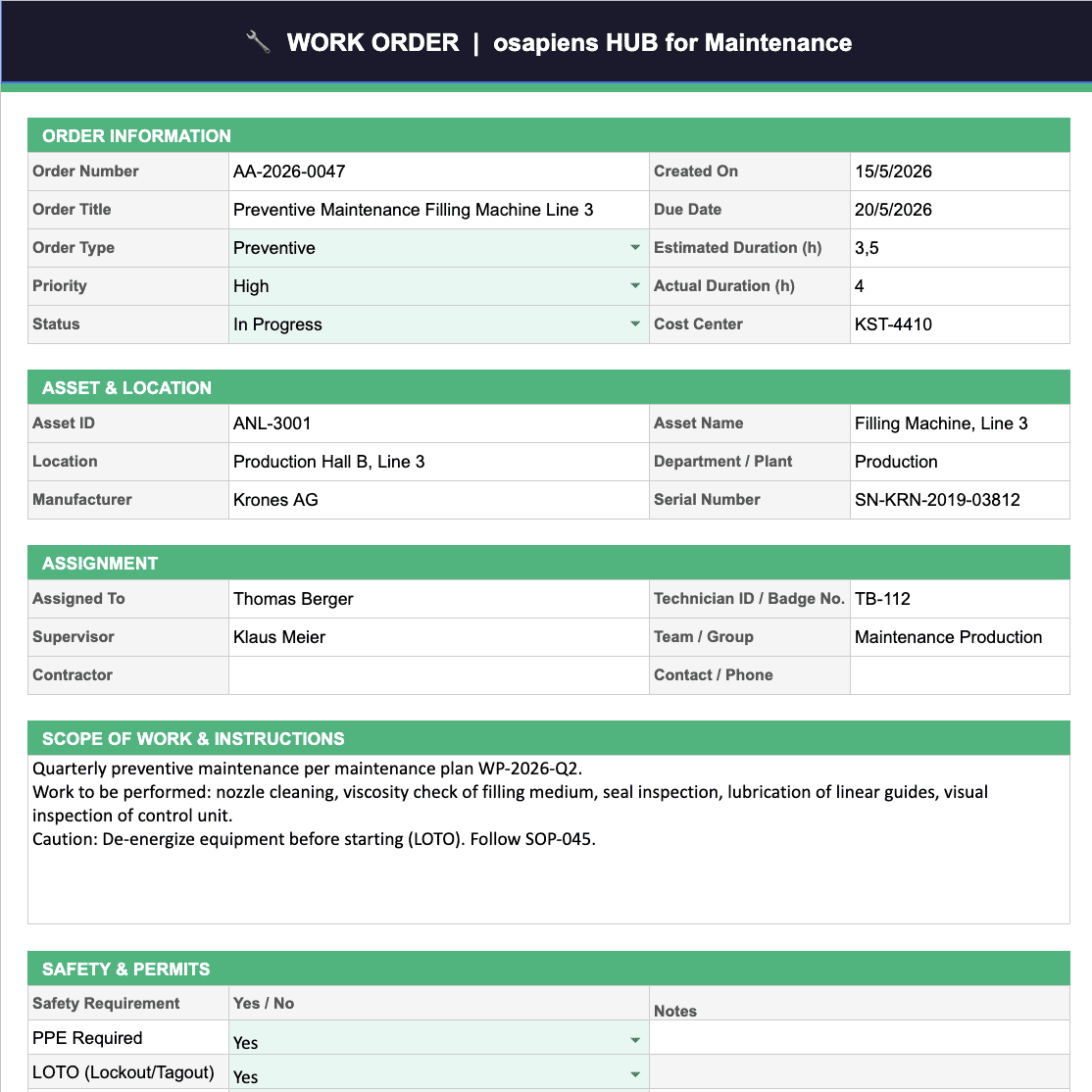
Download the osapiens Work Order Template for Free
Structured excel template for maintenance – with required fields, task list, and cost overview.
Download for free
What Is a Maintenance Work Order?
A work order is the central transactional document in maintenance operations. It specifies what work needs to be done, on which asset, by whom, with what materials, by when, and at what cost. In regulated industries such as pharmaceuticals and life sciences, a work order also forms part of the compliance record. Every task must be traceable and signed off. In manufacturing, a work order is the link between a production disruption and the technician response that resolves it.
A work order template standardizes this document so that every order, regardless of who creates it or which shift is running, contains the same fields, follows the same structure, and generates usable data. Without that standardization, teams accumulate records that cannot be compared, filtered, or analyzed.
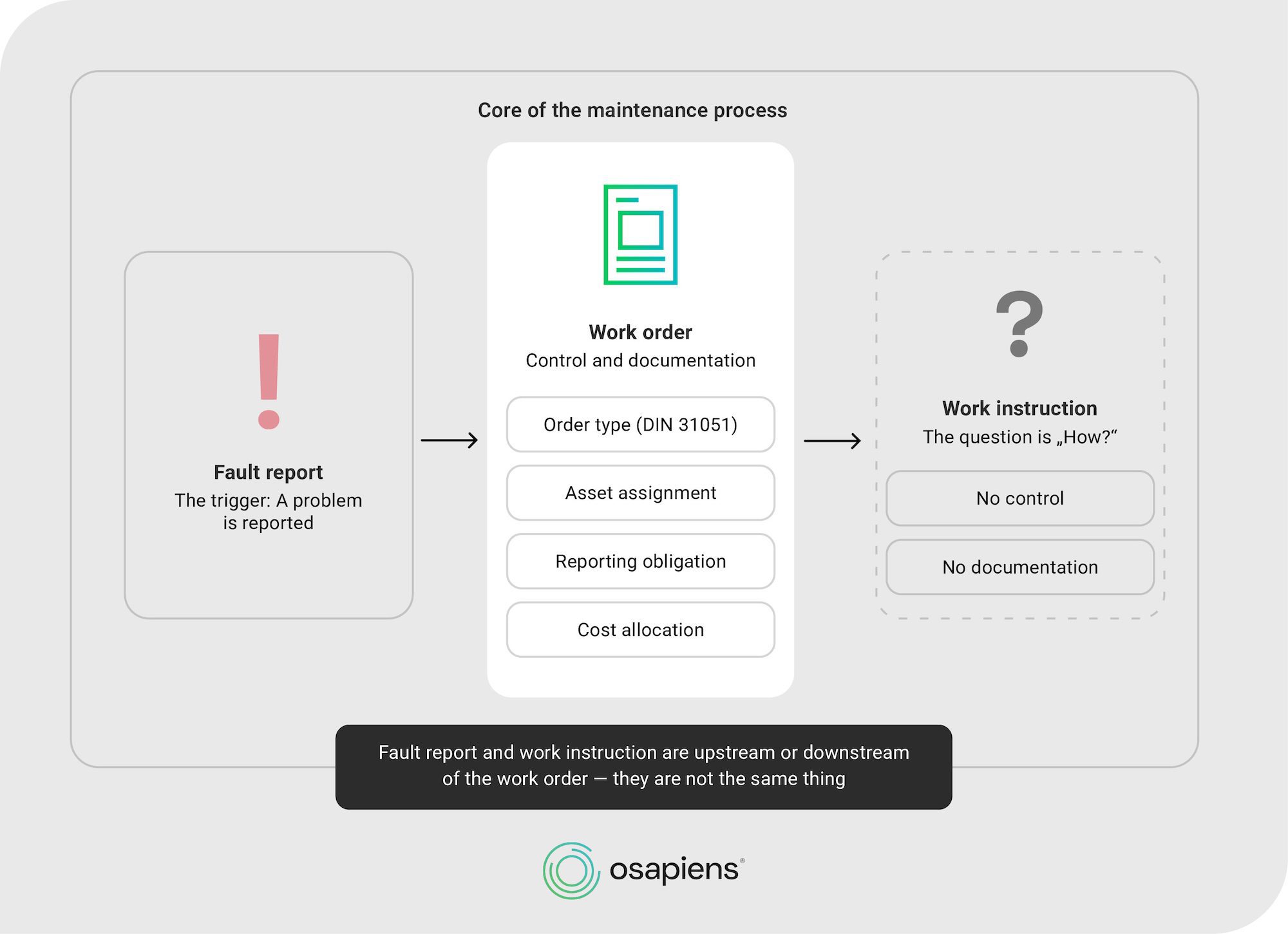
The Four Types of Maintenance Work Orders
Not all work orders serve the same purpose. Understanding the distinctions matters for template design, because each type requires slightly different fields and approval logic.
| Type | Trigger | Key Template Fields |
|---|---|---|
| Preventive maintenance | Scheduled interval (time- or usage-based) | Maintenance plan reference, interval, checklist steps |
| Corrective maintenance | Detected defect, not yet failed | Defect description, failure code, priority, follow-up date |
| Predictive maintenance | Condition data or sensor threshold | Condition reading, threshold breached, recommended action |
| Emergency / reactive maintenance | Unplanned failure or safety incident | Downtime start, urgency flag, safety/LOTO requirements, root cause |
For teams managing preventive maintenance programs, the template must enforce that scheduled orders are linked to specific assets and intervals. Otherwise the entire plan collapses into a list of tasks with no execution record.
What Every Maintenance Work Order Must Include
Generic work order templates cover the basics: a description of the task, an assignee, and a due date. That is sufficient for a general contractor managing a handful of jobs. For industrial maintenance teams managing dozens of assets across multiple shifts, those basics are not enough.
Core Fields
- Unique work order number: essential for tracking, referencing, and audit trails
- Asset ID and location: the specific machine, line, or installation, not just a general area
- Order type: preventive, corrective, predictive, or emergency (ideally a dropdown, not free text)
- Problem description: what was observed or reported, in enough detail for a technician who was not present
- Priority level: standardized scale (e.g., critical / high / medium / low), not ad hoc judgment
- Assigned technician: named individual, not just a team or department
- Planned start and due date: with a traffic-light status indicator for overdue orders
- Status: open, in progress, on hold, completed, closed
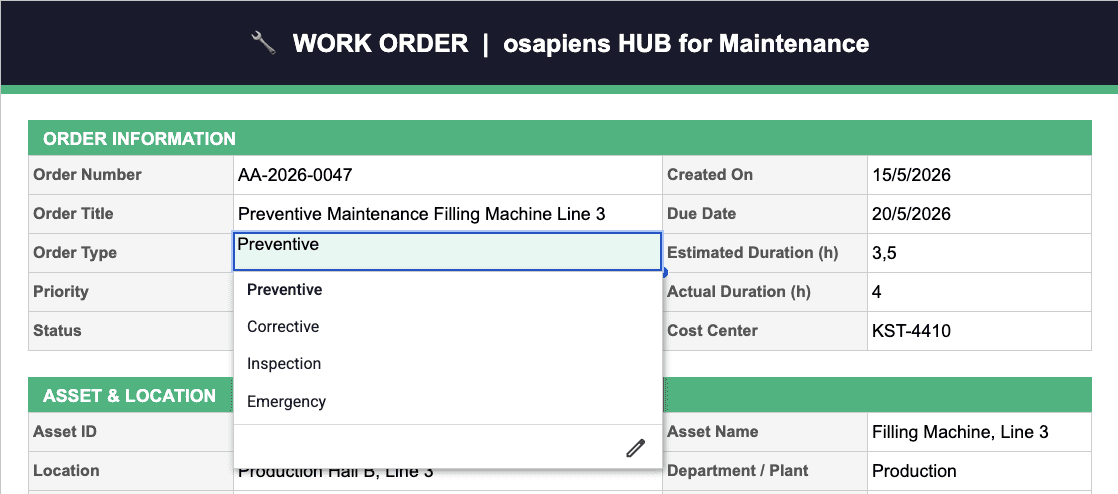
Maintenance-Specific Fields Most Templates Miss
The fields that separate a useful maintenance work order from a generic task form are the ones that feed downstream analysis. Failure codes allow teams to identify which failure modes recur most frequently. Lockout/tagout (LOTO) requirements protect technicians before they begin work. Actual versus estimated time reveals where planning assumptions are consistently wrong. Root cause fields turn individual repair records into a failure history that can drive predictive maintenance decisions over time.
- Failure code / failure mode: standardized classification for pattern analysis (e.g., wear, contamination, operator error, material fatigue)
- Safety requirements: LOTO procedure reference, permit required (yes/no), PPE specification
- Spare parts planned: part number, quantity, and estimated cost before work begins
- Actual spare parts used: recorded at completion, not estimated after the fact
- Estimated vs. actual labor hours: the gap between these two figures is one of the most revealing metrics in maintenance planning
- Root cause: what caused the failure, distinct from what the failure was
- Follow-up action required: does this order trigger a new preventive order, a spare parts reorder, or an engineering review?
- Sign-off / completion confirmation: named technician and supervisor, with date and time
In industries with strict regulatory requirements, such as pharmaceuticals operating under GxP frameworks, or utilities subject to DGUV inspection mandates, the sign-off field is not optional. It is the audit trail.
The osapiens work order template covers all of these fields out of the box – including failure codes, LOTO requirements, spare parts tracking, and a structured sign-off section.
The Completion Loop: Where Most Value Is Lost
Teams spend considerable effort designing work order creation forms and almost none on what happens after the wrench goes back in the toolbox. This is the completion loop, and it is where the majority of maintenance intelligence is either captured or permanently lost.
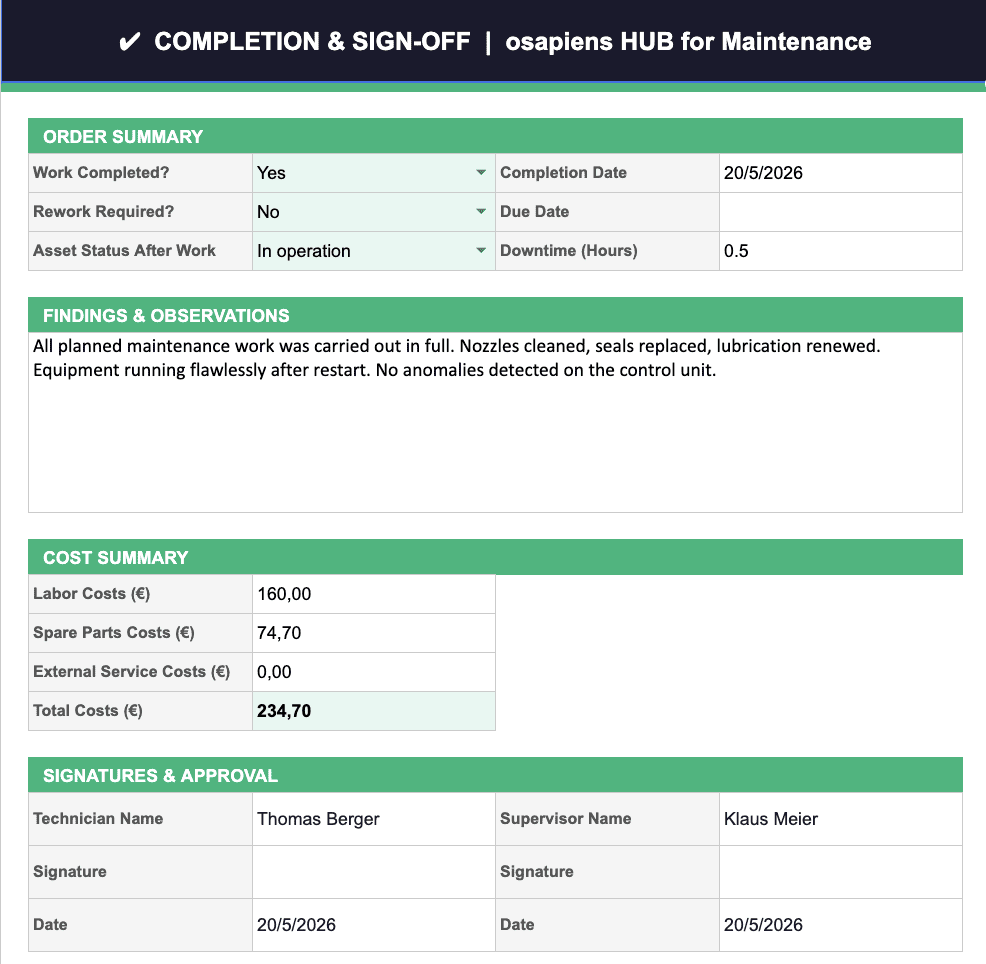
A work order that records only “task completed” tells you nothing about whether the repair held, what it actually cost, or whether the same failure will recur in six weeks. The completion section of a work order template should capture actual time spent, actual parts consumed with costs, root cause identified, and any follow-up action required. These four fields, consistently populated across every order, create a dataset that makes Pareto analysis of repeat failures possible within 3–6 months of consistent use.
The discipline of completing this loop is also what separates teams that can justify their maintenance budget from those that cannot. If you cannot show actual cost per asset per order type, budget conversations with management will always be based on estimates rather than evidence.
The osapiens work order template includes a dedicated completion sheet that captures actual labor costs, spare parts consumed, downtime duration, findings, and a dual sign-off – technician and supervisor.
Five Practices That Determine Whether a Work Order Template Actually Works
A template is only as good as the discipline behind it. Most template initiatives fail not because of poor design but because adoption is inconsistent. These five practices address the most common failure modes.
1. Start with the minimum viable fields
Resist the urge to capture everything from day one. A template with 30 fields that gets filled out partially is worse than a template with 10 fields that gets filled out completely. Add complexity only after adoption is stable across all shifts.
2. Use dropdowns, not free text, for categorical fields.
Order type, priority, failure code, and status should all be selectable values, not typed entries. Free text in categorical fields makes filtering and analysis impossible. This is the single most important structural decision in template design.
3. Track costs from the first order
Even rough spare parts costs and estimated labor hours per order create a dataset that becomes operationally valuable within months. Without this, cost center allocation and budget planning remain guesswork.
4. Review completed orders weekly
A 15-minute weekly review of the previous week’s closed orders reveals patterns: repeat failures on the same asset, consistently underestimated repair times, recurring spare parts needs. This is the foundation of a proactive asset maintenance approach.
5. Build the documentation habit before building the system
Teams that establish consistent work order discipline with a template transition to CMMS software significantly faster than teams that attempt both simultaneously. The habit is the prerequisite.
When a Template Reaches Its Structural Limits
A well-designed Excel template solves the documentation problem. It does not solve real-time visibility, mobile access, multi-user concurrency, automated scheduling, or system integration. Understanding exactly where the template stops being sufficient helps maintenance managers make the transition decision at the right moment.
osapiens HUB
| Capability | Excel Template | CMMS (e.g., osapiens HUB) |
|---|---|---|
| Structured work order creation | ~ Yes | ✓ Yes, with validation and Smart Forms |
| Order history and audit trail | × Manual, error-prone | ✓ Automatic, tamper-proof |
| Mobile access for field technicians | × No | ✓ Yes, including offline capability |
| Real-time status visibility | × No | ✓ Yes, live dashboards |
| Multi-user concurrent editing | × No (version conflicts) | ✓ Yes |
| Automated preventive maintenance scheduling | × No | ✓ Yes |
| SAP PM / ERP integration | × No | ✓ Yes, SAP-certified connector |
| Approval workflow with sign-off | × No | ✓ Yes, configurable per order type |
| Automatic KPI calculation (MTTR, backlog) | × Manual formulas | ✓ Automatic, real-time |
| Multi-site management | × No | ✓ Yes |
✓ Yes ~ Limited × No / Not available
Excel was not designed for concurrent multi-user editing of transactional data. Version conflicts, file corruption, and data overwrites are structural limitations, not feature gaps. Teams with more than 2–3 technicians creating orders simultaneously will encounter these problems regardless of how well the template is designed. For teams managing maintenance across multiple sites, the coordination problem becomes unmanageable without a shared platform.
Dr. Thomas Heller, Head of Department Facilities and Service Management at Fraunhofer IML, puts the investment question in practical terms:
“The systems that deliver the strongest impact are those that quickly show tangible and measurable benefits while also being simple to implement and train teams on.”
That observation applies equally to the template and to the CMMS that follows it.
From Work Order Template to osapiens HUB: Structured Maintenance Without the Complexity
The osapiens HUB for Maintenance addresses the exact limitations that a work order template cannot. Where a template captures data, the osapiens HUB enforces it. Smart Forms with built-in validations reduce faulty work orders by 25%, ensuring that every order contains the fields required for downstream analysis before it can be submitted. Where a template requires manual review, the osapiens HUB provides live dashboards showing open orders, overdue tasks, and cost breakdowns by asset or order type in real time.
For teams operating in SAP environments, the osapiens HUB connects to SAP PM through a certified connector, which means work order data flows between the mobile app and SAP without manual re-entry or data loss. Nordex uses it to coordinate service operations across more than 11,400 wind turbines worldwide.

Alberto Ecre, Group Lead Service Digitalization Department
★ ★ ★ ★ ★Nordex
“We were looking for a cloud platform solution that supports all of our regions. Our technicians have to visit the wind turbines every day to fix problems—we need stable solutions that make their work easier. The key was the very simple integration with our ERP system. Now we are gradually expanding: subcontractor management, tool management, and more.”
With the osapiens HUB for Maintenance, you’ll benefit from:
- 25% fewer faulty work orders through Smart Forms with field validation
- 17 minutes saved per order across planning, execution, and documentation
- Mobile-first with offline capability for technicians working in the field
- SAP-certified integration for enterprises already running SAP PM
- Real-time dashboards for order status, backlog, and cost per asset
- Freemium entry point with no procurement process required
Your maintenance team already knows what a structured work order should contain. The osapiens HUB makes sure every order actually contains it.
Frequently Asked Questions
What is the difference between a work order and a maintenance request?
A maintenance request is an initial notification that something needs attention. It may come from a production operator, a sensor alert, or a routine inspection. A work order is the authorized, structured document that assigns the task to a technician, specifies the asset, sets a priority and due date, and tracks execution through to completion. In many organizations, a maintenance request triggers the creation of a work order once it has been reviewed and approved by a maintenance planner or supervisor.
How many fields should a work order template include?
Start with 8–10 core fields: unique ID, asset reference, order type, problem description, priority, assigned technician, planned date, and status. Add maintenance-specific fields—failure code, safety requirements, spare parts, actual time, root cause, and sign-off—once basic adoption is stable. A template with too many fields that get left blank is less useful than a shorter template that gets completed consistently on every order.
Can a work order template support compliance requirements such as ISO 9001 or GxP?
A template can document that maintenance was performed, but it cannot provide the tamper-proof audit trail that regulated industries require. In pharmaceutical environments subject to GxP requirements, or in manufacturing operations being audited against ISO 55000, the sign-off chain and order history must be verifiably unaltered. Excel files can be edited after the fact without any record of the change. A dedicated compliance-capable CMMS is required for environments where audit integrity is a regulatory obligation.
When should a maintenance team move from a template to a CMMS?
The clearest signals are: more than 2–3 technicians creating orders simultaneously (causing version conflicts), technicians needing mobile access to orders in the field, management requesting real-time visibility into open or overdue orders, and the need to connect maintenance data to SAP or another ERP system. If any of these conditions are present, the structural limitations of Excel have already been reached. With freemium CMMS options available, the barrier to making that transition is now equivalent to downloading a template.
Start using osapiens for free
Improve your uptime, extend the life of your equipment, and simplify work order management.
Book a demo
ENTERPRISE CAPABILITIES
- SAP ECC & S/4HANA Certified
- Infor & MS Dynamics
- Microsoft Entra ID / Okta
- ISO 27001 & 9001
- EU Cloud · Data Sovereignty
- Development, Test, and Production Environments
- Multi-Entity & Multi-Site
- Power BI Integration
- Audit Trail & Compliance
Related content
January 1, 2026
Relay Protection System Maintenance Checklist – Tasks, Standards & Digital Execution

January 9, 2026
Work Order Software: How Modern Solutions Transform Maintenance Operations

December 17, 2025
maintenance Antwerp: Experience the osapiens CMMS live
January 1, 2026
Backflow Preventer Maintenance Checklist – Tasks, Compliance & Digital Execution
January 1, 2026
Generator Maintenance Checklist – Tasks, Tips & Best Practices
January 1, 2026
Circuit Breaker Maintenance Checklist – Tasks, Tips & Template
January 1, 2026
Industrial Mixer Maintenance Checklist – Tasks, Tips & Template
January 1, 2026
CNC Machine Maintenance Checklist: What to Inspect, When & How
January 1, 2026
Power Cable Maintenance Checklist – Tasks, Tips & Template
January 1, 2026
Air Compressor Maintenance Checklist: Tasks, Tips & Template
January 1, 2026
Emergency Lighting System Maintenance Checklist – Tasks, Compliance & Digital Execution
August 19, 2025