

Blog

Tobias Schlereth, osapiens Expert | 11. June 2026 | Lesezeit 8 min.
Your contractor network grew from a handful of partners to dozens, but your visibility didn't grow with it. Tickets disappear in email threads, completion proof arrives weeks late, and right now you couldn't tell which crews are actually on site. See how enterprise teams keep control over third-party technicians without adding another layer of bureaucracy.
End Contractor Chaos with One Platform













TRUSTED BY LEADING COMPANIES




ENTERPRISE-READY
 SAP Certification
 ISO 27001
 EU Hosting
 Entra ID & Okta
 Multi-Entity
Table of Contents
- Key Facts
- The Real Challenge of Field Service Contractor Management
- How to Control Field Service Contractors Without Crossing Compliance Lines
- 7 Building Blocks of a Working Contractor Workflow
- One System for Internal Technicians and Contractors with the osapiens HUB
- Conclusion: From Contractor Chaos to One Operational Layer
- FAQ
Your internal technicians are fully booked, the backlog keeps growing, and half of next week’s jobs will be executed by partners you’ve never met in person. So how do you keep service quality consistent when the people doing the work no longer sit in your office? For most enterprise teams, contractor coordination still happens across Excel sheets, email threads, and phone calls, while the real work moves on without visibility. The answer isn’t tighter contracts or stricter SLAs, but shared systems. The osapiens HUB for Maintenance brings internal and external technicians onto one operational layer, so contractor work becomes as transparent as in-house execution.
Key Facts
- Contractor share is significant and growing: In many asset-intensive industries, a substantial share of field jobs is now executed by external partners, yet visibility into their performance lags behind internal teams.
- Shared systems are the real lever: Control comes from running internal and external technicians on the same work order, documentation, and scheduling layer.
- Standard FSM tools stop too early: Most dispatch tools optimise for employed technicians and miss contractor-specific needs like credentialing, SLA tracking per partner, and arms-length performance review.
- One platform for both workforces with the osapiens HUB: The osapiens HUB for Maintenance manages internal and external technicians inside one Planning and Scheduling module, with mobile execution for field work and SAP-certified integration for SAP PM and SAP IS-U.
The Real Challenge of Field Service Contractor Management
Field service contractor management is the operational discipline of running internal technicians and external partners on one shared process, from intake to documented completion.
Once a contractor network grows past a handful of partners, the cracks show fast: tickets get lost between email threads and partner portals, two crews get dispatched to the same fault, and nobody can confirm whether a job is in transit, on site, or already finished.
For enterprise teams, the downstream effects are concrete. SLA penalties accumulate when B2B customers see missed response windows, repeat truck rolls eat margin, and disputes erupt over what was actually done on site because proof of completion lives in a contractor’s inbox rather than your asset record.
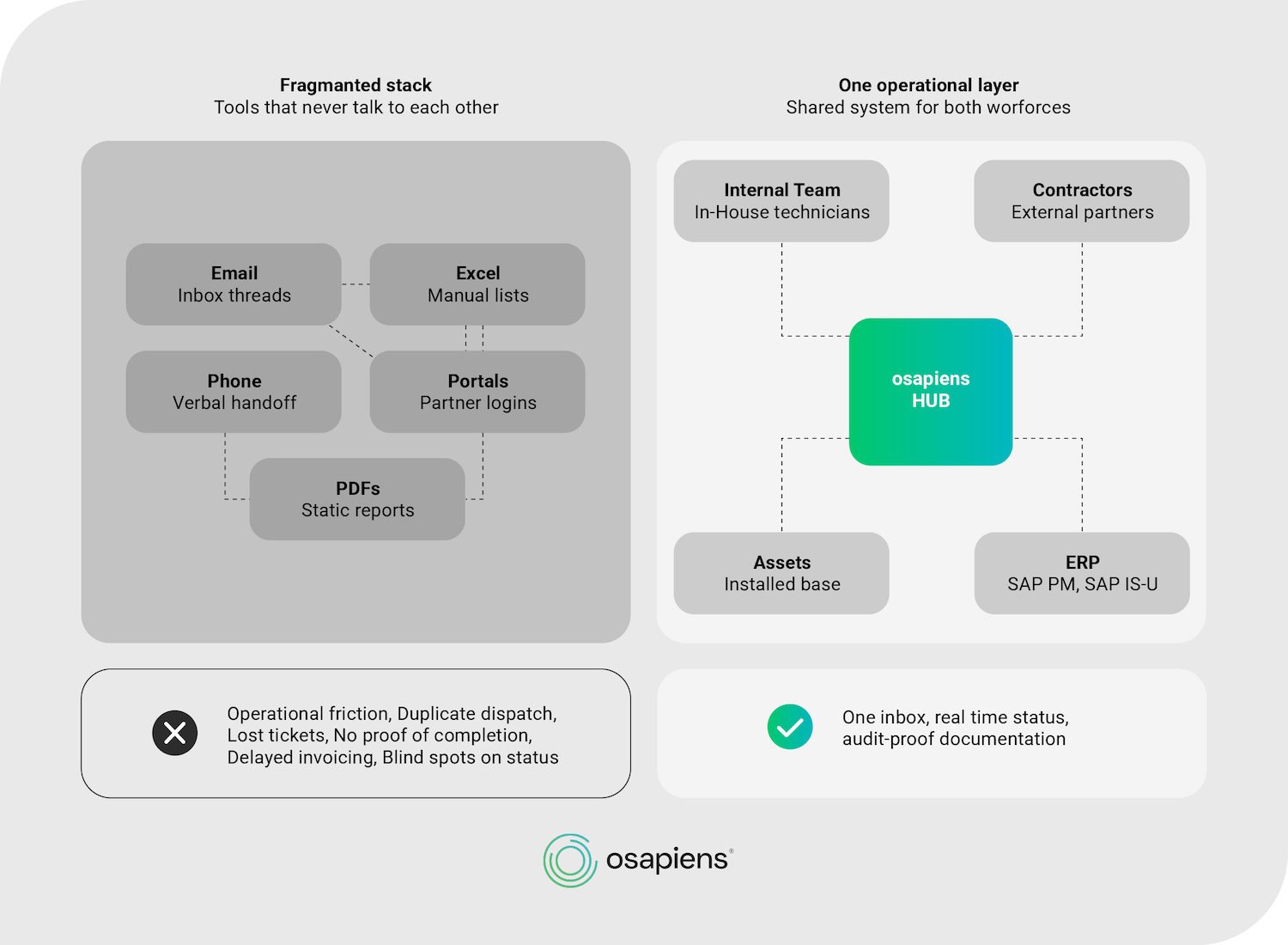
The Hidden Cost of a Fragmented Contractor Stack
Fragmentation rarely shows up overnight. It grows in parallel with the contractor network, until the operational tools that worked for a small team no longer scale with the asset base. The pattern is most visible in fast-scaling industries like charge point operations or wind energy.
Example: A charge point operator scales from 200 to more than 2,000 charging points within two years. The team stays roughly the same size, but external contractors now cover the bulk of on-site work. The backend still detects faults reliably, but every contractor dispatch now travels through email, spreadsheets, and partner portals. Hours disappear on manual ticket reassignment, invoicing stalls because completion proof never arrives, and first-time fix rate drops as contractors show up without asset history.
Build your contractor workflow on one platform
Most FSM tools cover building blocks one through six well, but leave the ERP write-back gap open, forcing manual re-entry into SAP PM or SAP IS-U. The osapiens HUB for Maintenance covers all seven building blocks in one solution, available from the free version upwards or via a demo tailored to your specific contractor scenarios.
Get started for free
How to Control Field Service Contractors Without Crossing Compliance Lines
The more an organisation directs contractor methods, routes, tools, and daily schedules, the closer it moves toward misclassification or co-employment risk. The exact legal threshold varies by jurisdiction, with different frameworks applying in DACH labour law, the wider EU, and other markets.
The operational principle, however, holds across regions: define SLAs, KPIs, and documentation requirements in the contract, then let contractors execute inside a shared system. That shift changes what enterprise teams centrally control versus what contractors access directly. The table below maps three core decision areas across internal-only and contractor-open scopes.
| Decision Area | Internal Only | Open to Contractors |
|---|---|---|
| Workflow access | Master scheduling rules, dispatcher overrides, pricing logic | Assigned work orders, asset history for the job, mobile execution |
| Documentation standards | Form templates, mandatory fields, audit retention rules | Completion of digital checklists, photos, signatures on site |
| KPI escalation triggers | SLA thresholds, penalty rules, rework definitions | Visibility into own first-time fix rate and response time |
7 Building Blocks of a Working Contractor Workflow
The following checklist breaks contractor workflow into seven components enterprise teams can audit against their current FSM and CMMS stack.
| Building Block | Operational Area | What It Covers | Why It Matters |
|---|---|---|---|
| 1 | Contractor onboarding and credential capture | Account provisioning, qualification records, insurance and safety certificates | Prevents unqualified dispatch and audit gaps |
| 2 | Shared work order intake | One ticket queue for internal teams and external partners | Eliminates duplicate dispatch and lost requests |
| 3 | One planning board for internal and external technicians | Drag-and-drop scheduler with qualification-based assignment across both workforces | Removes silos between dispatch and contractor coordination |
| 4 | Mobile execution with offline access | Job details, asset history, and checklists available on site without connectivity | Keeps first-time fix rate stable in remote locations |
| 5 | Structured documentation via smart forms | Guided digital forms with mandatory fields, photos, and signatures | Creates audit-proof proof of completion |
| 6 | KPI tracking per contractor | First-time fix, response time, SLA adherence, rework rate | Enables arms-length performance review per partner |
| 7 | ERP write-back | Contractor completions flow into the ERP of record (SAP PM, SAP IS-U, Schleupen, or other systems) and into asset history | Closes the loop for invoicing and lifecycle data |
Block 7 is where most FSM tools stop. They handle dispatch and mobile execution well but leave the ERP write-back gap open, forcing manual re-entry into SAP PM, SAP IS-U, or whichever ERP runs the asset and finance data of record. Asset-centric platforms like osapiens HUB close that loop, which is where utilities, manufacturers, and charge point operators see measurable value in cleaner asset history and faster contractor invoicing.
Expert tip from osapiens
Charge point operators and energy providers don’t fail at fault detection. Their backends do that reliably. They fail at the moment a technician is needed on site, because that’s where backend systems run out of scope. Start there: bring your blended workforce, internal staff and external contractors alike, onto one operational layer before you scale further.
Tobias Schlereth, osapiens Expert
One System for Internal Technicians and Contractors with the osapiens HUB
The osapiens HUB for Maintenance brings internal teams and external contractors onto the same planning board, mobile app, and asset record, closing the gaps identified in the seven building blocks.
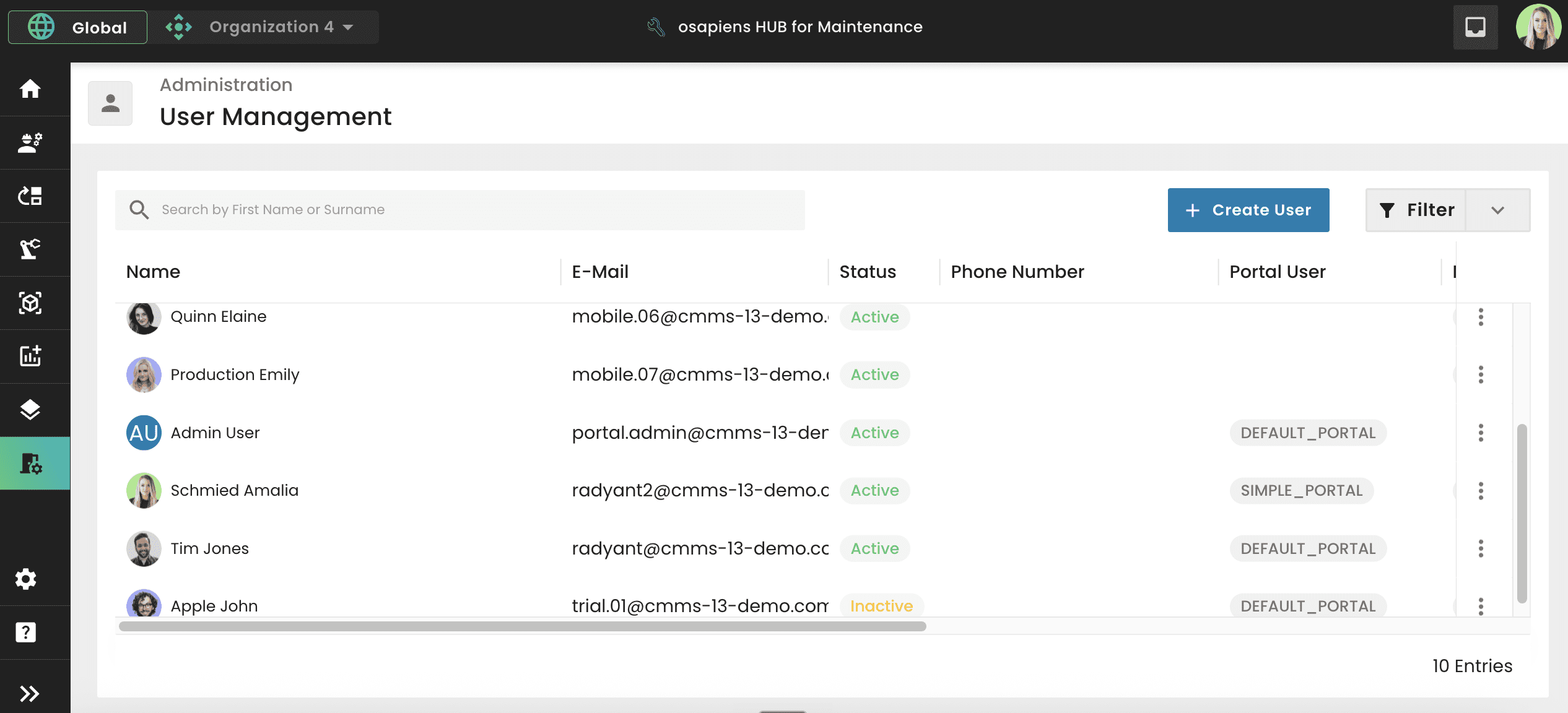
- Planning and Scheduling: Drag-and-drop scheduler for blended workforces with manual dispatching by a dispatcher, no auto-assignment.
- Work Orders, Tickets, and Forms: Shared intake with smart forms and built-in validations for audit-proof documentation.
- Asset Management: Role-based access to relevant asset history without exposing the full installed base to every partner.
- ERP integration with a certified SAP connector: Contractor completions write back into SAP PM, SAP IS-U, and other ERP environments, keeping asset history complete. For SAP customers, the certified connector runs directly in the SAP ABAP stack on both NetWeaver and S/4HANA, so the integration stays stable across SAP updates.
Nordex maintains more than 11,400 wind turbines worldwide on the osapiens HUB.
Alberto Ecre, Group Lead Service Digitalization Department★ ★ ★ ★ ★Nordex
“We were looking for a cloud platform solution that supports all of our regions. Our technicians have to visit the wind turbines every day to fix problems—we need stable solutions that make their work easier. The key was the very simple integration with our ERP system. Now we are gradually expanding: subcontractor management, tool management, and more.”

For a blended-workforce scenario at that scale, a stable, simplified workflow layer is the foundation that makes contractor management work in the first place.
Conclusion: From Contractor Chaos to One Operational Layer
Control over third-party technicians does not come from tighter contracts or stricter procurement language. It comes from shared systems. Once internal teams and external partners execute on the same work order layer, planning board, and documentation standard, contractor work becomes as visible and auditable as in-house execution. The seven building blocks only deliver value when they sit in one platform, not stitched across portals and spreadsheets.
Utilities and charge point operators feel this gap earliest and hardest. Teams that grew from 200 charging points to 2,000 or more discover that their backend reliably detects faults, but was never built for workforce coordination. The moment a technician, internal or external, is needed on site, classic backend systems run out of scope, and contractor coordination falls back into email and Excel.
Start with the free version of the osapiens HUB for Maintenance to test the workflow on a single site, or book a demo for an enterprise rollout with SAP PM and SAP IS-U integration.
Run internal and external technicians on one system
Whether you start with a single site or roll out across a global asset base, the osapiens HUB scales from free trial to enterprise deployment. SAP-certified integration means contractor completions write back into SAP PM and SAP IS-U, keeping your asset history complete regardless of who executed the job.
Book a demo
FAQ
How is contractor management different from standard FSM?
Standard FSM optimises dispatch, routing, and mobile execution for employed technicians. Contractor management adds credentialing and qualification capture, arms-length SLA tracking per partner, and per-partner performance reporting on top of the same execution layer, so external work stays visible and auditable without direct supervision.
How do we manage contractor performance without creating employer risk?
Define SLAs, KPIs, and documentation standards in the contract, then give contractors access to work orders and digital forms inside a shared system. Avoid directing daily methods, routes, or working hours. The specific legal threshold for misclassification or co-employment varies by jurisdiction, but the outcome-based operational principle holds across markets.
Which KPIs should we track per contractor?
Five core metrics give enterprise teams a complete view per partner: first-time fix rate to gauge execution quality, response time against SLA for reliability, customer satisfaction score per job for service experience, rework rate to flag repeat issues, and documentation completeness for audit-proof proof of work.
Can contractor workflows integrate with SAP PM or SAP IS-U?
Yes. Through the osapiens HUB’s SAP-certified integration, contractor work orders, completion data, checklists, and documentation write back into SAP PM and SAP IS-U. Asset history stays complete and audit-ready, regardless of whether the job was executed by an internal technician or an external partner.
Start using osapiens for free
Improve your uptime, extend the life of your equipment, and simplify work order management.
Book a demo
ENTERPRISE CAPABILITIES
- SAP ECC & S/4HANA Certified
- Infor & MS Dynamics
- Microsoft Entra ID / Okta
- ISO 27001 & 9001
- EU Cloud · Data Sovereignty
- Development, Test, and Production Environments
- Multi-Entity & Multi-Site
- Power BI Integration
- Audit Trail & Compliance
Related content

January 15, 2026
IBM Maximo Alternatives: The Best EAM & CMMS Platforms Compared

January 1, 2026
Hydraulic Press Maintenance Checklist – Tasks, Tips & Best Practices
January 1, 2026
Centrifugal Fan Maintenance Checklist – Tasks, Best Practices & Digital Execution
January 1, 2026
Machine Maintenance Checklist: What to Inspect, How to Execute, and Why Digital Checklists Reduce Downtime
January 1, 2026
Cleanroom Maintenance Checklist – Tasks, Compliance & Digital Execution

July 21, 2025
Maintenance Bilbao 2025: Key Insights on Maintenance Management
January 1, 2026
Lightning Arrester Maintenance Checklist – Tasks, Tips & Best Practices

June 11, 2026
How to Improve First Time Fix Rate in Maintenance
January 1, 2026
Biomass Boiler Maintenance Checklist – Tasks, Safety & Digital Execution
January 1, 2026
Scaffolding Maintenance Checklist: What to Inspect, When, and How to Stay Compliant
January 1, 2026
Bending Machine Maintenance Checklist – Tasks, Safety & Digital Execution
March 19, 2026