

Blog

Florian Bartholomäus, osapiens Expert | 6. July 2026 | Lesezeit 12 min.
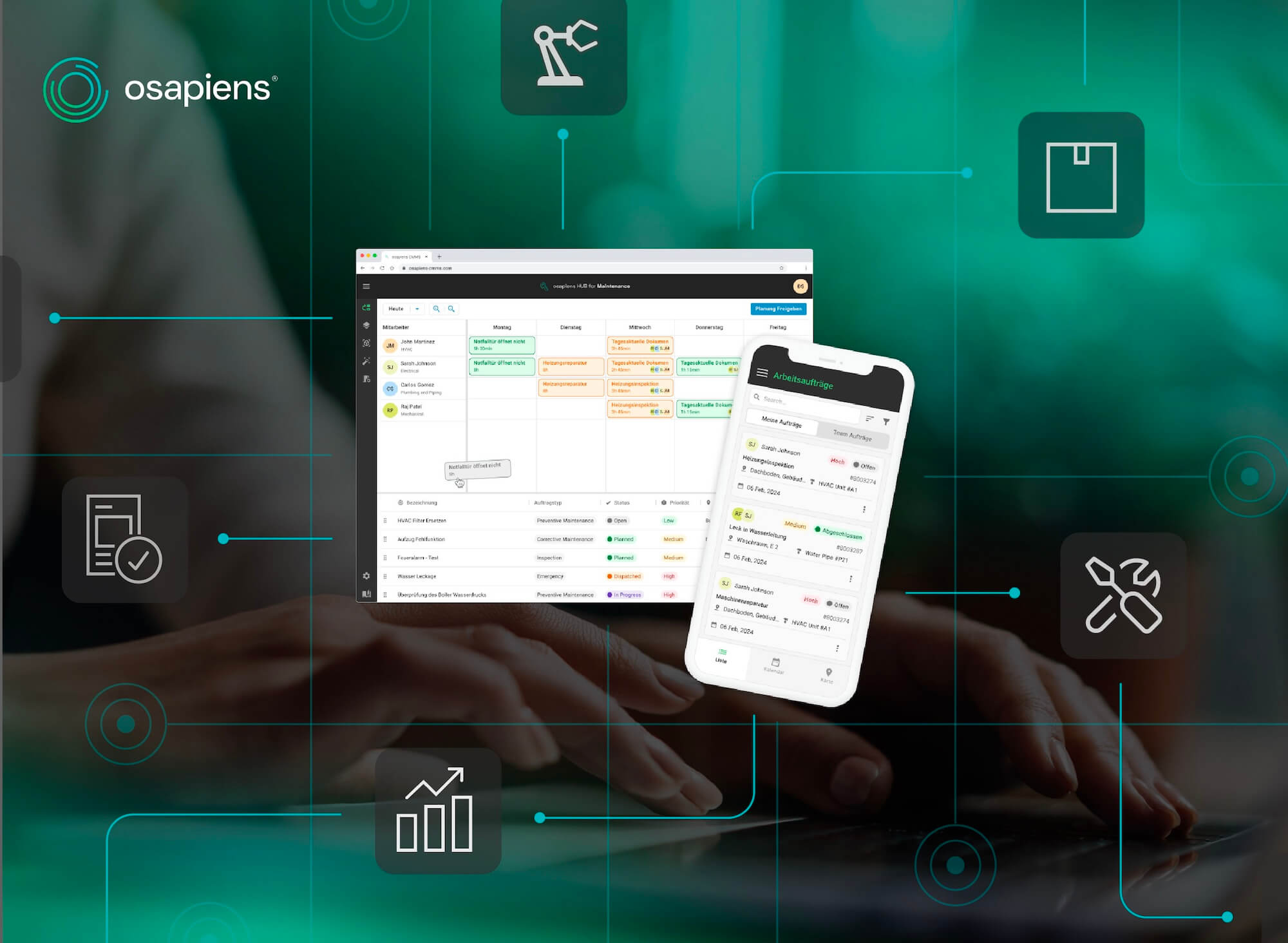
When maintenance happens on the shop floor but documentation happens at a desktop terminal, data quality suffers and productivity erodes. The osapiens HUB for Maintenance saves 17 minutes per work order with offline-first mobile execution.
Start With Mobile CMMS










TRUSTED BY LEADING COMPANIES




ENTERPRISE-READY
 SAP Certification
 ISO 27001
 EU Hosting
 Entra ID & Okta
 Multi-Entity
A technician finishes a repair, walks back across the shop floor, logs into a desktop terminal, and tries to reconstruct from memory what he just did. Sound familiar? This gap between where the work happens and where it gets recorded is where asset histories become unreliable, compliance audits get complicated, and productivity quietly erodes. A mobile CMMS closes that gap by putting the full maintenance workflow directly in the technician’s hands, at the machine. The osapiens HUB for Maintenance is built around exactly that principle.
Key Facts
- Most maintenance teams are still largely analog: According to a study conducted with Fraunhofer IML, 41% of organizations still rely on paper-based forms for maintenance execution, and CMMS adoption in daily maintenance tasks remains below 20%.
- The cost of desktop-only maintenance compounds fast: Every work order that requires a technician to walk to a terminal, reconstruct notes from memory, or manually re-enter data into SAP represents wasted time that accumulates across hundreds of jobs per week.
- Offline capability is the actual differentiator: Many mobile CMMS apps require constant connectivity and become unusable in basements, plant interiors, or remote field locations. A genuinely offline-first design is an important prerequisite for field use.
- osapiens HUB for Maintenance saves 17 minutes per work order: mobile-first execution, Smart Forms with built-in validations, and a bidirectional SAP-certified integration eliminate manual re-entry between field and back office.
What Is a Mobile CMMS?
A mobile CMMS is a maintenance management platform designed to be fully functional on smartphones and tablets, enabling technicians to create, receive, update, and close work orders, access asset histories, complete inspection checklists, and document maintenance activities directly at the point of work.
In a mobile-first CMMS, the smartphone interface is the primary execution layer for field technicians. Desktop access remains essential for planning, scheduling, and reporting, but the daily work of maintenance happens on the device in the technician’s pocket.
Desktop-Only vs Mobile CMMS: What Changes in Practice
The table below shows how the same common maintenance tasks play out differently depending on whether a team uses a desktop-only CMMS or a mobile-first platform.
osapiens HUB
| Task | Desktop-Only CMMS | Mobile CMMS |
|---|---|---|
| Receiving a work order | Technician checks terminal at shift start or waits for printed sheet | Work order appears on mobile device in real time |
| Accessing asset history | Walk to nearest terminal, search system, return to machine | Scan QR code at asset, full service history loads instantly |
| Documenting completed work | Write notes on paper, enter data at terminal later (often incomplete) | Complete structured checklist at the machine, data saved immediately |
| Reporting a fault | Report verbally or by phone, someone else creates the ticket | Technician creates ticket with photo and location directly on device |
| Working in a low-connectivity area | No access to CMMS, work continues undocumented | Full offline functionality, data syncs automatically when connection returns |
| Transferring data to SAP | Manual re-entry into SAP PM, delays and transcription errors common | Bidirectional sync via certified integration, no manual re-entry required |
Where Paper and Desktop Workflows Break Down
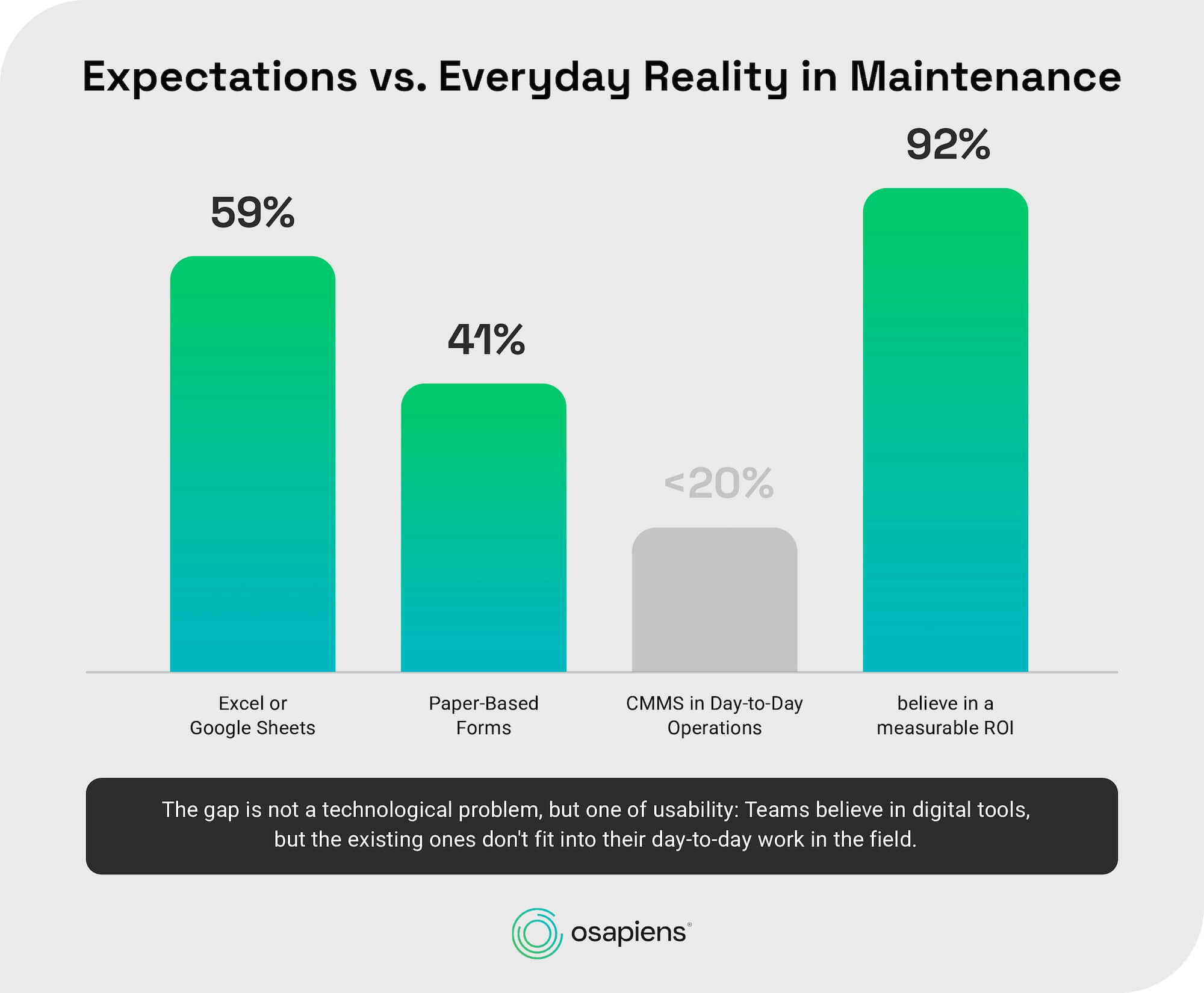
Walk through most maintenance departments today, and you’ll still find a clipboard somewhere. Or an Excel sheet with more tabs than anyone remembers the purpose of. The osapiens CMMS Study, conducted together with Fraunhofer IML, puts numbers on that picture: 59% of maintenance teams rely on Excel or Google Sheets as their main tool, and 41% still use paper forms for execution. CMMS adoption in daily tasks sits below 20%.
Still working from clipboards or spreadsheets?
Give your paperwork structure first. Our free Excel work order template covers order number, asset ID, technician assignment, scope of work, and a PPE checklist in one form.
Here’s the part that stands out: 92% of the same organizations believe digital maintenance tools can deliver measurable ROI. So the gap isn’t about conviction. Teams already know digital tools help. What’s missing is a tool built for where maintenance actually happens, not at a desktop, but on the shop floor, at the machine, in a basement with no signal.
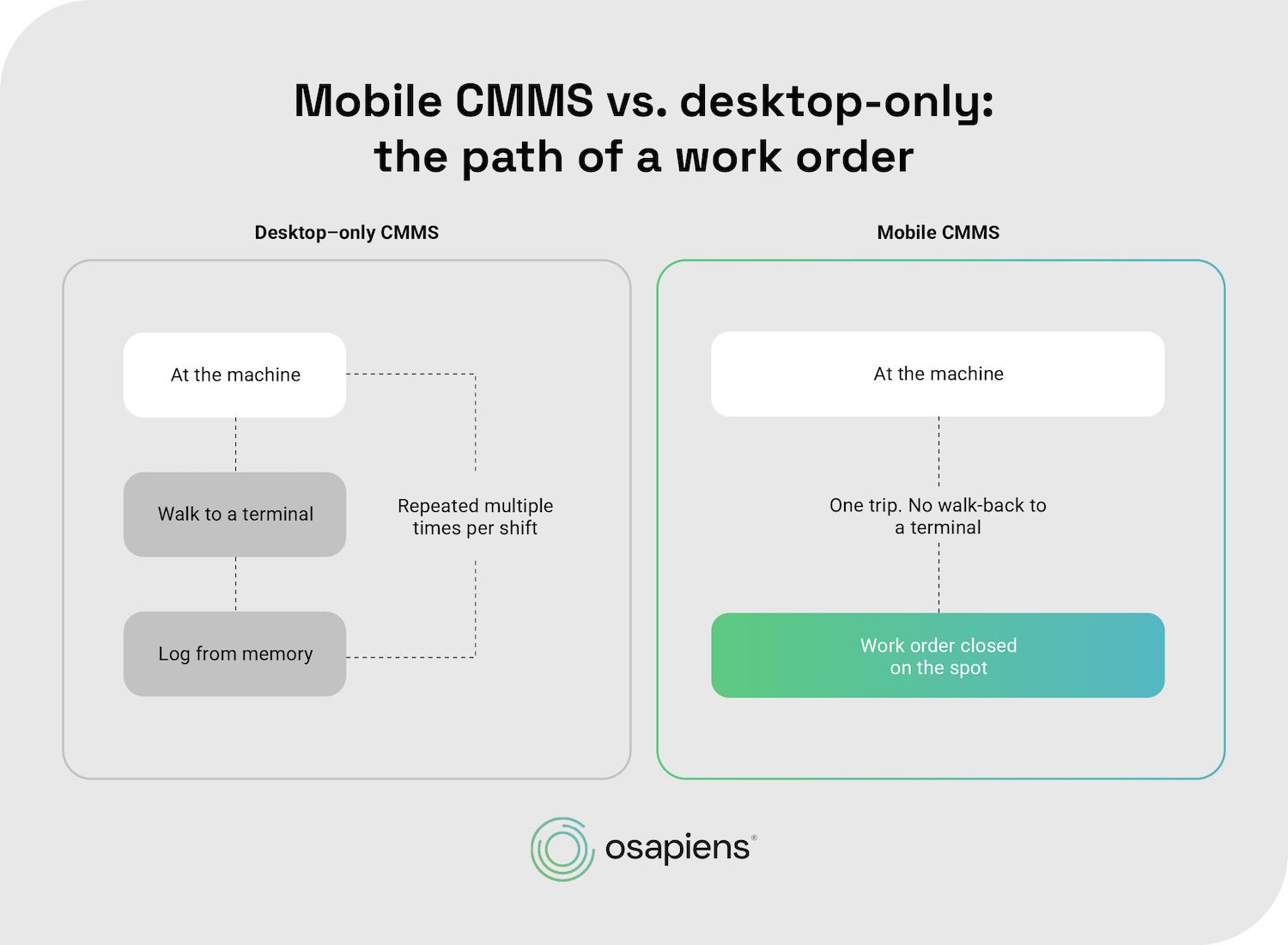
Without mobile access, technicians walk back to a terminal every time they need to log data or check an asset’s history. In a large plant, that adds up to multiple trips per shift. Whatever gets documented afterward is often reconstructed from memory, hours later, which is exactly how asset histories turn unreliable and compliance audits get complicated. In regulated industries like pharma and life sciences, that delay isn’t just inconvenient. It’s a liability under GMP and EU Annex 11.
For utilities and field service teams managing infrastructure spread across a region, geography makes it worse. A crew heading to a substation or a charge point needs the full job package on the device before they even leave the depot.
See Mobile CMMS in Action
See how the osapiens HUB for Maintenance brings work orders, Smart Forms, and SAP sync directly to the technician's device, no walking back to a terminal required.
Book a demo
Core Features of Mobile CMMS
Not all mobile CMMS platforms are equal in their field readiness. The following capabilities separate tools that genuinely enable field execution from those that create a new layer of friction.
Offline-First Functionality
True offline capability means the full application works without any internet connection: work orders can be opened, checklists completed, photos captured, and asset data updated. When connectivity returns, data synchronizes automatically.
Partial offline modes, where only certain screens are available without a connection, are not sufficient for industrial environments. Plant interiors with metal shielding, underground facilities, and remote field locations all create connectivity gaps that a mobile CMMS must handle without degrading the technician’s workflow.
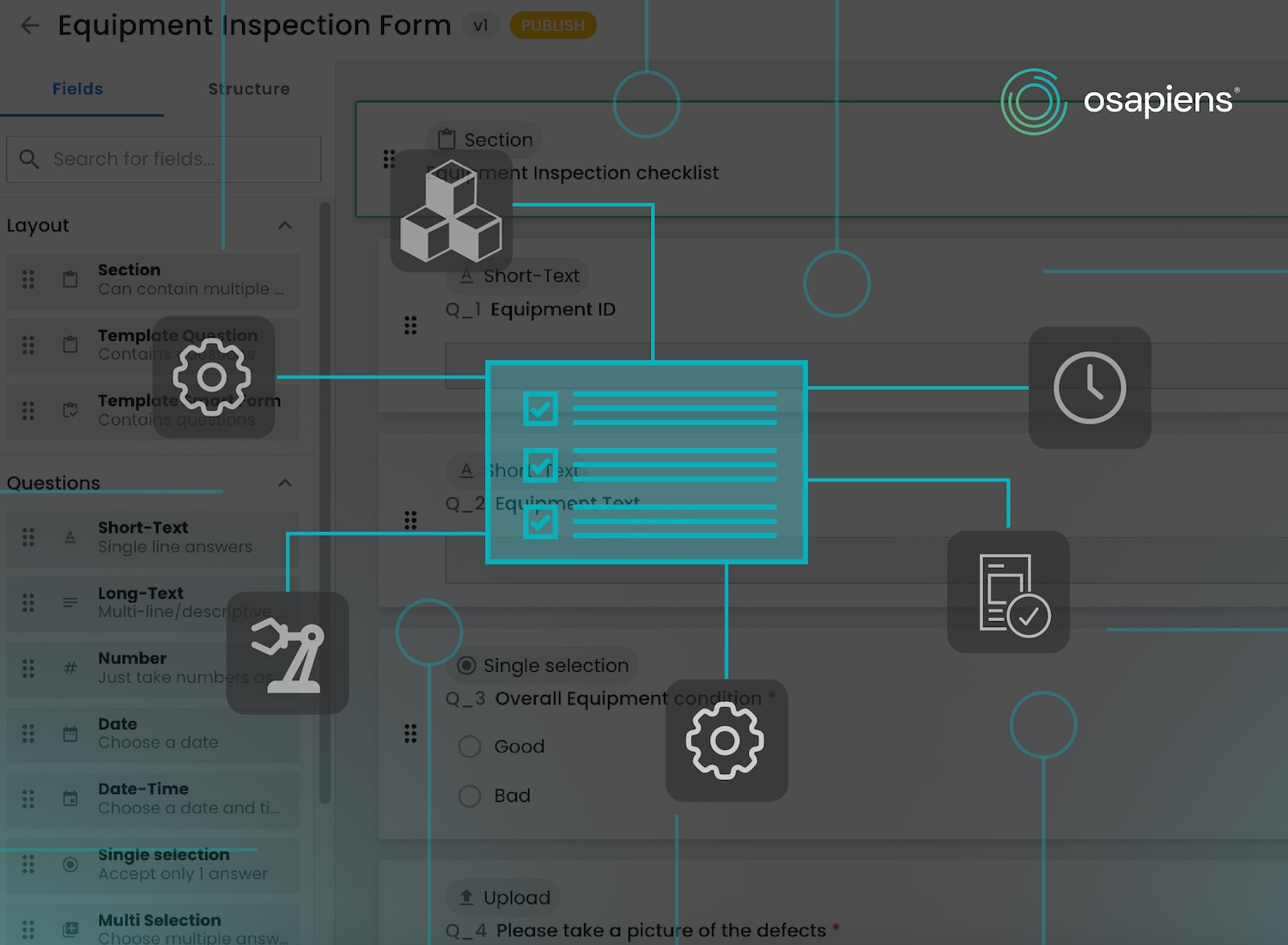
Smart Forms and Digital Checklists with Validation
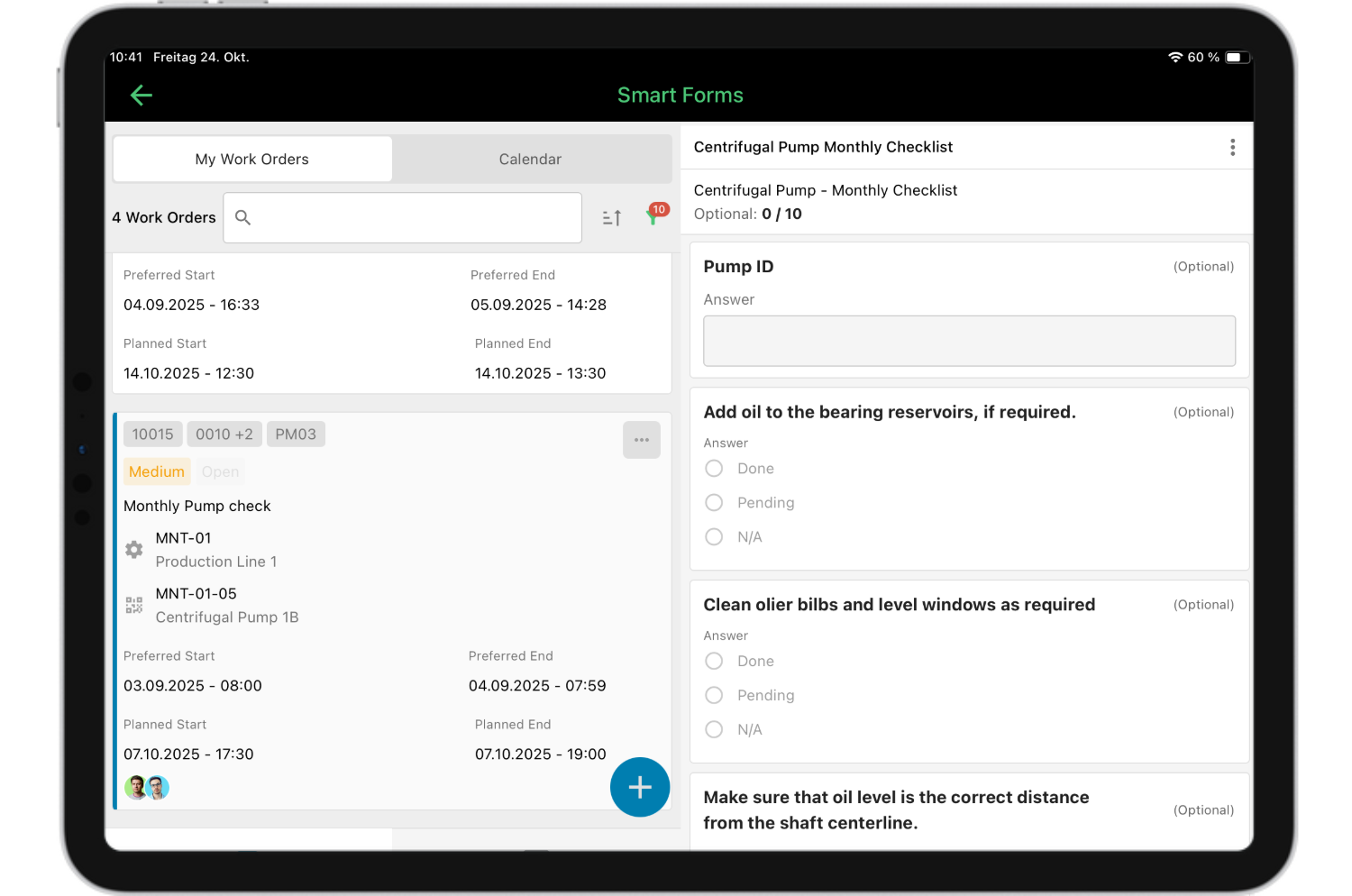
Replacing paper round sheets with digital checklists is only valuable if the digital forms enforce data quality. Smart Forms with built-in validation logic prevent technicians from completing a checklist with missing or out-of-range values, which eliminates a significant source of downstream data problems. osapiens customers using Smart Forms in the osapiens HUB for Maintenance report 25% fewer faulty work orders compared to paper-based or unvalidated digital processes.
Asset History and QR/Barcode Scanning
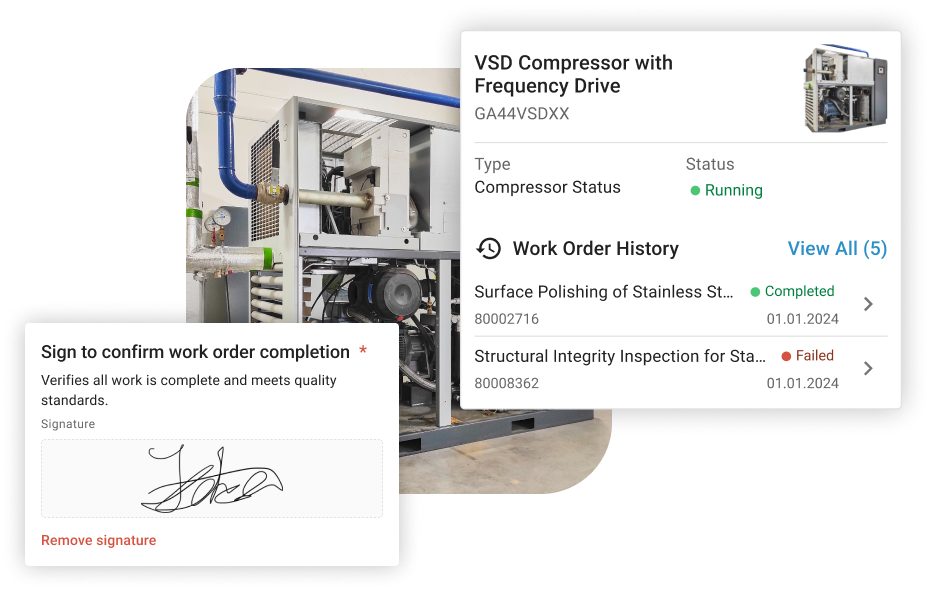
A technician arriving at an asset should be able to scan a QR code or barcode label and immediately see the full service history, open work orders, attached documentation, and spare parts records for that specific machine. This eliminates the walk-back to a terminal and ensures that the technician has the full context needed to make informed decisions at the point of work. The osapiens HUB for Maintenance includes asset management capabilities that surface this history directly on the mobile device.
SAP-Certified Bidirectional Integration
For organizations running SAP PM or SAP EAM, the most persistent pain point in mobile maintenance is the media break between field execution and back-office systems. Technicians complete work on site, but that data must then be manually entered into SAP, creating duplicate effort, transcription errors, and delays. A certified bidirectional integration means that work orders flow from SAP to the mobile device and completed documentation flows back automatically, without manual re-entry. The osapiens HUB for Maintenance holds an SAP-certified integration that covers this full data exchange, which is a meaningful differentiator for the large share of European industrial organizations running SAP environments.
Eliminate the Media Break Between Field Execution and SAP
The osapiens HUB for Maintenance connects your technicians' mobile devices directly to SAP PM and SAP EAM via certified bidirectional integration, no manual re-entry, no transcription errors. See exactly how the data exchange works in a live walkthrough.
Start for free
Photo and Media Documentation
Capturing photographic evidence at the point of work, before and after a repair, during a fault, or as part of an inspection, is a standard requirement in most maintenance environments. A mobile CMMS must make this frictionless: open camera, capture image, attach to work order, done. When this process requires multiple steps or uploads fail due to connectivity issues, technicians stop doing it.
How to Select a Mobile CMMS: A Practical Framework
Maintenance managers evaluating mobile CMMS platforms frequently ask the wrong question first. The question is not “which platform has the most features?” but “which platform will my technicians actually use?” User adoption is the single most important success factor in any CMMS implementation, and it is determined by UX design quality, not feature count.
Eight Criteria for Evaluating a Mobile CMMS
- Offline-first architecture: Full functionality without internet connection, with automatic sync when connectivity returns.
- Technician UX: Common tasks completable in three taps or fewer; no SAP expertise required to close a work order.
- Smart Forms with validation: Checklists that enforce data quality at the point of capture, not after the fact.
- SAP/ERP integration: Certified bidirectional data exchange, not a generic API that requires custom development to maintain.
- Asset management depth: Full service history, attached documentation, and spare parts visibility accessible by scanning an asset label.
- Multi-site scalability: Consistent experience and data structure across locations, supporting multi-site maintenance management.
- Implementation speed: A standalone mobile CMMS typically goes live within weeks. Once ERP or SAP integration is involved, timelines usually stretch to a few months, depending on the complexity of the existing system landscape. That said, a modern, well-architected platform should still be measured in weeks to a few months, not the 12–18 months often associated with legacy enterprise rollouts.
- Integration breadth: Certified connectors beyond just SAP, plus a developer API, for organizations that will need to connect additional systems as they scale.
Expert tip: Before rolling out a mobile CMMS across your entire plant, run a focused pilot on a single production line and measure wrench time before and after: the share of each shift spent on actual hands-on maintenance versus walking, searching, and documenting. That before-and-after comparison is the most credible internal business case you can present to a CFO or plant director, and osapiens supports exactly this approach with a freemium plan covering up to 5 users with full mobile and offline functionality at no cost.
osapiens HUB for Maintenance: Mobile-First, Offline-First, SAP-Integrated
The osapiens HUB for Maintenance addresses the central problem of mobile maintenance management directly. Instead of forcing technicians to choose between working at the machine and documenting the work properly, the ai-ready platform brings the full maintenance workflow to wherever the job actually happens, on the technician’s device, without an internet connection, and without a media break to SAP.
- Complete work order management on iOS and Android, fully functional offline. Technicians can open, update, and close work orders, capture photos, and check asset history at the machine, even in basements, plant interiors, or other low-connectivity environments. Data syncs automatically once a connection is available again.
- Smart Forms with validation logic, reducing faulty work orders by 25%. Built-in checks catch missing or out-of-range values at the point of capture, so incomplete documentation doesn’t make it into the system in the first place.
- SAP-certified bidirectional integration, eliminating manual re-entry between field and SAP PM/EAM. Work orders flow from SAP to the mobile device, and completed documentation flows back automatically, closing the loop without a second data-entry step at a desktop terminal.
The business case for mobile maintenance management is best made with specific, verifiable numbers rather than general claims. The figures below reflect results observed with osapiens HUB for Maintenance customers and verified platform data.
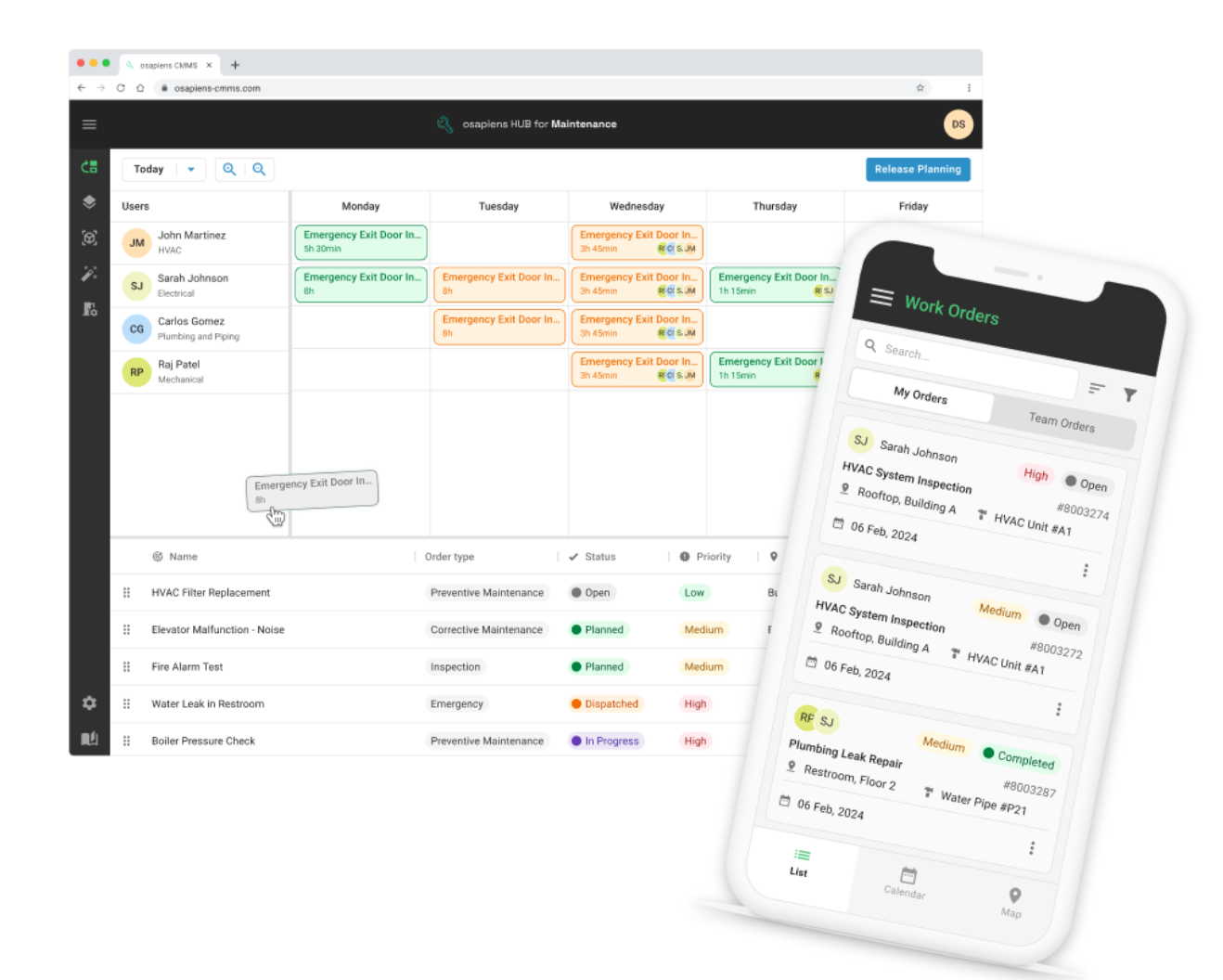
What osapiens HUB for Maintenance Delivers:
- 17 minutes saved per work order: 12 minutes from faster execution and documentation at the point of work, plus 5 minutes from improved planning and dispatching. For a team of 20 technicians completing 5 work orders per day each, this represents approximately 7,000 hours of recovered capacity per year.
- 25% fewer faulty work orders through Smart Forms with validation logic that enforce data quality at the point of capture.
- 14% increase in technician productivity through end-to-end digital workflows that eliminate paper handling, manual data entry, and unnecessary travel to terminals.
- 8% reduction in unplanned downtime through better preventive maintenance execution and condition-based planning.
- 20% more time spent on actual maintenance work as administrative overhead decreases.
Nordex manages more than 11,400 wind turbines worldwide using the osapiens HUB for Maintenance, in some of the most connectivity-challenging environments in industrial maintenance.

Alberto Ecre, Group Lead Service Digitalization Department
★ ★ ★ ★ ★Nordex
“We were looking for a cloud platform solution that supports all of our regions. Our technicians have to visit the wind turbines every day to fix problems—we need stable solutions that make their work easier. The key was the very simple integration with our ERP system. Now we are gradually expanding: subcontractor management, tool management, and more.”
Grupo Agora, the oldest brewing group in Spain, saw the same pattern. Sergio González, Maintenance Manager, put it plainly: “This project has completely changed the way we work. The collaboration with osapiens has made us more efficient and leads to fewer downtimes and disruptions.” Puratos has standardized maintenance the same way across more than 65 production sites globally.
Recover 17 Minutes Per Work Order Across Your Entire Team
For a team of 20 technicians running 5 work orders per day, that adds up to roughly 7,000 hours of recovered capacity per year. A demo shows you precisely where those minutes are lost today and how mobile-first execution reclaims them.
Book a free demo
FAQ
What is the difference between a mobile CMMS and a regular CMMS with a mobile app?
A regular CMMS with a mobile app typically offers a reduced version of the desktop interface on a smartphone, often requiring connectivity and lacking the full feature set available on desktop. A mobile-first CMMS is designed from the ground up for field use, with offline capability, simplified UX for technicians, and complete work order management on the device. The distinction matters most in environments with connectivity challenges or high work order volumes.
Can a mobile CMMS work in areas without Wi-Fi or mobile data?
A genuinely offline-first mobile CMMS stores all relevant data locally on the device, allowing technicians to open work orders, complete checklists, capture photos, and update asset records without any internet connection. Data synchronizes automatically when connectivity returns. Platforms that only offer partial offline modes, where certain screens or functions require connectivity, are not adequate for industrial environments such as plant interiors, basements, or remote field locations.
How does a mobile CMMS integrate with SAP PM or SAP EAM?
Integration quality varies significantly between platforms. A generic API connection requires ongoing custom development to maintain and often breaks during SAP updates. A certified SAP integration, such as the one offered by the osapiens HUB for Maintenance, is formally validated by SAP and covers bidirectional data exchange, meaning work orders flow from SAP to the mobile device and completed documentation flows back automatically. This eliminates manual re-entry and the transcription errors that accompany it.
How long does it take to implement a mobile CMMS?
Implementation timelines depend on whether SAP or ERP integration is required. A standalone deployment of the osapiens HUB for Maintenance typically takes 1–3 weeks. An enterprise deployment with SAP integration runs 4–12 weeks, depending on the complexity of the SAP environment and the number of sites involved.
Start using osapiens for free
Improve your uptime, extend the life of your equipment, and simplify work order management.
Book a demo
ENTERPRISE CAPABILITIES
- SAP ECC & S/4HANA Certified
- Infor & MS Dynamics
- Microsoft Entra ID / Okta
- ISO 27001 & 9001
- EU Cloud · Data Sovereignty
- Development, Test, and Production Environments
- Multi-Entity & Multi-Site
- Power BI Integration
- Audit Trail & Compliance
Related content
November 4, 2025
CMMS Software for Small Business: Choosing the Right Solution
January 1, 2026
Wheel Loader Maintenance Checklist – Tasks, Tips & Template

December 4, 2025
Best UpKeep Alternatives for Enterprise CMMS in 2026
October 1, 2025
Which KPIs in maintenance really matter? Here’s what your peers say:
January 1, 2026
Oxygen Concentrator Maintenance Checklist – Tasks, Documentation & Digital Execution
January 1, 2026
Milling Machine Maintenance Checklist – Tasks, Best Practices & Digital Execution

April 7, 2026
IFS Ultimo Alternatives: Top 5 Comparison 2026
January 1, 2026
Fire Suppression System Maintenance Checklist – Tasks, Compliance & Digital Execution
January 1, 2026
Industrial Preventive Maintenance Checklist – Tasks, Documentation & Digital Execution
January 1, 2026
Power Cable Maintenance Checklist – Tasks, Tips & Template
January 1, 2026
Industrial Turbines Maintenance Checklist – Tasks, Tips & Digital Execution
December 1, 2025