

CMMS

Florian Bartholomäus, osapiens Expert | 5. August 2026 | Lesezeit 12 min.
We see this pattern constantly with new customers: the first instinct is to bring as many assets as possible into the maintenance program at once. The teams that succeed long term do the opposite. They start deliberately small, with the assets that actually matter, and build out from there.
See how your team follows the plan












TRUSTED BY LEADING COMPANIES




ENTERPRISE-READY
 SAP Certification
 ISO 27001
 EU Hosting
 Entra ID & Okta
 Multi-Entity
The schedule exists. It lists the assets, the intervals, and the responsible technicians. On paper, it looks like a working maintenance program. But on the floor, tasks get delayed, technicians improvise, and when the last audit came around, the documentation had gaps nobody could explain. A preventive maintenance schedule that exists but is not executed, tracked, and adjusted is, for compliance purposes, no schedule at all. This article walks through the three reasons PM schedules fail in practice and how to build one your team will genuinely follow, with the records to prove it.
Key Takeaways
-
Most PM schedules fail for the same three reasons: they are too rigid (calendar-only), too complex (no prioritization), or not digitally tracked (no audit trail).
-
A PM schedule is a process, not a document: it must be executed, monitored, and adjusted, not filed.
-
Asset criticality drives interval logic: not all equipment deserves equal attention; prioritize by failure consequence, not floor proximity.
-
osapiens HUB for Maintenance closes the gap: mobile-first execution, SAP-certified integration, and a built-in audit trail turn a plan on paper into a process your team actually follows.
Why Most Preventive Maintenance Schedules Break Down
Before building a PM schedule, it helps to understand why most of them fail. The failure patterns are consistent across industries and plant sizes. Three root causes account for the majority of programs that look good on paper but collapse in practice.
Failure Mode 1: The Calendar Trap
The most common PM schedule is built around a calendar. Every asset gets a fixed interval: monthly, quarterly, or annually. The logic feels sound. In reality, it has a structural flaw.
For most equipment, the probability of failure does not increase with age in a way that a fixed calendar interval would catch. Time-based life-renewal tasks add no reliability benefit for assets whose failure pattern is random or condition-driven, and yet calendar-based PM remains the industry default. The result is predictable: over-maintenance on stable assets that rarely fail, under-maintenance on high-cycle machinery where actual usage patterns drive degradation far faster than the calendar suggests.
A schedule calibrated to the calendar rather than to equipment behavior fires interventions at the wrong time. Technicians learn this quickly. When PM tasks consistently find nothing wrong, teams start treating them as bureaucratic overhead, and compliance drops.
Failure Mode 2: The Overloaded Plan
The second failure mode comes from ambition. A new maintenance program gets built to cover every asset, every possible failure mode, and every recommended inspection. It looks comprehensive. It is also unsustainable.
PM programs that start too broad collapse within months. The temptation to implement comprehensive PM across all equipment immediately creates an unsustainable workload spike: teams fall behind, tasks get skipped, and the program collapses within months. The root cause is the absence of an asset criticality ranking. When everything is treated as equally urgent, nothing gets the attention it actually needs.
Maintenance costs already represent 15 to 40% of total production costs in manufacturing. Optimizing for completeness over priority compounds costs without delivering reliability gains. A leaner schedule built around the assets that matter most outperforms a comprehensive one that teams cannot realistically execute.
Failure Mode 3: The Undocumented Plan
The third failure mode is the one that creates the most serious operational and legal risk. A plan executed but not recorded is, for compliance purposes, a plan not executed.
ISO 55001, ISO 9001, and FDA 21 CFR Part 11 all require timestamped, traceable evidence that every asset was inspected, serviced, and signed off on schedule. Spreadsheets and paper logs cannot auto-schedule recurring tasks, escalate missed work orders, or produce 12 to 24 months of asset history on demand, which is precisely what auditors request.
There is also a subtler problem: PM compliance is not the same as tasks completed. PM compliance measures whether scheduled tasks were completed on time, not just whether they were done at all. A task completed a week late may still show up as finished in a system, but it did not protect the asset the way it was intended to. Without digital tracking, this distinction is invisible.
Expert tip from osapiens
We see this pattern constantly with new customers: the first instinct is to bring as many assets as possible into the maintenance program at once. The teams that succeed long term do the opposite. They start deliberately small, with the assets that actually matter, and build out from there.
Florian Bartholomäus, osapiens Expert
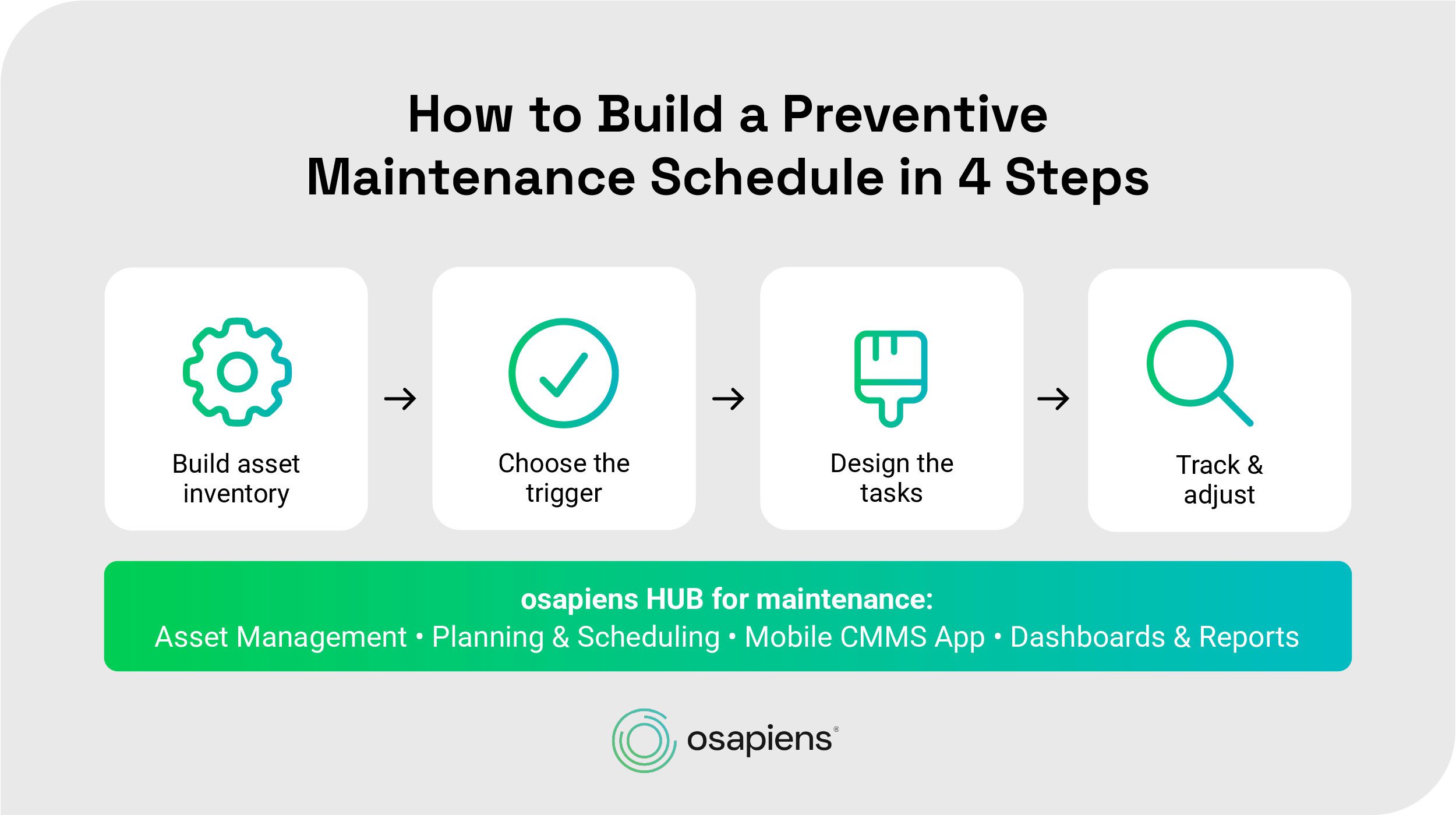
How to Build a Preventive Maintenance Schedule in 4 Steps
Knowing why PM schedules fail is only half the picture. The other half is building one that avoids all three failure modes from the start: right-sized, correctly triggered, and fully trackable. The following four steps walk through that process, from the first asset entry to the ongoing adjustment cycle that keeps the schedule accurate over time.
Step 1: Build Your Asset Inventory and Rank by Criticality
Every functioning PM schedule starts with a clear picture of what needs to be maintained. This sounds obvious. In practice, most organizations discover their asset inventory is incomplete, inconsistent, or siloed across departments the first time they try to build one.
For a mid-size industrial operation, the scope covers production equipment, utilities infrastructure, and safety-critical systems. For each asset, capture:
-
asset ID and location
-
manufacturer, age, and failure history
-
current maintenance regime (if any)
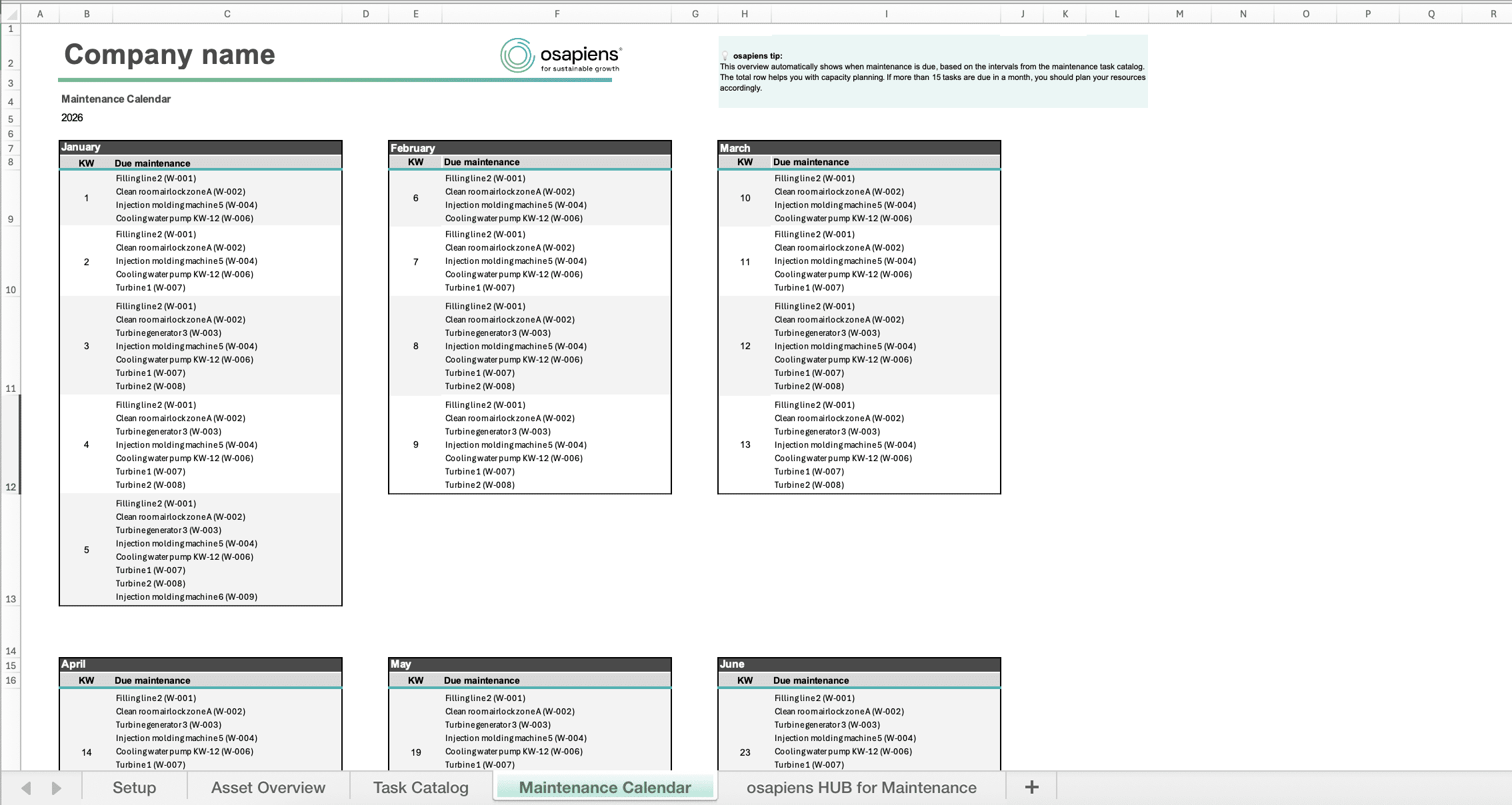
This baseline is the foundation for everything that follows. If you are starting from scratch, osapiens’ free maintenance schedule template gives you a ready-made structure for capturing this data before you build it out further.
Once the inventory exists, rank assets by criticality. The ranking formula is straightforward:
failure consequence × repair cost × production impact.
A Risk Priority Number (RPN) approach works well for teams new to criticality-based scheduling: it converts the three dimensions into a single score that makes prioritization decisions defensible and auditable.
The practical implication for program design: start with the top 20 to 30% of assets by criticality. Do not attempt to schedule everything at launch. A focused program that teams can actually execute is more valuable than a comprehensive one that collapses under its own scope in the first quarter.
Step 2: Choose the Right Maintenance Trigger for Each Asset
Once assets are prioritized, the next decision is what triggers a maintenance task. There are three trigger types, and the right choice depends on the asset’s failure pattern, not on administrative convenience.
| Trigger type | When to use | Example asset | Limitation |
|---|---|---|---|
| Time-based (calendar) | Safety-critical assets with regulatory inspection requirements | Pressure vessels, electrical panels | Ignores actual usage; may over- or under-service depending on cycle rates |
| Usage-based (meter) | High-cycle machinery where wear correlates with operating hours | CNC machines, compressors, conveyor drives | Requires reliable usage data; more complex to set up than calendar scheduling |
| Condition-based | Assets with observable degradation signals (vibration, temperature, oil analysis) | Rotating equipment, motors, pumps | Requires sensor infrastructure or regular inspection to trigger correctly |
One rule applies across all three types: no blanket intervals. Inspection intervals are determined by the operator’s risk assessment, equipment manufacturer specifications, and actual operating conditions, not by generic schedules. The operator sets the intervals; the schedule executes them.
In practice, most mid-size industrial operations use mixed trigger logic:
-
time-based for safety-critical systems
-
usage-based for high-cycle production machinery
-
condition-based where sensor data or regular inspection findings are available.
Research in reliability-centered maintenance shows that most equipment benefits from some form of condition-based maintenance, while only a minority of assets can be effectively managed by time-based replacement or overhaul alone. A mixed-trigger approach moves the program toward that reality without requiring a full predictive maintenance infrastructure at the outset.
Step 3: Design Tasks Your Team Can Actually Execute
A scheduled task has two components: what to do and when to do it. Most PM schedules define the second and neglect the first.
Every recurring PM task needs an attached standard operating procedure (SOP) that defines the required steps, tools needed, and estimated completion time. If a technician is missing an SOP or the procedure is unclear, they will skip the task or delay the work order. This is not a motivation problem. It is a design problem. Unclear instructions create friction; friction creates skipped tasks; skipped tasks create compliance gaps.
Workload sizing matters as much as task design. Map the total scheduled maintenance hours against available technician capacity. High-reliability teams build a 10% buffer into their maintenance intervals: for a 30-day task, that means allowing a 3-day grace period to complete it without marking it non-compliant. This flexibility helps teams manage real-world disruptions without losing sight of the plan.
Technician involvement in task design is one of the most underused levers for adoption. Teams that help build the schedule understand why tasks exist and are more likely to execute them consistently. Standardized procedures also serve a compliance function: in an audit, it is the procedure documentation that demonstrates due diligence, not the fact that a task was scheduled.
Still building your PM schedule in Excel?
Get a head start with our free maintenance schedule template: a ready-to-use equipment overview, task catalog, and maintenance calendar you can adapt to your own assets today.
Download the free template
Step 4: Track, Measure, and Adjust the Schedule
A PM schedule is not complete when it is launched. It enters a continuous cycle: execution, measurement, adjustment. This is the difference between a maintenance document and a maintenance process.
Three KPIs are worth tracking from the start:
-
PM compliance rate: the percentage of scheduled PMs completed on time. This is the leading indicator for program health. A rate below 80% signals either overload, missing SOPs, or scheduling logic that does not reflect operational reality.
-
MTBF (Mean Time Between Failures): Improvement in MTBF over time confirms the schedule is correctly targeting the assets and intervals that matter. Flat or declining MTBF with high PM compliance points to wrong trigger types or incorrect intervals.
-
Planned maintenance percentage (PMP): the ratio of planned maintenance hours to total maintenance hours. A rising PMP over time is the clearest signal that the program is working: the team is spending more time on prevention and less on firefighting.
World-class manufacturing facilities achieve OEE scores of 85% or higher, while most manufacturing plants operate at an OEE of between 60 and 65%. A functioning PM schedule is one of the primary operational levers that closes that gap.
Most teams start to see structure and consistency within 60 to 90 days. A full transition from reactive to proactive maintenance typically takes 6 to 12 months, depending on team size, asset complexity, and how quickly the organization adopts new processes.
The adjustment loop is what makes the schedule a living process: When should intervals be revised?
-
When MTBF improves significantly, the interval may be extended.
-
When PM tasks consistently find nothing wrong, that is a signal of over-maintenance on that asset.
-
When unplanned failures cluster around a specific asset despite on-time PM completion, the trigger type or task design needs revisiting.
Catch compliance drift before it becomes an audit gap
osapiens HUB for Maintenance turns PM compliance, MTBF, and planned maintenance percentage into dashboards your team actually checks.
Get real-time compliance visibility
How osapiens HUB for Maintenance Turns a Plan Into a Running System
A structured PM schedule on paper still requires a system to execute it. Work orders need to be generated on schedule, assigned to available technicians, tracked to completion, and documented in a way that survives an audit. Without execution infrastructure, even the best-designed schedule stays a document.
osapiens HUB for Maintenance is a mobile-first, SAP-certified CMMS built for exactly this transition:
-
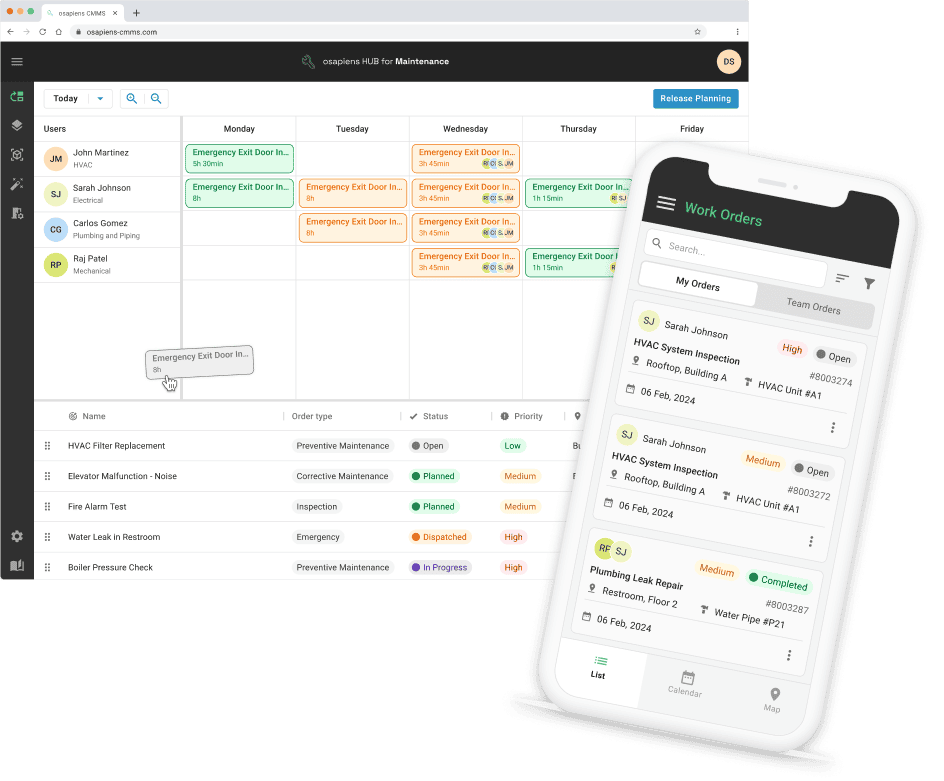
Technicians receive work orders directly on their mobile devices, confirm task completion through digital checklists, and the audit trail writes itself with every sign-off.
-
For plants already running SAP PM, the osapiens HUB adds the mobile execution layer without replacing SAP as the system of record: master data, work orders, material consumption, and cost center assignments remain in SAP, while the operative workflows move to a system technicians will actually use.
-
Work order assignment is manual or assisted through the planning and scheduling board, where dispatchers and maintenance managers handle tasks with full visibility of team availability and qualifications.
-
Every completed work order is timestamped, signed off, and permanently retrievable: when an auditor asks for 12 months of inspection records, that is a filtered export, not a day of manual spreadsheet reconciliation.
More than 350 freemium customers have started exactly this way. osapiens HUB is operational within 1 to 3 weeks as a standalone deployment. For organizations with SAP integration requirements, the certified connector has a typical implementation window of 4 to 12 weeks, significantly shorter than a conventional enterprise CMMS rollout, without a dedicated IT project team.

Pradeep Dalal, Product Director – Planning & Execution
★ ★ ★ ★ ★CONA Services
“Working with osapiens has been a positive experience for our company. Their innovative solutions and exceptional support have not only met but exceeded our expectations, paving the way for a successful partnership.”
A PM Schedule Becomes a Process With osapiens HUB for Maintenance
The gap between a preventive maintenance schedule that exists on paper and one that a team actually follows comes down to execution infrastructure: clear task instructions, realistic workload sizing, digital tracking, and the ability to measure and adjust over time. Getting those elements right is how a maintenance team moves from firefighting mode to genuinely predictable operations.
osapiens HUB for Maintenance gives maintenance managers the tools to close that gap without abandoning SAP or launching a multi-year IT project. Start with the assets that matter most. Get operational in weeks. Build the audit trail from day one.
See how much maintenance time per work order your team can reclaim
Managing PM schedules without a reliable audit trail means every audit is a reconstruction project. osapiens HUB for Maintenance tracks completion in real time and keeps every record retrievable, without replacing SAP.
Start without an IT project
FAQ
What should a preventive maintenance schedule include for a manufacturing plant?
A complete schedule includes a full asset inventory with criticality rankings, a task list with attached SOPs per asset, maintenance triggers (time-based, usage-based, or condition-based), clearly assigned responsibilities, a digital completion tracking mechanism, and a defined review cadence.
Why do preventive maintenance schedules fail even when they look good on paper?
Most failures trace to one of three root causes: the schedule is too rigid (calendar-only intervals), too complex (no criticality prioritization, creating unsustainable workloads), or not digitally tracked (no audit trail, no way to surface missed or late tasks).
What is the difference between a fixed and a floating preventive maintenance schedule?
A fixed schedule triggers on a predetermined calendar date regardless of when the previous task was completed. A floating schedule triggers a set interval after the last task’s completion date. Fixed works well for regulatory deadlines; floating better reflects real operational patterns.
How do maintenance managers track PM schedule compliance?
PM compliance is the percentage of scheduled tasks completed on time, not just completed. Reliable tracking requires a CMMS that records the scheduled date, completion date, and responsible technician per work order. Without this, the distinction between “done” and “done on time” is invisible.
How long does it take to build an effective preventive maintenance programme?
Most teams see initial structure within 60 to 90 days. A full transition from reactive to proactive maintenance typically takes 6 to 12 months. Starting with the top 20 to 30% of critical assets, rather than everything at once, produces significantly more durable results.
Start using osapiens for free
Improve your uptime, extend the life of your equipment, and simplify work order management.
Book a demo
ENTERPRISE CAPABILITIES
- SAP ECC & S/4HANA Certified
- Infor & MS Dynamics
- Microsoft Entra ID / Okta
- ISO 27001 & 9001
- EU Cloud · Data Sovereignty
- Development, Test, and Production Environments
- Multi-Entity & Multi-Site
- Power BI Integration
- Audit Trail & Compliance
Related content
January 1, 2026
Die Casting Machine Maintenance Checklist – Tasks, Best Practices & Digital Execution
January 1, 2026
Circuit Breaker Maintenance Checklist – Tasks, Tips & Template
January 1, 2026
Commercial Building Maintenance Checklist – Tasks, Systems & Digital Execution
January 1, 2026
Plumbing Maintenance Checklist – Tasks, Components & Digital Execution

October 8, 2026
CMMS Software for Food and Beverage Manufacturing

January 12, 2026
SAP S/4HANA Migration: Complete Guide for a Successful ERP Transition
January 1, 2026
Injection Mold Maintenance Checklist – Tasks, Systems & Digital Execution
January 1, 2026
Concrete Mixer Truck Maintenance Checklist – Tasks, Safety & Digital Execution
January 1, 2026
Uninterruptible Power Supply Maintenance Checklist – Tasks, Safety & Digital Execution
January 1, 2026
Automatic Screw Machine Maintenance Checklist – Tasks, Components & Digital Execution
January 1, 2026
Milling Machine Maintenance Checklist – Tasks, Best Practices & Digital Execution
January 1, 2026