

Blog

Daniel Schwarz, osapiens Expert | 18. September 2026 | Lesezeit 13 min.
For forty years, maintenance software did one thing well: it recorded what happened. Work orders were filed, inspections were logged, assets were tagged. But when a technician stood in front of a broken machine and asked what was wrong, the software had nothing to say. The shift we are building toward is a system that does not just capture the work: it senses, plans, and guides it. Most companies are still at Stage 1. We are already at Stage 2, and Stage 3 is within reach.
See how osapiens HUB handles both









TRUSTED BY LEADING COMPANIES




ENTERPRISE-READY
 SAP Certification
 ISO 27001
 EU Hosting
 Entra ID & Okta
 Multi-Entity
Table of Contents
- Key Takeaways
- Why Maintenance Teams Are Searching for “AI Maintenance Software” Right Now
- What a Traditional CMMS Actually Does
- Expert tip from osapiens
- Which Approach Is Right for You? Four Options Compared
- How to Choose the Right Approach for Your Team
- osapiens HUB for Maintenance: The AI-Ready CMMS Alternative to “Both”
- FAQ
Every few years, a new software category arrives with the promise of transforming maintenance. Right now, that category is AI maintenance software. CMMS vendors are slapping AI labels on dashboards, standalone tools are promising autonomous repairs, and heads of maintenance are left trying to figure out whether they need to buy something new, replace what they have, or simply wait for the dust to settle. The question most buyers are actually asking is not which technology is better. It is whether the choice between a CMMS and an AI maintenance tool is even real. What if the dichotomy itself is the problem?
Key Takeaways
-
Traditional CMMS: records work orders, schedules preventive maintenance, and manages assets, but does not diagnose problems or decide what to do next.
-
Standalone AI tools: add a knowledge and diagnostic layer, but still need a CMMS underneath them to function reliably.
-
Spreadsheets and fragmented records: what most maintenance teams still run on. AI bolted onto that foundation produces unreliable outputs, not intelligence.
-
osapiens HUB for Maintenance: combines a full CMMS with three live AI agents, already at Stage 2 of the maintenance maturity model, where agents handle the routine and people stay in command of the exceptions. No second platform, no integration layer.
Why Maintenance Teams Are Searching for “AI Maintenance Software” Right Now
Two structural pressures are making this conversation urgent, and neither of them will ease on its own. A large share of maintenance teams still run their operations on spreadsheets, not as a temporary workaround, but as standard practice. AI tools that promise to “transform maintenance” on top of that foundation are building on sand.
Pressure 1: Scale is outpacing maintenance capacity
Global Fortune 500 companies lose $1.4 trillion annually to unplanned equipment downtime, equivalent to 11% of total revenues, according to Siemens’ True Cost of Downtime report (2024). The assets that need maintaining keep growing. The teams managing them are not growing at the same rate.
Pressure 2: The knowledge drain is accelerating
According to Eurobarometer, 42% of European SMEs report they cannot find qualified maintenance technicians, making it the most commonly cited skills shortage across the continent. The problem is not just headcount. When an experienced technician retires, decades of asset-specific knowledge leave with them. Which pump tends to run hot after a certain load. Which sensor reading actually signals a problem versus background noise. That knowledge lives in someone’s head, and a traditional CMMS has no mechanism to capture or surface it.
This is not a story about technology adoption. It is about a widening gap between the assets that need maintaining and the people trained to maintain them, and the growing recognition that traditional software was never designed to close it.
What a Traditional CMMS Actually Does
A traditional CMMS has done its job well for forty years, and that job deserves an honest description before discussing what it cannot do.
Where a traditional CMMS delivers value:
-
Work order creation, tracking, and completion. The operational record of every maintenance task.
-
Preventive maintenance scheduling, whether time-based, meter-based, or condition-triggered.
-
Asset registry: manufacturer, serial number, location, maintenance history, documentation.
-
Spare parts inventory tracking and procurement workflows.
-
Compliance documentation: audit trails, sign-off records, inspection history.
Where a traditional CMMS stops:
-
It does not diagnose. When a technician opens a work order, the CMMS tells them what was done last time. It does not tell them what is wrong right now.
-
It does not answer “how do I fix this?” at the point of repair. That answer lives in a manual, a colleague’s memory, or nowhere at all.
-
It does not capture tribal knowledge. If the institutional memory of how a specific asset behaves belongs to one technician, it leaves when they do.
-
It does not improve from experience. The same failure next month generates the same manual effort as this month.
This is the gap that “AI maintenance software” is trying to fill. The question is whether a separate product is the right way to fill it, or whether a modern CMMS already does both.
Expert tip from osapiens
For forty years, maintenance software did one thing well: it recorded what happened. Work orders were filed, inspections were logged, assets were tagged. But when a technician stood in front of a broken machine and asked what was wrong, the software had nothing to say. The shift we are building toward is a system that does not just capture the work: it senses, plans, and guides it. Most companies are still at Stage 1. We are already at Stage 2, and Stage 3 is within reach.
Daniel Schwarz, osapiens Expert
Which Approach Is Right for You? Four Options Compared
The choice is not really AI vs. CMMS. Here is how the four most common approaches actually stack up.
| osapiens HUB (AI-ready CMMS) | Standalone AI Tool | Traditional CMMS | Spreadsheets + Basic CMMS | |
|---|---|---|---|---|
| Work order management | Yes (agent-drafted) | No | Yes | Manual |
| PM scheduling | Yes | No | Yes | Manual |
| Asset registry and lifecycle | Yes | No | Yes | Fragmented |
| Condition-based failure detection | Yes | Yes | Partial | No |
| Diagnosis at point of repair | Yes (Co-Pilot on mobile) | Yes | No | No |
| Self-improving from closed jobs | Yes (coming next) | Partial | No | No |
| SAP integration | Yes (SAP-certified) | No | Varies | No |
| Single platform | Yes | No | Yes | No |
osapiens HUB for Maintenance: The CMMS That Already Has AI Built In
osapiens HUB for Maintenance combines the operational foundation of a full CMMS with AI agents that are live today, not on a roadmap. Three agents are already running:
-
The Maintenance Frontdesk Agent turns any incoming signal, whether an email, a sensor alert, or a phone call, into a clean, structured ticket.
-
The Work Order Drafter Agent takes that ticket and produces a complete work order: task, parts required, skill set, estimated time.
-
The Maintenance Co-Pilot, running on mobile at the point of repair, draws on the full asset history and every available manual to answer the technician’s question in plain language.
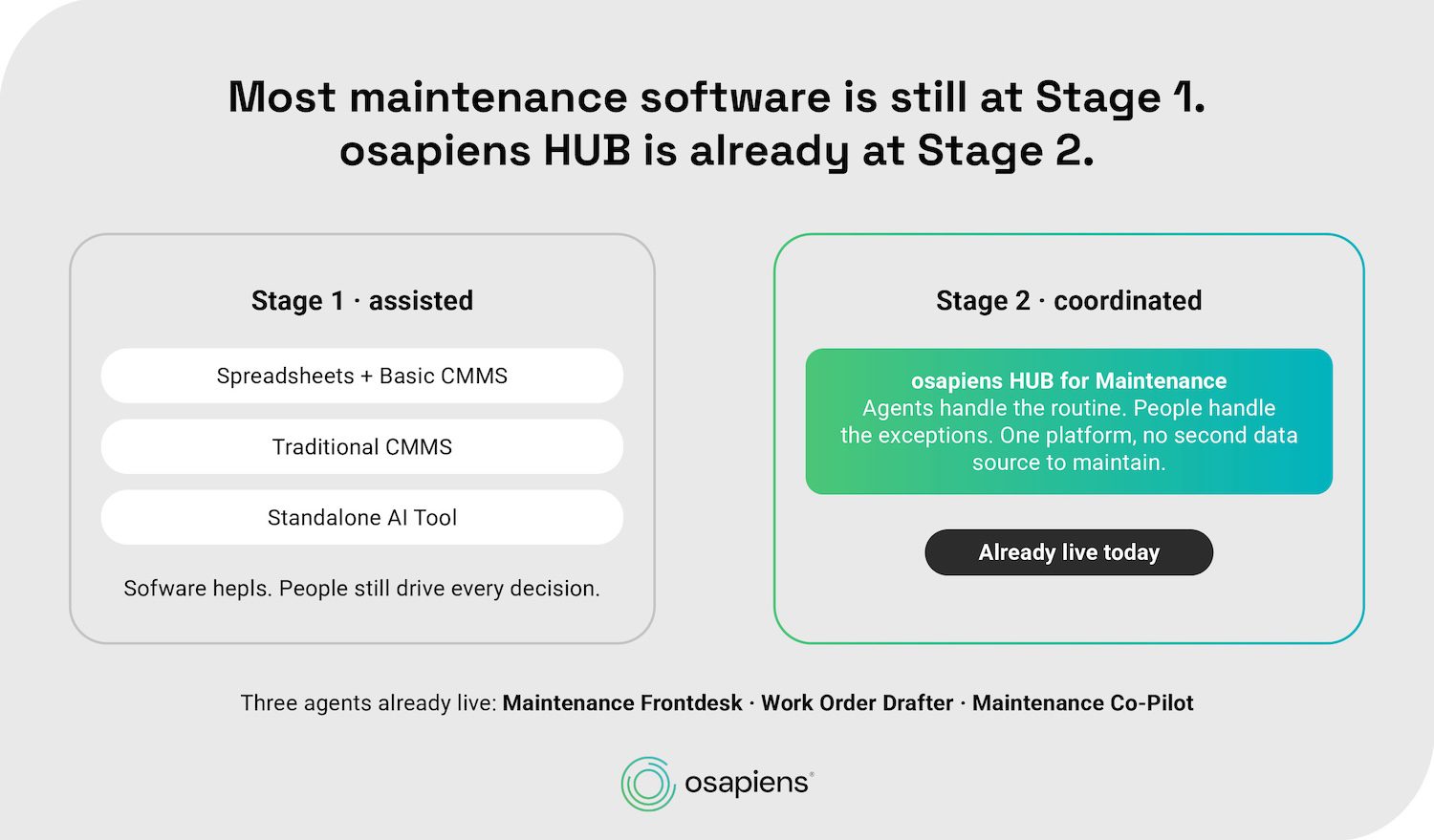
This is Stage 2 of a three-stage maturity model. Most of the industry is still at Stage 1, where software helps and people drive every decision. osapiens HUB is already at Stage 2, where agents and people work in sync: agents handle the routine, people handle the exceptions. Stage 3, where the system runs itself, is on the roadmap.
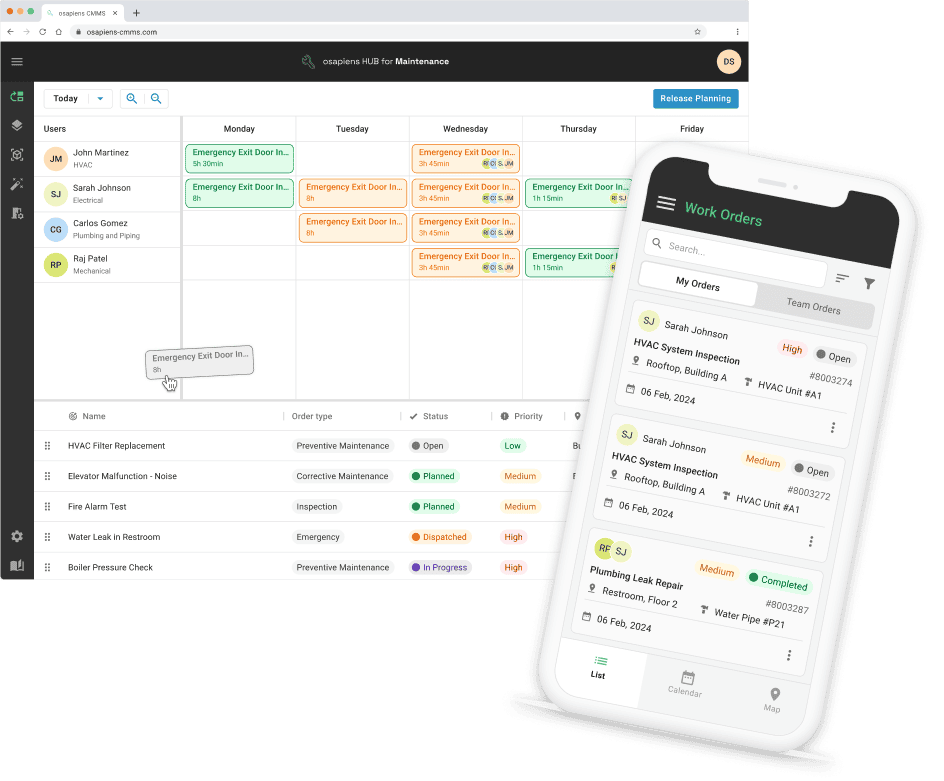
Best for: Maintenance and production teams moving away from spreadsheets or overly complex SAP PM, who want AI capabilities without buying a second product or managing two data sources.
Compared to a traditional CMMS: The operational foundation is the same, work orders, asset registry, PM scheduling, spare parts, compliance. What changes is that AI agents now draft, route, guide, and learn, all on the same data.
Compared to a standalone AI tool: The AI runs on the same structured data as the CMMS. No integration layer, no duplicate records, no second login, no risk that the AI is drawing on stale or inconsistent information.
Strengths:
-
SAP-certified integration: the osapiens HUB extends SAP PM rather than competing with it
-
Mobile-first UX built for the shopfloor, not a desktop dashboard
-
Implementation in 1 to 3 weeks as a standalone deployment; 4 to 12 weeks with SAP integration
Limitations:
-
Not an EAM: does not cover full asset lifecycle from procurement to decommission
-
Not suited for teams with strict on-premise deployment requirements
Before you buy a second platform, ask one question. Check whether your CMMS already has condition-based workflows, agent-assisted work order drafting, and mobile knowledge access at the point of repair. If it does, you may already be at Stage 2 without knowing it. If it doesn't, the cost of adding a standalone AI tool to a weak data foundation is real: the AI output is only as reliable as the records underneath it.
Standalone AI Tools: More Diagnostic Power, but No Data Foundation
Standalone AI maintenance tools add a knowledge and diagnostic layer on top of an existing CMMS. The proposition is real: a technician can ask a question about an asset and get a verified answer drawn from repair history, manuals, and engineering notes, rather than spending twenty minutes searching or calling a colleague.
Best for: Teams with a well-maintained, consistently used CMMS who want to add diagnostic AI capability without a platform migration.
Compared to a traditional CMMS: Adds the point-of-repair guidance and knowledge capture that no traditional CMMS provides. Still requires two platforms, two contracts, and an integration layer between them.
Strengths:
-
Targeted capability uplift without replacing an existing CMMS
-
No platform migration required
-
Can be faster to deploy for teams with a stable CMMS already in place
Limitations:
-
AI quality is directly tied to CMMS data quality. Inconsistent records, parallel spreadsheets, or incomplete work order history produce unreliable AI outputs
-
Two platforms means two contracts, two support relationships, and one integration that needs maintaining
-
Total cost of ownership accumulates over time
Traditional CMMS: The Record-Keeping Baseline Without Intelligence
A traditional CMMS does exactly what it was designed to do: structure maintenance work, schedule preventive tasks, and create an auditable record. For teams in early stages of digitalization, moving from Excel or paper to a structured CMMS is still a meaningful step forward.
Best for: Teams that need to establish structured work order management and PM scheduling before addressing AI. Getting the data foundation right first is a legitimate priority.
Compared to the AI-augmented alternatives: Provides the operational record without the diagnostic or knowledge layer. Adding AI later means either upgrading the CMMS or buying a separate tool.
Strengths:
-
Established, well-understood category with a clear implementation path
-
SAP PM integration available in enterprise variants
-
Strong compliance and audit trail capabilities
Limitations:
-
No diagnostic capability: the CMMS records what happened, not what to do
-
No knowledge capture: tribal knowledge continues to leave with departing technicians
-
Knowledge drain accelerates as the workforce ages and turnover increases
Spreadsheets and a Basic CMMS: The Hidden Cost of Standing Still
This entry is not a recommendation. It is here because the majority of maintenance teams are still operating this way, and the cost of staying here is worth naming explicitly. A basic CMMS used alongside spreadsheets, email chains, and paper checklists means no structured knowledge capture, no diagnostic capability, and no foundation for AI to build on. Any AI tool layered on top of fragmented data produces noise, not insight.
Strengths:
-
Zero migration effort
-
Familiar tools that require no training
Limitations:
-
Knowledge drain accelerates as experienced workers retire or move on
-
No path to AI-readiness without first fixing the data foundation
-
AI bolted onto spreadsheets produces unreliable outputs, not operational intelligence
How to Choose the Right Approach for Your Team
Five criteria that determine the right fit for your team.
Do you have clean, consistent asset and work order data?
AI is only as reliable as the data underneath it. If your maintenance records live across a CMMS, several spreadsheets, and a folder of PDFs, the priority is consolidating that foundation before adding any AI layer. For a large share of teams, that is still the starting point. Buying a standalone AI tool does not fix a data problem, it reveals it.
Are you running SAP PM and need to keep it?
Many enterprise maintenance teams have SAP PM as a non-negotiable constraint. A mobile-first CMMS with certified SAP integration adds the operational layer that SAP PM was never built for: shopfloor usability, real-time technician guidance, and mobile work order completion. Standalone AI tools rarely integrate at the depth SAP environments require.
How urgent is the knowledge drain problem?
If experienced technicians are retiring or turning over at a rate that is noticeable, the ability to capture and surface institutional knowledge becomes a primary criterion, not a nice-to-have. Maintenance software for manufacturing teams makes this tractable at scale. An AI-ready CMMS captures that knowledge in the same system where work orders are created and closed. A standalone AI tool can surface knowledge, but only if that knowledge was structured and stored somewhere in the first place.
What is your implementation capacity?
A standalone CMMS plus a standalone AI tool means two procurement processes, two implementations, one integration project, and two ongoing vendor relationships. osapiens HUB as a standalone deployment takes 1 to 3 weeks. With SAP integration: 4 to 12 weeks. A full enterprise EAM implementation is measured in months to years.
Where do you want to be in three years?
Most teams are at Stage 1 today: software helps, people drive every decision. osapiens HUB is already at Stage 2, where agents and people work in sync. Stage 3, the autonomous CMMS where the system runs itself, is the direction the industry is heading. Choosing a platform already at Stage 2 means building toward that future rather than migrating to a new platform again when AI becomes standard.
Before you buy a second platform, ask one question. Check whether your CMMS already has condition-based workflows, agent-assisted work order drafting, and mobile knowledge access at the point of repair. If it does, you may already be at Stage 2 without knowing it. If it doesn't, the cost of adding a standalone AI tool to a weak data foundation is real: the AI output is only as reliable as the records underneath it.
osapiens HUB for Maintenance: The AI-Ready CMMS Alternative to “Both”
The question “do you need AI maintenance software and a CMMS?” contains a built-in assumption: that they are two different things. For a growing category of modern CMMS platforms, that assumption no longer holds.
osapiens HUB for Maintenance runs three AI agents today. The Maintenance Frontdesk Agent processes any incoming signal into a structured ticket. The Work Order Drafter Agent creates the complete work order before a planner touches it. The Maintenance Co-Pilot guides the technician through the repair on mobile, drawing on the full asset history and every available document. Two more agents are in development: a Work Order Dispatcher that will suggest the right routing for each job, with dispatchers confirming exceptions, and a Work Order Reviewer that will close the loop and feed what it learned into the next job.
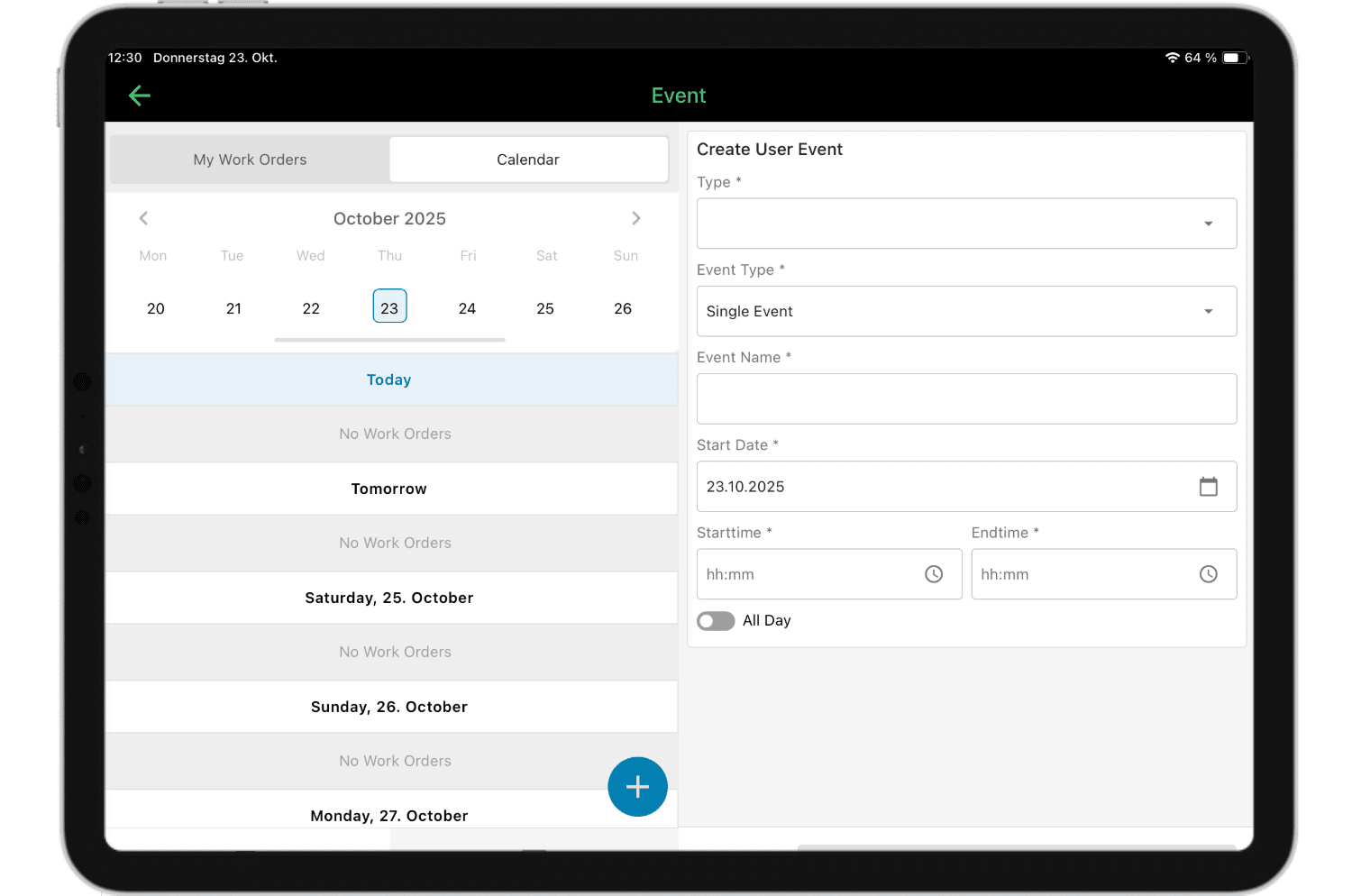
This is what Stage 2 looks like in practice: agents drive the routine, people stay in command of the exceptions. Customers including Coca-Cola North America, with 35 plants and 1,500 users, have built their maintenance operations on this foundation.
The false choice between AI maintenance software and a traditional CMMS has a straightforward answer: choose a CMMS that already has AI built in, and you will not need to answer it again.
Your maintenance data is already there. Let it work for you.
Every work order your team has ever closed, every asset history entry, every completed PM. That is the data foundation AI needs to function. osapiens HUB puts agents on top of it.
Start with a free demo
FAQ
Can AI replace a CMMS entirely?
No. AI adds a knowledge and diagnostic layer, but it requires structured data to function. That data comes from a CMMS. An AI tool without one underneath it draws on spreadsheets, email threads, and memory. The output reflects the input.
Does a Head of Maintenance need both a CMMS and a separate AI maintenance tool?
For teams whose CMMS already has AI built in, a separate tool adds cost and complexity without adding capability. The more useful question is whether your current CMMS can be upgraded, or whether switching to an AI-ready platform is the more cost-effective path.
Do I still need a CMMS if I already use SAP PM?
SAP PM handles enterprise-level maintenance orders and ERP integration, but it was not built for the shopfloor. Mobile usability is limited, and there are no AI-native features. A mobile-first CMMS with SAP integration fills that gap: work orders are created and closed in the field, data flows back into SAP, and AI agents can access the full asset history.
What is the difference between preventive and predictive maintenance software?
Preventive maintenance is scheduled in advance, based on time intervals or meter readings, and any CMMS manages this. Predictive maintenance is condition-based: sensors monitor asset health in real time, and AI identifies patterns that indicate an emerging failure before it happens. An AI-ready CMMS supports both, scheduling preventive tasks and surfacing condition-based alerts from the same platform.
How long does it take to implement an AI-ready CMMS?
osapiens HUB deploys as a standalone system in 1 to 3 weeks, without a dedicated IT project team. With SAP integration, implementation takes 4 to 12 weeks. This compares favorably to traditional enterprise EAM deployments, which typically run for several months and require significant IT resource. Teams that have delayed digitalization because of implementation concerns tend to find the actual timeline shorter than expected.
What happens to maintenance knowledge when experienced technicians retire?
In a traditional CMMS, it disappears. Work orders record what was done, not how the decision was made or what the technician noticed. An AI-ready CMMS captures repair history, documented fixes, and asset-specific patterns in a searchable form – accessible to every technician at the point of repair, not just the ones who were there when the problem first appeared.
Start using osapiens for free
Improve your uptime, extend the life of your equipment, and simplify work order management.
Book a demo
ENTERPRISE CAPABILITIES
- SAP ECC & S/4HANA Certified
- Infor & MS Dynamics
- Microsoft Entra ID / Okta
- ISO 27001 & 9001
- EU Cloud · Data Sovereignty
- Development, Test, and Production Environments
- Multi-Entity & Multi-Site
- Power BI Integration
- Audit Trail & Compliance
Related content
January 1, 2026
Industrial Turbines Maintenance Checklist – Tasks, Tips & Digital Execution
January 12, 2026
SAP S/4HANA Migration: Complete Guide for a Successful ERP Transition in 2026
March 24, 2026
Multi-Site CMMS Software: How to Choose the Right Platform and Roll It Out Across Every Site
January 1, 2026
Vehicle Maintenance Checklist – Essential Tasks, Compliance Tips & Digital Template
January 1, 2026
CFR 21 Part 11 Compliance Maintenance Checklist – Tasks, Validation & Audit Readiness
January 1, 2026
Oxygen Concentrator Maintenance Checklist – Tasks, Documentation & Digital Execution
January 1, 2026
Capacitor Bank Maintenance Checklist – Tasks, Safety & Digital Execution
January 1, 2026
Solar Panel Maintenance Checklist: What to Inspect & When
January 1, 2026
Drilling Machine Maintenance Checklist – Tasks, Tips & Digital Execution
January 1, 2026
Plasma Cutting Machine Maintenance Checklist – Tasks, Safety & Digital Execution
January 1, 2026
Chilled Water Pump Maintenance Checklist – Tasks, Tips & Template
January 1, 2026