

CMMS

Florian Bartholomäus, osapiens Expert | 21. September 2026 | Lesezeit 11 min.
If you're trying to work out whether your team actually needs a dedicated CMMS, don't start with a feature checklist. Ask your maintenance team where they lose the most time re-entering the same information twice: that's usually the clearest signal of where a mobile execution layer pays for itself first. Teams that already run SAP PM often find the answer sits in the gap between the office screen and the shop floor, which is exactly the layer osapiens HUB for Maintenance is built to close.
Start Without an IT Project












TRUSTED BY LEADING COMPANIES




ENTERPRISE-READY
 SAP Certification
 ISO 27001
 EU Hosting
 Entra ID & Okta
 Multi-Entity
Table of Contents
- Key Takeaways
- What an ERP Maintenance Module and a CMMS Are Each Built to Do
- Expert tip from osapiens
- Inside SAP PM: What an ERP’s Maintenance Module Can (and Can’t) Do in the Field
- CMMS + ERP in Practice
- CMMS vs. ERP Maintenance Module: How to Decide What Your Team Actually Needs
- Where osapiens HUB for Maintenance Fits Next to Your SAP System
- CMMS vs. ERP Maintenance Module: osapiens HUB Ends the Debate for Your Team
- FAQ
Picture a budget review where a maintenance manager proposes a new CMMS, and someone on the call asks the obvious question: we already have SAP, so why add another system? That question sits at the center of the CMMS vs. ERP maintenance module debate, and it deserves a real answer, not a sales pitch. An ERP’s maintenance module and a dedicated CMMS are not fighting for the same job. One manages resources and compliance from the office; the other keeps technicians moving in the field. Understanding where each one actually works changes how you evaluate the decision.
Key Takeaways
-
Different jobs, not rival products: An ERP maintenance module is built for financial and procurement control, while a CMMS is built for field execution.
-
Desktop-first design breaks down in the field: Transaction codes and limited offline capability create real technician-adoption gaps, even with a modern interface layer on top.
-
Multi-site scale is the real trigger: Multi-site rollouts, mobile technician adoption, and audit-trail requirements are what usually push a team toward a dedicated CMMS.
-
osapiens HUB for Maintenance closes the gap: It runs as a SAP-certified CMMS layer alongside SAP PM, mobile-first for technicians and connector-based for IT.
What an ERP Maintenance Module and a CMMS Are Each Built to Do
An ERP maintenance module and a dedicated CMMS often get compared as if they were competing for the same job. They are not.
ERP Maintenance Module (e.g., SAP PM)
An ERP maintenance module, like SAP PM, inherits its parent system’s design: transactional, procurement-and-finance-first, built to sit inside a system whose primary job is resource and cost control.
Dedicated CMMS
A dedicated CMMS is built for a different job entirely: field execution. Its core unit is the work order, from creation through mobile execution to closeout, with asset history captured at the exact point where the work happens.
The two typically diverge along the same lines:
-
Interface and users: back-office, transaction-driven screens built for planners and controllers vs. a mobile-first interface built for technicians in the field.
-
Core unit of work: cost centers and purchase requisitions vs. the work order itself.
-
Depth vs. reach: an ERP module carries procurement, accounting and regulatory-compliance functionality a CMMS typically doesn’t, while a CMMS goes deeper on the maintenance workflow itself, technician scheduling and asset-level history.
The functional split is what to design for, not which system is better. The terminology overlap doesn’t help matters either. SAP PM itself functions as a CMMS within the broader SAP ecosystem, which is one reason the “do we need a CMMS if we already have SAP” question comes up as often as it does. What it doesn’t include natively are the mobile-first, technician-facing capabilities a dedicated CMMS is built around from day one.
Neither system is incomplete. Each was designed to solve a specific, narrower problem, and that is exactly why so many maintenance teams end up running both.
Expert tip from osapiens
If you're trying to work out whether your team actually needs a dedicated CMMS, don't start with a feature checklist. Ask your maintenance team where they lose the most time re-entering the same information twice: that's usually the clearest signal of where a mobile execution layer pays for itself first. Teams that already run SAP PM often find the answer sits in the gap between the office screen and the shop floor, which is exactly the layer osapiens HUB for Maintenance is built to close.
Florian Bartholomäus, osapiens Expert
Inside SAP PM: What an ERP’s Maintenance Module Can (and Can’t) Do in the Field
SAP PM is the maintenance module built into SAP’s ERP, and it is the concrete example this article uses because most readers evaluating a CMMS vs. ERP maintenance module question are already running SAP. Teams on Oracle, Dynamics 365, or another ERP hit the same functional pattern under a different module name; the mechanism described here is general, SAP PM is simply the most common named instance.
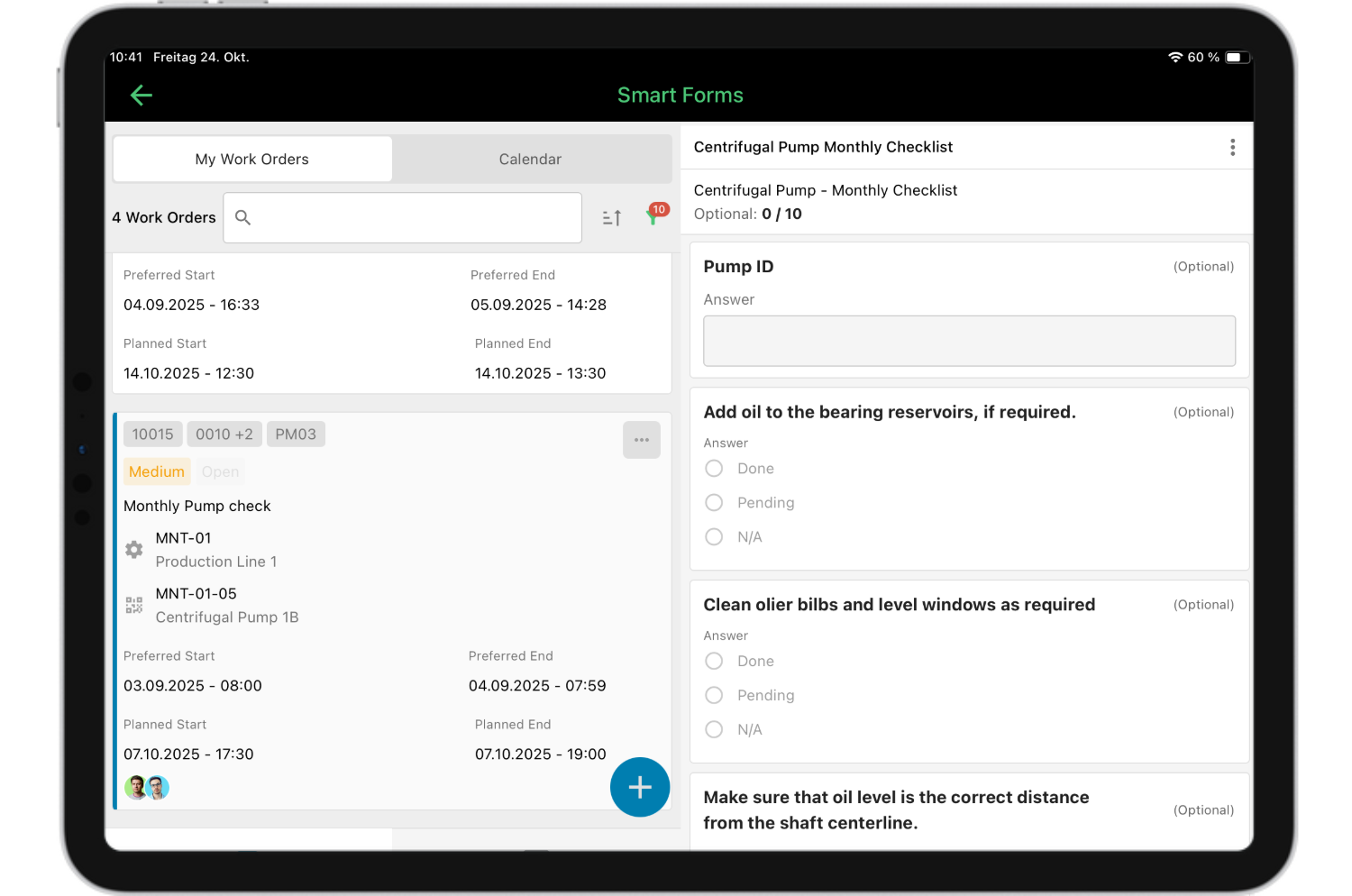
SAP PM’s interface was built for commercial and back-office users, not for a technician standing at a piece of equipment. Even where SAP Fiori adds a more modern layer on top, the same barriers tend to show up in practice:
-
Complex screens designed for back-office workflows, not shop-floor use.
-
Transaction-code navigation that adds steps between a technician and a closed work order.
-
Limited offline capability once a technician moves out of network range.
A technician who has to hunt through several transaction codes to close a single work order will avoid the system whenever they can.
The practical effect shows up in the data itself. When technicians avoid the ERP screen, they fall back to manual re-entry and paper workarounds, and the ERP’s own maintenance records quietly lose accuracy over time. That erosion is qualitative but persistent; it compounds every time a work order gets closed from memory instead of from the field.
See how much time frees up per work order
Manual re-entry and incomplete technician data don't just slow down one work order, they compound across every shift. See what happens when execution moves off paper and desktop screens and back into the field.
Recover Time Lost Per Work Order
CMMS + ERP in Practice
Across asset-intensive industries, the same pattern repeats: SAP, or whatever ERP a company runs, stays the system of record for cost, budget and compliance data, while a dedicated CMMS becomes the mobile execution layer technicians actually use. The CMMS syncs data back into the ERP; it does not replace it.
A peer-reviewed case study on implementing a mobile Plant Maintenance module within an SAP ERP system found a reduction of over 85% in the average time to report equipment failures, which minimized production losses and led to faster, less complex repairs. The result came from a mobile execution layer added on top of SAP data, not from replacing SAP.
SAP certification is what makes that coexistence low-risk for IT. A certified connector goes through SAP’s own Integration Certification Center and keeps working through SAP updates. An uncertified custom API integration carries no such guarantee and can break on the next release. That single distinction is why IT teams treat “SAP-certified” as a real qualifying question, not a marketing label.
SAP remains the system of record. The CMMS is the field-execution layer. That is the resolution to the tension built up so far: the two systems were never competing for the same job in the first place.
Case in Point: Coca-Cola North America Runs Both
Coca-Cola North America runs maintenance across 35 plants with 1,500 users on osapiens HUB, layered on top of its existing SAP landscape. The company did not replace SAP to get there.

Pradeep Dalal, Product Director – Planning & Execution
★ ★ ★ ★ ★CONA Services
“Working with osapiens has been a positive experience for our company. Their innovative solutions and exceptional support have not only met but exceeded our expectations, paving the way for a successful partnership.”
It added a mobile execution layer that syncs back into the systems it already relies on for cost and compliance data, which is exactly the pattern this kind of multi-site rollout follows at enterprise scale.
See maintenance without the data gaps
Seeing a proof point at 35 plants is one thing, picturing it for your own team is another. See what running SAP and a mobile execution layer together actually looks like day to day.
Close Your Maintenance Data Gaps
CMMS vs. ERP Maintenance Module: How to Decide What Your Team Actually Needs
The right answer to the CMMS vs. ERP maintenance module question depends less on company size or industry, and more on who inside the organization is asking it. Three roles tend to raise the objection, and each one needs a different kind of reassurance.
If you’re the one who has to approve the integration
An IT or SAP-basis stakeholder wants clear answers on three points before signing off:
-
The connector’s certification status.
-
Whether it runs on the ABAP stack without middleware.
-
Whether it changes the SAP basis configuration at all.
A certified connector, reviewed through SAP’s own Integration Certification Center, answers all three without asking IT to take anything on faith.
If you own the budget and the uptime number
A plant manager or budget owner cares about ROI, not features. The numbers that matter to this reader:
-
Technician adoption rates.
-
How complete the reporting data actually is.
-
What unplanned downtime costs per incident.
A CMMS earns its budget line by making the data behind those numbers reliable in the first place.
If you run the day-to-day maintenance team
A maintenance leader lives with the operational pain described earlier:
-
Desktop-first screens technicians avoid.
-
No offline mode in the field.
-
Documentation gaps that surface right when an audit asks for them.
Mobile usability and offline capability are not nice-to-haves for this reader, they are the entire point.
Where osapiens HUB for Maintenance Fits Next to Your SAP System
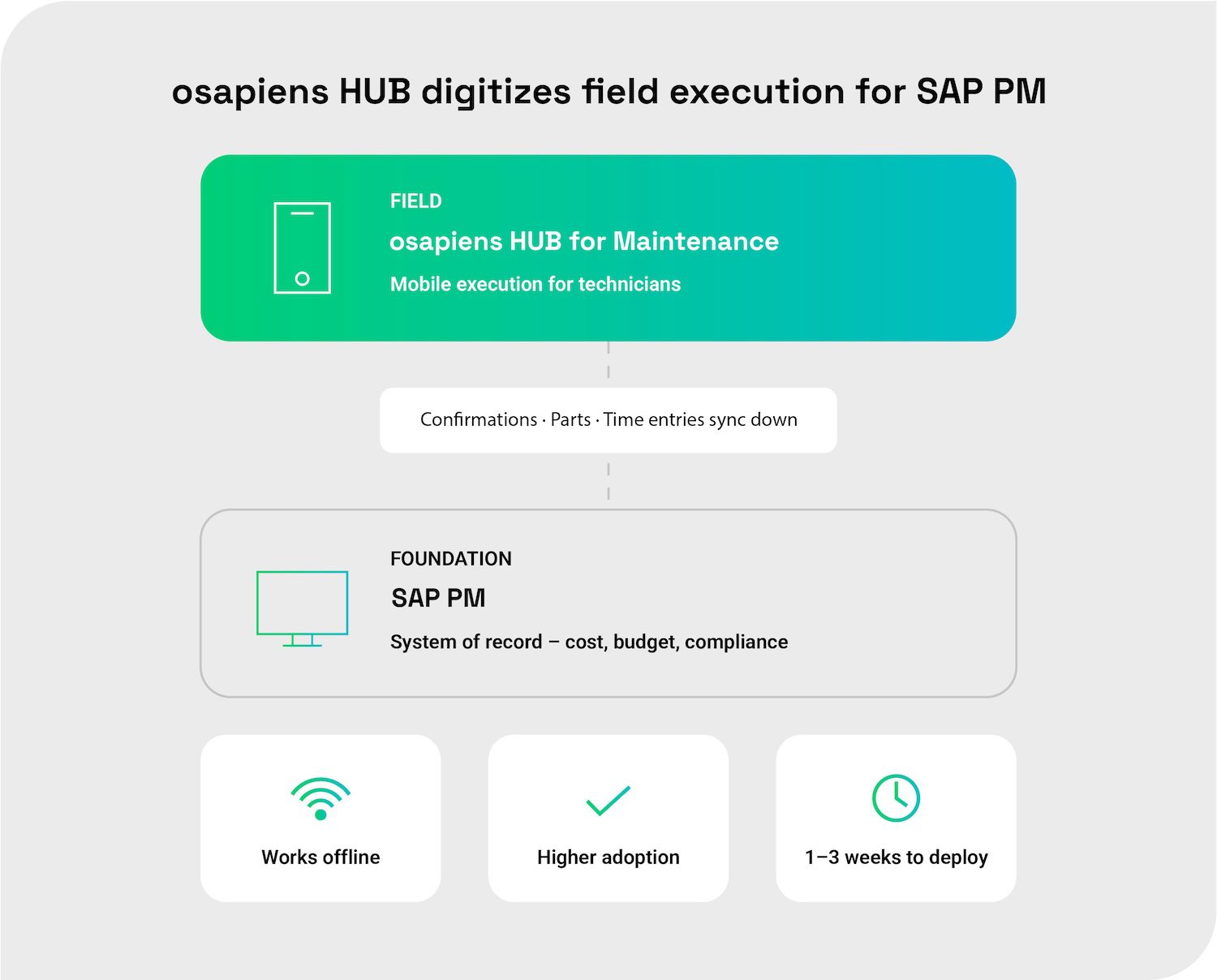
osapiens HUB for Maintenance runs as a SAP-certified connector directly in the ABAP stack, on NetWeaver or S/4HANA, with no middleware layer in between. Data syncs back into SAP automatically in both directions, so the ERP stays the system of record without technicians ever touching its screens:
-
Technician confirmations
-
Parts consumption
-
Time entries
Implementation timelines stay predictable: 1–3 weeks for a standalone deployment, 4–12 weeks when SAP integration is part of the rollout. Either path is shorter than a classic enterprise platform rollout, and neither requires a dedicated IT project team.
Teams that aren’t running SAP yet don’t need to wait. osapiens HUB for Maintenance works fully standalone, and connecting it to SAP later is a configuration step, not a rebuild. The same connector supports the preventive maintenance workflows most teams set up first, before expanding into the rest of the platform.
Assigning work to technicians stays manual or assisted through the planning board; dispatchers and planners keep the final call, and the system supports the decision rather than making it automatically.
CMMS vs. ERP Maintenance Module: osapiens HUB Ends the Debate for Your Team
This article opened with an objection: we already have SAP, why add a CMMS? That question was never really about CMMS versus ERP. It was about who executes the work order once it reaches the field.
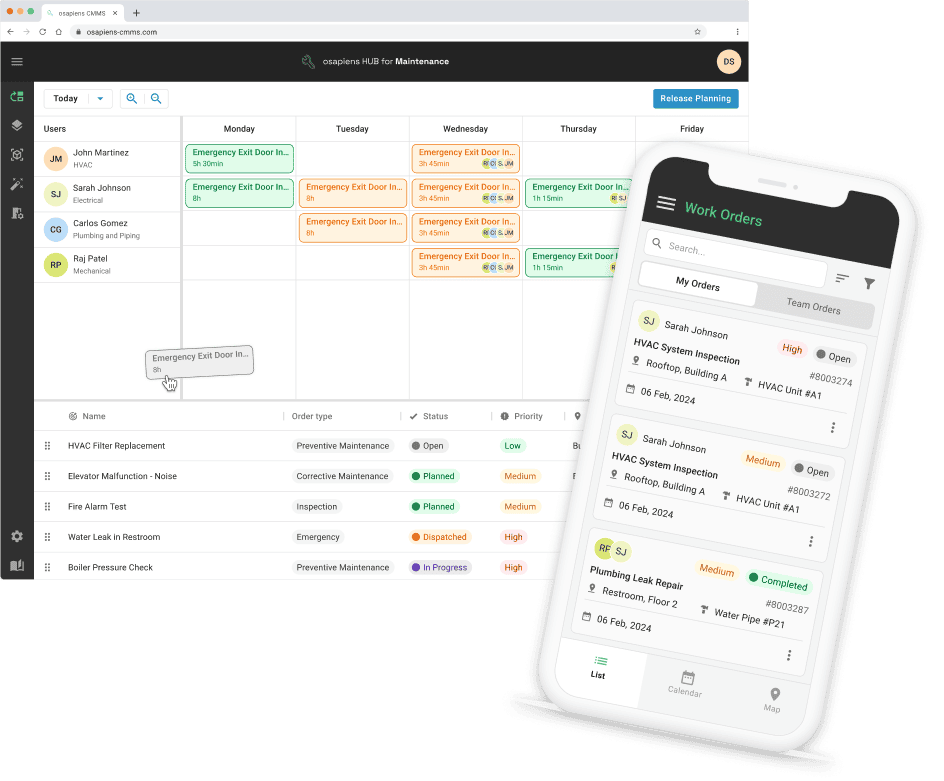
Resolved at the organizational level, the debate settles into three wins at once: IT keeps its system of record intact, budget owners get a trackable story on adoption and downtime and the maintenance team gets a tool built for the shop floor. osapiens HUB for Maintenance makes all three true at once, so your team can stop debating the question and start running both systems the way they were meant to work together.
Run SAP and maintenance together, without the gaps
See your own SAP environment reflected in osapiens HUB for Maintenance: one source of truth, higher uptime and a mobile execution layer your technicians will actually use.
Elevate Your Asset Uptime
FAQ
Does osapiens HUB replace an ERP’s maintenance module like SAP PM, or run alongside it?
No, osapiens HUB for Maintenance does not replace SAP PM or another ERP’s maintenance module. SAP PM, or the equivalent module in another ERP, remains the system of record for cost, budget and compliance data. osapiens HUB for Maintenance is the mobile-first execution layer technicians use in the field, syncing confirmations, parts consumption and time entries back into SAP automatically. The two systems run side by side, each doing the job it was built for.
Does adding a CMMS next to SAP require IT security sign-off?
Most IT teams will want to confirm the connector’s certification status before opening any access. osapiens HUB for Maintenance uses a SAP-certified connector that runs directly in the ABAP stack, on NetWeaver or S/4HANA, with no middleware layer involved. Because the connector is reviewed through SAP’s own Integration Certification Center, it keeps working through SAP updates without requiring a fresh security review every release cycle. That certification status is usually the fastest way to satisfy an IT sign-off request.
How long does it take to add osapiens HUB next to an existing SAP system?
A standalone deployment of osapiens HUB for Maintenance typically takes 1–3 weeks. Adding the SAP integration extends that to 4–12 weeks, depending on the scope of the rollout. Both timelines are shorter than a classic enterprise platform implementation, and neither requires a dedicated IT project team. Many teams start standalone to get technicians onto the platform quickly, then connect it to SAP once integration priorities are clear, following the same phased implementation approach osapiens uses for every rollout.
Is a separate CMMS worth it for a plant manager if maintenance is already included in the SAP license?
Licensing coverage and usable functionality are different questions. A plant manager’s real cost drivers are technician adoption, how complete the maintenance data actually is and what unplanned downtime costs per incident, not whether a module is technically included in an existing license. A CMMS earns its budget line by making those numbers reliable, because a maintenance module technicians avoid using produces incomplete data no matter what the license covers.
What’s the real difference between an ERP maintenance module and a CMMS for a maintenance manager’s daily work?
In daily practice, the difference shows up on the shop floor. An ERP maintenance module is typically desktop-first, with transaction-code navigation and limited offline capability, even when a modern interface layer sits on top. A dedicated CMMS is built mobile-first: technicians create and close work orders on a phone or tablet, work offline when needed and capture asset history at the point of work instead of re-entering it later from memory.
Start using osapiens for free
Improve your uptime, extend the life of your equipment, and simplify work order management.
Book a demo
ENTERPRISE CAPABILITIES
- SAP ECC & S/4HANA Certified
- Infor & MS Dynamics
- Microsoft Entra ID / Okta
- ISO 27001 & 9001
- EU Cloud · Data Sovereignty
- Development, Test, and Production Environments
- Multi-Entity & Multi-Site
- Power BI Integration
- Audit Trail & Compliance
Related content
January 1, 2026
Surface Grinding Machine Maintenance Checklist – Tasks, Tips & Template
January 1, 2026
Screw Compressor Maintenance Checklist – Tasks, Intervals & Digital Execution
July 27, 2026
Salesforce Field Service Alternative: Top 7 Comparison 2026
January 1, 2026
Press Machine Maintenance Checklist – Tasks, Tips & Template

December 19, 2025
Best MRO Asset Management Software: Top 6 Comparison 2026
January 1, 2026
Busbar Maintenance Checklist: What to Inspect & When
August 19, 2025
Version 3.17: The Next-Gen Cockpit for Your Maintenance
January 1, 2026
Power Cable Maintenance Checklist – Tasks, Tips & Template
January 1, 2026
Capacitor Bank Maintenance Checklist – Tasks, Safety & Digital Execution
January 1, 2026
Crane Maintenance Checklist – Essential Tasks, Safety Checks & Digital Template
January 1, 2026
Overhead Crane Maintenance Checklist: What to Inspect & When
January 1, 2026