

Blog

Florian Bartholomäus, osapiens Expert | 2. November 2026 | Lesezeit 13 min.
Lockout/tagout procedures live in binders, Excel files, and printed checklists while the actual work orders run somewhere else entirely. When an OSHA inspector or an insurance adjuster asks for proof that energy isolation was verified before every service job, that split becomes a liability. osapiens HUB for Maintenance runs LOTO as enforced steps inside the work order itself, so the safety record and the maintenance record are the same record.
Lock in audit-ready LOTO documentation










TRUSTED BY LEADING COMPANIES




ENTERPRISE-READY
 SAP Certification
 ISO 27001
 EU Hosting
 Entra ID & Okta
 Multi-Entity
Table of Contents
- Key Takeaways
- Why LOTO on Paper and Excel Breaks Exactly When It Matters
- The 6 Best LOTO Software Options for Maintenance Teams
- What to Look for in LOTO Software for Maintenance Teams
- The Benefits of Digital LOTO in Your Maintenance Workflow
- LOTO Software: Strongest Where Safety Lives Inside the Work Order
- FAQ
A technician is about to open a panel on an energized machine. The LOTO procedure is a laminated card on a ring, the permit is a paper slip, and the sign-off happens later, maybe. For maintenance teams that already run their work orders digitally, adding a dedicated LOTO tool usually creates a second silo next to the CMMS, and the strongest option on this list is the system that enforces isolation steps inside the work order itself. So which tools actually enforce isolation steps before work begins, and which ones just store PDFs?
Key Takeaways
- OSHA 1910.147 is a program, not a form: the standard requires documented, machine-specific energy control procedures, employee training, and periodic inspections, so any tool must produce audit-ready records that go beyond stored checklists.
- LOTO enforcement beats LOTO documentation: the rule protects technicians before work begins, so software that lets a work order start before isolation steps are confirmed misses the point of the standard.
- Dedicated LOTO tools are procedure writers: most of the market focuses on authoring and storing procedures, which leaves the maintenance workflow itself untouched.
- Paper and Excel fail at the tenth incident, not the first: according to a study by osapiens and Fraunhofer IML, 59% of maintenance teams in the UK and Europe still use Excel or Google Sheets as their primary tool, and 41% use paper forms.
- osapiens HUB enforces LOTO inside the work order: safety and LOTO requirements are mandatory fields on emergency work orders, and mandatory checklist fields block work order completion until critical safety steps are confirmed.
Why LOTO on Paper and Excel Breaks Exactly When It Matters
Almost no maintenance team lacks a LOTO process. What they lack is a visible one: binders at the machine, permits on paper, sign-offs in a logbook, and work orders in a separate system. Florian Bartholomäus, osapiens expert, describes the pattern this way: many teams that come to them “have not the problem that they don’t have processes, but that their processes are not visible.” In his words, that is exactly the point “where Excel and WhatsApp stop working: not at the first failure, but at the tenth.”
The failure signals are consistent across plants:
- Media breaks create duplicate data entry, version chaos, and gaps in documentation.
- Responsibilities are agreed verbally and cannot be traced later.
- Incidents get reported multiple times because nobody knows they are already captured.
The audit moment is where this becomes expensive. OSHA’s Control of Hazardous Energy standard (29 CFR 1910.147) requires an energy control program built on documented, machine-specific procedures, employee training, and periodic inspections, including group lockout and continuity of protection across shift changes. Handwritten logbooks and spreadsheets are not a defensible basis when a citation, an insurance claim, or a product-liability question arrives. And citations are not rare: lockout/tagout ranked fourth among OSHA’s most-cited standards in fiscal year 2025, with 2,177 citations.
What a compliant procedure must contain follows directly from the standard: shutdown steps, isolation of every energy source, placement and removal of locks or tags, and verification that isolation is effective before work begins. Most “LOTO software” on the market, however, is procedure-authoring software. It writes and stores the document. What maintenance teams increasingly need is the enforcement layer: isolation steps that live in the same system that runs the work order, so the step cannot be skipped and the record cannot be lost.
Make Every Isolation Step Provable
Audit-ready LOTO records should come out of the system your technicians already work in, not from a second tool that someone has to reconcile by hand. When the permit, the isolation verification, and the sign-off are fields on the work order itself, every completed order carries its own evidence.
Turn your LOTO records into audit evidence
The 6 Best LOTO Software Options for Maintenance Teams
The entries below split into two groups: dedicated LOTO and procedure tools built primarily for EHS document management, and systems that run LOTO as part of the maintenance workflow itself. All six were selected because they are frequently shortlisted by maintenance and EHS teams evaluating lockout tagout software in 2026.
| Tool | LOTO procedure handling | Maintenance workflow integration | Mobile execution and enforcement | Audit trail and sign-off | Pricing |
|---|---|---|---|---|---|
| osapiens HUB for Maintenance | Mandatory LOTO fields inside the work order | Full CMMS, SAP-certified bidirectional sync, standalone capable | Mobile-first, QR scan opens the correct checklist, mandatory fields block completion, offline capable | Dual sign-off with date and time, automatic protocol, complete audit trail | Freemium, usage-based and enterprise packages |
| autoLOTO | Mobile LOTO procedure automation | Standalone LOTO, no CMMS | Mobile-first field execution | Procedure records | On request |
| LOTOBuilder | Procedure authoring and records management | None documented | Not a maintenance execution tool | Records management | $97 per user per year, $17 read-only |
| SafetyCulture | Inspection checklists used for LOTO | General inspection platform, not a CMMS | Mobile inspections at scale | Inspection records | Free up to 10 seats, Premium from $24 per seat per month |
| Sphera Isolation Management | Multi-phase isolation planning | Enterprise control-of-work platform | Status tracking of isolation points | Work and authorization history | On request |
| OXMAINT | Claims the full 29 CFR 1910.147 chain | AI-powered CMMS | Vendor-reported | Verification record, annual audit scheduler | On request |
osapiens HUB for Maintenance, LOTO Inside the Work Order
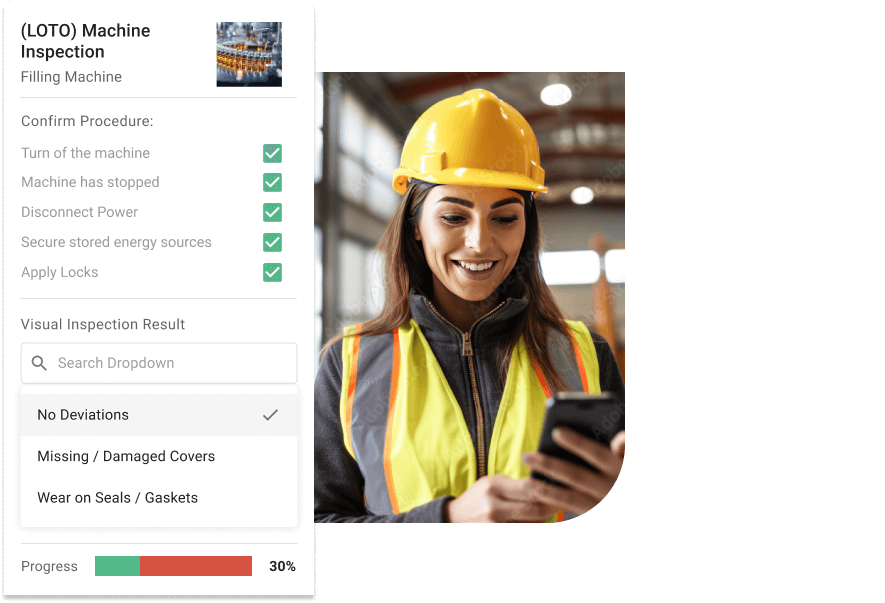
osapiens HUB for Maintenance is the CMMS that treats LOTO as part of the work order, not as a separate document library. It is built for maintenance teams in SAP-run or multi-site plants that want isolation steps enforced where the work order already lives.
Best for: maintenance teams in SAP-run or multi-site plants.
The configuration follows the documented work order template structure. On emergency and reactive orders, safety and LOTO requirements are mandatory fields of the order type, alongside downtime start, urgency flag, and root cause. The documented field structure covers the LOTO procedure reference, whether a permit is required (yes/no), and the PPE specification. In regulated environments, the sign-off field is not optional: it is the audit trail, with dual sign-off from technician and supervisor, each with date and time. The template covers these fields out of the box, including failure codes, LOTO requirements, spare parts tracking, and a structured sign-off section.
The lifecycle runs mobile-first: a QR code scan at the asset opens the correct checklist for exactly that machine, with its maintenance history and open notifications. The order is created and prioritized, approved by the maintenance lead or dispatcher in seconds rather than at the next office visit, planned and assigned, executed against the mobile checklist, and closed with a digital signature. Mandatory fields block completion when something is missing, conditional logic adapts the checklist to what the technician enters, and critical safety steps must be completed before work begins. The app works offline in areas without stable Wi-Fi, generates the protocol automatically after completion, and with SAP PM it synchronizes bidirectionally: orders from SAP open in the CMMS, checklist results flow back. Approval workflows use the same mechanics osapiens demonstrated at its 3.20 release: status flows, roles, and an approval step with a mandatory reason, shown on procurement and carrying the same logic for work orders and checklists.
Strengths:
- No second system: LOTO steps, permit, and sign-off live in the work order record itself.
- Enforcement before work begins: mandatory fields and critical safety steps block completion.
- SAP-certified bidirectional integration without replacing SAP PM; standalone deployment in 1–3 weeks, with SAP integration in 4–12 weeks.
Limitations: osapiens HUB has no dedicated visual LOTO procedure-authoring studio; it enforces and documents the record of the hazard assessment but does not replace the employer’s obligation to perform that assessment; and a LOTO-named published demo case is not yet available.
Pricing: freemium entry, usage-based packages, and individual enterprise packages.
According to osapiens, a study with Fraunhofer IML found that 59% of maintenance teams in the UK and Europe still use Excel or Google Sheets as their primary tool and 41% use paper forms; in the same context osapiens reports 25% fewer faulty work orders and 17 minutes saved per work order through smart forms with validations at order creation. At 200 orders per month, that is more than 56 hours of technician time, per osapiens’ own figures.
Run LOTO Where Your Work Orders Already Run
If your team scans a QR code, opens the right checklist and cannot close the order until isolation is confirmed, LOTO compliance stops being a documentation project. The approval step takes seconds, and the audit trail builds itself.
Enforce isolation steps on every work order
autoLOTO, Mobile-First LOTO Automation
autoLOTO is a mobile platform that digitizes hazardous energy isolation procedures at the worksite, and it holds US patent 11,876,372 for its approach.
Best for: EHS teams that need field execution of LOTO procedures on mobile devices.
Strengths: mobile procedure execution at the point of work; a clear automation focus; a patent-backed method for hazardous energy management.
Limitations: it is a standalone LOTO tool, separate from the maintenance and CMMS workflow; integration depth with ERP work orders is not documented in the reviewed material.
Pricing: on request.
LOTOBuilder, Procedure Authoring With Records Management
LOTOBuilder focuses on guided authoring and management of lockout/tagout procedures with records management attached.
Best for: EHS managers who need a procedure library and audit records fast.
Strengths: transparent per-user pricing at $97 per standard user per year and $17 per read-only user per year, plus a fully functional 30-day free trial without a credit card.
Limitations: the focus is authoring and storage; execution and enforcement live in a different system from the maintenance work orders the technicians actually use.
Pricing: as above.
SafetyCulture, Inspection Platform at Scale
SafetyCulture is a general inspection and checklist platform that many EHS teams use for LOTO and safety inspections.
Best for: EHS teams running broad inspection programs beyond maintenance.
Strengths: a generous free tier for up to 10 seats with five active templates; Premium at $24 per seat per month billed annually or $29 monthly; the vendor reports more than 50 million inspections across more than 80 countries.
Limitations: it is a general inspection platform without a maintenance core; LOTO checklists run parallel to work order execution, and asset history or ERP sync is not its core.
Pricing: as above.
Sphera Isolation Management, Enterprise Control of Work
Sphera’s Isolation Management capability sits inside a broader enterprise control-of-work platform aimed at process industries.
Best for: large process-industry sites with formal permit-to-work regimes.
Strengths: multi-phase isolation planning for different stages of work, individual isolation points with dependencies between them, energy-source visibility, status tracking, and complete work and authorization history.
Limitations: enterprise weight and scope; SpheraCloud holds 4.0 out of 5 from 11 reviews on G2 at platform level, not a dedicated rating of the isolation product.
Pricing: on request.
OXMAINT, AI-Powered CMMS With a LOTO Module
OXMAINT is an AI-powered CMMS whose vendor states that it runs the full 29 CFR 1910.147 chain on one platform, including a procedure library, isolation point register, group-lockout box mirror, verification record, and annual audit scheduler.
Best for: teams evaluating CMMS-integrated LOTO across several vendors.
Strengths: LOTO positioned inside a CMMS, the same category logic this article argues for.
Limitations: the claims are vendor self-reported, and the depth of enforcement (mandatory fields blocking completion, sign-off structure) is not documented at the level of the other reviewed material.
Pricing: on request.
💡 Good to Know
Editorial Tip: Start With the Work Orders, Not the Procedures. Before you shortlist any LOTO tool, map where your LOTO steps actually touch the work order: the permit, the isolation verification, and the sign-off. If the answer is “inside the work order,” a dedicated procedure-authoring tool adds a second system that someone has to keep in sync. If your LOTO program is purely document management, a dedicated tool may be all you need. In more than 80 conversations with prospects at Maintenance München, the question the osapiens team heard most often was how the tool differs from the large established providers, and the answer that resonated was that it fits into the existing system landscape without adding another tool.
What to Look for in LOTO Software for Maintenance Teams
1. Enforcement, not just documentation. Does the system prevent a work order from starting or closing before isolation steps are confirmed? The standard protects technicians before work begins, so a tool that only records what happened afterwards addresses the paperwork and leaves the hazard itself untouched.
2. Work order integration. Do LOTO steps live in the same record as the maintenance work order, or in a parallel system that creates a media break? Every additional system is another place where the safety record and the maintenance record can drift apart.
3. Audit trail quality. Timestamps, photos, dual sign-off from technician and supervisor, and complete history per asset: this is what survives an OSHA inspection or an insurance claim. A logbook entry written after the fact does not.
4. Mobile and offline execution. Technicians work at the machine, not at a desk. If the checklist cannot run without stable Wi-Fi, it will not run in half the plant, and the paper workaround returns.
5. System openness. If you run SAP PM, the tool should connect to it, certified and bidirectionally, without replacing it. If you do not, it should work standalone. The tool’s job is to connect your landscape.

The Benefits of Digital LOTO in Your Maintenance Workflow
- Isolation steps verified and recorded before work begins, on every order.
- One audit trail that serves both safety compliance and maintenance KPIs.
- No duplicate data entry between safety documents and work orders.
- Shift-change continuity: the record shows who locked out, who verified, who released.
- Inspection readiness without assembling binders and spreadsheets on short notice.
LOTO Software: Strongest Where Safety Lives Inside the Work Order
The question worth asking is not which tool writes the best procedures, but which system makes the isolation step impossible to skip. osapiens HUB for Maintenance positions LOTO as mandatory fields and enforced checklist steps inside the work order, with dual sign-off and a complete audit trail, SAP-certified and standalone capable. Your team decides how far automation goes, from assist to autopilot, and the system documents and enforces the record while the employer still owns the hazard assessment. For maintenance teams that want their safety evidence and their maintenance history in one place, that is the standard lockout tagout software should be held to.
Bring Your Asset Availability to a New Level
Every work order that enforces its own isolation steps is a work order that is ready for any audit, any insurance question, and any shift change. Start with the orders your team runs every day.
Digitalize your maintenance, one enforced step at a time
FAQ
What does OSHA 29 CFR 1910.147 require from maintenance teams?
The standard requires an energy control program: documented, machine-specific procedures, employee training, and periodic inspections. It also covers group lockout and continuity of protection across shift changes. Any software you use must produce audit-ready records of all three, going beyond stored checklists.
Can a CMMS replace dedicated LOTO software?
For most maintenance teams, yes. If LOTO steps are enforced as mandatory work order fields and checklist steps with structured sign-off, a separate procedure tool is unnecessary. Dedicated tools remain relevant when the LOTO program is purely document management with no maintenance workflow attached.
Do I still need a LOTO tool if my maintenance runs in SAP PM?
Not necessarily. osapiens HUB works as a SAP-certified, bidirectional extension that makes SAP PM mobile without replacing it: orders from SAP open in the CMMS, and checklist results flow back. It also runs standalone for teams without SAP.
Doesn’t osapiens HUB just add another tool to my landscape?
No. It is built to integrate into the existing system landscape, with a freemium entry and onboarding support included. The interface is designed so a technician finds their way without a supervisor walkthrough.
How do digital checklists actually enforce LOTO steps?
Mandatory fields block work order completion until they are filled, conditional logic adapts the checklist to what the technician enters, and critical safety steps must be completed before work begins. The app works offline, and the protocol is generated automatically at completion.
osapiens HUB for Maintenance
Learn how our CMMS solution improves your uptime, extends the service life of your equipment, and simplifies the management of your work orders.
Book demo
ENTERPRISE CAPABILITIES
- SAP ECC & S/4HANA Certified
- Infor & MS Dynamics
- Microsoft Entra ID / Okta
- ISO 27001 & 9001
- EU Cloud · Data Sovereignty
- Development, Test, and Production Environments
- Multi-Entity & Multi-Site
- Power BI Integration
- Audit Trail & Compliance
Related content
January 1, 2026
Booster Pump Maintenance Checklist – Tasks, Tips & Template
January 1, 2026
Concrete Mixer Truck Maintenance Checklist – Tasks, Safety & Digital Execution

July 14, 2025
Unlocking Operational Excellence Through Preventive Maintenance
January 1, 2026
Air Compressor Maintenance Checklist: Tasks, Tips & Template
January 1, 2026
CFR 21 Part 11 Compliance Maintenance Checklist – Tasks, Validation & Audit Readiness
January 1, 2026
Heat Pump Maintenance Checklist: What to Inspect, When & How

July 6, 2026
Work Order Template for Maintenance Teams
January 1, 2026
Band Saw Maintenance Checklist – Tasks, Tips & Template
January 1, 2026
Industrial Turbines Maintenance Checklist – Tasks, Tips & Digital Execution
January 1, 2026
MIG Welding Machine Maintenance Checklist – Tasks, Tips & Template
January 1, 2026
Pallet Jack Maintenance Checklist – Essential Tasks, Safety Checks & Digital Execution
January 1, 2026