

CMMS

Florian Bartholomäus, osapiens Expert | 11. March 2026 | Lesezeit 18 min.
Before you evaluate any reporting tool, ask yourself one question: does it show me why something failed or just that it did? The gap between those two answers is where most maintenance teams lose time, budget, and confidence in their data.
Stop exporting spreadsheets. Start making decisions.













TRUSTED BY LEADING COMPANIES




ENTERPRISE-READY
 SAP Certification
 ISO 27001
 EU Hosting
 Entra ID & Okta
 Multi-Entity
How do you turn thousands of work orders into one clear answer for leadership? Most maintenance leaders know the frustration: it’s Monday morning, and you’re pulling maintenance data from SAP, copying numbers from a spreadsheet, and cross-referencing a third system just to explain why downtime spiked last week. The right reporting tools inside a CMMS can eliminate that scramble entirely. The osapiens HUB for Maintenance was built for exactly this challenge, connecting work orders, costs, and asset performance in a single view.
Key Facts
- Reporting ≠ dashboards: Effective maintenance reporting connects work order data to asset performance, costs, and compliance. Charts on a screen without context don’t drive decisions.
- Data silos kill decisions: Fewer than 40 % of maintenance teams use dedicated KPI tools. Most still rely on spreadsheets and ERP exports that are outdated before they reach leadership.
- Context matters more than volume: The best maintenance software doesn’t just collect data. It links maintenance activities to business outcomes like downtime reduction, preventive maintenance performance and cost per asset.
- SAP integration is a differentiator: For organizations running SAP, SAP-integrated maintenance software eliminates manual data entry and ensures a single source of truth across systems.
- osapiens HUB for Maintenance combines advanced dashboards, multi-site reporting, and SAP-certified integration into one platform built for data-driven maintenance management decisions.
What Is Maintenance Reporting Software?
Maintenance reporting software is not a standalone product you can buy off the shelf. It’s a set of reporting capabilities embedded within CMMS software and EAM platforms. When maintenance managers search for maintenance reporting software, they’re really looking for a CMMS with strong analytics and reporting tools built in.
The quality of these features for preventive maintenance varies dramatically between platforms. Some only offer basic work order counts, while others deliver deep maintenance analytics. Choosing the right one depends on what you need reports to do: inform decisions, prove regulatory compliance, optimize maintenance costs or preventive maintenance compliance.
Why Maintenance Reporting Still Fails: Spreadsheets, Data Silos, and Blind Spots
Picture this: a maintenance manager exports data from SAP, copies work order logs from email into Excel, cross-references costs from the ERP, and spends hours building a report. By the time it reaches leadership, the numbers are already outdated. This isn’t an edge case. For most maintenance operations, it’s Monday morning.
The most common failure points follow a predictable pattern:
- Spreadsheet dependency: Manual data entry, version control issues, and formulas that break the moment someone edits a cell. Spreadsheets weren’t built to manage maintenance data at scale.
- Data silos between systems: Work orders live in one tool, asset data in SAP, and costs in the ERP. Nothing connects automatically, so every report requires manual reconciliation.
- Missing real-time visibility: Reports reflect last week’s reality, not today’s. Maintenance managers make decisions on stale data, and leadership gets a delayed picture of performance.
- No standardized KPIs: Every site defines “downtime” differently and preventive maintenance completion rates are tracked inconsistently, making cross-site comparison meaningless and benchmarking impossible.
According to the osapiens Industrial Maintenance Report, fewer than 40 % of maintenance organizations use dedicated dashboard or KPI tools. The rest rely on exports and workarounds. Understanding where reporting breaks down is the first step toward identifying the features that actually make a difference.
Expert tip from osapiens
Before you evaluate any reporting tool, ask yourself one question: does it show me why something failed or just that it did? The gap between those two answers is where most maintenance teams lose time, budget, and confidence in their data.
Florian Bartholomäus, osapiens Expert
What Features Should Maintenance Reporting Software Have?
Not every reporting feature delivers equal value. The difference between useful preventive maintenance software and noise comes down to a few core capabilities that connect daily operations to strategic decisions. Here’s what to prioritize when evaluating your options.
Real-Time Work Order Tracking
Real-time work order tracking means seeing the status of every open, in-progress, and completed task without refreshing a spreadsheet or waiting for someone to update a shared file. The best maintenance software lets you filter work orders by site, team, priority, or asset, giving maintenance managers immediate visibility into what’s happening across operations.
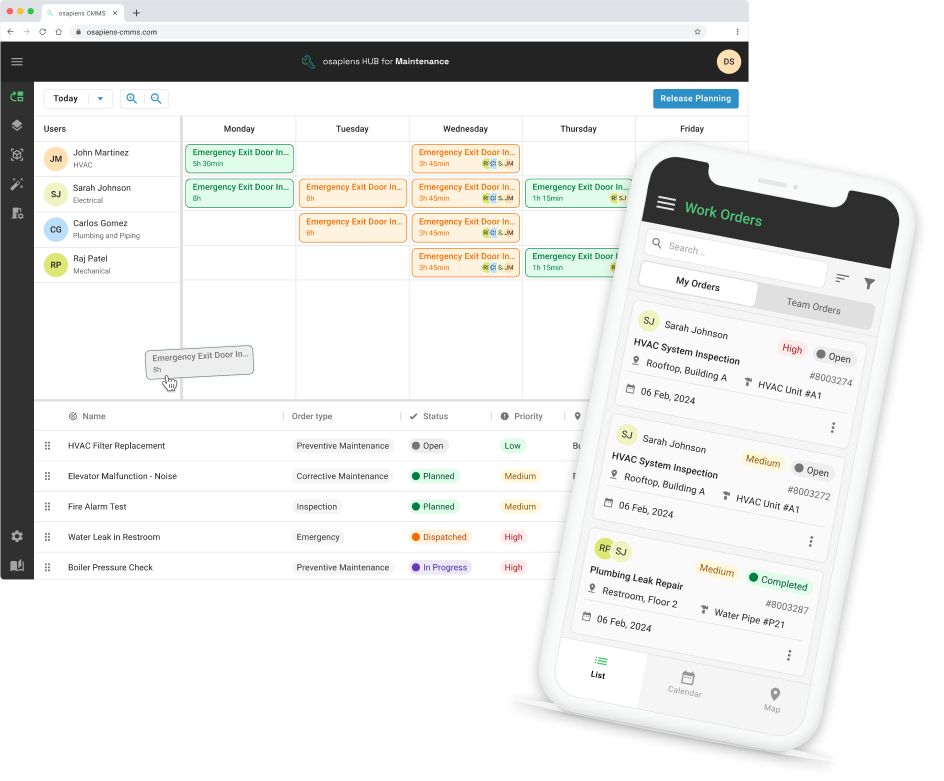
This matters because it enables you to spot bottlenecks the moment they form. If a backlog is building on a specific production line or maintenance requests are piling up at one location, you see it in real time. The osapiens HUB for Maintenance provides this through live dashboards accessible on both desktop and mobile, so managers can track work orders from anywhere.
Asset Performance & Downtime Analysis
Strong asset performance reporting tracks the metrics that directly impact equipment reliability: MTBF (mean time between failures), MTTR (mean time to repair), and the ratio of unplanned downtime to planned downtime. These numbers reveal which assets drain the most resources and where preventive maintenance is actually reducing failures.
Comparing asset performance across multiple sites or asset classes helps maintenance leaders identify patterns and allocate budgets more effectively. The osapiens HUB for Maintenance links downtime data directly to work orders and maintenance costs, providing a complete picture rather than isolated numbers. This connection turns raw data into actionable insights for extending asset life and reducing downtime.
Technician Productivity & Cost Tracking
Understanding where your maintenance budget goes requires tracking labor hours per work order, cost per asset, and technician utilization rates. This data is essential for resource planning, budget justification, and identifying where operational efficiency can improve. Effective cost tracking should cover:
- Labor cost per work order and per asset
- Parts consumption and inventory cost
- External contractor spend
- Budget variance (planned vs. actual)
Without this level of detail, maintenance departments struggle to justify investments or prove that preventive maintenance scheduling is delivering returns. The right CMMS software makes these numbers available automatically, eliminating manual data entry and spreadsheet reconciliation.
Compliance and Audit Trails
For regulated industries like pharma, energy, and food & beverage, reporting isn’t optional, it’s a legal requirement. Maintenance software needs to capture time-stamped task completions, e-signatures, inspection records, and exportable audit trails that satisfy regulatory compliance standards.
The osapiens HUB for Maintenance automatically documents every maintenance activity with timestamps and user attribution. This makes audit preparation straightforward rather than a multi-day scramble through paper records and disconnected systems. For pharmaceutical operations, it ensures that safety compliance and documentation meet the strictest industry standards.
Best Maintenance Reporting Software Compared
Choosing maintenance reporting software depends on how well it handles key features: reporting depth and custom KPI dashboards, SAP or ERP integration, scalability across multiple sites, mobile access for field teams, and ease of report customization. The comparison below focuses on platforms most relevant to mid-size and enterprise maintenance teams that need reporting to drive real operational decisions.
| Feature | osapiens HUB | MaintainX | UpKeep | IBM Maximo |
|---|---|---|---|---|
| Custom KPI Dashboards | ✅ Advanced, multi-site | ✅ Good, customizable | ✅ Visual, basic depth | ✅ Deep, complex setup |
| SAP-Certified Integration | ✅ Native, certified | ❌ No | ❌ No | ⚠️ Possible, complex |
| Multi-Site Benchmarking | ✅ Built-in | ✅ Available | ⚠️ Limited | ✅ Enterprise-grade |
| Mobile Reporting Access | ✅ Mobile-first | ✅ Strong | ✅ Strong | ⚠️ Functional, dated UX |
| Cost Tracking per Asset | ✅ Labor + Parts + Downtime | ✅ Good | ✅ Basic | ✅ Deep |
| Ease of Report Customization | ✅ No-code | ✅ Intuitive | ⚠️ Moderate learning curve | ❌ Requires technical expertise |
| Best For | SAP environments, mid-to-enterprise | Mobile-first teams | Smaller teams, visual dashboards | Large enterprise, complex assets |
* Comparison based on publicly available product information and user reviews.
The osapiens HUB for Maintenance bridges the gap between complex enterprise systems like IBM Maximo and simpler tools like UpKeep. It delivers enterprise-grade reporting and multi-site benchmarking through a modern, user-friendly interface, while its native SAP-certified integration eliminates the data silos and manual exports that slow down maintenance teams in SAP environments.
MaintainX: Mobile-First CMMS for Frontline Maintenance Teams
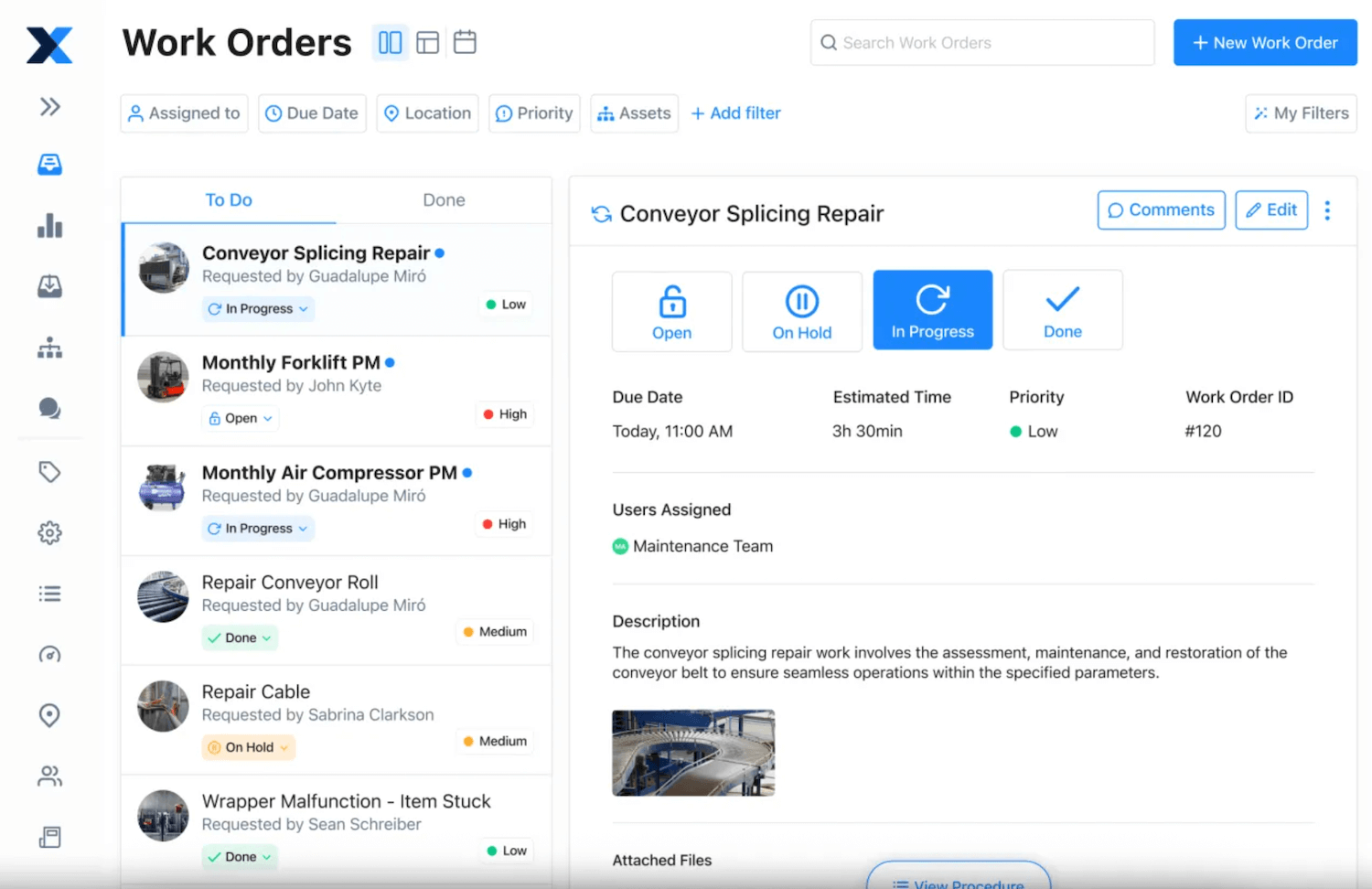
MaintainX is a US-based CMMS built primarily for frontline maintenance teams that need a fast, intuitive way to manage work orders and track basic reporting on mobile. The platform has gained strong traction among smaller operations and facilities teams moving away from paper or spreadsheets. Its strength lies in simplicity and speed of adoption, not in reporting depth or enterprise integration.
Key strengths:
- Intuitive mobile-first interface with native iOS and Android apps that allow technicians to create, update, and complete work orders directly from the shop floor, reducing administrative back-and-forth with the office.
- Visual dashboards with pre-built KPIs for work order volume, completion rates, and asset history that give maintenance managers a clear operational overview without requiring configuration or IT support.
- Fast onboarding with minimal setup, making it one of the quickest CMMS platforms to deploy for small to mid-size teams that need to get started without a lengthy implementation project.
Limitations:
- No certified SAP integration, meaning work order data, asset information, and maintenance costs don’t flow automatically into SAP PM. Every report that crosses the system boundary requires manual exports and reconciliation, creating exactly the data silos that reporting is supposed to eliminate.
- Reporting depth is limited for complex or multi-site operations. Teams that need cross-site benchmarking, custom KPI dashboards, or cost tracking at the asset level will quickly hit the ceiling of what MaintainX can deliver.
Best for: Mobile-first teams and smaller operations without SAP that prioritize ease of use and fast setup over deep reporting or enterprise integration.
Pricing: Free tier available; paid plans from $20 per user / month up to $65 per user / month; Enterprise pricing on request.
UpKeep: Visual Dashboards for Teams Getting Started with CMMS Reporting
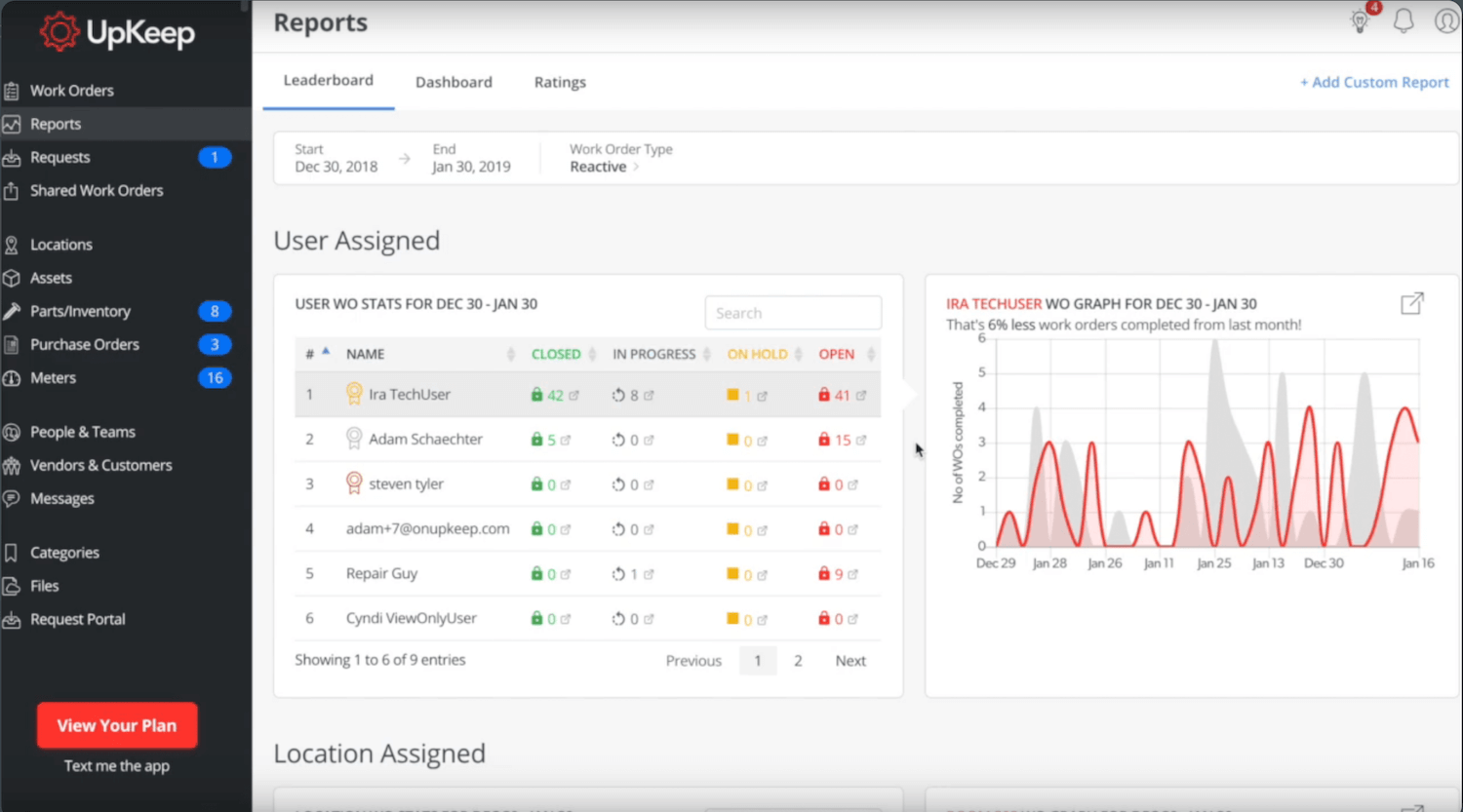
UpKeep offers clean visual dashboards and straightforward KPI tracking that work well for maintenance teams taking their first steps with dedicated software. Setup is fast and the interface requires little training, making it a popular choice for facilities and property management teams. For organizations that outgrow basic reporting or operate across multiple sites, however, its limitations become apparent quickly.
Key strengths:
- Out-of-the-box KPI dashboards covering work order completion rates, asset downtime, and basic cost tracking, giving maintenance managers immediate visibility without any configuration work.
- Strong mobile access via iOS and Android apps that support work order management, asset lookups, and photo documentation, making it a practical tool for technicians who need information at the point of work.
- Quick deployment with a low learning curve, allowing smaller maintenance teams to get up and running in days rather than weeks without relying on IT resources.
Limitations:
- Limited customization depth for more advanced reporting needs, with no no-code dashboard builder for teams that want to track KPIs beyond the pre-configured defaults.
- No certified SAP connectivity, which means maintenance data stays siloed from enterprise systems and requires manual exports for any report that needs to reflect costs or asset data from SAP.
- Multi-site benchmarking requires additional configuration that becomes increasingly cumbersome at scale, making it a poor fit for organizations managing maintenance across multiple locations.
Best for: Smaller maintenance teams in facilities and property management that need visual reporting without complex setup and don’t operate in an SAP environment.
Pricing: From $20 per user / month; Premium at $55 per user / month; advanced tiers on request.
IBM Maximo: Enterprise Asset Management for Large, Complex Operations
IBM Maximo is one of the most established enterprise asset management platforms on the market, with deep reporting capabilities and broad support for complex asset structures across industries. For large organizations with dedicated IT resources and long implementation horizons, it delivers a level of depth that few platforms match. That depth, however, comes at a cost: in complexity, implementation time, and day-to-day usability for technicians.
Key strengths:
- Enterprise-grade asset lifecycle management supporting detailed asset structures, maintenance strategies, work order processing, and inventory management across large and distributed asset portfolios, making it one of the most functionally complete EAM platforms available.
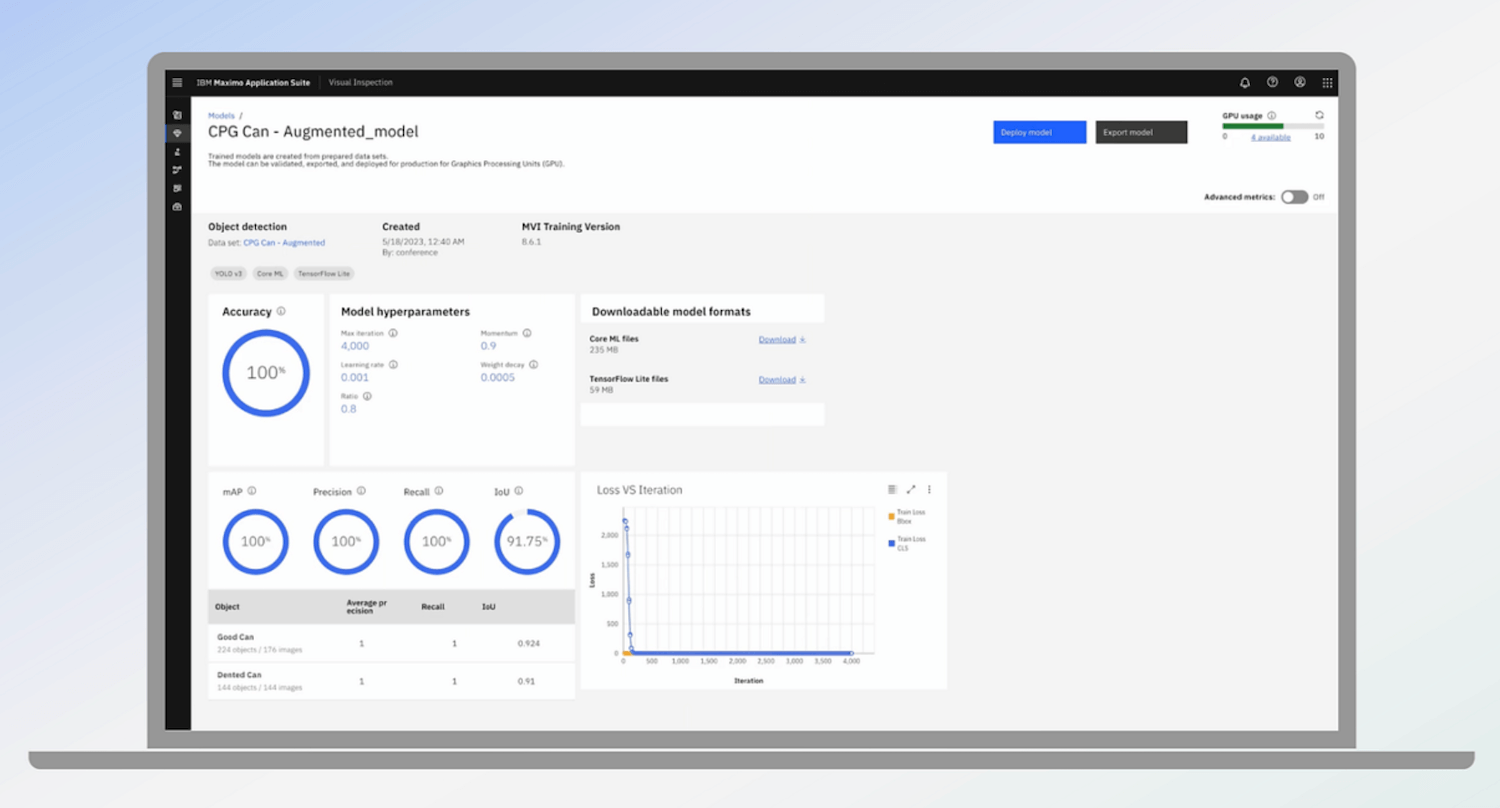
- Advanced analytics and reporting through built-in Cognos reporting, enabling real-time insights and customizable dashboards that display critical KPIs across complex operations with multiple asset classes and locations.
Limitations:
- Complex setup and configuration requiring specialized IT skills and extended implementation timelines, particularly for advanced analytics and custom integrations. For mid-size organizations without a dedicated IT team, this depth quickly becomes a barrier rather than an advantage.
- Higher total cost of ownership compared to modern CMMS platforms, both in licensing and in the ongoing IT resources required to maintain, customize, and update the system.
- Dated user interface that makes technician adoption a persistent challenge, with many organizations reporting that field teams revert to manual processes rather than navigating a system that wasn’t designed with usability in mind.
- SAP integration is technically possible but requires additional configuration effort and lacks the bidirectional real-time synchronization of a certified connector, which is a meaningful gap for organizations where SAP is the system of record.
Best for: Large enterprises with dedicated IT teams, complex asset portfolios across multiple industries, and the organizational resources to manage a long, complex implementation.
Pricing: Pricing on request. Based on publicly available market data, enterprise contracts are typically a significant investment but exact costs vary depending on deployment model, customization scope, and support requirements.
The osapiens HUB: SAP-Native CMMS with Enterprise Reporting
The osapiens HUB for Maintenance was built to close the gap that most CMMS platforms leave open: enterprise-grade reporting in a modern, user-friendly interface with certified SAP integration that works out of the box.
Where MaintainX and UpKeep stop at the CMMS boundary, and Maximo demands months of implementation work, the osapiens HUB connects natively to SAP PM while remaining fully functional as a standalone platform for teams without SAP. More than 2,000 organizations worldwide rely on the platform, including Coca-Cola across 35 North American facilities and Nordex managing 11,400 wind turbines globally.
Key strengths:
- SAP-certified integration with bidirectional real-time synchronization between the osapiens HUB and SAP PM, ensuring that asset master data, work orders, and cost postings stay consistent across both systems without manual exports or duplicate data entry.
- No-code dashboard customization that lets maintenance managers build and adjust KPI views without IT support, combined with built-in multi-site benchmarking that standardizes performance metrics across all locations for meaningful cross-site comparison.
- Mobile-first design with native iOS and Android apps that support full offline functionality, so technicians can complete work orders, checklists, and inspections in production environments without reliable internet connectivity.
- Fast implementation with typical timelines of 1–3 weeks for standalone deployment and 4-12 weeks including SAP integration – significantly shorter than traditional enterprise platforms and without the need for a dedicated IT project team.
- Transparent pricing with a free tier for up to 5 users, giving smaller teams access to enterprise-grade functionality without upfront investment and allowing organizations to evaluate the platform before committing to a broader rollout.
Limitations:
- Best suited for organizations with structured maintenance processes already in place. Teams that are just beginning their digitalization journey may want to start with the free trial to build familiarity with the platform before rolling it out more broadly.
Best for: SAP environments, mid-to-enterprise maintenance teams, and organizations that need enterprise-grade reporting depth without the implementation complexity or IT overhead of traditional EAM platforms.
Pricing: Free up to 5 users, then 29–49 € per user/ month
Try the osapiens HUB
No IT project required. Get started in minutes and see enterprise-grade maintenance reporting in action.
Start for free
Why SAP Users Need a Different Reporting Standard
For organizations running SAP, the table above tells a clear story: certified SAP integration is the dividing line. MaintainX and UpKeep are well-designed platforms for mobile-first teams, but neither offers certified SAP integration. That means work orders, cost postings, and asset data don’t flow automatically between the CMMS and SAP PM. Every report that crosses the boundary between systems requires a manual export, a reconciliation step, or a workaround that someone on the team has to maintain.
IBM Maximo solves the integration problem at the enterprise level, but introduces a different one: reporting customization requires technical expertise, and implementation timelines stretch from months to over a year for complex deployments. For mid-size organizations that need strong reporting without a dedicated IT team to configure it, Maximo’s depth becomes a barrier rather than an advantage.
The osapiens HUB for Maintenance occupies a different position. It connects natively to SAP PM via certified connector meaning asset master data, work orders, and cost postings stay synchronized automatically, in both directions, without manual intervention. At the same time, it operates as a fully standalone CMMS for organizations that don’t run SAP, or that want to preserve flexibility as their ERP landscape evolves. The result is reporting that reflects the full operational picture, not just what lives inside one system.

Alberto Ecre, Group Lead Service Digitalization Department
★ ★ ★ ★ ★Nordex
“We were looking for a cloud platform solution that supports all of our regions. Our technicians have to visit the wind turbines every day to fix problems—we need stable solutions that make their work easier. The key was the very simple integration with our ERP system. Now we are gradually expanding: subcontractor management, tool management, and more.”
How the osapiens HUB Turns Maintenance Data into Decisions
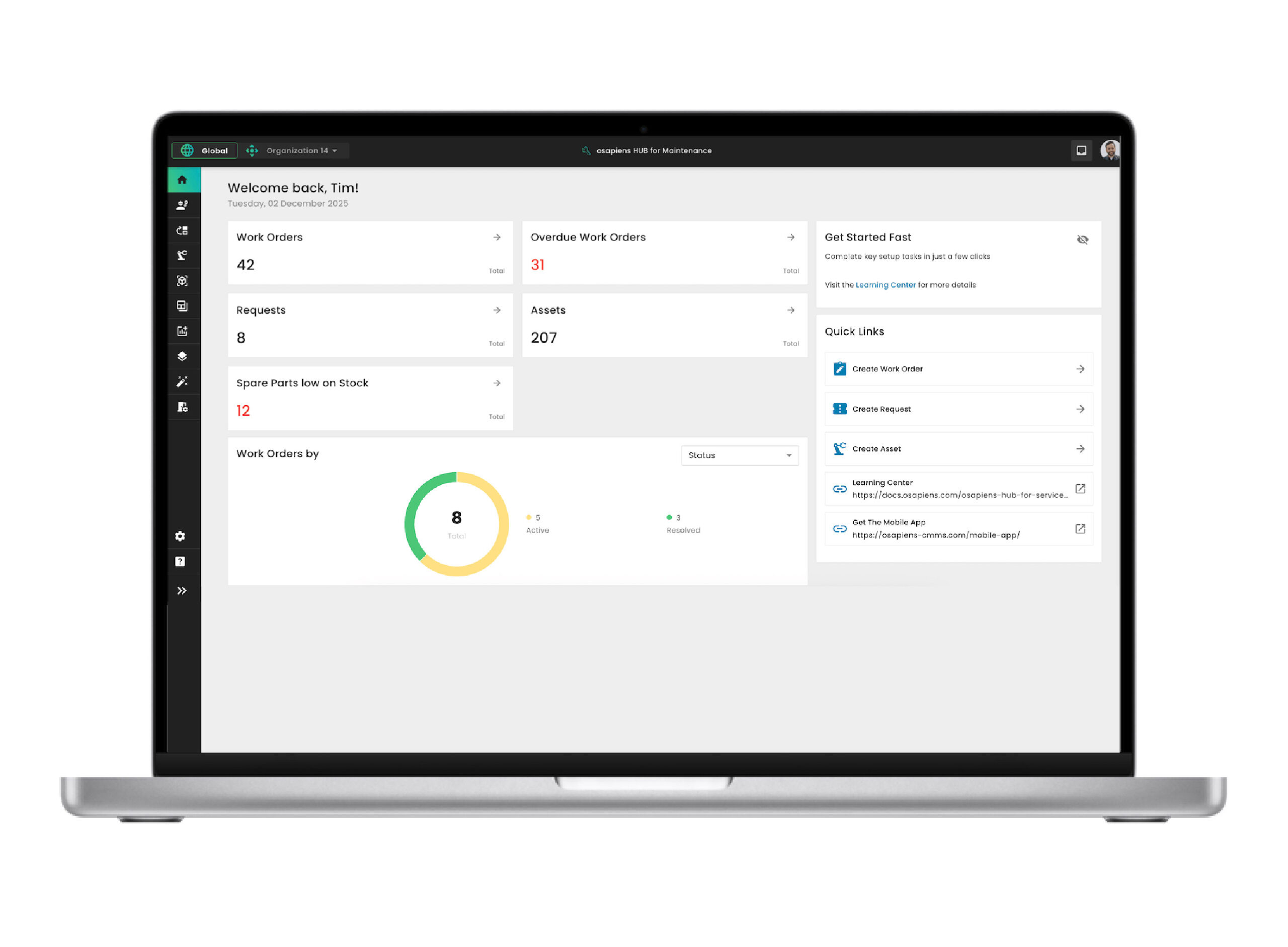
Most CMMS platforms collect data, the osapiens HUB for Maintenance is built to make that data usable. It connects work orders, asset performance, and maintenance costs into a single platform designed for operational and strategic decision-making, from technicians on the shop floor to maintenance leaders presenting to the boardroom.
Advanced Dashboards & KPI Tracking: Open the osapiens HUB on a Monday morning and your maintenance picture is already there. No exports, no manual updates. Maintenance managers see live KPI widgets, filter by site or asset class in seconds, and share views directly with leadership without involving IT or an external BI tool. Every dashboard is built for action, not just visibility.
Cost Tracking Across Labor, Parts, and Downtime: Every work order automatically captures labor hours, parts consumed, and associated costs, rolling up to asset-level and site-level views in real time. Maintenance leaders see exactly where budgets are spent and where savings are possible, without a single spreadsheet.
Multi-Site Reporting & Benchmarking: The osapiens HUB standardizes KPIs across all locations, so managers can compare sites on equal footing and identifying which facilities outperform, where recurring issues cluster, and where to reallocate resources. Isolated site data becomes a connected operational picture.
SAP-Certified Integration: The osapiens HUB connects natively to SAP PM, ensuring that asset master data, work orders, and cost postings stay synchronized with your existing systems. No duplicate entries, no manual exports. Just one connected data flow that keeps reporting accurate and up to date across your enterprise resource planning landscape.
Conclusion: Better Data, Better Maintenance
Maintenance reporting is only as good as the system behind it. Most organizations collect plenty of data, but the gap between raw numbers and real decisions is where value gets lost. The right preventive maintenance software closes that gap by connecting work orders, assets, costs, and compliance into a single, actionable view.
The osapiens HUB for Maintenance delivers exactly this: enterprise-grade reporting with modern usability and SAP-certified integration, built for teams that need clarity, not complexity.
Maintenance Reporting That Actually Drives Decisions
Real-time dashboards, SAP-certified integration, multi-site benchmarking, and cost tracking: all in one platform built for maintenance teams that need clarity, not complexity.
Get started with osapiens
FAQ
What is the best software for maintenance management?
The best maintenance management software depends on your team size, existing systems, and operational complexity. Smaller teams get started fastest with platforms like MaintainX or UpKeep. Large enterprises with complex asset portfolios are better served by IBM Maximo. For organizations running SAP – or those that need enterprise-grade reporting without the implementation overhead – the osapiens HUB for Maintenance combines certified SAP integration, no-code dashboards, and multi-site benchmarking in one platform. The right choice starts with identifying what’s actually holding your operations back today.
What is the difference between a CMMS report and a dashboard, and why does it matter?
A dashboard shows real-time status, open work orders, current KPI snapshots, live alerts from the shop floor. A report provides historical analysis: trends over time, cost developments, and root cause data that explain why something failed, not just that it did. Both serve different audiences too: maintenance teams use dashboards to manage their day, while leadership relies on reports for budget decisions and strategic planning. Without both working together, maintenance data either sits unused or gets presented without the context needed to act on it.
Which maintenance KPIs should software track automatically, and which are most commonly overlooked?
Essentials include MTTR, MTBF, preventive maintenance compliance, and cost per asset. Any serious equipment maintenance platform should deliver these out of the box. What gets overlooked more often are the planned vs. unplanned maintenance ratio, backlog age, and first-time fix rate. These three reveal how reactive a team actually is, how long unresolved work orders are quietly building risk, and how efficiently technicians resolve issues on the first visit. The best maintenance software calculates all of this automatically from work order data, without manual input or spreadsheet formulas.
Can maintenance reporting software integrate with SAP without a lengthy IT project?
Yes, if the platform offers certified SAP integration rather than a generic API connection. APIs require custom development, break during SAP updates, and need ongoing IT resources to maintain, the opposite of what maintenance teams need. A certified connector is validated against SAP’s own standards and survives system updates without manual intervention. The osapiens HUB for Maintenance connects natively to SAP PM with typical implementation times of 2-4 weeks, so maintenance data flows automatically between systems from day one.
How does maintenance reporting software help multi-site operations get a unified view of performance?
The core problem in multi-site operations is inconsistency: every facility defines KPIs slightly differently, tracks data in different formats, and reports on different cycles, making meaningful comparison nearly impossible. Good maintenance management software solves this by standardizing definitions across all locations from the start. Preventive maintenance compliance means the same thing at every site, and maintenance costs roll up into a single view without manual normalization. The osapiens HUB for Maintenance builds this cross-site benchmarking in natively, so managers can identify which facilities outperform and where to reallocate resources based on data, not gut feeling.
Start using osapiens for free
Improve your uptime, extend the life of your equipment, and simplify work order management.
Book a demo
Related content
October 30, 2025
Cloud Based Maintenance Management Software: How Modern CMMS Transforms Maintenance Operations

January 1, 2026
Pharmaceutical Mixer Maintenance Checklist – GMP Tasks, Safety & Digital Execution
January 1, 2026
Assembly Line Equipment Maintenance Checklist – Tasks, Tips & Digital Execution
January 1, 2026
Solar Panel Maintenance Checklist: What to Inspect & When
January 1, 2026
Bioreactor Maintenance Checklist – Tasks, Compliance & Digital Execution
January 1, 2026
Cooling Tower Maintenance Checklist – Tasks, Safety & Digital Execution
January 1, 2026
Fire Suppression System Maintenance Checklist – Tasks, Compliance & Digital Execution
January 1, 2026
Crane Maintenance Checklist – Essential Tasks, Safety Checks & Digital Template
January 1, 2026
Compactor Maintenance Checklist – Essential Tasks & Digital Execution
January 1, 2026
Plastic Injection Mold Maintenance Checklist – Tasks, Tips & Best Practices
January 1, 2026
Electrical Substation Maintenance Checklist – Tasks, Safety & Digital Execution
January 1, 2026