

Blog

Nastja Pressler, osapiens Expert | 9. March 2026 | Lesezeit 14 min.
Learn how to avoid status chaos in field service through clear status logic, mobile data capture, and centralized resource planning, thereby increasing your first-time fix rate and reducing costs.
Book a demo













TRUSTED BY LEADING COMPANIES




ENTERPRISE-READY
 SAP Certification
 ISO 27001
 EU Hosting
 Entra ID & Okta
 Multi-Entity
When the current assignment status is unclear in field service, costly problems can quickly arise: The service technician is on the road, but the office staff does not know whether he is still hours away or has already arrived at the customer’s location. At the same time, status reports are scattered across email, Excel, and mobile apps. The result is poor decisions, delayed customer information, and unnecessary additional costs. It is precisely this status chaos in field service that costs many companies time, money, and customer satisfaction every day.
Key Facts
- When the actual progress of an assignment is not clearly traceable, this leads to wrong decisions, missed SLAs, and avoidable additional costs.
- The causes are structural: information is scattered across tools and media breaks, statuses are defined inconsistently, and feedback arrives too late or not at all.
- The consequences affect the entire process: repeat trips, unnecessary rescheduling, more queries from the back office, and delayed completion and invoicing reduce efficiency and customer satisfaction.
- How modern solutions counteract this: With clear status logic throughout the entire service process, mobile data collection that technicians actually use in their daily work (including offline), and automated status changes and notifications, a reliable real-time picture is created that makes field service assignments controllable and plannable.
Status chaos arises when the actual progress of a service call cannot be clearly tracked. This happens almost automatically when:
- Call data is fragmented across multiple tools (dispatching, ERP, documentation, feedback)
- Status messages remain ambiguous – “in progress” can mean: en route, on site, or waiting
- Feedback arrives late and is recorded on paper or offline
- No automated processes to update status
The consequences are directly measurable: SLA violations, higher costs due to repeat trips, loss of reputation among customers, and increased administrative effort in the back office.
The hidden costs of a lack of operational transparency
Repeat trips instead of first-time fix
The classic scenario: A technician arrives at the job site without any system history, complete checklists, or critical parts information. The result: A second appointment is necessary—sometimes with significant additional costs compared to the original invoice.
Without live status updates and clear preparation, this happens too often. Every technician documents differently, uses different systems, and does not have consistent access to relevant information.
Planning without reliable data
The office staff cannot actively control the situation. They can only react. If the current status is unclear, they plan “to be on the safe side”:
- Overbooking of technicians
- Planned idle times
- Unnecessary detours between locations
- Unexpected overtime
Industry experts report that a lack of transparency often leads to significant capacity losses—due to rescheduling, follow-up phone calls, and idle times. With better data, you can use these resources in a more targeted manner.
Documentation gaps prolong completion
If signatures, measurements, or photos are missing, the query cycle begins: the office staff contacts the technician, who must return to the construction site or provide further information. This delays:
- The closing of accounts
- The cash position (cash flow problems)
- Customer invoicing
- And ultimately, customer complaints
Poor customer communication costs contract renewals
When customers do not receive reliable arrival times or the progress of the service call remains unclear, trust declines. Reliability is a selling point, especially in the service industry. Dissatisfied customers are less likely to renew their contracts—or they will look for a more reliable partner.
Where status chaos arises: The actual causes
Many companies respond to status chaos with more meetings, better rules, or tighter control. That doesn’t solve the problem. The real causes are structural in nature:
Too many isolated solutions
The typical situation in many service companies:
- Scheduling runs in one system,
- ERP/billing in another system
- documentation and feedback follow in a third solution or on paper.
- Mobile apps are optional or are not used consistently.
No one sees the entire process from inquiry to invoicing. Data is transferred manually between systems—with all the known sources of error.
Inconsistent statuses without clear definitions
A status such as “in progress” is worthless if it can mean any of the following:
- The technician is on the way.
- The technician is on site and working.
- The technician is waiting for a replacement part.
- The technician is on site, but the work is blocked.
Each interpretation leads to different decisions. The result is chaos and incorrect planning.
Mobile feedback does not work in everyday life
The app is too complex, involves too many steps, or does not work reliably offline when used on mobile devices. As a result, technicians often do not complete the documentation immediately on site, but postpone it until a later date or do not complete it at all. This is usually not due to a lack of diligence, but rather to the application’s insufficient user-friendliness.
Lack of automation creates manual processes
Without timestamps, check-in/check-out, and workflows, all statuses must be maintained manually. In everyday life, when things get hectic, this tends to be neglected. The status is forgotten, becomes outdated, or is updated incorrectly.
The solution: Controllable real-time transparency for all roles
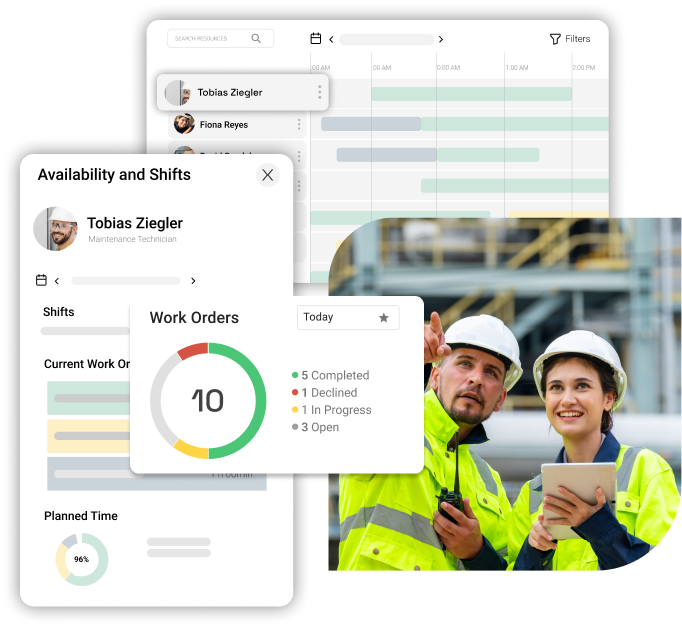
True operational transparency does not mean that everyone knows everything. Instead, each role receives exactly the information it needs to make quick decisions:
For office work/scheduling:
- Live overview of all orders by deadline, region, technician skill, and status
- Immediate visibility of blockers and their causes (missing parts, missing approvals, etc.)
- Capacity and utilization overview per team
- Warning system for critical time windows
For service technicians:
- Clear next steps in mobile orders
- Complete system history and checklists
- Availability of spare parts and material inventory
- Offline functionality for locations with poor connectivity
- Fast, intuitive documentation on site
For customers and locations:
- Reliable estimated time of arrival (ETA) with real-time updates
- Clarity about the scope of work and duration
- Transparent communication about the final result
- Planning security for follow-up appointments
5 concrete steps to real-time transparency in field service
Step 1: Uniform status logic for all service calls
The problem: ambiguous statuses impair planning and service quality. The basis is a clear, unambiguous status logic. Each status must describe exactly one condition—no more, no less. This allows the office staff to immediately recognize the true progress.
In many service organizations, statuses such as “in progress,” “open,” or “pending” are too vague. The office staff cannot reliably determine whether an order is actually in progress, blocked, or has long since been put on hold. This leads to incorrect priorities, poor capacity utilization, unclear escalations, and unnecessary queries.
A modern field service management solution establishes clear status logic throughout your service process:
- Before the assignment (planning) – ticket comes in, is checked, is scheduled bindingly
- During the assignment (execution) – technician on the way / on site / working
- After the assignment (completion) – technically documented, commercially completed, and ready for billing/ERP
The advantage of this status logic is that you can see delays immediately and evaluate their causes in a targeted manner. Planning in the office becomes more reliable, customer communication more dependable, and scheduling can be actively controlled instead of merely reactive.
Step 2: Mobile data collection that technicians actually use
A perfect status scheme is useless if technicians don’t use it. The solution must work in everyday life under real conditions:
Offline functionality is mandatory
Many locations have poor or no internet connection. The app must work offline and synchronize later. No technician will use the app if they cannot document their work because the signal is down.
Guided checklists instead of free fields
Technicians should not have to write freely. Instead:
- Structured checklists (yes/no, selection, input fields)
- Clear mandatory fields that must be completed before completion

Photos, measurements, notes directly in the workflow
Don’t document things “later at the office”:
- Photos: Take them directly on site and assign them (errors, device, condition before/after)
- Measurements: Record them while you work (pressures, temperatures, current, etc.)
- Notes: Make a note of what was done in keywords.
This is faster than reconstructing things later, and the data quality is better.
Time and material recording directly in the workflow
Do not add up hours retrospectively or estimate material usage:
- Automatic time recording: Start/stop when checking in/out
- Material usage: Record directly in the order when installing
- Travel times: Document separately if relevant
- Breaks: Record separately if relevant for billing
Digital signature on site
The customer signs directly in the app or on the tablet. This saves an additional step in the back office and automatically documents the date, time, and location.
The result: status and documentation are created reliably and in real time. The office staff has up-to-date data, the transaction is accelerated, and there is no need for follow-up work. In addition, structured spare parts management helps to consistently control material availability, reservations, and consumption.
Step 3: Live board and automated workflows for active control
A status only helps if everyone can see it immediately and respond to it. The office staff needs a live dashboard that accurately reflects priorities:
Sorting and filtering according to operational criteria
- By SLA risk: Which orders are at risk of exceeding agreed deadlines or response times?
- By region: Who is currently in which area and can take on another job?
- By technician skill: Who can perform the task independently?
- By status: Quick view of “Planned,” “On the way,” “Waiting for,” etc.
- By blocker: Filter all jobs with the status “Waiting for” with an explicit reason—and who is working on them.
Capacity and utilization overview
- Available technician capacity per team/per shift
- Actual utilization (not just planned, but actual)
- Identification of overloading and underloading
- Quick reprioritization in case of bottlenecks
Effect: The process runs smoothly, even when everyday life is chaotic. No more manual status updates that get forgotten.
Step 4: Track material and spare part status directly on the order
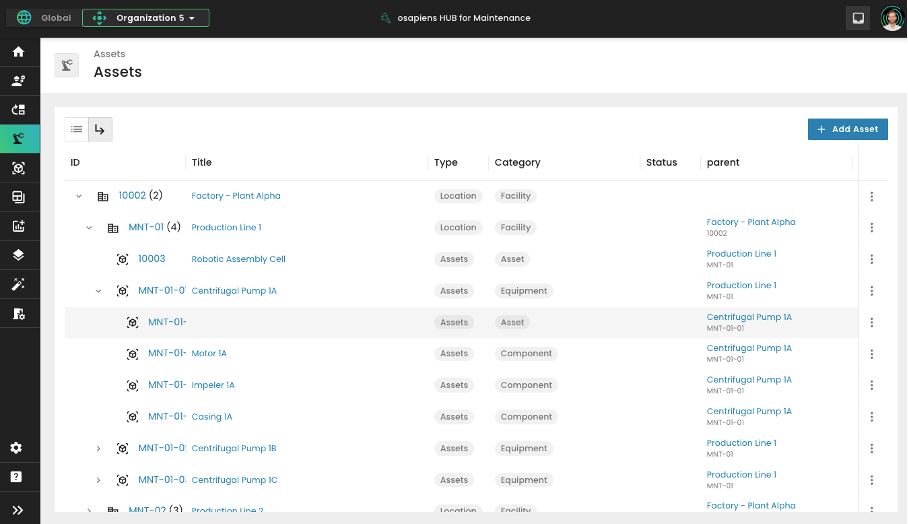
Missing or incorrectly planned spare parts are one of the most common causes of repeat trips in field service. You don’t have to organize materials on the side; they must be managed centrally in the order.
Secure spare parts before use
- Direct assignment to the order: Which parts are likely to be needed?
- Binding reservation: Parts are not assigned to other jobs.
- Availability check: Which parts are in stock? Which ones need to be ordered?
- Vehicle inventory: Check parts for the technician’s route—what needs to be reloaded?
Transparent documentation of availability and delivery dates
- In stock: Spare part is available and will be taken
- Reorder: Part is ordered, delivery date is known
Complete recording of consumption and returns
- Consumption: Which parts were installed and consumed?
- Returns: Replaced parts are documented and returned (for repair or stock)
- Stock movements: The system automatically updates stock levels
Financial control
- Parts relevant for billing are documented
- Cost calculations for customers are automatically updated
- Double billing is prevented
Result: With transparent spare parts management, you can significantly increase your first-time fix rate and reduce costly repeat trips.
Step 5: Seamless completion without media discontinuity
The technician has completed the work on site, but missing or scattered information creates unnecessary additional work in the back office. A good solution completes assignments consistently and without media discontinuity.
Automatic service report generation
- All recorded data—checklists, measurements, photos, notes—are automatically compiled into a structured report.
- No duplicate documentation: The technician documents once, and the report is generated from that—not the other way around.
- Formatted to suit the customer: The report is professional and understandable for the customer.
Signature directly at the customer’s site
- Digitally recorded: Date, time, and digital signature are automatically documented.
- Digital signature instead of paper: No more copying in the office, no lost slips of paper.
- Immediately available: The signature is immediately in the system and can be used for billing.
Structured data transfer to ERP without media discontinuity
- Data relevant for billing is automatically transferred to financial accounting/ERP in a structured manner:
- Hours worked (including travel time, waiting time, and deployment time)
- Materials used and their costs
- Customer signature and completion date
- Expense reports (if relevant)
- No manual entries: Technicians do not have to re-enter hours, materials, and signatures in the office.
- Invoicing is accelerated: All data is available, and invoices can be issued immediately.
Financial and operational effects:
- Invoicing is accelerated by an average of 3–5 days.
- Discussions about services rendered are reduced (complete documentation).
- Back-office effort for data post-processing is almost completely eliminated.
- Cash flow improves due to faster invoicing.

Optimize your service with osapiens HUB for Service
Status chaos cannot be solved by more meetings, better rules, or stricter controls. It is structural.
The solution requires:
- Clear process definition – Who does what and when?
- Uniform status logic – No ambiguities, each status describes a condition.
- Mobile-first documentation – Data is created on site, not in the office.
- Centralized order file – One system for all information, not multiple isolated solutions.
- Automated workflows – The process runs without constant manual status updates.
- Real-time visibility – Live board for scheduling, mobile app for technicians.
A specialized field service management solution combines these requirements in a single, integrated platform:
- Central order file – All data in one system.
- Mobile app with offline function – Technicians reliably document on site.
- Live dispatching with filtering and prioritization – office staff actively manages.
- Automatic workflows – status changes and notifications run automatically.
- Material management directly on the order – spare parts are planned transparently.
- Seamless billing – data flows automatically into the ERP.
- Customer portal – transparent communication (ETA, progress, result).
Process more service orders in less time
Your technicians are on the road visiting customers – efficiency determines your margin. With osapiens HUB for Maintenance, you can optimize route planning, spare parts logistics, and order processing. Your teams work with a mobile app, and you control everything centrally via real-time dashboards.
Optimize your service processes
FAQ
What exactly is status chaos in field service?
Status chaos arises when the actual progress of a service call cannot be clearly tracked. Typical signs include inconsistent statuses (one status has multiple meanings), delayed feedback from the field, information spread across multiple systems, or manual status management that is forgotten in everyday life. This leads to wrong decisions, missed SLAs, and repeat trips.
Why is real-time visibility so important in field service?
Real-time visibility enables back office staff to actively manage service calls instead of just reacting to them. With up-to-date status information, you can:
- Identify and actively resolve blockers early on
- Set priorities correctly
- Make optimal use of technician capacity
- Provide customers with reliable information (ETA, progress)
- Meet SLAs instead of missing them
How does clear status logic help prevent status confusion?
Clear status logic ensures that each assignment status describes a unique state—no ambiguities. This allows office staff to immediately see whether an order is planned, en route, on site, blocked, or completed.
What role does mobile data capture play in field service?
Mobile data capture is crucial for ensuring that status updates and documentation are created directly in the field—not later in the office. Technicians record:
- Time (automatically or manually)
- Materials and spare parts (consumption, returns)
- Photos and measurements
Customer signature
This only works if the app:
- Works offline (in case of poor connection)
- Is intuitive and fast (not too many clicks)
- Offers help (checklists instead of free text)
Reliable mobile capture eliminates rework in the back office, improves data quality, and speeds up billing.
How does real-time transparency reduce repeat visits?
Repeat visits often occur because:
- The technician arrives without a complete system history and checklists.
- Required spare parts were not planned for.
- The customer was not informed about the scope of work.
With real-time transparency:
- All system data and history are available
- Spare parts are planned and reserved in advance
- The technician is prepared and works in a targeted manner
- Blockages (missing parts, approvals) are identified and documented on site
This significantly increases the first-time fix rate.
Kann ich Statuschaos ohne neue Software vermeiden?
Schwer. Einige Verbesserungen sind organisatorisch möglich (bessere Status-Definitionen, regelmäßige Abstimmungen), aber ohne zentrale Lösung fehlen zentrale Voraussetzungen:
- Zentrale Datenbasis: Informationen bleiben auf mehrere Tools verteilt.
- Automatisierung: Manuelle Prozesse sind fehleranfällig und skalieren schlecht.
- Mobiler Datenstand: Papier/Excel liefern keinen aktuellen, durchgängigen Status.
- Integration: Daten müssen zwischen Systemen manuell übertragen werden..
A specialized field service management solution significantly standardizes and accelerates these processes. Get started now for free or book a personalized demo—optimize your service and maintenance for the long term.
Start using osapiens for free
Improve your uptime, extend the life of your equipment, and simplify work order management.
Book a demo
ENTERPRISE CAPABILITIES
- SAP ECC & S/4HANA Certified
- Infor & MS Dynamics
- Microsoft Entra ID / Okta
- ISO 27001 & 9001
- EU Cloud · Data Sovereignty
- Development, Test, and Production Environments
- Multi-Entity & Multi-Site
- Power BI Integration
- Audit Trail & Compliance
Related content

March 19, 2026
Best CMMS Software for Microsoft Dynamics 365 Integration

January 1, 2026
Switchgear Maintenance Checklist – Tasks, Tips & Template
January 1, 2026
Fire Alarm System Maintenance Checklist – Essential Tasks, Compliance & Digital Execution
January 1, 2026
Bioreactor Maintenance Checklist – Tasks, Compliance & Digital Execution
January 1, 2026
Scaffolding Maintenance Checklist: What to Inspect, When, and How to Stay Compliant
January 1, 2026
Injection Mold Maintenance Checklist – Tasks, Systems & Digital Execution
January 1, 2026
Lorry Maintenance Checklist – Tasks, Tips & Template
January 1, 2026
Preventive Maintenance Checklist – Tasks, Structure & Digital Execution

March 24, 2026
Multi-Site CMMS Software: How to Choose the Right Platform and Roll It Out Across Every Site
January 1, 2026
Compactor Maintenance Checklist – Essential Tasks & Digital Execution
January 1, 2026
Metal Stamping Press Maintenance Checklist – Tasks, Tips & Template
January 1, 2026