

CMMS

Florian Bartholomäus, osapiens Expert | 21. September 2026 | Lesezeit 10 min.
Before comparing vendors on sensor specs, pull the last three unplanned failures and check one thing: did a condition alert exist, and if so, why did it not become a work order in time? That answer usually points straight at whether the real gap is a sensing gap or a workflow gap, and only one of those gets solved by adding more sensors.
Turn Alerts Into Work Orders











TRUSTED BY LEADING COMPANIES




ENTERPRISE-READY
 SAP Certification
 ISO 27001
 EU Hosting
 Entra ID & Okta
 Multi-Entity
Table of Contents
- Key Takeaways
- The Gap Between a Condition Alert and a Finished Repair
- The Best Condition-Based Monitoring Software for CMMS-Driven Maintenance Teams
- Expert tip from osapiens
- What to Check Before You Commit to a Condition-Based Monitoring Platform
- Condition-Based Monitoring, Benefits at a Glance
- Condition Based Monitoring Software: osapiens HUB’s SAP-Certified Work Order Bridge
- FAQ
A maintenance or reliability manager running vibration sensors, temperature probes, or a SCADA feed still gets blindsided by unplanned downtime more often than the hardware budget would suggest. Condition monitoring tools are good at one job: telling you something is wrong. Most of them were never built to make sure a technician actually acts on it before the asset fails. So which of the platforms below actually closes that loop, and which one just hands you another dashboard to check?
Key Takeaways
-
Feature, not a category: condition-based monitoring is a data layer inside a maintenance strategy, not a standalone software category. It only reduces downtime once its alerts turn into assigned, tracked work.
-
The real buying question: most evaluations should center on how a condition alert reaches a technician, not which sensor collected it in the first place.
-
SAP depth varies by vendor: some platforms hold a native SAP certification, while others reach SAP PM through API middleware or a third-party connector instead.
-
Monitoring-only tools still need a CMMS: several established condition-monitoring platforms explicitly hand diagnoses off to a separate maintenance management system for scheduling and work order management.
-
SAP-certified closure: osapiens HUB for Maintenance is a SAP-certified CMMS, so a condition-triggered work order writes back into SAP PM as part of closing it out, without a separate manual reconciliation step.
The Gap Between a Condition Alert and a Finished Repair
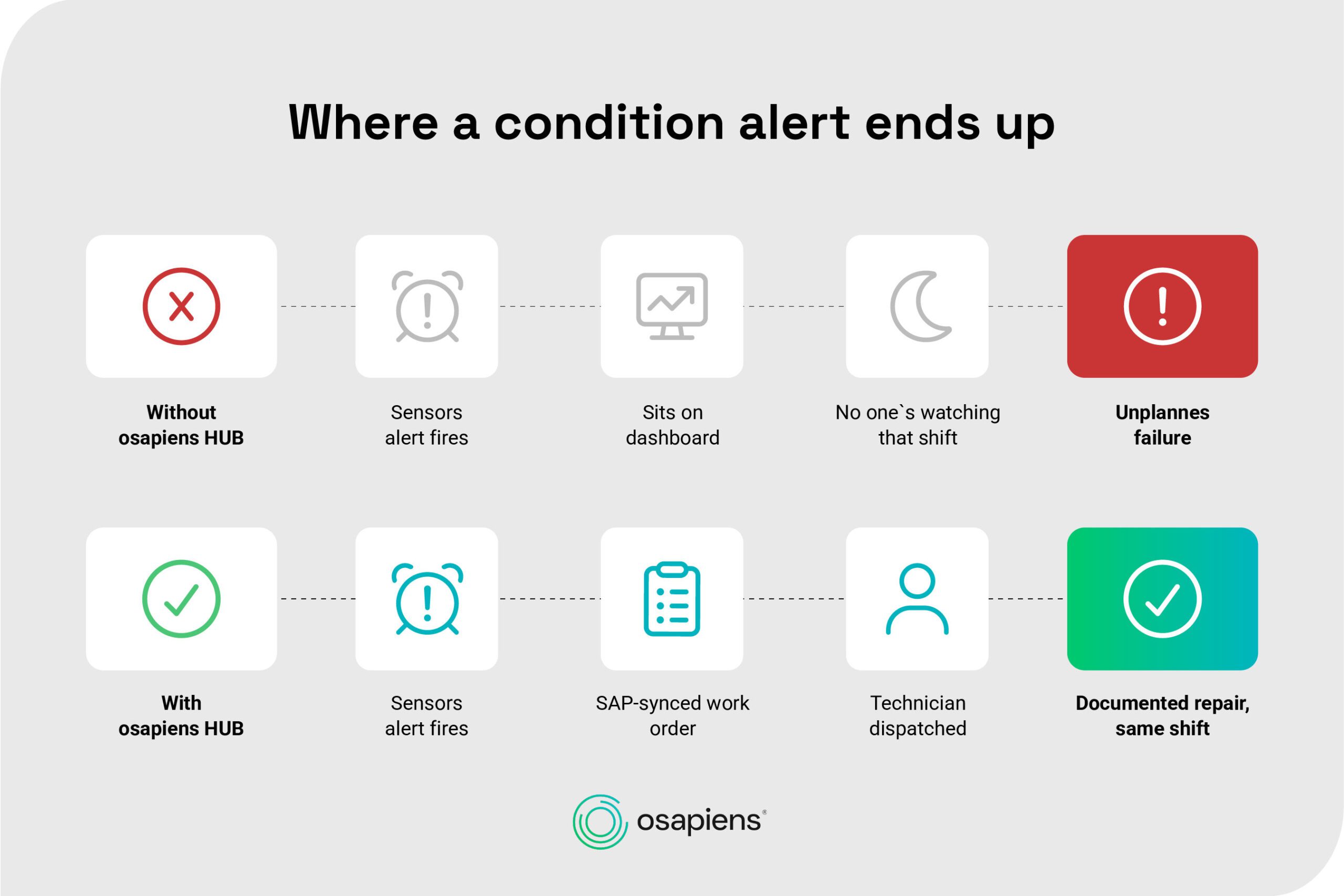
Sensors and SCADA systems detect an anomaly reliably. The failure point sits downstream of detection, in the handoff between the reading and the repair. Buyers shortlisting vendors tend to blur three related terms: condition monitoring is the continuous tracking of a health signal, condition-based maintenance uses that signal to trigger an intervention, and predictive maintenance goes further still, forecasting when a failure will happen. Knowing which one a vendor actually sells matters more than the marketing page suggests.
The pattern that causes the most damage looks the same across plants:
-
A sensor threshold is breached on a pump, motor, or compressor.
-
The alert sits in a monitoring dashboard that nobody is actively watching that shift.
-
No work order gets generated from the alert.
-
No SAP or ERP record exists, so the issue is invisible to planning.
-
The technician only learns about it once the asset has already failed.
This is not an osapiens talking point. Several established condition-monitoring vendors, including some compared below, explicitly hand diagnoses off to a separate maintenance management system for scheduling and work order management, and built dedicated features specifically to bridge that signal-to-action gap. That is evidence the problem is real and shared across the category, which is exactly why a fair comparison has to look past the sensor spec sheet.
Turn Every Condition Alert Into a Tracked Job
A sensor threshold breach only prevents downtime once it reaches a technician as a scheduled, documented task, not a reading on a screen. osapiens HUB for Maintenance closes that gap by turning a condition signal, whether it comes from SAP PM, a SCADA system or a connected IIoT platform, into a SAP-synced work order.
Experience Maintenance Without Workflow Gaps
The Best Condition-Based Monitoring Software for CMMS-Driven Maintenance Teams
The comparison below evaluates five platforms on the criteria that actually decide whether a condition alert turns into finished work: SAP integration depth, sensor and IoT connectivity, mobile execution for the technician doing the repair and how each vendor deploys its platform. osapiens HUB for Maintenance is included as one of five evaluated platforms, ranked first against these criteria, not presented as the only option on the market.
| Platform | SAP Integration | Sensor / IoT Connectivity | Mobile Execution | Deployment Model |
|---|---|---|---|---|
| osapiens HUB for Maintenance | SAP-certified Standalone: 1–3 weeks With SAP: 4–12 weeks |
API-based Connects to SAP PM, SCADA, third-party IIoT No proprietary sensor hardware |
Mobile-first Manual or assisted dispatch via the Plantafel |
Standalone or SAP-integrated on the same platform |
| eMaint (Fluke Reliability) | Native SAP/Oracle ERP connectors Full REST API on enterprise tier only |
Native tie-in to Fluke hardware Vibration, temperature, ultrasound |
Mobile access via Fluke Mobile | Full REST API reserved for enterprise-tier subscriptions |
| Tractian | SAP-certified, SAP Store listed Also integrates Oracle, MS Dynamics |
Proprietary sensor Vibration, ultrasound, magnetic field, temperature |
Mobile app Offline capability |
Runs its own CMMS or feeds an existing one (SAP PM, Maximo) |
| UpKeep | Reaches SAP via API or third-party platform No native SAP certification |
UpKeep Edge: wireless IIoT add-on | Mobile-first CMMS by design | Mobile-first CMMS core, IoT sold as an add-on |
| MaintainX | SAP-certified (ECC, S/4HANA) Requires Enterprise plan plus paid SAP add-on |
Open API, sensor-agnostic Native OT connectors (Ignition, Kepware, MQTT) |
Mobile-first Offline capability |
Standalone from day one, SAP layered in later as a paid add-on |
osapiens HUB for Maintenance: The SAP-Certified Signal-to-Work-Order Bridge
osapiens HUB for Maintenance is the execution layer that turns a condition alert, regardless of which sensor or SCADA system produced it, into a tracked, documented job.
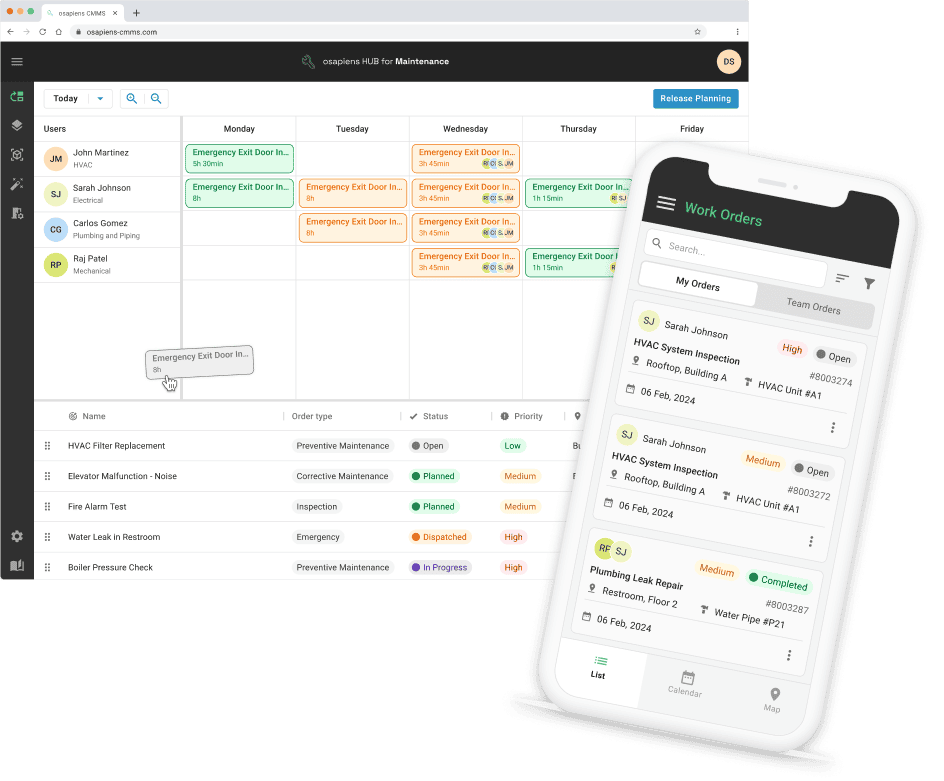
Best for: SAP-using manufacturing, energy and field service organizations that already have, or plan to add, condition and sensor data and need it to become real maintenance work instead of a dashboard reading.
-
SAP-certified integration closes the media break between an alert and a completed work order.
-
Standalone deployment in 1–3 weeks, or 4–12 weeks with SAP integration.
-
Manual or assisted dispatch through the Plantafel keeps a human decision in the loop.
-
Enterprise scale proven at Coca-Cola North America, spanning 35 plants and 1,500 users.
Limitations: osapiens does not manufacture condition-monitoring sensor hardware itself. Condition data has to come from SAP PM, SCADA or a connected third-party sensor or IIoT platform through the API.
Pricing: Free for up to 5 users (Starter), from €29 per user/month (Essential) up to €49 per user/month (Premium); Enterprise pricing is custom.
Give Your SAP Team a CMMS That Fits the Rollout Window
A standalone deployment goes live in 1–3 weeks. Add SAP PM integration, and the same platform is running in 4–12 weeks, without a dedicated IT project team on either path.
Deploy in Weeks, Not Months
eMaint: Built Around Fluke’s Own Sensor Hardware
eMaint targets manufacturers already using Fluke condition-monitoring hardware who want that data to trigger a work order without a separate integration project.
Best for: teams standardized on Fluke’s vibration, temperature and ultrasound instruments who want the sensor and the CMMS from the same vendor.
-
Native Fluke hardware tie-in rather than a third-party integration.
-
A threshold breach creates a work order with asset history and parts attached.
-
SAP and Oracle ERP connectors handle purchase orders and cost data.
Limitations: full REST API access is reserved for enterprise-tier subscriptions, and the deepest sensor support is built around Fluke’s own hardware line.
Pricing: from $85 per user/month (Professional, 3-user minimum); Enterprise pricing is custom.
Tractian: Its Own Sensor Hardware Plus SAP Certification
Tractian suits reliability teams evaluating vendor-owned sensor hardware bundled with, or feeding into, maintenance execution.
Best for: teams open to a single-vendor sensor and software bundle who also need a certified SAP connection.
-
SAP-certified and listed on the SAP Store.
-
A multi-modal sensor covering vibration, ultrasound, magnetic field and temperature.
-
Runs its own CMMS or feeds an existing system such as SAP PM or Maximo.
-
Mobile app with offline access.
Limitations: the native sensing experience is built around Tractian’s own hardware. Using third-party sensors means routing through its separate integration path instead.
Pricing: On request.
UpKeep: a Mobile CMMS With an IoT Add-On
UpKeep fits field-service teams that want a mobile CMMS first, with condition data layered on as an add-on rather than the starting point.
Best for: teams prioritizing technician-facing mobile usability who plan to add sensor connectivity later.
-
Mobile-first design built for field technicians.
-
UpKeep Edge creates a work order when a sensor threshold is crossed, with a checklist attached.
-
A connector library that includes NetSuite, QuickBooks and Zapier.
Limitations: SAP connectivity runs through an API or a third-party integration platform rather than a native, certified SAP connector.
Pricing: from $24 per user/month (Essential) up to $55 per user/month (Premium); Professional and Enterprise plans are quote-based.
MaintainX: SAP-Certified, Sensor-Agnostic Execution
MaintainX suits teams that want a mobile-first CMMS with a certified SAP connector available as an add-on, without needing vendor-specific sensor hardware to get condition data into a work order.
Best for: teams that already run a mix of sensor and SCADA brands and want one CMMS to sit on top of all of it.
-
SAP-certified CMMS and EAM integration with SAP ECC and S/4HANA.
-
An open API plus native OT connectors, including Ignition, Kepware and MQTT.
-
A condition threshold, such as temperature or vibration, triggers a work order automatically.
-
Mobile-first app with offline capability.
Limitations: SAP connectivity requires an Enterprise plan plus a separate, paid SAP integration-services package, and it is not included by default. MaintainX does not manufacture its own condition-monitoring sensor hardware.
Pricing: free forever (Basic) up to $65 per user/month billed annually (Premium, $75 billed monthly); Enterprise pricing is custom.
Expert tip from osapiens
Before comparing vendors on sensor specs, pull the last three unplanned failures and check one thing: did a condition alert exist, and if so, why did it not become a work order in time? That answer usually points straight at whether the real gap is a sensing gap or a workflow gap, and only one of those gets solved by adding more sensors.
Florian Bartholomäus, osapiens Expert
What to Check Before You Commit to a Condition-Based Monitoring Platform
Sensor accuracy is easy to demo and hard to differentiate on. The criteria below decide whether the platform actually changes what happens after the alert fires.
-
End-to-end workflow closure: does a condition alert become a tracked, assigned, closed-out job, or does it stay a reading on a dashboard? This is the gap most vendor demos gloss over.
-
SAP or ERP integration depth: a native, certified connector behaves differently under audit and at scale than an API-plus-middleware path. Ask a vendor to show the certification, not just claim that it “integrates with SAP.”
-
Mobile execution for technicians, not just analysts: some platforms in this space are built primarily for the person interpreting the signal, not the person fixing the asset in the field.
-
Proven scale, not just proven sensors: ask for a reference at a comparable multi-site footprint, not just a lab-grade accuracy number.
Condition-Based Monitoring, Benefits at a Glance
-
Fewer unplanned stoppages, because a developing fault gets caught and acted on before it causes a failure.
-
Maintenance spend prioritized toward the assets actually showing signs of wear, not a fixed calendar.
-
Audit-ready documentation of the condition-to-repair chain once the work order ties back into the CMMS or ERP.
-
Longer asset lifespan and better spare-parts planning once condition data and inventory sit in the same system.
Condition Based Monitoring Software: osapiens HUB’s SAP-Certified Work Order Bridge
For SAP-using, multi-site maintenance teams, the deciding factor in this comparison is not which platform reads a sensor most precisely. It is which one turns that reading into a completed, SAP-documented repair without adding a second system for technicians to fight.
osapiens HUB for Maintenance answers that with a SAP-certified connector that writes the finished work order straight back into SAP PM, closing the loop the rest of this comparison was built to test. Choosing the best condition based monitoring software for a SAP-using maintenance team starts with that write-back, not the sensor spec sheet.
Make Every Condition Alert End in a Finished Repair
A platform that only detects a problem has done half the job. osapiens HUB for Maintenance closes the other half, turning the alert into an assigned, SAP-synced work order technicians can act on the same shift.
Increase Your Asset Availability
FAQ
What’s the difference between condition-based monitoring and predictive maintenance?
Condition-based monitoring uses continuous sensor data to trigger action once a threshold is crossed. Predictive maintenance goes a step further and forecasts when a failure is likely to happen, using that same underlying data to estimate timing rather than just reacting to a breach.
Why should a condition alert reach a CMMS, not just a dashboard?
An alert that only lives in a dashboard is easy to miss on a busy shift. The same alert, turned into a prioritized, assigned work order inside a CMMS, is much harder to lose, and it leaves a documented trail from detection to repair.
Does condition-based monitoring software replace SAP PM?
No. osapiens HUB for Maintenance is built as a SAP-certified extension, not a replacement. SAP PM can stay the system of record while osapiens HUB adds mobile execution and closes the loop between a condition alert and a finished work order.
Is condition-based monitoring worth it for mid-sized plants?
The cost-benefit case scales with failure cost and downtime risk, not company size alone. A mid-sized plant with a handful of high-value, hard-to-replace assets can justify condition-based monitoring as readily as a larger enterprise with a bigger asset count.
Does osapiens HUB include its own sensors, or use existing hardware?
osapiens HUB does not sell proprietary sensor hardware. It connects through an API to SAP PM, SCADA and third-party sensor or IIoT platforms already in place, and focuses on turning that data into dispatched, documented maintenance work.
Start using osapiens for free
Improve your uptime, extend the life of your equipment, and simplify work order management.
Book a demo
ENTERPRISE CAPABILITIES
- SAP ECC & S/4HANA Certified
- Infor & MS Dynamics
- Microsoft Entra ID / Okta
- ISO 27001 & 9001
- EU Cloud · Data Sovereignty
- Development, Test, and Production Environments
- Multi-Entity & Multi-Site
- Power BI Integration
- Audit Trail & Compliance
Related content
January 1, 2026
Laser Cutting Machine Maintenance Checklist: Prevent Downtime & Extend Equipment Life

September 19, 2025
Meet the osapiens maintenance experts at Pharma Maintenance Reloaded 2025
December 17, 2025
maintenance Antwerp: Experience the osapiens CMMS live

July 6, 2026
Work Order Template for Maintenance Teams
January 1, 2026
Tankless Water Heater Maintenance Checklist – Tasks, Tips & Best Practices
January 1, 2026
Booster Pump Maintenance Checklist – Tasks, Tips & Template
January 1, 2026
Switchgear Maintenance Checklist – Tasks, Tips & Template

October 29, 2025
Maintenance Software for Manufacturing: Reduce Downtime & Boost OEE in 2026
January 1, 2026
Turret Punch Press Maintenance Checklist – Tasks, Tips & Template

August 5, 2026
How to Build a Preventive Maintenance Schedule That Your Team Will Actually Follow
January 1, 2026
Diesel Generator Set Maintenance Checklist – Tasks, Best Practices & Digital Execution
January 1, 2026