

CMMS

Florian Bartholomäus, osapiens Expert | 23. June 2026 | Lesezeit 13 min.
Most cloud inventory tools track quantities. They don't connect parts to work orders, assets, or SAP. This comparison shows which platforms actually solve maintenance inventory problems.
Improve your inventory quality













TRUSTED BY LEADING COMPANIES




ENTERPRISE-READY
 SAP Certification
 ISO 27001
 EU Hosting
 Entra ID & Okta
 Multi-Entity
Table of Contents
- Key Facts
- Why Generic Inventory Software Fails Maintenance Teams
- Three Inventory Patterns That Quietly Drain Maintenance Budgets
- Best Cloud-Based Inventory Management Software for Maintenance: Platform Comparison
- Five Evaluation Steps for Maintenance Managers Choosing Inventory Software
- osapiens HUB for Maintenance: Connecting Inventory to Every Work Order
- Frequently Asked Questions
When a production line stops because a technician can’t locate a bearing that should be in the storeroom, the problem is rarely a shortage of parts. It’s a shortage of visibility. Most maintenance organizations carry far more MRO inventory than they need, yet still run out of the parts that matter most at the worst possible moment. Cloud-based inventory management software built for maintenance solves this by connecting parts directly to work orders, assets, and procurement workflows and the osapiens HUB for Maintenance is built precisely for this.
Key Facts
- MRO inventory is a maintenance problem, not a procurement problem: Generic inventory tools track stock quantities; purpose-built CMMS platforms connect parts to work orders, assets, and failure histories.
- The cost of poor parts visibility is concrete: According to Siemens’ True Cost of Downtime 2024, large manufacturing plants lose an average of 27 hours per month to unplanned downtime, with spare parts availability consistently among the root causes.
- Most organizations are still operating reactively: Many maintenance teams rely on disconnected tools such as spreadsheets, phone calls, paper forms to track parts across sites. Without a dedicated system, stockouts go unnoticed until a technician is already standing in front of a broken machine.
- osapiens HUB for Maintenance connects spare parts directly to work orders and SAP: With an SAP-certified bidirectional integration, parts consumption is synced automatically between the CMMS and SAP PM/MM, eliminating the manual reconciliation that drives stockouts and duplicate orders across multi-site operations.
Why Generic Inventory Software Fails Maintenance Teams
Most cloud-based inventory software on the market was built for retail, e-commerce, or general procurement. It tracks stock quantities, manages purchase orders, and integrates with accounting tools. For a maintenance team managing spare parts across multiple production lines, this architecture is fundamentally insufficient.
Spare parts management in a maintenance context requires connecting parts to equipment, not just to purchase orders. When a bearing fails on a specific pump at a specific plant, the relevant questions are:
- Is the replacement in stock? In which bin?
- Was it reserved for a scheduled preventive maintenance job next week?
- Which technician has the work order?
No generic inventory system can answer these questions. It only knows the part exists somewhere in a warehouse.
That gap has real consequences. In the 2025 study “Maintenance in Transition” with Fraunhofer IML, 43 % of European maintenance decision-makers cited integration complexity as their single biggest barrier to digitalization — not budget, not willingness. 92 % were confident that digital maintenance tools deliver measurable value. The problem is the wrong tool for the job.
Three Inventory Patterns That Quietly Drain Maintenance Budgets
Across asset-intensive industries, the same three patterns account for the majority of inventory-related downtime and budget overruns.
Parts Are in Stock but Cannot Be Found
Without bin location tracking and barcode scanning integrated into the work order, technicians search manually. Multiplied across dozens of work orders per day, this is a significant portion of lost wrench time.
Teams still working from printed sheets or basic spreadsheets often start by formalizing the work order itself, including the parts and bin information a technician needs on site. Our free Excel work order template provides a structured starting point with order details, asset ID, scope of work, and a PPE checklist. It can be a useful interim step before connecting parts to work orders in a proper system.
Overstocking Runs Parallel to Stockouts
MRO inventory typically represents 40–50% of the total maintenance budget, yet an estimated 15–25% of that inventory sits obsolete on shelves. This happens because parts are ordered without reference to equipment criticality, consumption history, or scheduled maintenance plans. The result is storerooms full of parts that are never used, while critical spares run out during emergency repairs.
Emergency Procurement at Premium Cost
When a stockout occurs, the immediate response is an emergency purchase order — typically at a 20–40 % price premium over standard procurement. Consider a mid-sized manufacturing plant with two stockout-related downtime events per month: at €50,000 per hour production value and four hours average downtime per event, the annual cost reaches approximately €4.8 million, before a single rush order is placed.
Best Cloud-Based Inventory Management Software for Maintenance: Platform Comparison
The table below compares four platforms across the dimensions that matter for maintenance-driven organizations. The evaluation criteria reflect what actually determines operational outcomes: parts-to-work-order integration, SAP compatibility, mobile and offline capability, multi-site visibility, and implementation speed.
| Platform | Best For | Work Order Integration | SAP Integration | Mobile / Offline | Multi-Site |
|---|---|---|---|---|---|
| osapiens HUB for Maintenance | Maintenance-driven orgs with SAP environments | Native, bidirectional | SAP-certified connector | Mobile-first, offline capable | Yes, centralized |
| Microsoft Dynamics 365 SCM | Microsoft-standardized enterprises | Via configuration | Custom API required | App available, offline limited | Yes |
| Oracle Fusion Cloud SCM / NetSuite | Enterprise-scale demand planning | Indirect, via ERP modules | Custom integration | Mobile app, limited offline | Yes |
| Odoo | Smaller orgs seeking open-source flexibility | Basic, via modules | Not native | Mobile app, limited offline | Limited |
| MaintainX | Mobile-first maintenance teams without SAP | Native, work-order linked | No native SAP integration, custom API required | Mobile-first, offline capable | Yes, Enterprise plan |
osapiens HUB for Maintenance: Purpose-Built for Maintenance Teams Running SAP
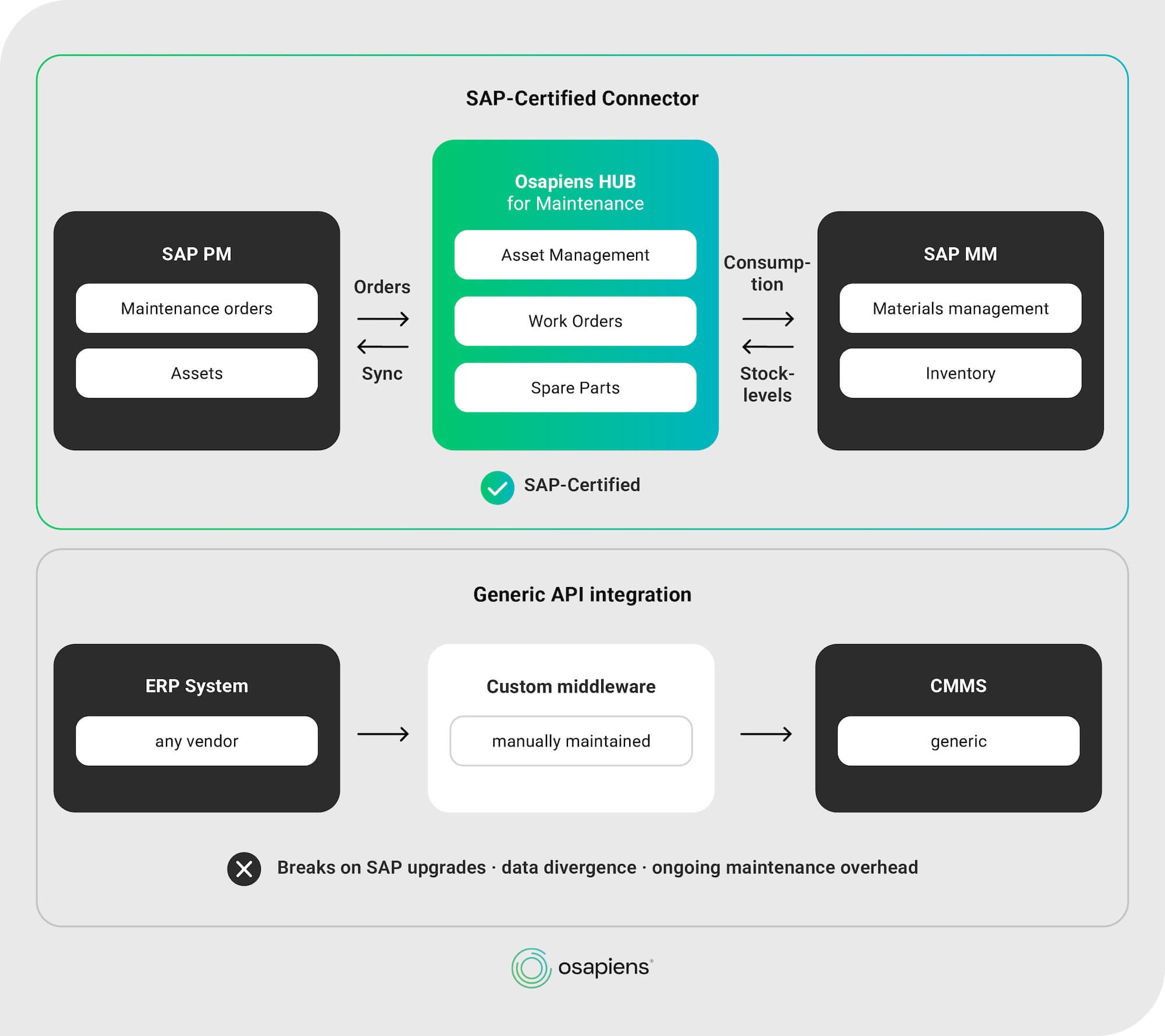
The osapiens HUB for Maintenance connects spare parts directly to work order execution. When a technician opens a work order on the mobile app, required parts, stock levels, and bin locations are visible in real time. Consumption is recorded at the point of work and synced bidirectionally to SAP PM and SAP MM through an SAP-certified connector — no manual reconciliation, no stock divergence between systems.
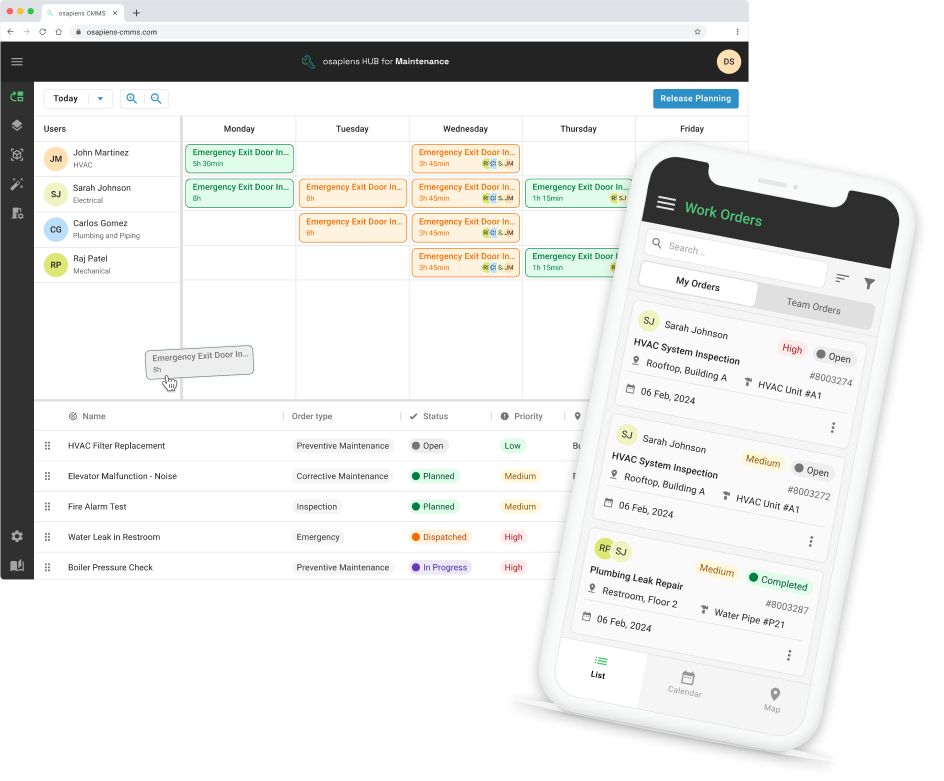
Key Strengths:
- SAP-certified bidirectional integration: syncs work orders, parts consumption, and stock levels with SAP PM/MM without custom middleware
- Mobile-first with offline capability: technicians record parts usage on-site, with or without network connectivity
- Multi-site inventory visibility: centralized stock levels, reorder alerts, and consumption history across all locations
- Freemium entry point at €0: core inventory and work order features available; enterprise SAP integration deployable in 1–3 months
- ISO 27001 and ISO 9001 certified: meets security and quality requirements for regulated industries
Microsoft Dynamics 365 Supply Chain Management
Microsoft Dynamics 365 SCM is a capable enterprise platform with strong inventory and procurement functionality. For organizations already standardized on the Microsoft ecosystem, the integration with Power BI, Teams, and Azure is a genuine advantage. The limitation is that Dynamics was not designed for maintenance execution, connecting inventory to work orders and asset hierarchies requires significant configuration, and the interface is oriented toward back-office procurement users, not field technicians.
Key Strengths:
- Deep Microsoft ecosystem integration: native connectivity with Power BI, Teams, and Azure
- Strong procurement and financial workflows: well-suited for organizations where supply chain is the primary use case
- Enterprise scalability: handles complex multi-entity and multi-currency environments
Limitations:
- Maintenance-specific functionality requires significant configuration
- Implementation timelines significant longer for enterprise deployments
- Not optimized for field technician workflows or mobile-first use cases
For organizations evaluating CMMS integration with Microsoft Dynamics 365, a purpose-built maintenance layer running alongside Dynamics often delivers faster time-to-value than reconfiguring Dynamics itself.
Oracle Fusion Cloud SCM: Enterprise Supply Chain, Limited Maintenance Fit
Oracle Fusion Cloud SCM provides sophisticated demand forecasting and procurement automation at enterprise scale. Its strengths lie in complex multi-tier supply chains, global compliance, and financial integration. For maintenance-specific use cases, however, the platform requires substantial customization to connect parts consumption to individual work orders and assets. Functionality that purpose-built CMMS platforms deliver out of the box.
Key Strengths:
- Advanced demand forecasting and procurement automation: well-suited for complex global supply chains
- Strong financial and compliance integration: covers multi-entity, multi-currency, and regulatory requirements
- Enterprise-grade scalability: appropriate for large organizations with sophisticated procurement needs
Limitations:
- High implementation complexity and total cost of ownership
- Maintenance-specific workflows require significant customization
- Most appropriate where supply chain is the primary use case and maintenance is secondary
Odoo: Accessible Entry Point, Limited at Scale
Odoo offers a modular open-source foundation with inventory, purchasing, and basic maintenance functionality. For smaller organizations transitioning from spreadsheets, it provides a meaningful step forward at a manageable cost. The limitations become apparent as operations grow — multi-site inventory management requires developer resources to customize, and SAP integration is not available natively.
Key Strengths:
- Modular and accessible: low barrier to entry for organizations moving off spreadsheets
- Open-source foundation: flexible for teams with developer resources available
- Broad functional coverage: inventory, purchasing, and basic maintenance in one platform
Limitations:
- Multi-site inventory management requires significant customization
- No native SAP integration
- Ongoing developer dependency adds cost and technical debt over time
MaintainX: Strong Inventory Features, No Native SAP Integration
MaintainX is a widely adopted mobile-first CMMS platforms in the market, with a strong focus on parts inventory management. Stock levels, bin locations, low-stock alerts, and purchase order automation are all natively connected to work orders — making it a capable choice for maintenance teams moving off spreadsheets or basic tracking tools. For organizations without SAP, it covers the core inventory-to-work-order workflow well.
Key Strengths:
- Mobile-first execution: intuitive interface designed for field technicians, with strong adoption rates among frontline teams
- Inventory tied to work orders: parts consumption recorded at point of work, with automatic stock level updates and low-stock alerts
- Multi-site parts visibility: global parts management across facilities available on Enterprise plan
- AI-assisted features: predictive part needs, natural language reporting, and anomaly detection on higher tiers
Limitations:
- No native SAP integration: ERP connectivity requires custom API configuration, adding ongoing maintenance risk
- Advanced inventory reporting flagged as limited by users requiring deeper analytics
Five Evaluation Steps for Maintenance Managers Choosing Inventory Software
The evaluation sequence below is designed for maintenance managers and plant managers who need to build a credible shortlist and justify the investment to their CFO or CIO.
Step 1: Determine Whether Your Problem Is a Maintenance Problem or a Procurement Problem
If your primary challenge is tracking parts consumption per work order, connecting stock levels to equipment criticality, and giving field technicians real-time parts visibility, you need a CMMS with an integrated inventory module.
If your primary challenge is supplier management, purchase order processing, and financial reconciliation, an ERP inventory module may be sufficient. Most maintenance organizations need both, but the CMMS should drive the maintenance workflow, with the ERP handling financial transactions.
Step 2: Map Your SAP Environment Before Selecting Any Tool
For organizations running SAP PM and SAP MM, the integration architecture between any new CMMS and SAP is the most consequential technical decision. A generic API connection requires ongoing maintenance, breaks during SAP upgrades, and typically results in data divergence within months.
An SAP-certified connector, as used in the osapiens HUB for Maintenance, syncs work orders, parts consumption, and stock levels bidirectionally without custom middleware.
With the SAP S/4HANA migration deadline for ECC support approaching in 2027 inventory software decisions made now must account for S/4HANA compatibility from the outset.
Step 3: Evaluate Mobile and Offline Capability for Field Teams
In manufacturing plants, wind farms, and energy facilities, connectivity is unreliable. A CMMS that requires a network connection to record parts consumption is not suitable for field maintenance. Offline functionality is not a nice-to-have for energy and utilities operations, it is a baseline requirement. In manufacturing environments, it is rapidly becoming the expected standard.
Step 4: Assess Work Order and Asset-Level Parts Tracking
The core question is whether the platform can answer: which parts were used on which work order, on which asset, on which date, by which technician? This traceability is operationally necessary for MTTR analysis and first-time fix rate improvement. It is also a compliance requirement in pharmaceutical and life sciences environments under GxP frameworks, where full audit trails from part receipt to installation on a specific asset are mandatory.
Step 5: Calculate Total Cost of Ownership, Not Just the Subscription Fee
Subscription fees are the most visible cost but rarely the largest. Integration costs, implementation consulting, data migration, training, and ongoing customization maintenance frequently exceed the annual license fee within the first two years. For platforms requiring significant configuration to achieve maintenance-specific functionality, these hidden costs are substantial.
The freemium entry point of the osapiens HUB for Maintenance is designed exactly for this situation: validate workflows, demonstrate internal ROI, and build the business case — before committing to enterprise licensing.
osapiens HUB for Maintenance: Connecting Inventory to Every Work Order
The core problem is that most organizations manage maintenance inventory in isolation from the work that consumes it. The osapiens HUB for Maintenance solves this by making parts availability, bin location, and consumption tracking native to the work order process, not a separate lookup in a disconnected system.
When a technician receives a work order on the mobile app, the required parts are already listed, stock levels are visible in real time, and consumption is recorded automatically upon job completion. This data flows bidirectionally to SAP PM and SAP MM through a certified connector, keeping both systems accurate without manual reconciliation.
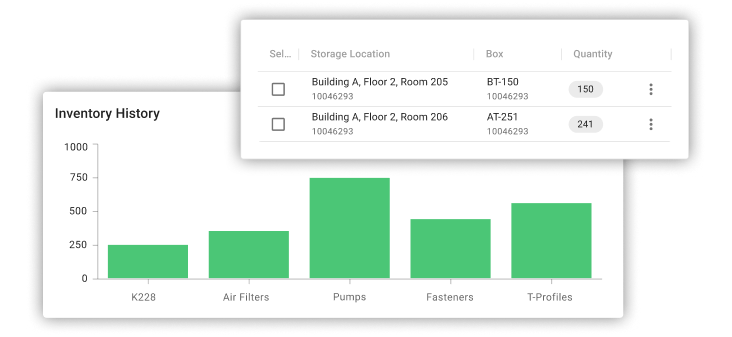
For organizations running multi-site maintenance management, the platform provides centralized inventory visibility across all locations from a single dashboard, with site-level stock levels, reorder alerts, and consumption history available to planners and managers without requiring site visits or manual reporting.
Frequently Asked Questions
What is the difference between inventory management software and a CMMS with inventory?
Standalone inventory management software tracks stock quantities, purchase orders, and supplier data in isolation. A CMMS with integrated inventory connects parts to work orders, assets, and maintenance schedules, so parts consumption is recorded per job, stock levels update automatically, and reorder triggers are based on actual maintenance demand rather than arbitrary thresholds. For maintenance organizations, the connection between parts and work orders is what makes inventory data operationally useful.
Can cloud-based maintenance inventory software integrate with SAP?
Yes, but the quality of integration varies significantly. Generic API connections require custom middleware, break during SAP upgrades, and typically result in data divergence over time. The osapiens HUB for Maintenance uses an SAP-certified connector that syncs work orders, parts consumption, and stock levels bidirectionally with SAP PM and SAP MM without custom development. This is particularly relevant for organizations preparing for SAP S/4HANA migration, where integration architecture decisions made now will determine operational continuity through the transition.
How long does implementation take for cloud-based inventory management software?
Implementation timelines depend primarily on integration requirements. The osapiens HUB for Maintenance can be deployed as a standalone system in 1–3 weeks, with self-onboarding supported by guides and video tutorials. Enterprise deployments including SAP integration typically take 1–3 months. Platforms like Microsoft Dynamics 365 or Oracle Fusion Cloud require 6–24 months for comparable functionality due to the configuration required to achieve maintenance-specific workflows.
Is cloud-based inventory software secure enough for regulated industries like pharma?
ISO 27001 certification and GDPR compliance address the primary security concerns for cloud-based systems in regulated industries. Cloud solutions maintained by dedicated security teams frequently provide stronger security postures than on-premise installations managed by understaffed internal IT departments. For GxP-regulated environments in pharmaceutical manufacturing, the key requirement is full audit trail capability—recording which parts were used on which asset, by whom, and when—which purpose-built CMMS platforms provide natively.
Can I start with a free version and scale up as my operation grows?
The osapiens HUB for Maintenance offers a freemium plan starting at €0, covering core work order and inventory management functionality. This allows maintenance teams to validate workflows, demonstrate internal ROI, and build organizational buy-in before committing to enterprise licensing. Scaling to full functionality including SAP integration, multi-site management, and advanced reporting is available without migrating to a different platform or rebuilding existing configurations.
Start using osapiens for free
Improve your uptime, extend the life of your equipment, and simplify work order management.
Book a demo
ENTERPRISE CAPABILITIES
- SAP ECC & S/4HANA Certified
- Infor & MS Dynamics
- Microsoft Entra ID / Okta
- ISO 27001 & 9001
- EU Cloud · Data Sovereignty
- Development, Test, and Production Environments
- Multi-Entity & Multi-Site
- Power BI Integration
- Audit Trail & Compliance
Related content

January 1, 2026
Sump Pump Maintenance Checklist – Tasks, Tips & Best Practices
January 1, 2026
Preventive Maintenance Checklist – Tasks, Structure & Digital Execution
August 17, 2026
Best Fleet Maintenance Software for Enterprise: Top 5 in 2026
January 1, 2026
Automated Guided Vehicle Maintenance Checklist – Tasks, Safety & Digital Execution

April 13, 2026
Service Report Template: Free Word Template for Field Service Teams
January 1, 2026
Capacitor Bank Maintenance Checklist – Tasks, Safety & Digital Execution

November 21, 2025
Field Service Management Solutions Comparison: The 6 Best FSM Solutions for Small Businesses

September 21, 2026
Best Condition Based Monitoring Software: Top 5 Comparison 2026
January 1, 2026
Lightning Arrester Maintenance Checklist – Tasks, Tips & Best Practices

May 23, 2025
Whitepaper: How to Build a Strong Business Case for a CMMS
January 1, 2026
Fire Extinguisher Maintenance Checklist – Tasks, Tips & Best Practices
January 1, 2026