

Blog

Remi Morisot, osapiens Expert | 19. March 2026 | Lesezeit 15 min.
Microsoft Dynamics 365 is built for finance and supply chain, not for the technician standing next to a machine. A dedicated CMMS bridges the gap. In this article we compared the six best CMMS options for Microsoft Dynamics 365.
Connect D365 with osapiens













TRUSTED BY LEADING COMPANIES




ENTERPRISE-READY
 SAP Certification
 ISO 27001
 EU Hosting
 Entra ID & Okta
 Multi-Entity
Table of Contents
- Key Facts
- Benefits of Integrating CMMS with Microsoft Dynamics 365
- What to Look for in a CMMS for Microsoft Dynamics 365
- Best CMMS Software for Microsoft Dynamics 365 Integration (2026 Comparison)
- How to Choose the Right CMMS for Microsoft Dynamics 365 Integration
- A Closer Look: osapiens HUB for Maintenance and Dynamics 365
- Conclusion: The best CMMS for Microsoft Dynamics 365
- FAQ
Your company runs Microsoft Dynamics 365 for finance and supply chain, but maintenance technicians avoid the system entirely. Logging a simple filter change means clicking through too many screens, so they track work orders in spreadsheets or personal notes instead. The result: shadow data, inaccurate records, and missed maintenance schedules. A specialized CMMS that integrates with Dynamics 365 solves this gap by giving technicians a mobile-first tool while keeping your ERP as the single source of truth.
Key Facts
- Dynamics 365 is a powerful ERP, but it was never built for frontline technicians. When maintenance teams bypass the system and track work orders in spreadsheets or personal notes, shadow data and missed schedules are the result.
- Not all CMMS tools connect equally well with Dynamics 365. The gold standard is a native integration using Push-Sync via Business Events and Pull-Sync via OData. Hard-coded or middleware-based connectors often break with every Microsoft release wave.
- The osapiens HUB for Maintenance connects to Dynamics 365 via native integration patterns, synchronizes assets, work orders, spare parts, and business partners, and delivers a mobile-first experience that requires zero Dynamics 365 expertise.
Benefits of Integrating CMMS with Microsoft Dynamics 365
Connecting a specialized CMMS with Dynamics 365 turns two separate systems into one streamlined maintenance ecosystem. Here are the key benefits organizations gain from this integration:
- Elimination of shadow data: Technicians log work orders in a mobile-friendly CMMS instead of bypassing the ERP, so every record stays accurate and centralized.
- Real-time inventory visibility: Spare parts and stock levels sync between both systems, preventing delays caused by outdated or duplicate inventory data.
- Higher technician productivity: Mobile workflows let maintenance teams manage tasks on-site without navigating complex ERP screens.
- Accurate cost tracking: Labor hours and part consumption flow back to Dynamics 365 automatically, giving finance teams reliable maintenance cost data.
- Stronger compliance: Centralized audit trails across both systems simplify documentation for regulated industries like pharma or energy.
- AI-ready data infrastructure: Clean, continuously synced data lays the foundation for predictive maintenance, advanced asset analytics, and full enterprise asset management across the entire asset lifecycle.
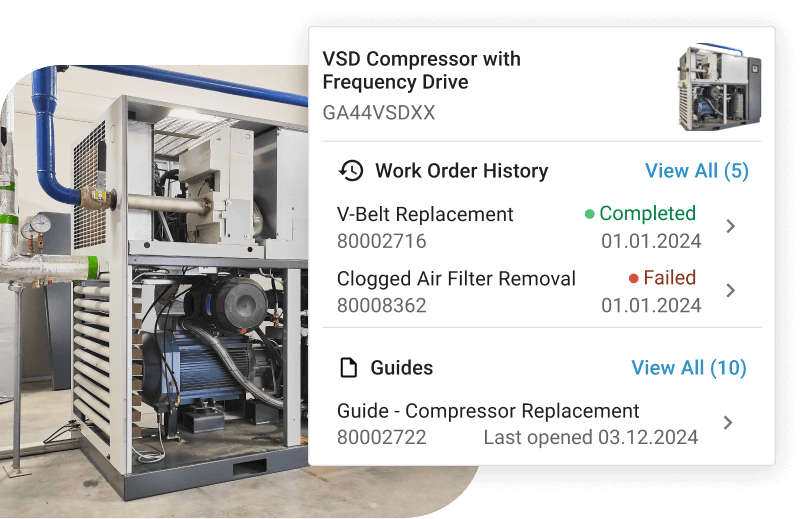
The osapiens HUB for Maintenance includes a dedicated Predictive Maintenance & Analytics module that turns this synchronized data into actionable insights, helping maintenance teams detect failure patterns before equipment goes down.
Ready to Close the Maintenance Gap in Dynamics 365?
The osapiens HUB integrates natively with your D365 environment: mobile-first, update-proof, and ready to deploy stand-alone or fully integrated.
Book a free demo
What to Look for in a CMMS for Microsoft Dynamics 365
Not every CMMS integrates equally well with Dynamics 365. These five criteria separate strong solutions from tools that create more problems than they solve.
Integration Patterns
Look for connectors that enable two-way sync of work orders, assets, and cost data, and pay close attention to how the integration is built. The gold standard is a connector that uses event-driven Push-Sync via Business Events combined with OData-based Pull-Sync, the two native integration patterns Microsoft built into Dynamics 365.
Tools that rely on these patterns, like osapiens HUB, stay stable across Microsoft’s bi-annual release waves. Hard-coded connections or Zapier-based middleware, by contrast, often break with every update and require constant rework to maintain.
Mobile Maintenance Workflows for Field Technicians
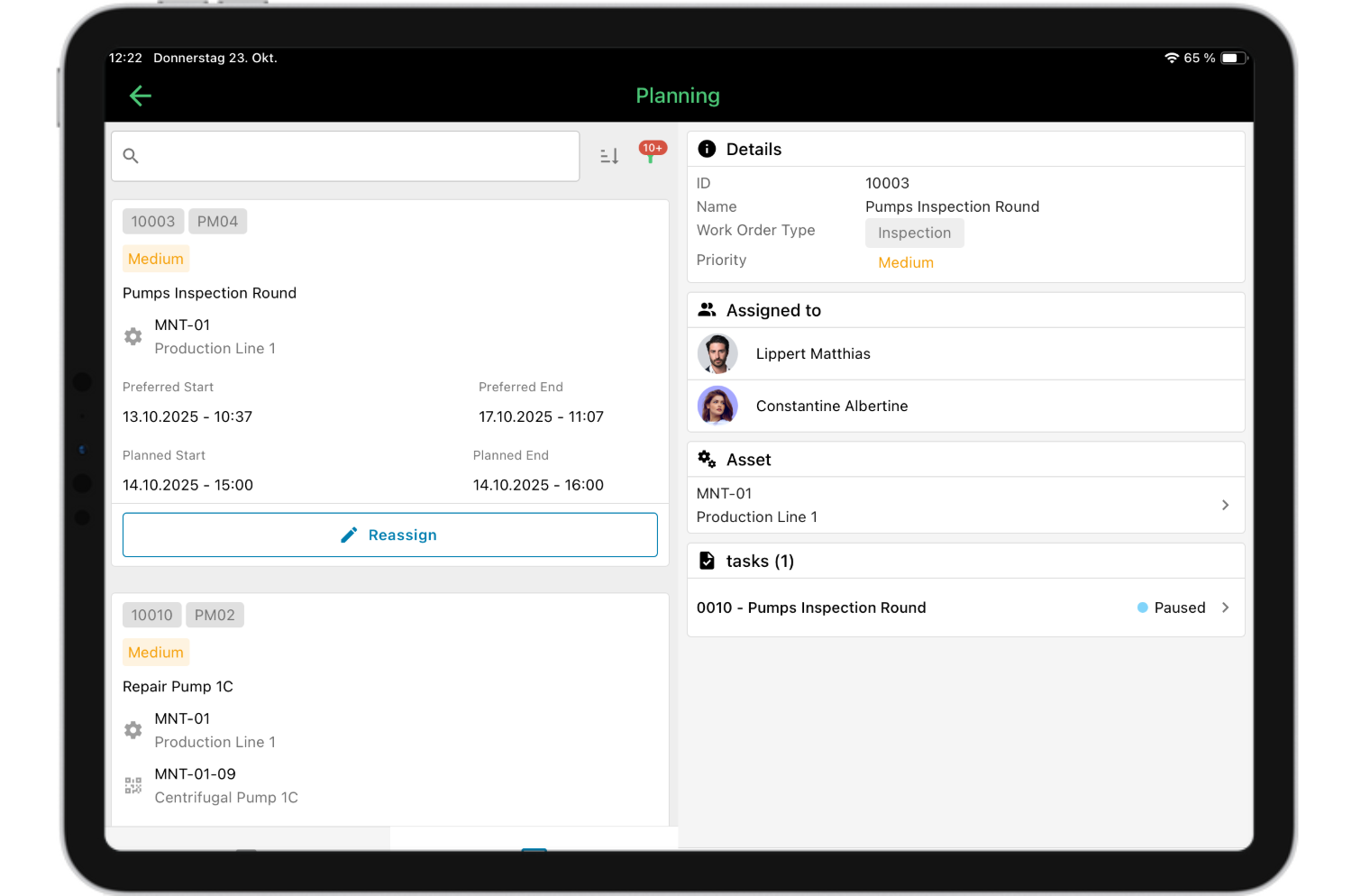
Technicians need an intuitive mobile-first app designed for the shop floor. If the mobile UX adds friction, adoption drops and shadow data returns. One often-overlooked requirement is offline capability. Technicians working in areas with limited or no network coverage (production halls, outdoor facilities, or remote sites) need to complete and document work orders without an active connection.
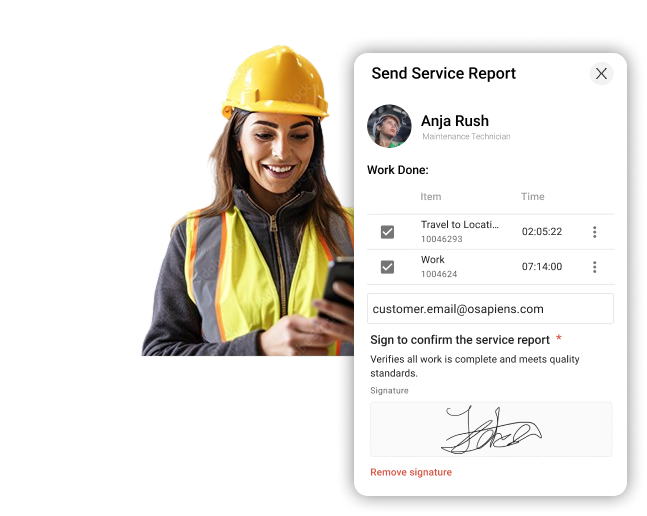
osapiens HUB for Maintenance syncs automatically once connectivity is restored, ensuring no data is lost and no manual re-entry is required.
Spare Parts and Inventory Synchronization
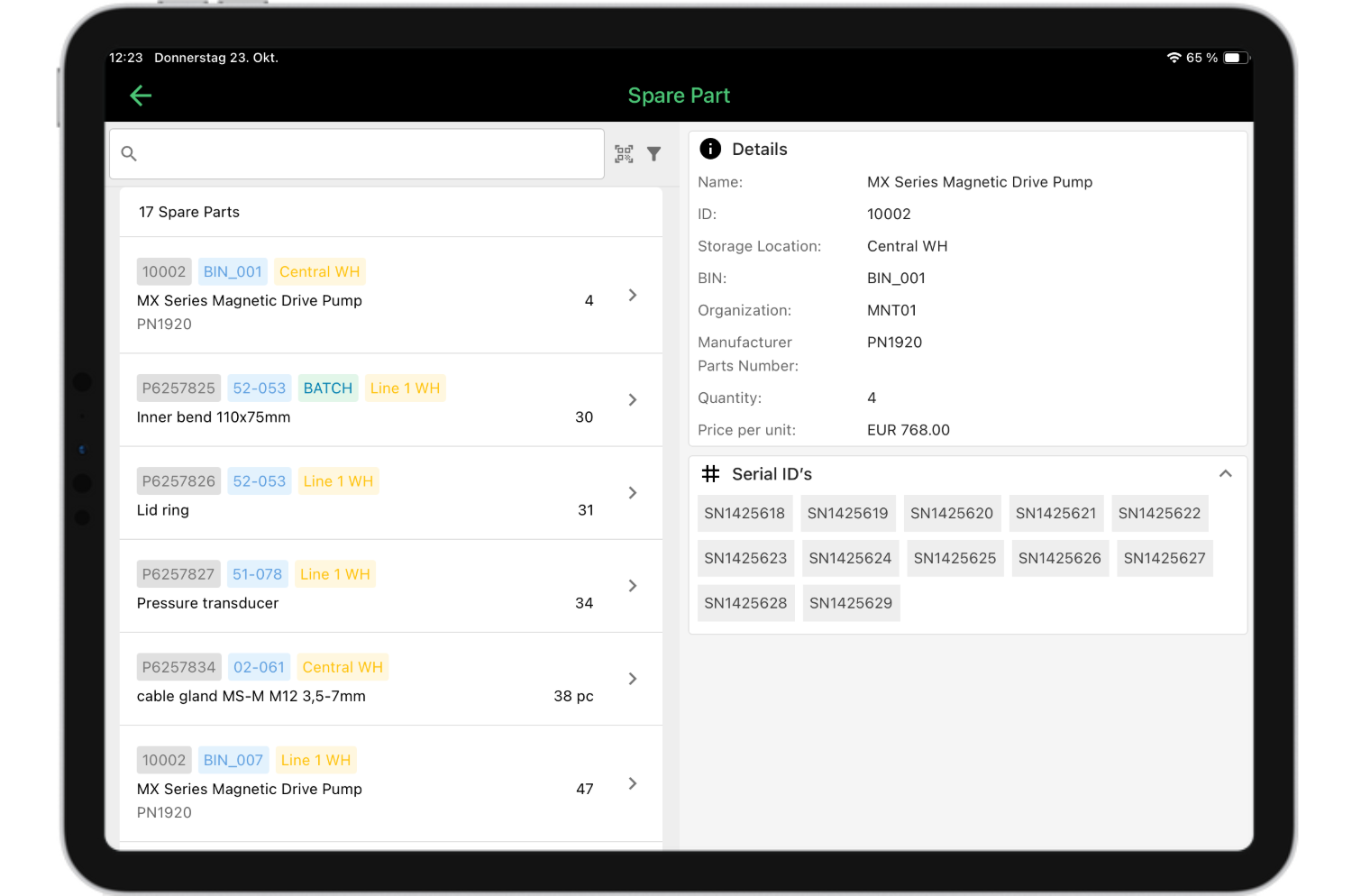
Spare parts are where maintenance delays often originate. The root cause is almost always the same: inventory data that lives in the ERP but never reaches the maintenance team in real time.
A strong CMMS eliminates this gap. When a technician closes a work order, part consumption syncs instantly back to Microsoft Dynamics 365, keeping stock levels accurate across both systems without manual updates. Look for tools that also sync spare parts catalogs and reorder thresholds in both directions, so procurement in Dynamics 365 and maintenance in the CMMS always work from the same data.
Predictive Maintenance and Asset Analytics
Reactive maintenance is expensive. Every unplanned breakdown means costly downtime, emergency labor costs, and accelerated asset wear. A strong CMMS turns continuously synced Dynamics 365 data into actionable insights, helping maintenance teams detect failure patterns, identify underperforming assets, and plan interventions before equipment goes down. Look for a dedicated analytics module that works directly on live maintenance data, not static exports.
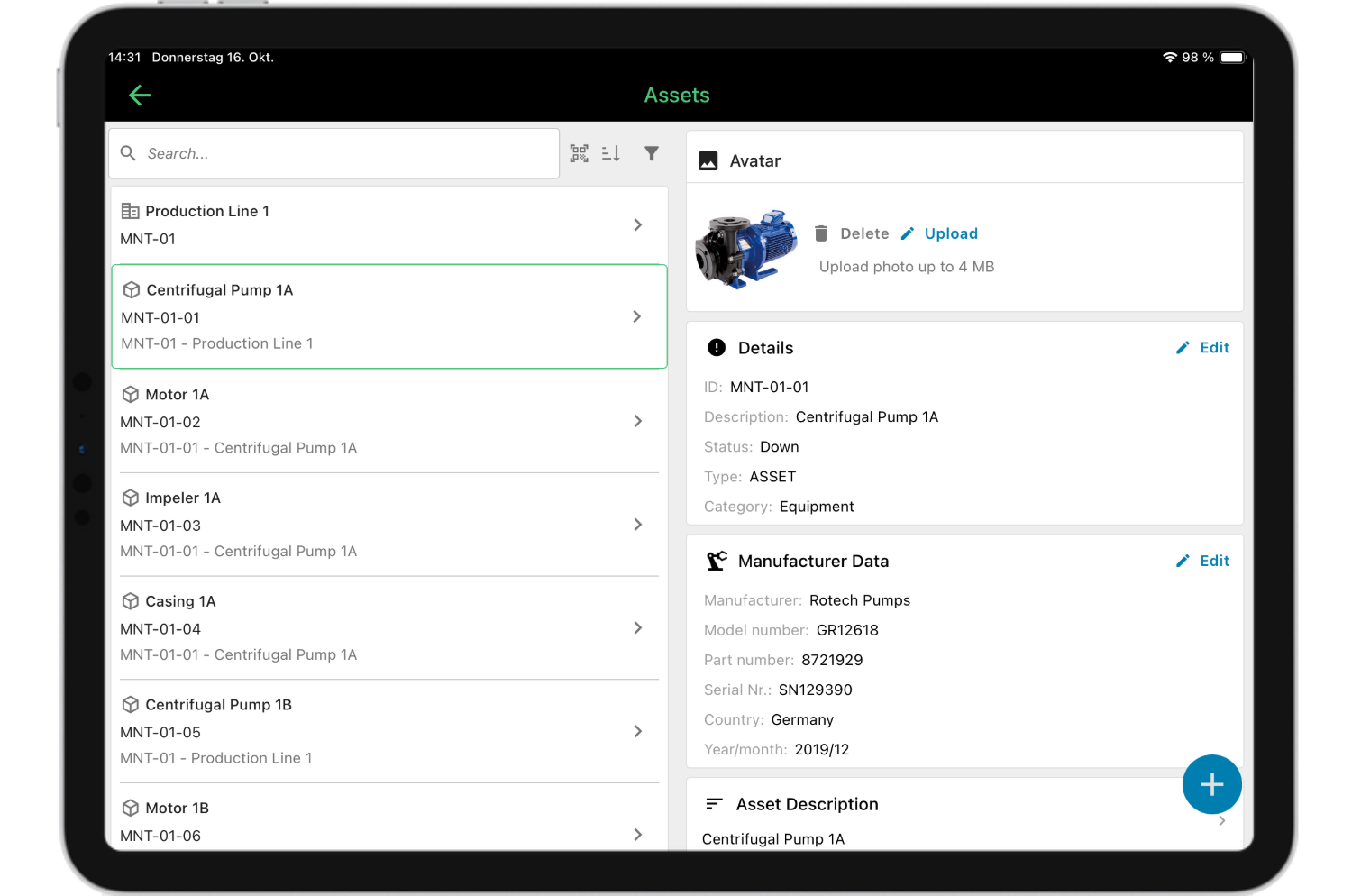
The osapiens HUB includes a Predictive Maintenance & Analytics module that turns your operational data into a foundation for smarter, forward-looking maintenance decisions.
Compliance and Audit Trails for Regulated Industries
For organizations in pharma, energy, or manufacturing, every maintenance action needs a traceable audit trail. Dynamics 365 stores financial and procurement records reliably, but it was not designed to capture the operational detail that regulators require: who performed the work, when, what parts were used, and what the outcome was.
Look for a CMMS that captures the full maintenance history automatically: who performed the work, when, what parts were used, and what the outcome was. This documentation should be centralized, tamper-proof, and retrievable at any time without manual effort.
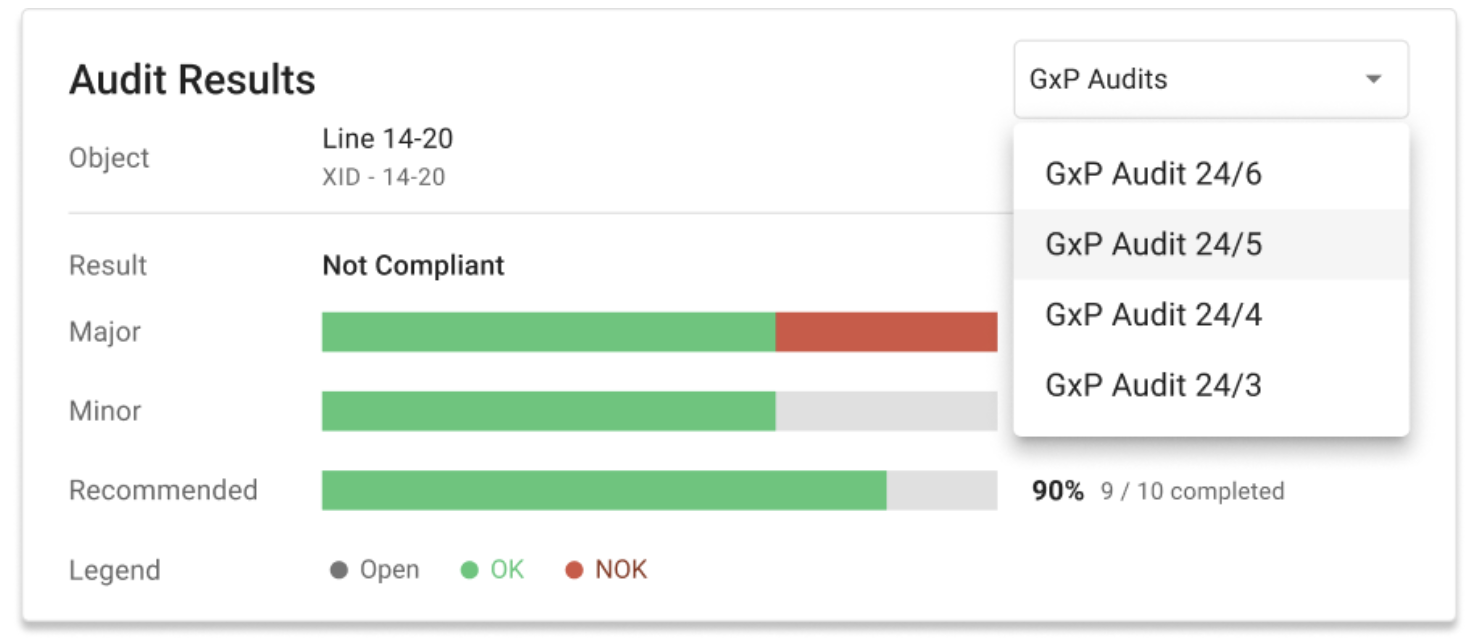
For pharma environments specifically, GxP-compliant workflows and electronic signatures are non-negotiable. For energy and utilities, the ability to demonstrate that maintenance obligations were met, down to the individual asset and technician, is equally critical.
Best CMMS Software for Microsoft Dynamics 365 Integration (2026 Comparison)
Choosing the right CMMS for your Dynamics 365 environment depends on your ERP module, team size, and integration requirements. The table below compares six leading options:
| CMMS | Integration Method | Strengths | Keep in Mind | Best For |
|---|---|---|---|---|
| osapiens HUB for Maintenance | API-based (Native: Business Events + OData) + Pre-Built Connector | Easy to use, fast deployment, mobile app for technicians, offline capability, EU hosting, ISO 27001 + ISO 9001 | Can be deployed stand-alone and connected to D365 at a later stage | European manufacturing, pharma, and utilities organizations running Dynamics 365 F&O / SCM that need a stable CMMS with native ERP integration |
| IFS Ultimo | Pre-built ERP connectors | Comprehensive EAM functionality for asset-intensive industries | Full EAM scope may go beyond the requirements of teams primarily looking for mobile-first technician workflows | Large-scale enterprise asset management |
| eMaint | API / configurable connectors | Flexible, customizable work order workflows | US-focused; could require additional configuration support | Organizations needing flexible workflows |
| MaintainX | Custom Build (Enterprise Plan required) | Strong mobile UX, high technician adoption | Organizations with EU data residency or GDPR requirements should verify current hosting options and compliance certifications | Teams prioritizing mobile UX |
| UpKeep | Zapier / API (via middleware) | Easy to use, fast deployment | Not designed for complex bidirectional sync with D365 F&O | Facilities teams on Business Central |
| The Asset Guardian (TAG) | Native inside Business Central | Zero integration complexity, fully within the Microsoft stack | Only works with Business Central, no standalone CMMS | SMBs committed to the Microsoft stack |
osapiens HUB for Maintenance
osapiens HUB for Maintenance is one of the strongest choices for European organizations running Dynamics 365 Supply Chain Management in manufacturing, pharma, or utilities. It combines mobile-first design with a native, updateproof D365 integration.
Why it works with Dynamics 365: The osapiens HUB connects to Dynamics 365 via two native integration patterns:
- Push-Sync via Business Events for event-driven, near-real-time updates
- Pull-Sync via OData for job-based polling.
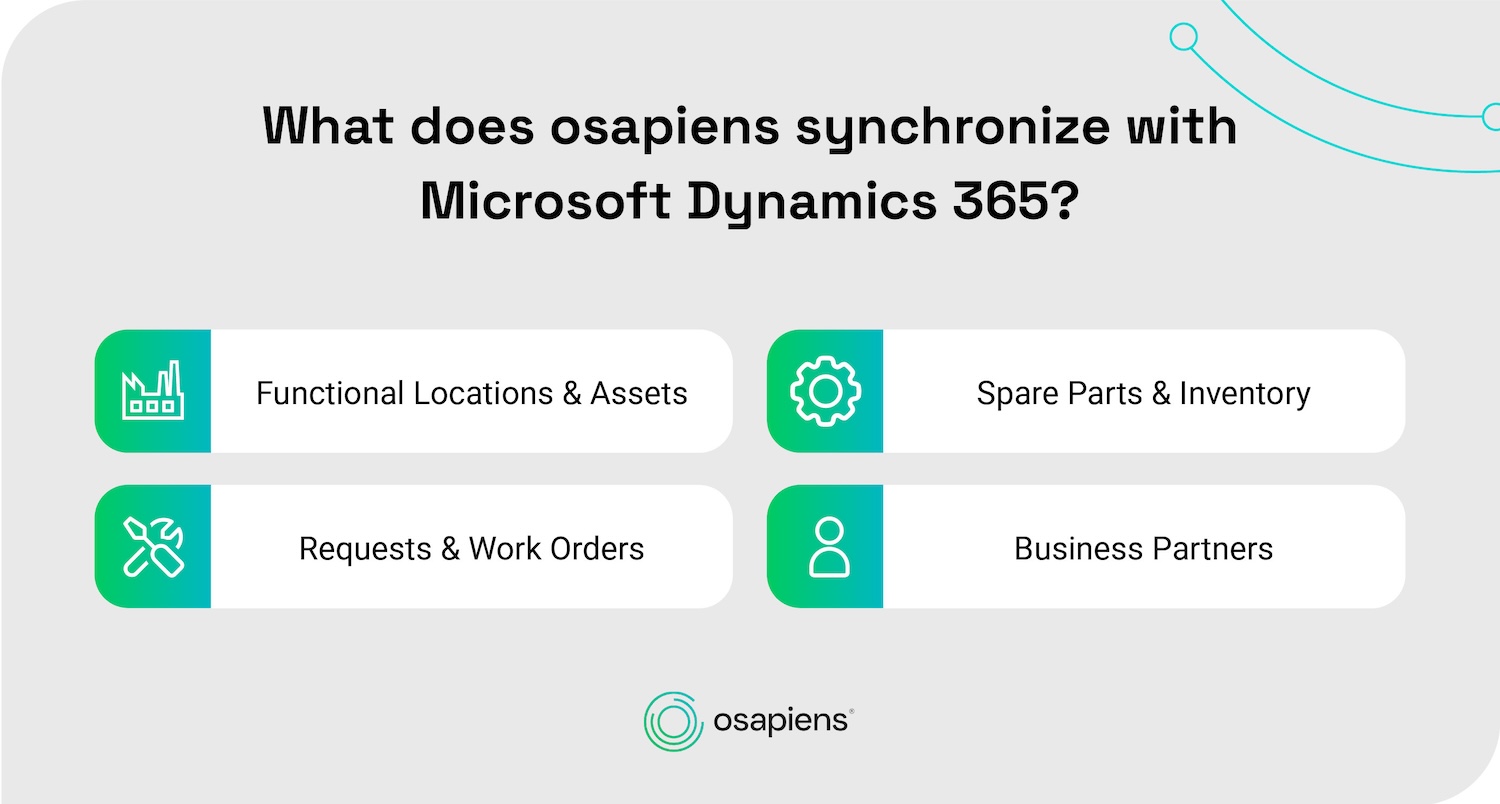
Authentication runs through Microsoft Entra ID via OAuth 2.0. The integration synchronizes four core object categories: Functional Locations & Assets, Spare Parts & Inventory, Requests & Work Orders, and Business Partners, and stays stable across Microsoft’s bi-annual release waves without custom development.
Best for: Enterprise manufacturing, pharma, and utilities organizations running Dynamics 365 F&O Supply Chain Management.
IFS Ultimo
IFS Ultimo is a comprehensive EAM platform for asset-intensive industries, with a dedicated Dynamics 365 integration focused on inventory and procurement workflows.
Why it works with Dynamics 365: IFS Ultimo connects to Dynamics 365 Supply Chain Management via a pre-built integration available on the Microsoft Marketplace. The connector focuses on streamlining procurement processes. Order requests initiated in Ultimo transfer automatically to Dynamics 365 for purchase order processing, and inventory data stays synchronized across both systems.
Limitations: The platform’s depth comes with implementation complexity. Organizations primarily looking for mobile-first technician workflows may find that IFS Ultimo’s full EAM scope goes beyond their immediate requirements.
Best for: Large-scale asset-intensive industries such as utilities, energy, and infrastructure with complex EAM requirements.
eMaint
eMaint is a CMMS with flexible API connectors, well-suited for organizations that need to adapt work order workflows to specific operational requirements.
Why it works with Dynamics 365: eMaint connects to Dynamics 365 via API and configurable connectors, enabling data exchange for work orders, assets, and inventory. The integration setup is flexible but typically requires configuration effort rather than an out-of-the-box deployment.
Limitations: eMaint’s primary market focus is North America. Organizations with EU data residency or GDPR requirements should verify hosting options before committing. Depending on the integration scenario, configuration may require additional consulting support.
Best for: Organizations with complex, non-standard work order workflows that need flexible configuration over out-of-the-box usability.
MaintainX
Maintain X is a modern, mobile-first CMMS with strong UX, but the Microsoft Dynamics 365 integration requires a custom build managed by MaintainX, available only on the Enterprise plan.
Why it works with Dynamics 365: MaintainX offers a custom Dynamics 365 integration built and managed directly by their team, focused on syncing parts and inventory between both systems.
Limitations: The Dynamics 365 integration is not standardized and requires Enterprise plan commitment before configuration begins. Organizations in Europe with strict data residency or GDPR requirements should verify MaintainX’s current hosting options and compliance certifications before committing.
Best for: Teams prioritizing mobile UX and technician adoption, particularly in North American markets.
UpKeep
UpKeep is a user-friendly CMMS for smaller businesses, with lightweight Dynamics 365 connectivity via Zapier and middleware.
Why it works with Dynamics 365: UpKeep connects to Dynamics 365 primarily via Zapier or third-party middleware, enabling basic synchronization of inventory transactions and purchase orders.
Limitations: The Zapier-based integration approach is not designed for high-volume industrial data or complex bidirectional sync with D365 F&O. Teams working in areas with limited network coverage should evaluate UpKeep’s offline capabilities against their specific field requirements.
Best for: Small to mid-sized facilities teams using Dynamics 365 Business Central who need a quick, easy-to-deploy CMMS without complex integration requirements.
The Asset Guardian (TAG)
The Asset Guardian (TAG) is a logical choice for SMBs fully committed to the Microsoft stack, since it lives entirely inside Dynamics 365 Business Central, eliminating integration complexity altogether.
Why it works with Dynamics 365: TAG is not an external tool that integrates with Dynamics 365, it is built natively inside Business Central. There is no connector to configure, no API to maintain, and no data sync to monitor. Asset data, work orders, inventory, and procurement all operate within the same environment, sharing the same data layer as the rest of the ERP.
Limitations: TAG’s strength is also its constraint. Organizations not running Business Central cannot use it. For companies on Dynamics 365 F&O Supply Chain Management, or those with plans to move beyond the Microsoft stack, TAG offers no flexibility. Organizations looking for a standalone CMMS with a dedicated mobile-first experience outside the Business Central environment will need to evaluate alternative platforms.
Best for: SMBs running Dynamics 365 Business Central who want zero integration complexity and a fully native Microsoft maintenance experience.
How to Choose the Right CMMS for Microsoft Dynamics 365 Integration
Finding the best CMMS for your Dynamics 365 environment comes down to a structured evaluation. Follow these five steps to narrow your options quickly:
- Identify your Dynamics 365 module. Integration options differ significantly between Supply Chain Management and Business Central, so start here.
- Assess technician needs. Prioritize mobile access, offline capability, and ease of use to optimize adoption on the shop floor.
- Define your data sync requirements. Clarify whether you need to sync work orders, spare parts, cost data, asset hierarchies, or all of the above.
- Evaluate compliance requirements. Regulated industries like pharma or energy need audit trails and documentation completeness built into the system.
- Request a pilot or demo. Test real-world integration behavior before committing to any platform.
- Consider a stand-alone start. Not every organization needs to activate the full ERP integration on day one. Some CMMS platforms, including osapiens HUB, allow you to start operating independently and connect to Dynamics 365 at a later stage. This reduces implementation risk and lets your maintenance team build confidence with the tool before the integration layer goes live.
If you are looking for a strong starting point, explore the osapiens HUB for Maintenance and see how its API-based ERP integration and mobile-first design fit your environment.
A Closer Look: osapiens HUB for Maintenance and Dynamics 365
Maintenance teams running Dynamics 365 face a common challenge: a powerful ERP on one side and technicians who avoid it entirely on the other. The osapiens HUB for Maintenance was built to close exactly this gap.
✓ Mobile-First Design Built for Technician Adoption: The osapiens HUB is designed mobile-first from the ground up: the interface requires no Dynamics 365 expertise, works offline for seamless use in areas without network coverage, and syncs automatically once connectivity is restored.
✓ API-Based D365 Integration That Stays Stable: Many CMMS tools claim Dynamics 365 integration, but rely on hard-coded connectors or Zapier-based middleware that break with every Microsoft release wave. The osapiens HUB uses two integration patterns built natively into Dynamics 365: Push-Sync via Business Events for event-driven, near-real-time updates, and Pull-Sync via OData using $deltatoken or ModifiedDateTime for job-based polling. Authentication runs through Microsoft Entra ID via OAuth 2.0. The result is a stable, updateproof connection that requires no custom development to maintain, and a solid technical backbone for fully integrated maintenance processes across your entire organization.
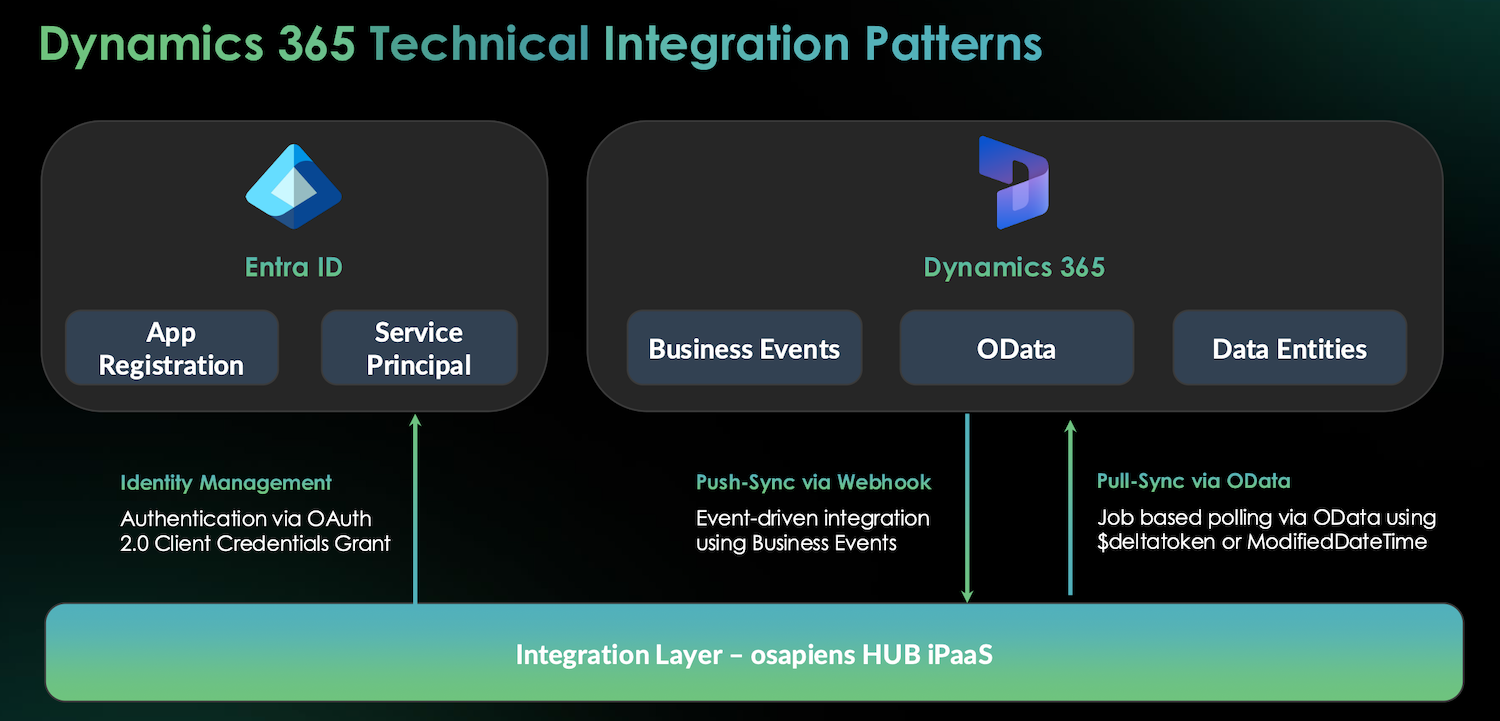
✓ The osapiens HUB connects to Dynamics 365 F&O Supply Chain Management across the full asset lifecycle, from acquisition to retirement. At the core of this integration sits the osapiens HUB iPaaS layer, which synchronizes four key object categories in real time: Functional Locations & Assets, Spare Parts & Inventory, Requests & Work Orders, and Business Partners, covering the full operational scope of a maintenance organization. The result: no data silos, no manual transfers, and no shadow data. Every action a technician takes in the osapiens HUB is reflected in Dynamics 365, and vice versa.
✓ Enterprise Scalability with Compliance Built In: For organizations in regulated industries, the platform is hosted entirely within the EU, fully GDPR-compliant, and certified to ISO 27001 for Information Security and ISO 9001 for Quality Management – both verified by DEKRA. Built-in audit trails and documentation features support compliance requirements in pharma, energy, and critical infrastructure without additional manual effort.

Pradeep Dalal, Product Director – Planning & Execution
★ ★ ★ ★ ★CONA Services
“Working with osapiens has been a positive experience for our company. Their innovative solutions and exceptional support have not only met but exceeded our expectations, paving the way for a successful partnership.”
osapiens HUB is trusted by global organizations, including Coca-Cola North America, where it supports maintenance operations across 35 plants and 1,500 users.
✓ Start Stand-Alone, Integrate Later
Not every organization needs to activate the full Dynamics 365 integration on day one. osapiens HUB can be deployed as a stand-alone CMMS and connected to your ERP at a later stage, once your maintenance team is comfortable with the tool and integration priorities are clear. This approach reduces implementation risk, shortens time-to-value, and gives your organization a natural migration path toward a fully integrated maintenance ecosystem.
See osapiens HUB in Action
Book a free demo and discover how osapiens HUB integrates with your Dynamics 365 environment, no commitment required.
Book a free demo
Conclusion: The best CMMS for Microsoft Dynamics 365
Dynamics 365 is a powerful ERP, but it was not built to be a frontline maintenance tool. Technicians need mobile workflows, not desktop-heavy screens. A specialized CMMS bridges this gap. The osapiens HUB for Maintenance delivers exactly that: a mobile-first app, API-based ERP integration, enterprise-grade scalability proven across global organizations, and built-in compliance features for regulated industries.
FAQ
What is the difference between Dynamics 365 Asset Management and a CMMS?
Dynamics 365 Asset Management handles asset tracking and financial reporting within the ERP. A CMMS is purpose-built for frontline maintenance operations: mobile-first work orders, digital checklists, and preventive scheduling. Most organizations run both systems in parallel: Dynamics 365 as the system of record, a CMMS like osapiens HUB as the system of action.
Does Microsoft Dynamics 365 include maintenance management features?
Yes, the Supply Chain Management module includes Asset Management features for scheduling and work orders. However, the interface is desktop-heavy and complex for field technicians. Many organizations add a dedicated CMMS like osapiens HUB for Maintenance for better mobile UX and higher adoption rates.
How does a CMMS integrate with Microsoft Dynamics 365?
Most CMMS tools connect via REST APIs or Microsoft Power Automate, syncing asset data, work orders, spare parts, and labor costs in both directions. The osapiens HUB uses two native Dynamics 365 integration patterns: Push-Sync via Business Events for near-real-time updates and Pull-Sync via OData for job-based polling. Both stay stable across Microsoft’s bi-annual release waves, without custom development required.
Can I use a CMMS without replacing Microsoft Dynamics 365?
Absolutely. A CMMS works alongside Dynamics 365, not instead of it. Dynamics 365 stays your system of record for financials and inventory. The CMMS serves as the system of action for your maintenance teams. The osapiens HUB even allows you to start stand-alone and activate the Dynamics 365 integration at a later stage, reducing implementation risk from day one.
Start using osapiens for free
Improve your uptime, extend the life of your equipment, and simplify work order management.
Book a demo
Related content
March 2, 2026
Resource planning with Field Service: The most important functions and biggest cost levers

January 1, 2026
Backflow Preventer Maintenance Checklist – Tasks, Compliance & Digital Execution
January 1, 2026
Electrical Substation Maintenance Checklist – Tasks, Safety & Digital Execution
January 1, 2026
Dust Collector Maintenance Checklist – Tasks, Safety & Digital Execution
January 1, 2026
Wind Turbine Maintenance Checklist – Tasks, Components & Digital Execution
January 1, 2026
Gas Meter Maintenance Checklist – Tasks, Safety & Digital Execution

June 25, 2025
What is a CMMS? A Guide to Modern Maintenance Software
January 1, 2026
Material Handling Equipment Maintenance Checklist: Tasks, Intervals & Digital Execution
January 1, 2026
Biomass Boiler Maintenance Checklist – Tasks, Safety & Digital Execution
January 1, 2026
Electrical Preventive Maintenance Checklist – Tasks, Safety & Digital Execution
January 1, 2026
Roof Coating Maintenance Checklist – Tasks, Best Practices & Digital Execution
January 1, 2026