

Blog

Daniel Schwarz, osapiens Expert | 7. July 2026 | Lesezeit 12 min.
IFS Field Service Management works well for large operations, but long rollouts, enterprise-sized pricing, and limited SAP integration push many teams to look elsewhere. See how osapiens HUB and four other alternatives compare on speed, cost, and fit.
Book a demo










TRUSTED BY LEADING COMPANIES




ENTERPRISE-READY
 SAP Certification
 ISO 27001
 EU Hosting
 Entra ID & Okta
 Multi-Entity
Evaluating IFS Field Service Management and not sure it fits your organization? IFS FSM is a powerful suite built for large, complex service operations, but implementations regularly run 6 to 18 months, licensing costs are calibrated for 100-plus-technician organizations, and native SAP integration is absent. If your company runs SAP, operates in production or utilities, or simply needs to go live faster, there are focused alternatives that close these gaps without the overhead.
Key facts
-
Four issues push companies to look beyond IFS FSM: rollout timelines stretching past a year, pricing calibrated for large-scale operations, the absence of native SAP integration, and technician adoption struggles from a steep learning curve.
-
SAP integration is the deciding factor for many buyers: IFS FSM has no native SAP connection, forcing manual data sync and middleware. osapiens HUB and SAP FSM both offer certified native integration, but only osapiens HUB combines it with full CMMS functionality.
-
FSM alone isn’t enough for asset-heavy operations: Dynamics 365, Salesforce, and ServiceNow all handle scheduling well but lack a native CMMS layer for asset lifecycle and spare parts management.
-
osapiens HUB is the only option combining FSM and CMMS on one SAP-certified platform: With up to 89 % First Time Fix Rate and 21 % fewer form errors, it’s already in use at 2,500+ companies including Coca-Cola North America and Nordex. See how it fits your SAP environment.
Why companies look for IFS FSM alternatives
IFS FSM is a capable platform, but the reasons buyers start looking elsewhere rarely come down to a single missing feature.
-
Implementation complexity and timeline. Enterprise IFS deployments routinely require external consultants, significant IT resources, and 6 to 18-plus months before go-live. For mid-market organizations, that timeline is a hard blocker.
-
Cost and sizing mismatch. IFS FSM is architected for large-scale service operations. Companies with smaller field teams or narrower FSM requirements often find themselves paying for a feature scope they will never use.
-
Limited native SAP integration. Organizations running SAP as their ERP system of record face a specific problem: IFS FSM introduces a parallel stack without native SAP PM, MM, or FI/CO integration. The result is manual data synchronization, middleware overhead, and process gaps between field execution and plant maintenance.
-
Interface and mobile usability. Steep learning curves and limited mobile technician UX are recurring themes in user reviews. For companies where technician adoption is a critical success factor, this is a material risk.
The 5 IFS Field Service Management alternatives in 2026
Each of the five alternatives below fits a different situation: combined FSM plus CMMS, Microsoft-ecosystem, CRM-led, SAP-native, and IT-platform-driven. They are ordered by relevance for SAP-centric and industrial organizations.
| Platform | Native SAP Integration | CMMS Included | Typical Rollout Time | Best Fit |
|---|---|---|---|---|
| IFS Field Service Management | No | No | 6–18+ months | Large, complex global service operations |
| osapiens HUB | Yes, SAP-certified (PM, MM, QM, FI/CO) | Yes, on the same platform | 1–2 weeks (freemium) / 1–3 months (enterprise) | Companies needing FSM and CMMS together, with or without SAP |
| Microsoft Dynamics 365 Field Service | No | No | Varies with Microsoft stack maturity | Organizations already on Dynamics 365 or Azure |
| Salesforce Field Service | No | No | Varies with Salesforce CRM maturity | Organizations where Salesforce CRM is the system of record |
| SAP Field Service Management | Yes, native S/4HANA | No | Enterprise-scale, timeline varies | Large SAP S/4HANA shops needing pure FSM scheduling |
| ServiceNow Field Service Management | No | No | Enterprise-scale, timeline varies | Enterprises where ServiceNow is the existing ITSM backbone |
1. osapiens HUB: SAP-certified FSM and CMMS on one platform
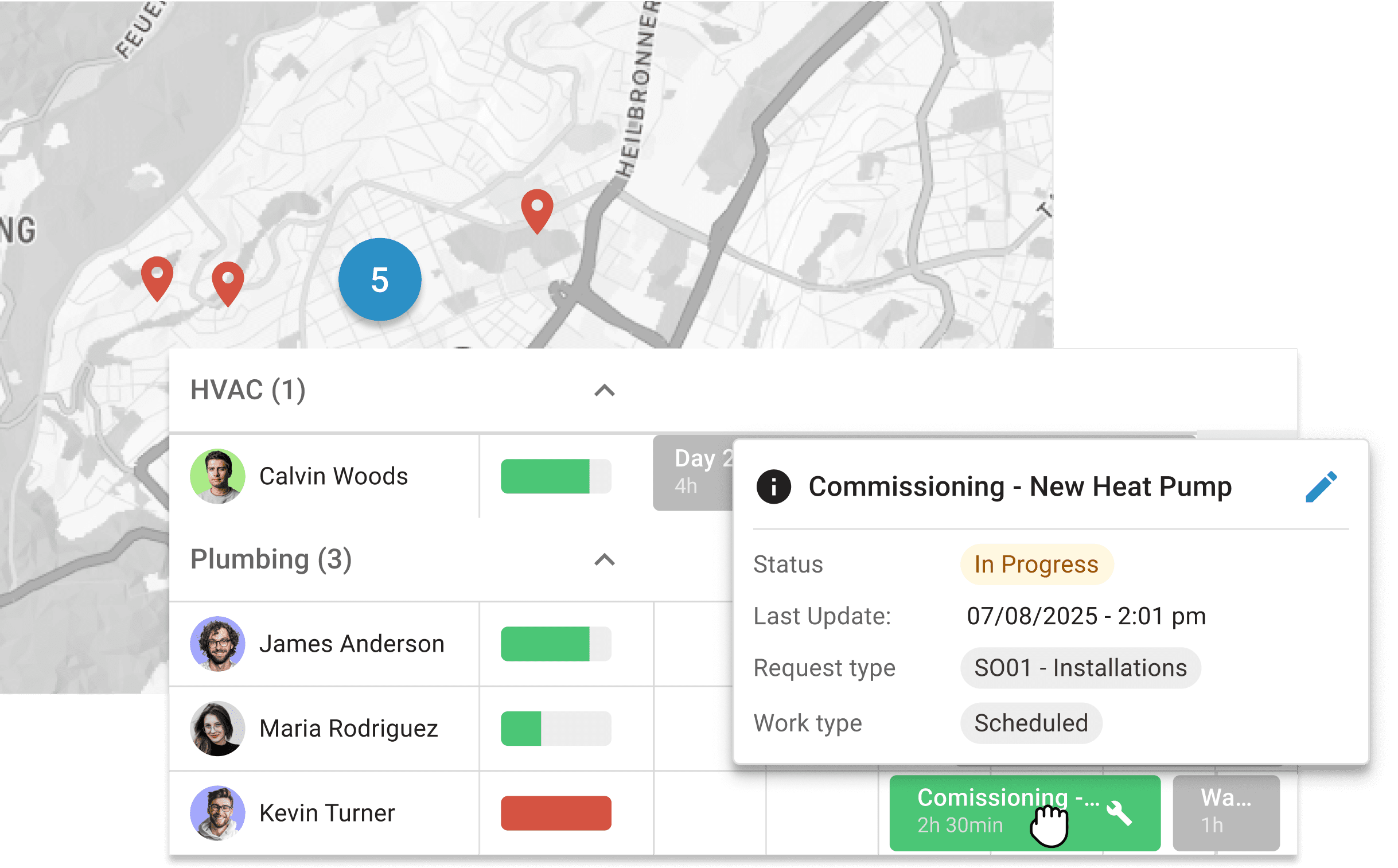
Most FSM tools handle scheduling and work order management. Most CMMS tools handle assets and maintenance history. osapiens HUB combines both in a single platform, connecting work orders, assets, spare parts, technicians, and billing from end to end on one database. For production and industrial companies, utilities, and technical service providers running SAP ERP, this is the clearest structural difference from IFS FSM.
Strengths
-
One system for CMMS & FSM: assets/equipment, spare parts/warehouse, scheduling & field service on a single database and no tool mix.
-
End-to-end billing, including partial billing & ERP integration: from order entry to deployment & reporting to direct billing; partial billing for multi-day deployments included.
-
Offline and online app including PDF service reports & signatures, customer notifications & live status.
-
SAP-certified native integration into SAP PM, MM, QM, and FI/CO with no middleware and no manual data synchronization.
-
DACH relevance: osapiens is GDPR-compliant with local data storage, German-language support, and onboarding specifically for skilled trades, building yards, and SMEs.
-
Deployment timelines are materially shorter: freemium users are live in 1 to 2 weeks, structured enterprise rollouts with full SAP integration take 1 to 3 months including training and customization.
-
Documented outcomes: up to 89% First Time Fix Rate and 21% fewer form errors. In use at more than 2,500 companies including Coca-Cola North America (35 plants, 1,500 users) and Nordex.
-
Freemium entry tier available. The commercial risk of trialing the platform is significantly lower than entering an IFS FSM contract.
Limitations
-
Primary market focus is DACH with planned expansion into Europe and the US. Organizations outside these geographies should verify local support coverage.
Best fit: Production and industrial companies, utilities, and technical service providers running SAP ERP that need FSM and CMMS on a single certified platform.
Ready for an FSM alternative that fits?
One platform for field service and maintenance, no middleware, and a rollout measured in weeks. See what that means for your team's fix rates, documentation, and technician workload.
Book a free demo
2. Microsoft Dynamics 365 Field Service: For Microsoft-ecosystem organizations
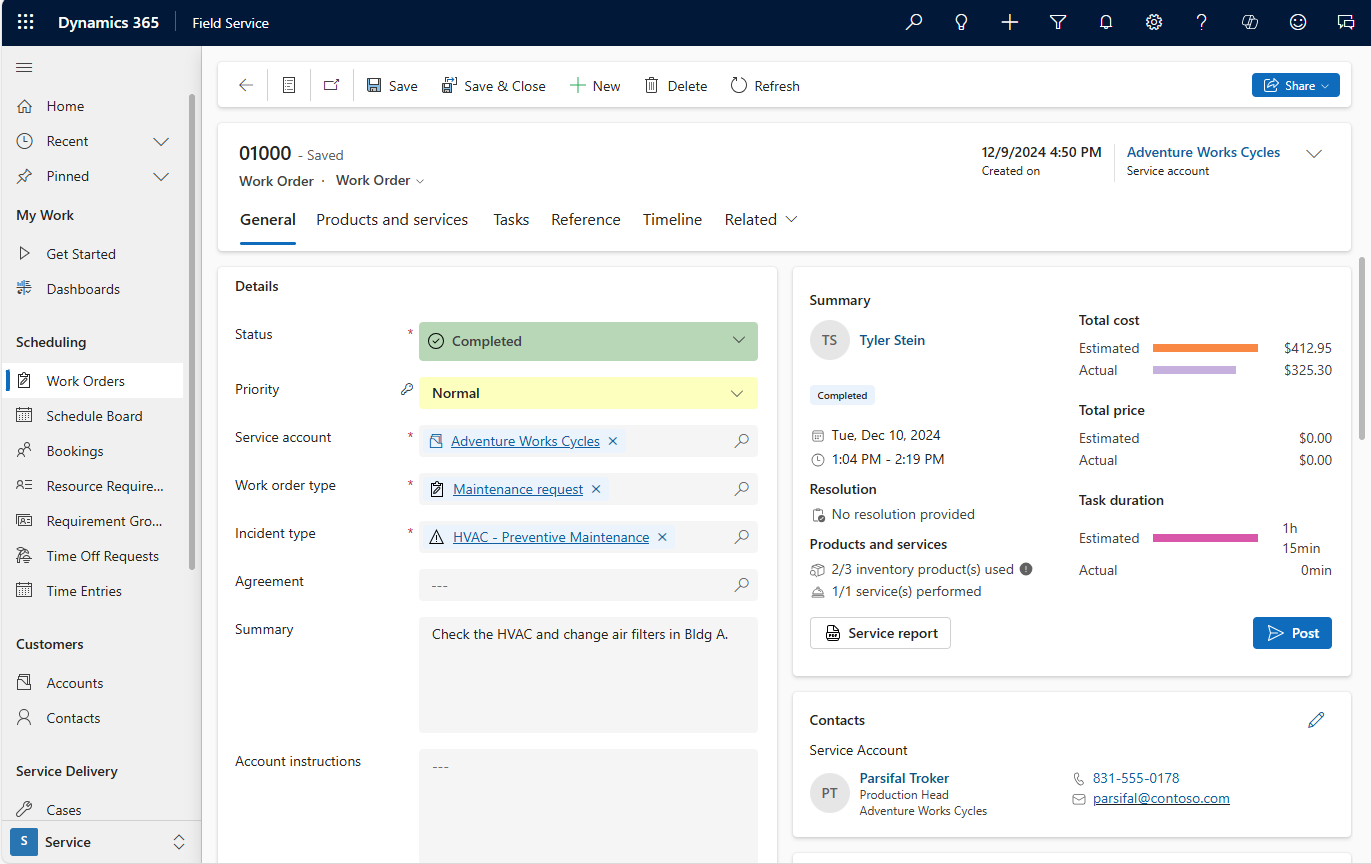
For organizations already licensed on Dynamics 365 CRM or ERP, or running Azure as their cloud infrastructure, Dynamics 365 Field Service is the natural extension. Native integration across Dynamics 365, Teams, Power Platform, and Azure IoT Hub for predictive service triggers makes the platform compelling when the Microsoft stack is already in place.
Strengths
-
Integration across the Microsoft stack: Dynamics 365 CRM and ERP, Teams, Power Platform, and Azure IoT Hub for IoT-triggered predictive maintenance.
-
HoloLens mixed reality remote expert guidance, giving field technicians real-time visual support from remote specialists. Valuable for high-complexity technical service.
-
Widely deployed platform with a large partner and integrator ecosystem globally.
Limitations
-
Mobile technician UX has been a persistent weak point. Despite improvement, it trails best-in-class competitors and is a relevant risk for organizations where technician adoption is critical.
-
Strongest ROI requires pre-existing Dynamics 365 licensing. Without it, total stack cost adds up quickly.
-
No native CMMS layer. Asset lifecycle management and spare parts inventory require additional modules or a second platform.
Best fit: Organizations already invested in the Microsoft ecosystem with Dynamics 365 or Azure as their platform foundation.
3. Salesforce Field Service: For CRM-led service organizations
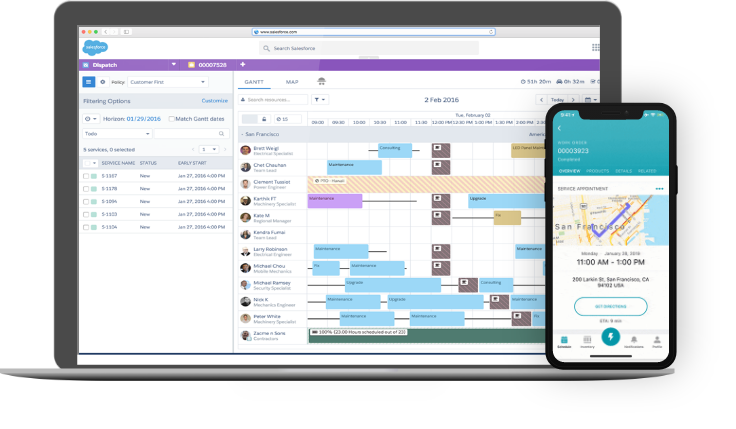
Salesforce Field Service is built from the CRM outward. Its scheduling and constraint-handling engine is the real differentiator, running dispatch scenarios before committing and scaling to large field workforces. For organizations where customer relationship data drives service operations, the tight CRM connection is a meaningful advantage.
Strengths
-
Handles complex technician, skill, and geographic constraint combinations and runs what-if dispatch scenarios before committing.
-
Tight integration with Salesforce CRM, keeping service history, customer data, and field execution on one record.
-
Large AppExchange marketplace for extensions and integrations across industries.
Limitations
-
Salesforce Field Service requires Salesforce CRM licensing. Enterprise CRM licenses add $150 to $300 per user per month on top of Field Service costs. Total cost of ownership is high without pre-existing Salesforce investment.
-
No native CMMS capability. Asset lifecycle management, spare parts inventory, and maintenance planning require additional platforms or integrations.
-
Not a fit for non-Salesforce environments. The platform’s value is contingent on existing CRM investment.
Best fit: Service organizations where Salesforce CRM is the system of record and the primary workflow runs through the CRM layer.
4. SAP Field Service Management: For large SAP S/4HANA environments with pure FSM needs
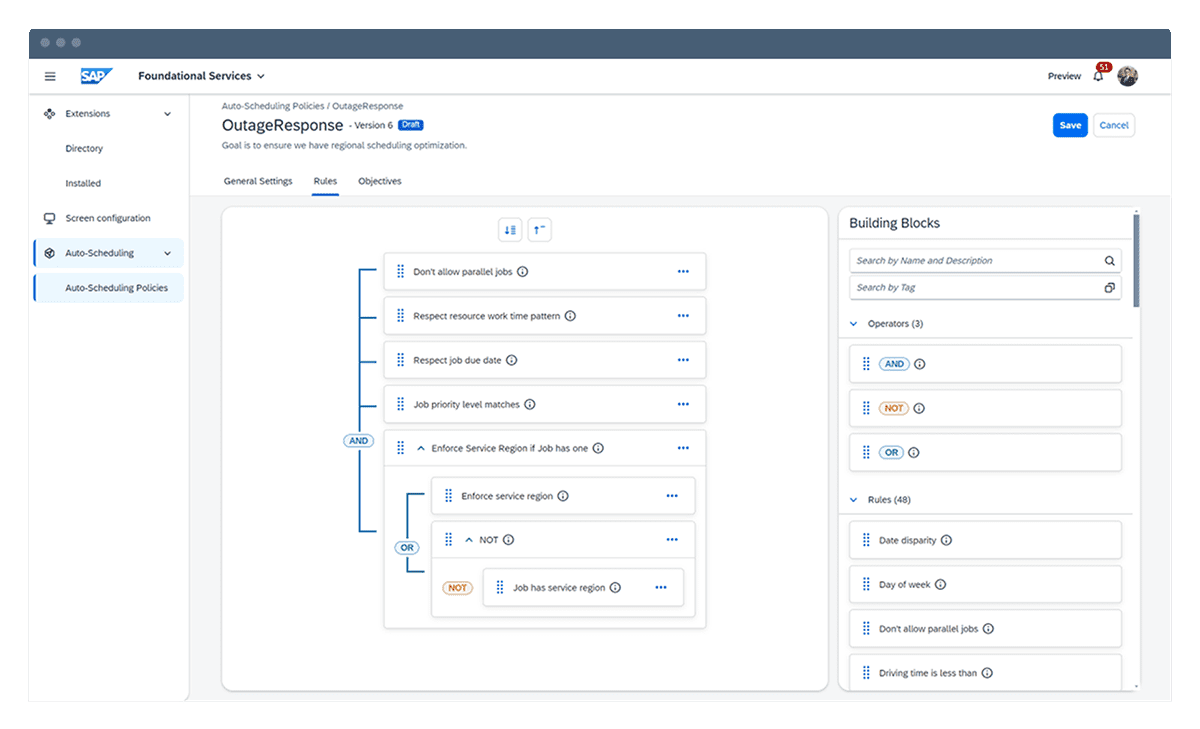
SAP’s own FSM product offers native integration for organizations running SAP S/4HANA, with no translation layer or middleware. For large enterprises where SAP is non-negotiable and the FSM requirement is limited to scheduling, work order management, and technician guidance, SAP FSM is a coherent choice.
Strengths
-
Native SAP S/4HANA integration, eliminating the translation overhead that third-party FSM tools introduce in SAP environments.
-
Full SAP ecosystem alignment: user management, reporting, and compliance tooling connect directly to existing SAP infrastructure.
Limitations
-
SAP FSM is a field service scheduling tool, not a full CMMS. It does not combine asset lifecycle management, spare parts inventory, and maintenance planning on a single operational database.
-
Outside the SAP ecosystem, the platform’s primary differentiator disappears. For non-SAP environments, SAP FSM is not a competitive choice.
-
Implementation complexity and licensing cost at enterprise SAP scale remain significant.
Best fit: Large enterprises on SAP S/4HANA with a pure FSM scheduling requirement and no need for integrated CMMS functionality.
5. ServiceNow Field Service Management: For IT-led enterprise service operations
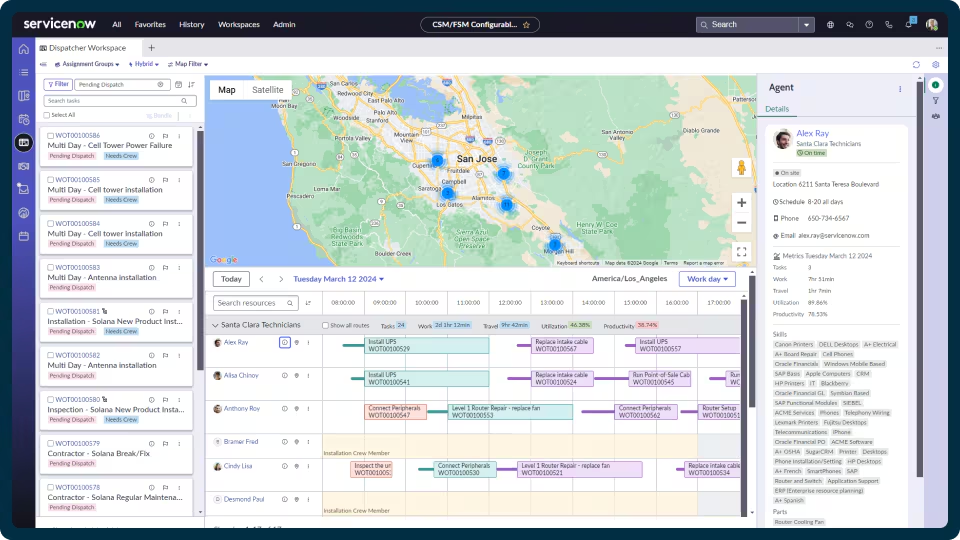
ServiceNow FSM covers the full job lifecycle on a single platform: work order creation, scheduling, technician guidance, parts management, contractor workflows, and billing settlement. For large enterprises where field service is part of a broader ITSM-driven operation, this depth of integration is the draw.
Strengths
-
End-to-end job lifecycle on one platform, from work order creation through technician guidance to billing close-out.
-
Native connection to ServiceNow ITSM, ITOM, and CSM modules, powerful for organizations where IT and field operations converge.
-
Contractor and multi-vendor workforce management built in.
Limitations
-
Implementation expenses typically run 3 to 5 times annual software licensing costs. ServiceNow FSM is not a mid-market option.
-
Delivers value only when ServiceNow is already the enterprise service backbone. As a standalone FSM platform, the cost-to-value ratio is poor.
-
No native SAP integration and no CMMS layer.
Best fit: Large enterprises where ServiceNow is already the enterprise service management platform and field service is one workstream within a larger ITSM or operations management deployment.
Calculate What Faster FSM Could Mean for You
Up to 89% First Time Fix Rate. 21% fewer form errors. See what a SAP-integrated FSM and CMMS rollout could deliver for your operation.
Calculate Your ROI
How to choose the right IFS FSM alternative
The clearest indicator is your ERP landscape and how much CMMS capability you need alongside field scheduling. Use the table below to orient quickly:
| If your situation is… | Consider… |
|---|---|
| SAP-centric company needing FSM and CMMS on one platform | osapiens HUB |
| Already on Microsoft Dynamics 365 or Azure, no CMMS requirement | Microsoft Dynamics 365 Field Service |
| Already on Microsoft Dynamics 365 or Azure, with CMMS requirement | osapiens HUB (SAP integration) or Dynamics 365 plus a CMMS add-on |
| Salesforce CRM is your system of record, no asset management needed | Salesforce Field Service |
| Industrial or asset-heavy operation on Salesforce needing CMMS | osapiens HUB alongside or instead of Salesforce Field Service |
| Large SAP S/4HANA shop with pure FSM scheduling needs only | SAP Field Service Management |
| Large SAP shop needing FSM plus asset and maintenance management | osapiens HUB |
| ServiceNow is your enterprise service backbone | ServiceNow FSM |
For any organization that needs field service management combined with maintenance and asset management, osapiens HUB is the only option in this list that covers both on a single database without a middleware layer or a second platform. That combination, with a 1 to 3 month enterprise rollout timeline, is the clearest differentiation from IFS FSM.
Calculate your ROI and see what a faster, SAP-integrated FSM rollout would mean for your operation.
Conclusion: The right IFS Field Service Management alternative depends on your ERP and your maintenance scope
IFS Field Service Management is engineered for the most complex global service operations. That same scale and sophistication makes it a poor fit for SAP-centric companies, mid-market operations, and organizations that need to be live in months rather than years. The alternatives in this list each solve a specific fit problem: Microsoft and Salesforce for ecosystem-led deployments, SAP FSM for pure SAP-native scheduling, ServiceNow for IT-platform-driven enterprise operations, and osapiens HUB for companies that need FSM and CMMS on a single SAP-certified platform, without the middleware, the 18-month rollout, or the over-specified feature set.
Field Service and Maintenance, Finally Connected
If your organization runs SAP and needs field service management that connects to your plant maintenance data from day one, book a free demo and see how osapiens HUB connects to your SAP environment in weeks, not months.Book a free demo
FAQ
What is the best alternative to IFS Field Service Management?
For SAP-centric organizations that need FSM and CMMS on a single platform, osapiens HUB is the strongest alternative. SAP-certified, with a structured enterprise rollout of 1 to 3 months, and in use at more than 2,500 companies including Coca-Cola North America. For Microsoft-ecosystem organizations, Dynamics 365 Field Service is the natural fit. For CRM-led service organizations, Salesforce Field Service is the market leader.
Why do companies look for IFS FSM alternatives?
IFS FSM is built for large, complex service operations. The most common triggers for the search: implementation timelines of 6 to 18-plus months, licensing costs calibrated for enterprise scale that do not fit mid-market budgets, and limited native integration for companies running SAP as their ERP. For SAP-centric or mid-market organizations, the fit gap is structural, not a matter of configuration.
Is there an FSM alternative that integrates natively with SAP?
Yes. osapiens HUB is SAP-certified and connects natively to SAP PM, MM, QM, and FI/CO with no middleware required. SAP’s own FSM product also integrates natively into S/4HANA, but covers field service scheduling only, without the asset management and CMMS layer that osapiens HUB provides on the same platform. For more on the SAP integration, see the SAP CMMS integration overview.
How long does it take to switch from IFS FSM to an alternative?
It depends on the platform chosen. osapiens HUB offers a freemium entry that is live in 1 to 2 weeks. A structured enterprise rollout with SAP integration takes 1 to 3 months including training and customization. Platforms like ServiceNow FSM or Salesforce Field Service typically require 6 to 12 months of implementation and significant consulting investment before go-live.
What is the difference between FSM and CMMS?
FSM (Field Service Management) software manages the scheduling, planning, and execution of technician assignments in the field. CMMS (Computerized Maintenance Management System) manages the asset side: maintenance plans, work order history, spare parts inventory, and equipment condition data. Most FSM tools cover one or the other. osapiens HUB combines both in a single platform, a shared database for assets, work orders, materials, and service reports with no media breaks between systems.
Start using osapiens for free
Improve your uptime, extend the life of your equipment, and simplify work order management.
Book a demo
ENTERPRISE CAPABILITIES
- SAP ECC & S/4HANA Certified
- Infor & MS Dynamics
- Microsoft Entra ID / Okta
- ISO 27001 & 9001
- EU Cloud · Data Sovereignty
- Development, Test, and Production Environments
- Multi-Entity & Multi-Site
- Power BI Integration
- Audit Trail & Compliance
Related content
January 1, 2026
Oxygen Concentrator Maintenance Checklist – Tasks, Documentation & Digital Execution

September 1, 2026
AI-Powered Predictive Maintenance in Your CMMS
April 7, 2026
IFS Ultimo Alternatives: Top 5 Comparison 2026
January 1, 2026
Overhead Crane Maintenance Checklist: What to Inspect & When
January 1, 2026
CNC Machine Maintenance Checklist: What to Inspect, When & How
February 4, 2026
Meter Reading Software: Transform Manual Processes into Digital Efficiency

September 18, 2026
AI Maintenance Software vs. Traditional CMMS: Do You Actually Need Both?
January 1, 2026
Robotic Assembly System Maintenance Checklist – Tasks, Tips & Digital Execution
January 1, 2026
Lyophilizer Maintenance Checklist – Tasks, Tips & Template

October 1, 2025
Which KPIs in maintenance really matter? Here’s what your peers say:
January 1, 2026
Hydraulic Power Pack Maintenance Checklist – Tasks, Tips & Best Practices

March 3, 2026