

Blog

Nastja Pressler, osapiens Expert | 2. March 2026 | Lesezeit 8 min.
Don't plan assignments based solely on availability. It is crucial that the right qualifications are scheduled, all order information is complete, the necessary materials are available on time, and the work steps are clearly defined—this is the only way to ensure that the initial appointment is successful without avoidable follow-up visits.
Book a demo
More than 2200 companies place their trust in osapiens













Table of Contents
- Key Facts
- Why resource planning in field service determines costs, quality, and customer satisfaction
- The typical weak point of traditional resource planning in field service
- Field service as an end-to-end process rather than individual tools
- What features you should really check for in field service software
- Expert tip from osapiens
- Typical hidden costs in field service and how digital solutions can reduce them
- How osapiens combines resource planning, maintenance, and field service in one service platform
- Field service becomes predictable when planning and execution go hand in hand.
- FAQs about field service scheduling
In many service organizations, resource planning must coordinate several requirements simultaneously: unplanned disruptions, scheduled maintenance, and particularly urgent customer cases with binding deadlines. At the same time, queries arise from the field service and back office—for example, regarding spare parts availability or performance records for billing. Customers also expect reliable information on appointment status and arrival times.
The causes rarely lie in a lack of commitment, but rather in a lack of consistent processes. If order acceptance, resource planning, execution, documentation, and billing are not properly linked, information gaps arise. This leads to queries, delays, and avoidable additional appointments.
The term field service management (FSM) is correspondingly broad. Gartner describes FSM as the interplay of demand detection, resource planning and optimization, provision of relevant information to field service personnel, and process support for technician interactions.
Many companies therefore start with resource planning. However, field service only becomes truly efficient when resource planning, order processing, asset information, and mobile feedback work together in a common solution. A platform such as osapiens HUB for Service creates a uniform database for this purpose and supports end-to-end service processes.
Key Facts
- In field service, planning only becomes possible when requests, planning, execution, documentation, and billing converge as a continuous process.
- Resource planning is more than just calendar maintenance because it directly influences costs, adherence to deadlines, quality, and customer satisfaction.
- The most common mistake is planning based solely on availability, even though qualifications, history, materials, and clear work steps determine the initial appointment.
- Good software needs a visual planning board, quick rescheduling, priority rules, and qualification-based assignment with complete order context.
- Mobile feedback, including offline functionality and structured documentation, ensures that service reports and billing are possible without rework.
Why resource planning in field service determines costs, quality, and customer satisfaction
Today, resource planning is much more than just schedule management. It directly influences how economically and reliably your service operates:
- Capacity utilization and revenue
How many assignments you can realistically take on and whether promised response and processing times can be met. - Costs and efficiency
How much travel, rework, and additional on-site appointments tie up your capacity and budget. - Data quality and verifiability
Whether services are fully documented and whether billing and internal and external requirements are reliably met. - Service experience
How transparent communication is, how reliably deadlines are met, and how professional your service is perceived to be.
In practice, problems often arise due to separate systems and channels: service requests in the customer system, planning in separate tools or spreadsheets, material information in another system, and feedback from the field via changing communication channels. Such disconnects cause additional work and avoidable errors.
The typical weak point of traditional resource planning in field service
In many companies, scheduling is primarily based on availability. This is not sufficient for reliable field service. The decisive factor is whether the job can be completed in full on the first appointment.
Often, important prerequisites are missing, for example:
- Appropriate qualifications or necessary documentation
- Complete equipment and deployment history
- Required spare parts or materials
- Clear work instructions, test points, and safety specifications
- Structured documentation as a basis for verification and billing
Simply scheduling appointments does not cover these requirements. Greater impact is achieved when resource planning, order data, asset information, and mobile feedback are brought together. This not only facilitates scheduling, but also supports successful processing from start to finish.
Field service as an end-to-end process rather than individual tools
In order to plan service assignments, a clear process with consistent terms and responsibilities is required:
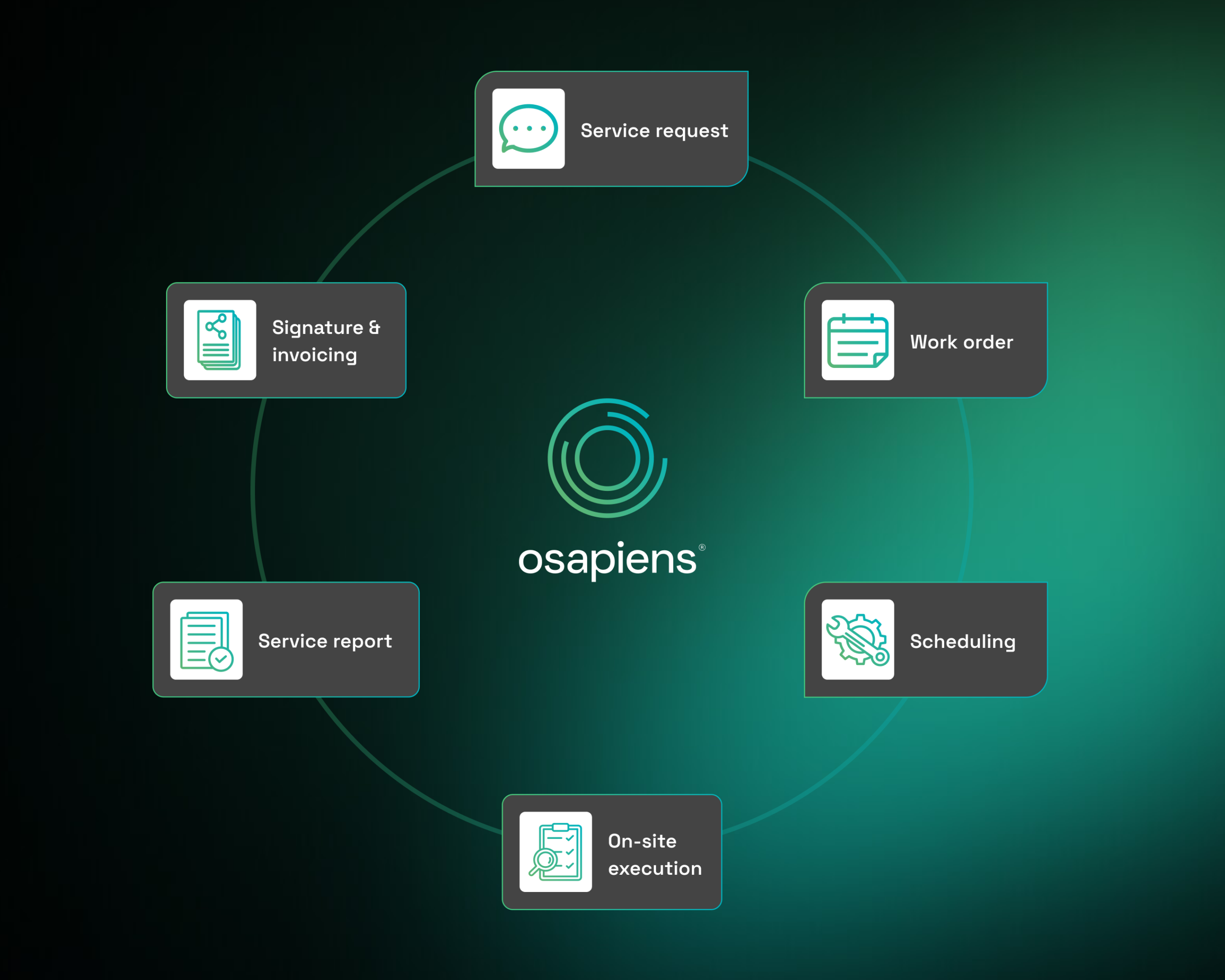
If this chain is consistent across the system, queries and rework are significantly reduced. At the same time, transparency regarding status, open tasks, and actual capacities increases.
What features you should really check for in field service software
Planning and scheduling
- Visual planning board with drag-and-drop for quick assignment and rescheduling
- Quick rescheduling in case of cancellations and emergencies without loss of information
- Capacity overview with overload, gaps, and outlook for coming weeks
- Set of rules for priorities and escalations based on promised response and processing times
Qualification-based assignment and preparation
- Assignment based on qualifications and experience rather than availability
- Consideration of location and area of operation to reduce unnecessary travel
- Complete order information including plant reference, history, and requirements
- Integration of materials and spare parts so that technicians arrive prepared
Mobile implementation in field service
- Mobile use that works even without a stable internet connection
- Digital checklists and work steps for consistent execution
- Photo and signature capture as proof of performance
- Up-to-date status reports so that dispatch and back office are always informed
Documentation, service reports, and evaluation
- Guided digital forms with mandatory fields and plausibility checks
- Automatically generated service reports from on-site data
- Clean database for documentation, billing, and asset history
- Key figures and evaluations for managing productivity, adherence to deadlines, and quality
Discover the 6 best FSM solutions in comparison—including features, strengths, and selection criteria—and quickly find the software that suits your service.
Expert tip from osapiens
Don't plan assignments based solely on availability. It is crucial that the right qualifications are scheduled, all order information is complete, the necessary materials are available on time, and the work steps are clearly defined—this is the only way to ensure that the initial appointment is successful without avoidable follow-up visits.
Nastja Pressler, osapiens Expert
Typical hidden costs in field service and how digital solutions can reduce them
Unclear priorities
Without clear rules, planning is often based on subjective impressions. In field service, this leads to critical cases being handled too late or resources being allocated incorrectly. Digital solutions prioritize tasks in a transparent manner according to defined criteria such as desired response time, risk of failure, safety relevance, customer agreements, and deployment history.
Dependency on individual knowledge
If only a few people know which technician has which skills or which system repeatedly causes problems, planning becomes vulnerable. Digital qualification profiles and system histories make knowledge systematically available and reduce misallocations.
Documentation without structure
Paper, photos in chat, or free-text notes are often an obstacle in field service: information is missing, evidence is difficult to find, and billing is delayed.
With osapiens HUB for Service, formal errors can be reduced by up to 21 percent thanks to guided digital forms with mandatory fields and plausibility checks. This creates a consistent database for reports, evidence, and evaluations.
Additional on-site appointments
A common cost factor in field service is additional trips when qualifications, materials, or equipment information are missing during the first appointment. With osapiens HUB for Service, repeat visits can be significantly reduced through qualification-based assignment and complete order information. Up to 89 percent of orders can be completed during the first visit. The specific effect depends on your processes, data quality, and consistent use in everyday operations.
Delayed completion
Many organizations lose time between on-site work and complete closure in the system. This leads to queries and delays further processing. Mobile closure processes and automatically generated service reports close this gap and improve throughput time to billing.
How osapiens combines resource planning, maintenance, and field service in one service platform
Many companies use separate systems for resource planning and maintenance. This leads to duplicate data maintenance, missing information in the field, and unnecessary coordination between dispatch, back office, and technicians. The osapiens HUB for Service combines field service, maintenance, and mobile service processes in a single solution.
This enables:
- Resource planning with complete order context
Work orders contain customer and plant references, history, requirements, and checklists. - Mobile use with offline function
Technicians collect data on site even without a stable connection and synchronize it automatically later. - Structured feedback and stable process quality
Guided forms and clear mandatory fields support consistent execution and reliable documentation. - Automatic service reports without rework
The on-site data is used to generate complete service reports, including photos, signatures, and recorded times and materials.
This creates a continuous process from service request to evaluation, including a continuous system history and a clear basis for billing.
Field service becomes predictable when planning and execution go hand in hand.
Scheduling that primarily fills the calendar often fails to solve the central problems in field service: orders are assigned incorrectly, information is missing, rework is required, and documentation is not consistently usable. Sustainable improvements are achieved when scheduling, order processing, asset information, and mobile execution converge in a single system.
The osapiens HUB for Service connects scheduling, field service, and back office in a consistent process. This reduces repeat visits and improves documentation quality, for example, with up to 89 percent of orders completed on the first visit and up to 21 percent fewer formal errors thanks to guided digital forms.
Process more service orders in less time
Your technicians are on the road visiting customers – efficiency determines your margin. With osapiens HUB for Maintenance, you can optimize route planning, spare parts logistics, and order processing. Your teams work with a mobile app, and you control everything centrally via real-time dashboards.
Optimize your service processes
FAQs about field service scheduling
What does field service scheduling mean?
Field service scheduling is the structured planning and assignment of service calls in the field. It includes scheduling, prioritization, appropriate assignment based on qualifications, and the provision of all information required for on-site execution.
What are the minimum functions that field service software should cover?
Important features include a visual planning board, quick rescheduling, qualification-based assignment, mobile use with offline function, digital checklists, structured documentation, and automatic service reports.
Why is an offline function important in field service?
Many locations have limited reception. Without an offline function, feedback is delayed, lost, or has to be added manually later. This reduces data quality and delays completion and billing.
How can repeat visits be reduced?
Through qualification-based assignment, complete order information, access to equipment history, and consideration of materials and spare parts already in the planning stage.
How does digital documentation improve billing?
When services are recorded in a structured manner and service reports are generated automatically, evidence is available more quickly, queries are reduced, and billing processes can be significantly accelerated.

Alberto Ecre, Group Lead Service Digitalization Department
★ ★ ★ ★ ★Nordex
“We were looking for a cloud platform solution that supports all of our regions. Our technicians have to visit the wind turbines every day to fix problems—we need stable solutions that make their work easier. The key was the very simple integration with our ERP system. Now we are gradually expanding: subcontractor management, tool management, and more.”
Start using osapiens for free
Improve your uptime, extend the life of your equipment, and simplify work order management.
Book a demo
Related content

January 1, 2026
Laboratory Equipment Maintenance Checklist – Tasks, Best Practices & Digital Solution
January 1, 2026
Coating Machine Maintenance Checklist – Tasks, Tips & Best Practices
January 1, 2026
Commercial Roof Maintenance Checklist – Tasks, Best Practices & Digital Execution
January 1, 2026
Solar Inverter Maintenance Checklist – Tasks, Tips & Template
January 1, 2026
Dust Collector Maintenance Checklist – Tasks, Safety & Digital Execution

December 4, 2025
Best UpKeep Alternatives for Enterprise CMMS in 2026
January 1, 2026
Air Compressor Maintenance Checklist – Tasks, Tips & Template
January 1, 2026
Injection Molding Machine Maintenance Checklist – Tasks, Systems & Digital Execution
January 1, 2026
Extruder Machine Maintenance Checklist – Tasks, Intervals & Digital Execution
January 1, 2026
Manufacturing Facility Maintenance Checklist – Essential Tasks & Digital Execution
January 1, 2026
Bioreactor Maintenance Checklist – Tasks, Compliance & Digital Execution
January 1, 2026