

CMMS

Florian Bartholomäus, osapiens Expert | 9. January 2026 | Lesezeit 13 min.
Work order software has evolved from a simple tracking tool into the backbone of modern maintenance operations. It eliminates paper-based chaos, automates task assignments, and provides real-time visibility into every maintenance activity across your facility.
Start with work order software













TRUSTED BY LEADING COMPANIES




ENTERPRISE-READY
 SAP Certification
 ISO 27001
 EU Hosting
 Entra ID & Okta
 Multi-Entity
A critical piece of equipment breaks down, but the maintenance team can’t find the repair history. Work orders pile up on clipboards, technicians waste time searching for asset information, and managers have no visibility into what’s actually getting done. This scenario costs companies countless hours of downtime each month. Work order software eliminates these bottlenecks by centralizing maintenance tasks, automating workflows, and delivering instant transparency into every repair, inspection, and preventive maintenance activity across your organization.
Key Facts
- Work order software transforms maintenance operations: By centralizing every inspection and emergency repair in one database, work order software eliminates the inefficiencies of paper-based tracking and provides the data-driven insights needed for organizational growth.
- Centralized asset information and real-time tracking: Equipment histories, manuals, and records are accessible from any device. Simultaneously, task statuses, technician assignments, and completion rates can be monitored through intuitive dashboards.
- Measurable efficiency gains: Streamlined workflows save significant time per task and reduce downtime. These improvements translate directly into increased productivity, lower operational costs, and extended asset lifespans.
- Your digital maintenance solution: The osapiens HUB for Maintenance combines intuitive work order creation with comprehensive asset management, delivering proven operational efficiency through seamless workflows and mobile accessibility for the entire team.
What Is Work Order Software?
Work order software is a digital platform that streamlines the creation, assignment, tracking, and completion of maintenance tasks across an organization.
This technology replaces paper-based systems and scattered spreadsheets with a centralized database that captures every maintenance activity, from routine inspections to emergency repairs.
The shift from paper-based to digital work order management has changed how maintenance teams operate. Traditional approaches relied on handwritten forms, phone calls, and manual data entry, creating delays, miscommunication, and lost information. Digital work order software automates these processes, enabling instant communication between requesters, managers, and maintenance technicians while building a comprehensive maintenance history for every asset.

In computerized maintenance management systems (CMMS), work order management serves as the operational engine. While a CMMS encompasses asset management, inventory management, and preventive maintenance scheduling, the work order module coordinates the actual execution of maintenance activities. This integration ensures that scheduled maintenance automatically generates work orders, parts are reserved for upcoming jobs, and completed tasks update asset histories without manual intervention.
Modern work order management software connects maintenance operations to business outcomes by providing data-driven insights into equipment reliability, technician productivity, and operational costs. The osapiens HUB for Maintenance exemplifies this approach by offering intuitive work order creation alongside comprehensive asset management capabilities, delivering improved operational efficiency through seamless workflows.
Types of Work Orders in Maintenance Operations
Different maintenance scenarios require distinct work order types, each with specific workflows and priorities. Understanding these categories helps organizations structure their maintenance operations more effectively.
| Work Order Type | Purpose | Typical Priority | Planning Required |
|---|---|---|---|
| Corrective Maintenance | Address equipment failures and breakdowns | High to Critical | Minimal |
| Preventive Maintenance | Scheduled inspections and service based on time or usage | Medium | Extensive |
| Predictive Maintenance | Condition based interventions triggered by monitoring data | Medium | Moderate |
| Emergency Maintenance | Immediate response to safety hazards or critical failures | Critical | None |
| Inspection Work Orders | Regular equipment checks and compliance audits | Low to Medium | Moderate |
Effective work order software differentiates between these types, automatically adjusting priorities and resource allocation. Emergency work orders interrupt scheduled tasks, while preventive maintenance can be batched to optimize technician routes and minimize production disruptions.
Modern systems like osapiens HUB for Maintenance enable maintenance teams to track progress across all work order categories, ensuring critical repairs receive immediate attention while routine tasks proceed according to schedule without overwhelming available resources.
Work Order Software for Different Maintenance Strategies
Maintenance strategies fundamentally shape how organizations approach equipment reliability, and work order software must adapt to support both corrective and preventive approaches with equal effectiveness.
- Corrective maintenance focuses on fixing equipment after failures occur. Work order management software supports this reactive approach by enabling rapid work order creation, immediate technician notification, and mobile access to troubleshooting guides. The system captures failure modes, repair times, and parts consumed, building a knowledge base that accelerates future repairs. However, relying solely on corrective maintenance typically results in higher operational costs, unpredictable downtime, and shorter asset lifespans.
- Preventive maintenance shifts the focus to scheduled servicing before failures happen. Digital work order software excels here by automatically generating work orders based on calendar intervals, runtime hours, or production cycles. Maintenance technicians receive detailed checklists, required parts are reserved in advance, and completion data feeds back into asset histories. This proactive approach reduces unexpected breakdowns and extends equipment life through consistent care.
The most effective maintenance programs combine both strategies, using work order software to balance planned and unplanned activities. The osapiens HUB for Maintenance supports this hybrid approach with flexible preventive maintenance scheduling, priority management, and analytics that reveal which assets benefit most from preventive care versus run-to-failure strategies, delivering improved operational efficiency across your facility.
Replace Paper Chaos With Digital Clarity
Paper-based chaos costs countless hours of downtime each month. osapiens HUB eliminates these bottlenecks by centralizing every maintenance task, automating workflows, and delivering instant transparency through mobile-first design.
Start with work order software
Essential Features of Work Order Software
Selecting the best work order software requires understanding which capabilities deliver the greatest operational impact. While feature lists can be extensive, certain functionalities prove essential for effective maintenance management.
- Mobile accessibility is the most important feature. Maintenance technicians spend their time on the shop floor, not at desks, so work order software for maintenance must function seamlessly on smartphones and tablets. Mobile apps enable technicians to receive assignments, access asset management information, update work order status, capture photos, and record time – all without returning to an office.

- Automated work order creation eliminates manual data entry and accelerates response times. Simple work order software systems allow anyone to submit service requests through web portals or mobile apps, automatically routing them to appropriate personnel for approval and assignment. Integration with IoT sensors can trigger work orders automatically when equipment conditions exceed thresholds.
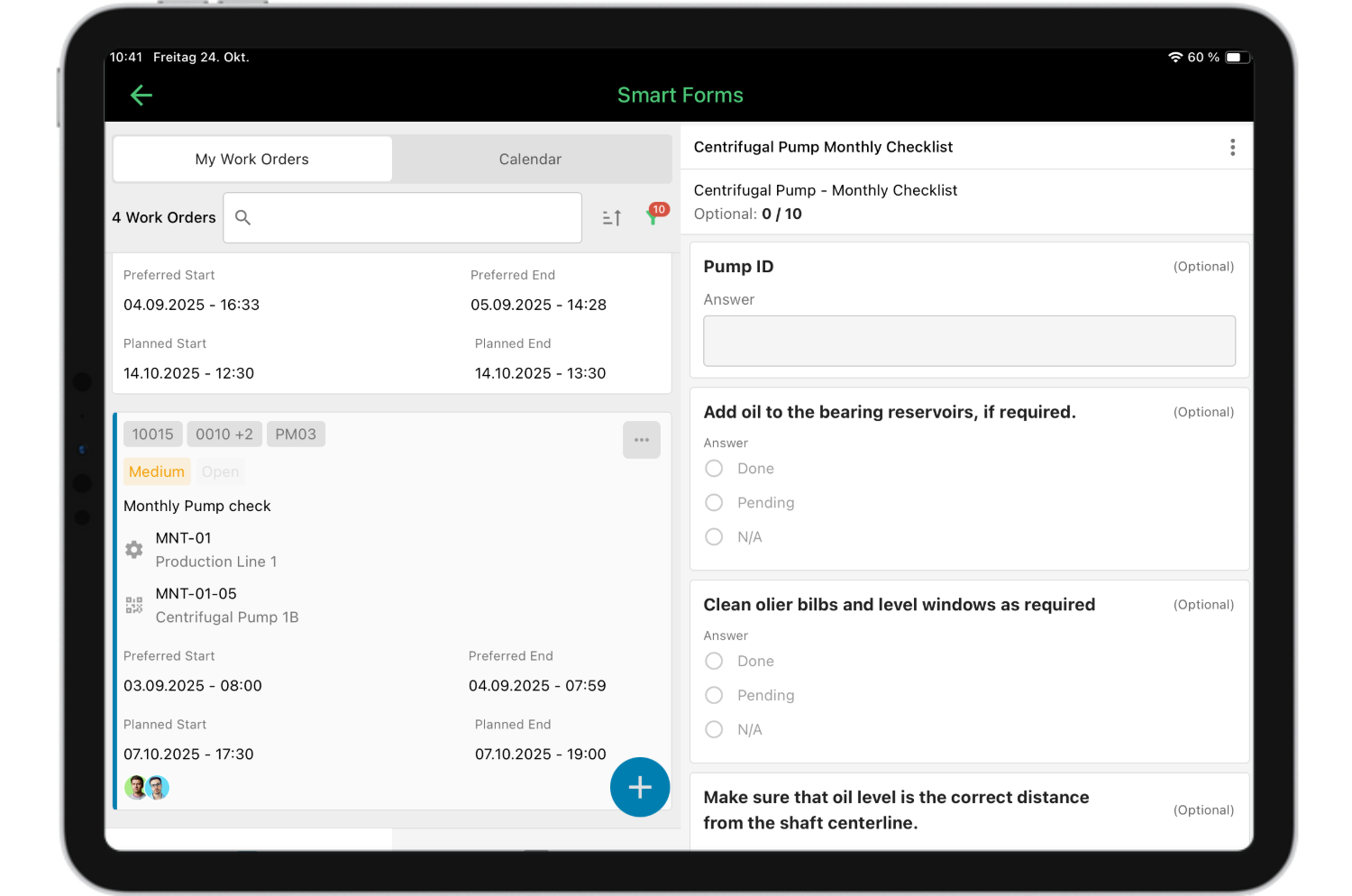
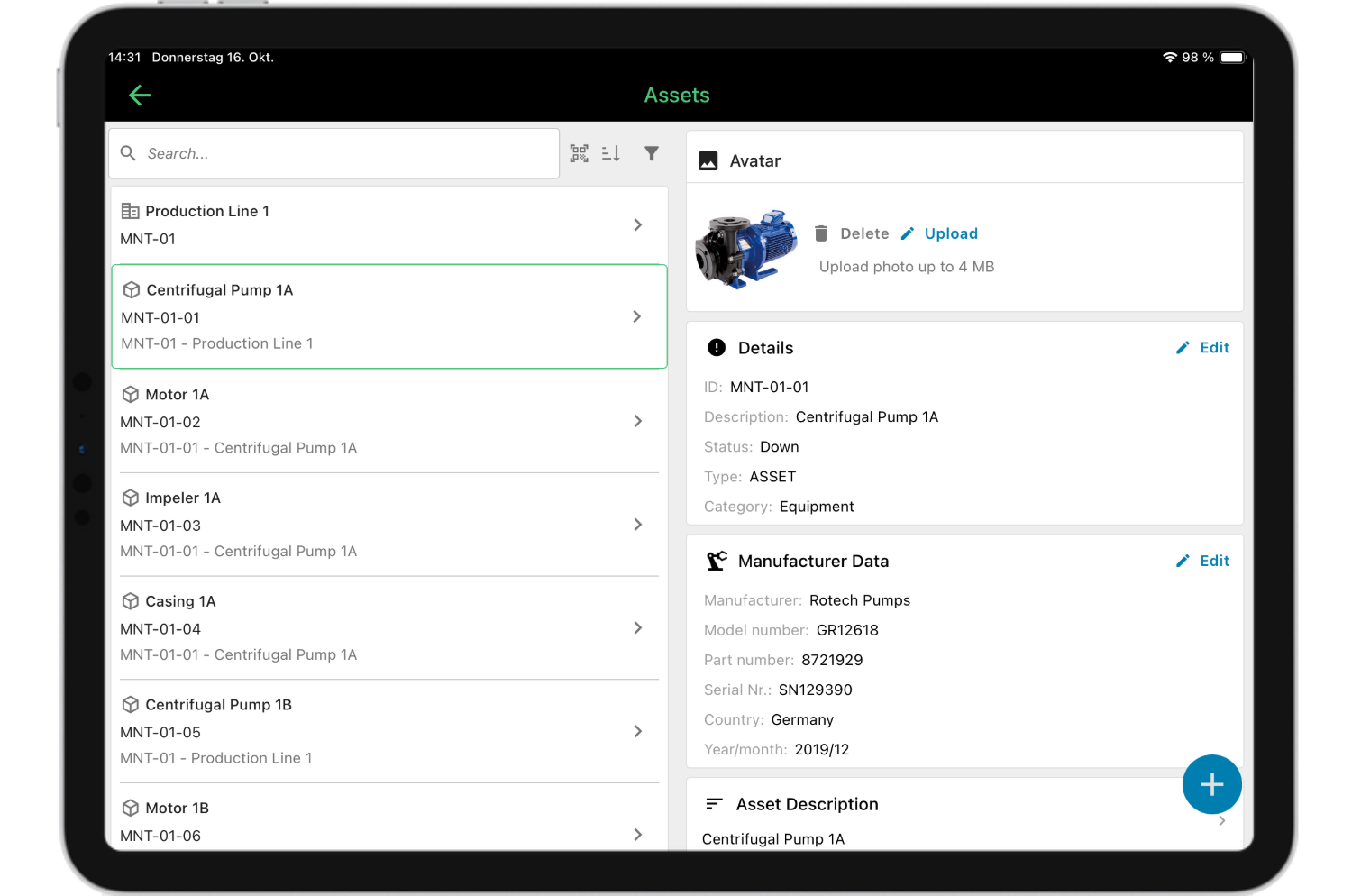
- Asset and equipment management provides context for every maintenance task. Technicians need instant access to equipment manuals, maintenance histories, spare parts lists, and safety procedures. The best work order software links this information directly to work orders, ensuring technicians arrive prepared with the necessary details to complete tasks efficiently.
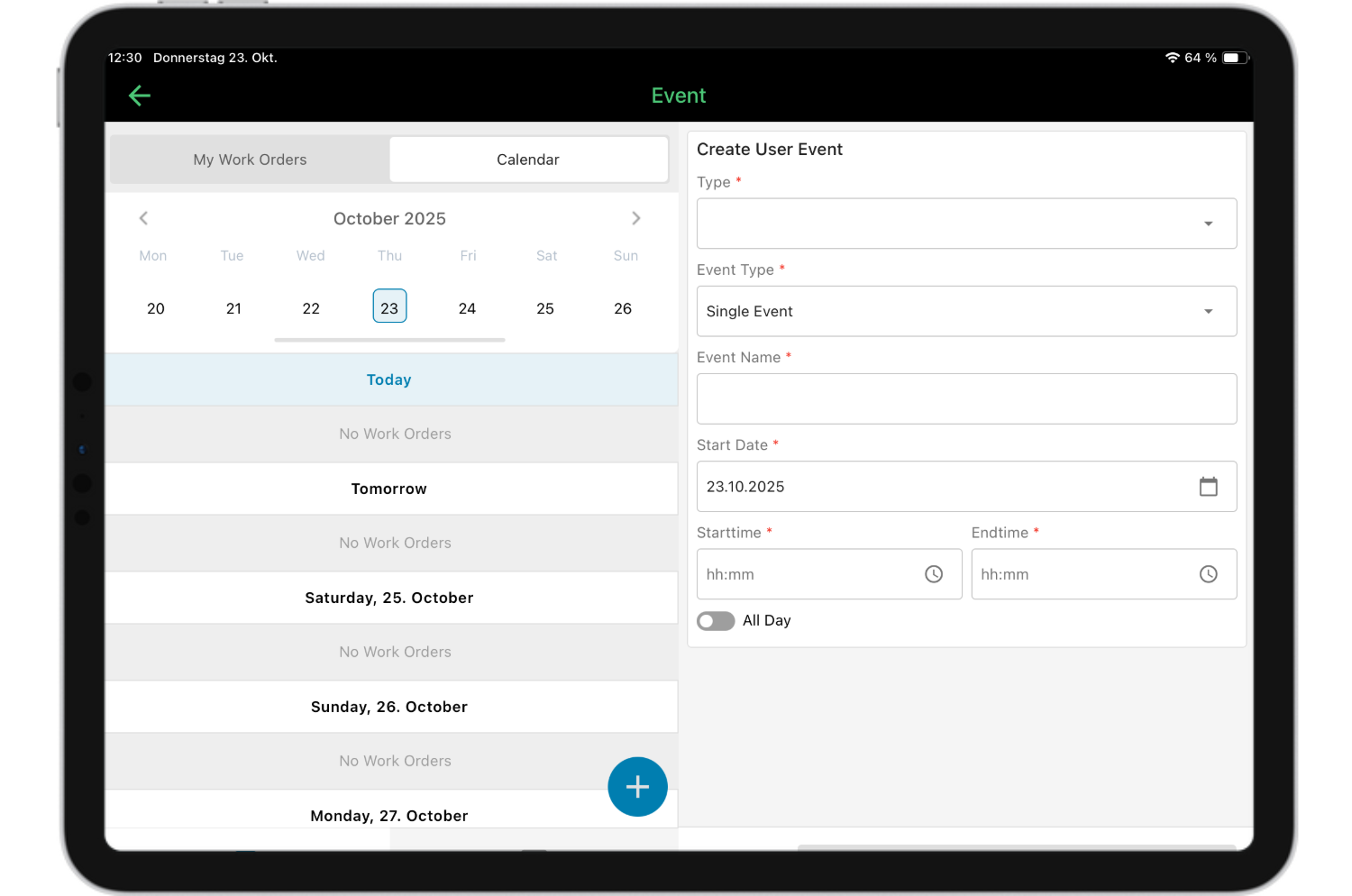
- Scheduling and calendar views help managers balance workloads and coordinate resources. Visual scheduling tools show technician availability, work order priorities, and upcoming preventive maintenance, making it easy to optimize task assignments and avoid conflicts across maintenance teams.

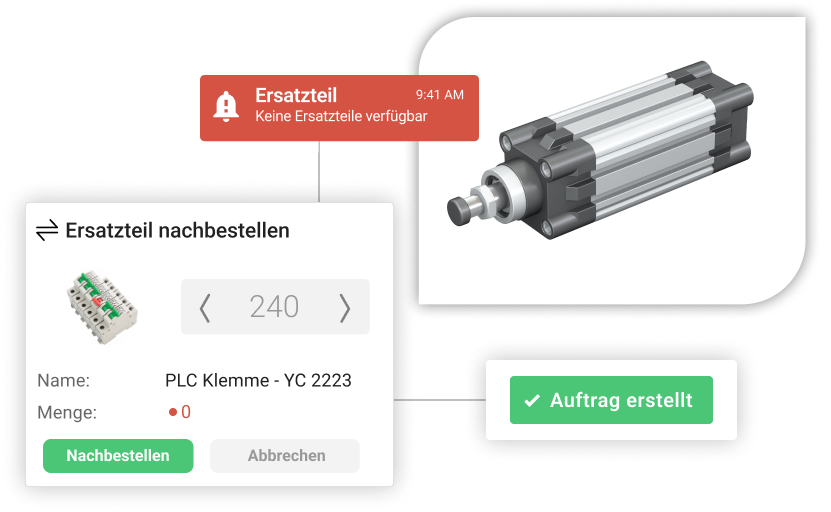
- Parts and inventory integration ensures required materials are available when needed. Work order scheduling software should reserve parts for upcoming jobs, track consumption, and trigger reorder points automatically, supporting seamless inventory management across your facility.
- Reporting and analytics transform maintenance data into actionable insights. Track key metrics like mean time to repair, work order completion rates, maintenance costs per asset, and technician productivity to identify improvement opportunities and support data-driven decisions that enhance operational efficiency.
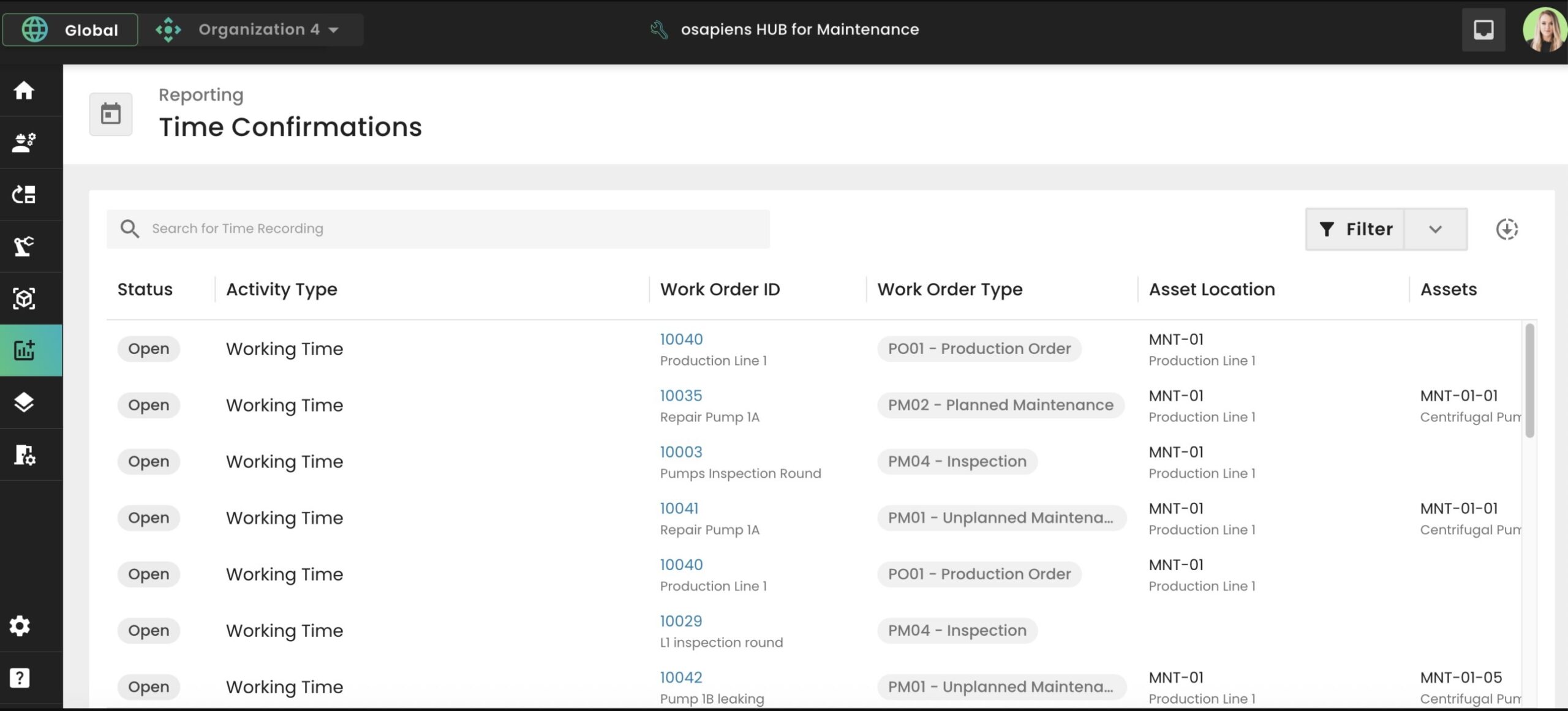
The osapiens HUB delivers all these essential features within an intuitive interface designed specifically for maintenance teams, eliminating the complexity often associated with enterprise CMMS platforms while providing the comprehensive functionality organizations need.
Benefits of Implementing a Work Order Software
Organizations switching from paper-based or spreadsheet maintenance management to digital work order software consistently report significant operational improvements across multiple dimensions.
- Reduced equipment downtime: When maintenance teams can quickly create, assign, and track work orders, equipment returns to service faster. Streamlined workflows eliminate communication delays and ensure technicians have the information they need before starting repairs, minimizing the time assets remain out of operation.
- Improved technician productivity as a result of the elimination of administrative tasks. Maintenance technicians save considerable time per work order by accessing digital instructions, capturing data through mobile devices, and avoiding trips back to the office for information or paperwork. This time savings translates directly to more completed work orders and better asset care across your facility.
- Enhanced accountability and compliance: Every work order captures who performed the work, when it was completed, what parts were used, and what was discovered. This documentation is essential for audits, warranty claims, and regulatory compliance in industries with strict maintenance requirements, providing the transparency needed for effective facility management.
- Better resource allocation: Facility maintenance work order software provides dashboards that highlight bottlenecks and enable data-driven decisions about staffing, priorities, and resource investments that optimize operational efficiency.
- Lower maintenance costs: Fewer emergency repairs, optimized parts inventory, reduced overtime, and extended asset lifespans. Organizations typically see significant reductions in overall maintenance spending within the first year of implementing work order management software, delivering measurable cost savings that impact the bottom line.
- Data-driven decision making replaces gut feelings with facts. Historical work order data reveals which assets consume the most maintenance resources, which failure modes occur most frequently, and which preventive maintenance activities deliver the best return on investment, enabling continuous improvement in maintenance operations.

Alberto Ecre, Group Lead Service Digitalization Department
★ ★ ★ ★ ★Nordex
“We were looking for a cloud platform solution that supports all of our regions. Our technicians have to visit the wind turbines every day to fix problems—we need stable solutions that make their work easier. The key was the very simple integration with our ERP system. Now we are gradually expanding: subcontractor management, tool management, and more.”
How to Choose the Right Work Order Software
Selecting work order management software is a significant decision that will impact maintenance operations for years. A structured evaluation process helps ensure you choose a solution that meets current needs while supporting future growth.
- Assess your maintenance maturity level. Organizations with mature preventive maintenance programs need different capabilities than those just transitioning from reactive maintenance. Simple work order software systems may suffice initially, but consider whether the platform can scale as your maintenance strategy evolves.
- Prioritize user adoption. The most feature-rich software delivers no value if maintenance technicians won’t use it. Look for intuitive interfaces, mobile-first design, and minimal training requirements. Request trial periods or free demos to test usability with your actual maintenance team before committing.
- Evaluate integration capabilities. Work order software rarely operates in isolation. Consider how the system connects with your ERP, asset management platforms, inventory management systems, and IoT sensors. The osapiens HUB offers seamless SAP integration, making it particularly attractive for organizations with existing SAP environments.
- Consider deployment and implementation. Cloud-based solutions like the osapiens HUB for Maintenance offer faster deployment, automatic updates, and lower IT overhead compared to on-premise systems. Evaluate implementation timelines, data migration support, and ongoing training resources that ensure smooth adoption across your maintenance teams.
- Review vendor support and longevity. Maintenance software becomes deeply embedded in daily operations, so vendor stability and support quality matter enormously. Look for providers with strong customer success programs, regular product updates, and clear product roadmaps that demonstrate commitment to continuous improvement.
How osapiens HUB Transforms Work Order Management
The osapiens HUB for Maintenance reimagines work order software by combining enterprise-grade functionality with the simplicity that maintenance teams actually need. Unlike complex CMMS platforms that require extensive training and customization, the osapiens HUB delivers immediate value through intuitive design and intelligent automation.
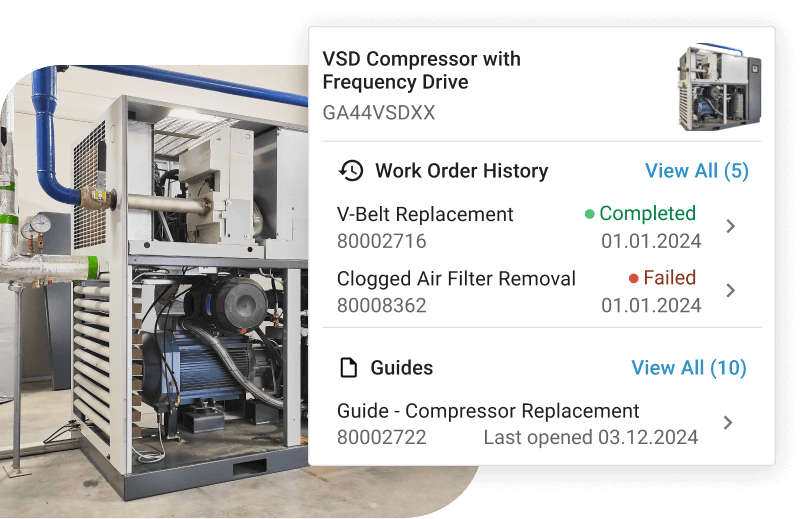
- Seamless SAP integration sets the osapiens HUB apart for organizations using SAP Plant Maintenance (SAP PM). Rather than forcing maintenance teams to navigate SAP’s complex interface, the osapiens HUB provides a modern, mobile-friendly layer that synchronizes bidirectionally with SAP. Technicians work in an intuitive environment while all data flows back to your SAP system automatically, maintaining data integrity and eliminating duplicate entry.
- Mobile-first architecture ensures maintenance technicians can manage their entire workday from smartphones or tablets. Create work orders, access asset management information, complete checklists, capture photos, record time, and update status – all without desktop access. The mobile app functions offline, syncing automatically when connectivity returns, so maintenance never stops.
- Intelligent work order routing uses configurable rules to automatically assign tasks based on asset location, required skills, technician availability, and priority levels. This automation eliminates manual dispatching while ensuring the appropriate personnel receives each work order immediately, streamlining maintenance operations and improving response times across your facility.
- Comprehensive asset context links every work order to complete equipment information, including maintenance history, documentation, spare parts, and related work orders. Technicians arrive prepared with the knowledge and materials needed to complete jobs on the first visit, reducing downtime and improving operational efficiency through better-informed service teams.
- Actionable analytics transform work order data into insights that drive continuous improvement. Pre-built dashboards track progress on key maintenance metrics, while customizable detailed reporting answers specific questions about asset reliability, operational costs, and team performance, enabling data-driven decisions that optimize maintenance schedules and resource allocation.
Organizations implementing the osapiens HUB typically see results within weeks: faster work order completion, reduced downtime, improved technician satisfaction, and measurable cost savings. The platform scales from single facilities to global operations while maintaining the simplicity that drives user adoption and delivers enhanced efficiency across maintenance teams.
See how much you can save with osapiens. Calculate your ROI now.

Conclusion: Streamline Your Maintenance with osapiens HUB
Work order software has evolved from a nice-to-have administrative tool to an essential platform for competitive maintenance operations. Organizations that continue relying on paper-based systems or basic spreadsheets face growing disadvantages in equipment reliability, operational costs, and overall operational efficiency.
The best work order software combines powerful functionality with genuine usability, ensuring maintenance technicians embrace the system rather than resist it. Mobile access, automated workflows, comprehensive asset management information, and actionable analytics form the foundation of effective digital work order management that delivers measurable improvements.
For organizations seeking to transform maintenance operations without the complexity and cost of traditional enterprise CMMS platforms, the osapiens HUB for Maintenance offers a compelling alternative. Its intuitive interface, seamless SAP integration, and proven results demonstrate that enterprise-grade maintenance management can be both powerful and simple to implement across maintenance teams.
The transition to digital work order software represents more than a technology upgrade: it’s a fundamental shift toward data-driven, proactive maintenance that extends asset lifespans, reduces costs, and supports business operations. Whether you manage a single facility or global operations, the right work order management software will deliver measurable returns on investment while making your maintenance team’s daily work easier and more effective.
Enterprise Power Meets Technician-Friendly Design
osapiens HUB delivers immediate value through intuitive work order management that maintenance teams actually embrace. Seamless SAP integration maintains data integrity while technicians work in modern mobile interfaces.
Start with work order software
FAQ
What is work order software?
Work order software is a digital platform that streamlines the creation, assignment, tracking, and completion of maintenance tasks. It replaces paper-based systems with centralized databases that capture maintenance activities, automate workflows, and provide real-time visibility into equipment repairs, inspections, and preventive maintenance across an organization.
What is O&M software?
O&M (Operations and Maintenance) software manages both operational processes and maintenance activities for physical assets. It encompasses work order management, asset tracking, inventory control, and performance monitoring. O&M software helps organizations optimize equipment reliability, reduce downtime, and coordinate maintenance activities with production schedules.
What is the best workforce management software?
The best workforce management software depends on your specific needs, but effective solutions combine scheduling, time tracking, skill management, and mobile accessibility. For maintenance teams, the osapiens HUB excels by automatically routing work orders based on technician skills and availability while providing mobile tools that maximize productivity.
What Are the Benefits of Using a Work Order Software?
Work order software reduces equipment downtime, improves technician productivity, enhances accountability, optimizes resource allocation, and lowers maintenance costs. Organizations typically achieve significant cost savings on maintenance spending while extending asset lifespans through better preventive maintenance scheduling and faster response to equipment issues.
Is Training Required to Use Work Order Software Effectively?
Training requirements vary by platform complexity. Simple, intuitive systems like the osapiens HUB require minimal training, often just a few hours, thanks to user-friendly interfaces and mobile-first design. More complex enterprise CMMS platforms may require extensive training. Prioritize solutions that your maintenance teams can adopt quickly with minimal disruption.
Maintenance Schedule Template
Use our template with asset overview, task catalog, and annual plan. Ready to use for your maintenance planning.
Download for free
ENTERPRISE CAPABILITIES
- SAP ECC & S/4HANA Certified
- Infor & MS Dynamics
- Microsoft Entra ID / Okta
- ISO 27001 & 9001
- EU Cloud · Data Sovereignty
- Development, Test, and Production Environments
- Multi-Entity & Multi-Site
- Power BI Integration
- Audit Trail & Compliance
Related content

January 1, 2026
Building Maintenance Checklist – Essential Tasks, Best Practices & Template

July 21, 2025
Maintenance Bilbao 2025: Key Insights on Maintenance Management
January 1, 2026
Laminar Flow Hood Maintenance Checklist – Tasks, Compliance & Digital Execution

December 29, 2025
Why should I use a field service management solution?
January 1, 2026
Fire Alarm System Maintenance Checklist – Essential Tasks, Compliance & Digital Execution
January 1, 2026
Heavy Duty Truck Preventive Maintenance Checklist – Tasks, Compliance & Digital Execution

July 14, 2025
Unlocking Operational Excellence Through Preventive Maintenance
January 1, 2026
Sump Pump Maintenance Checklist – Tasks, Tips & Best Practices
January 1, 2026
Battery Bank Maintenance Checklist: Essential Tasks & Digital Execution
January 1, 2026
Compaction Equipment Maintenance Checklist – Tasks, Tips & Template
January 1, 2026
Scaffolding Maintenance Checklist: What to Inspect, When, and How to Stay Compliant
January 1, 2026