

Field Service

Nastja Pressler, osapiens Expert | 13. April 2026 | Lesezeit 8 min.
For small service teams, a free service report template is a sensible first step to document visits uniformly and cleanly. However, once more technicians, more jobs, and faster billing processes come into play, manual templates quickly reach their limits. With osapiens HUB for Service, you digitalize the entire process – from mobile data capture to real-time handoff to dispatch.
Download Service Report Template













TRUSTED BY LEADING COMPANIES




ENTERPRISE-READY
 SAP Certification
 ISO 27001
 EU Hosting
 Entra ID & Okta
 Multi-Entity
Table of Contents
- Free Service Report Templates for Technical Field Service
- Service Report Template vs. Digital FSM Software
- Structure of a Professional Service Report Template
- The 5 Most Important Benefits of a Service Report Template
- What Does the Free osapiens Service Report Template Include?
- Word Template vs. Professional Field Service Management Software: When the Template Reaches Its Limits
- Start with the Service Report Template – Grow with osapiens HUB for Service
- FAQ
A service report template is the professional standard for service technicians – it documents visits comprehensively and with legal certainty. Every service technician knows the problem: after a long visit at the customer’s site, the service report still needs to be completed – by hand, on paper, often incomplete. This costs time, creates errors, and delays billing. A structured service report template provides immediate relief: uniform structure, complete documentation, faster invoicing.
Key Facts
- A service report documents a technician’s visit completely from travel time through work performed to customer signature. It serves as legally binding proof of performance to the customer and as the basis for invoicing.
- Without a uniform template, every technician works according to their own system. This leads to incomplete reports, delayed billing, and disputes over complaints. A structured template creates a standard for the entire service team.
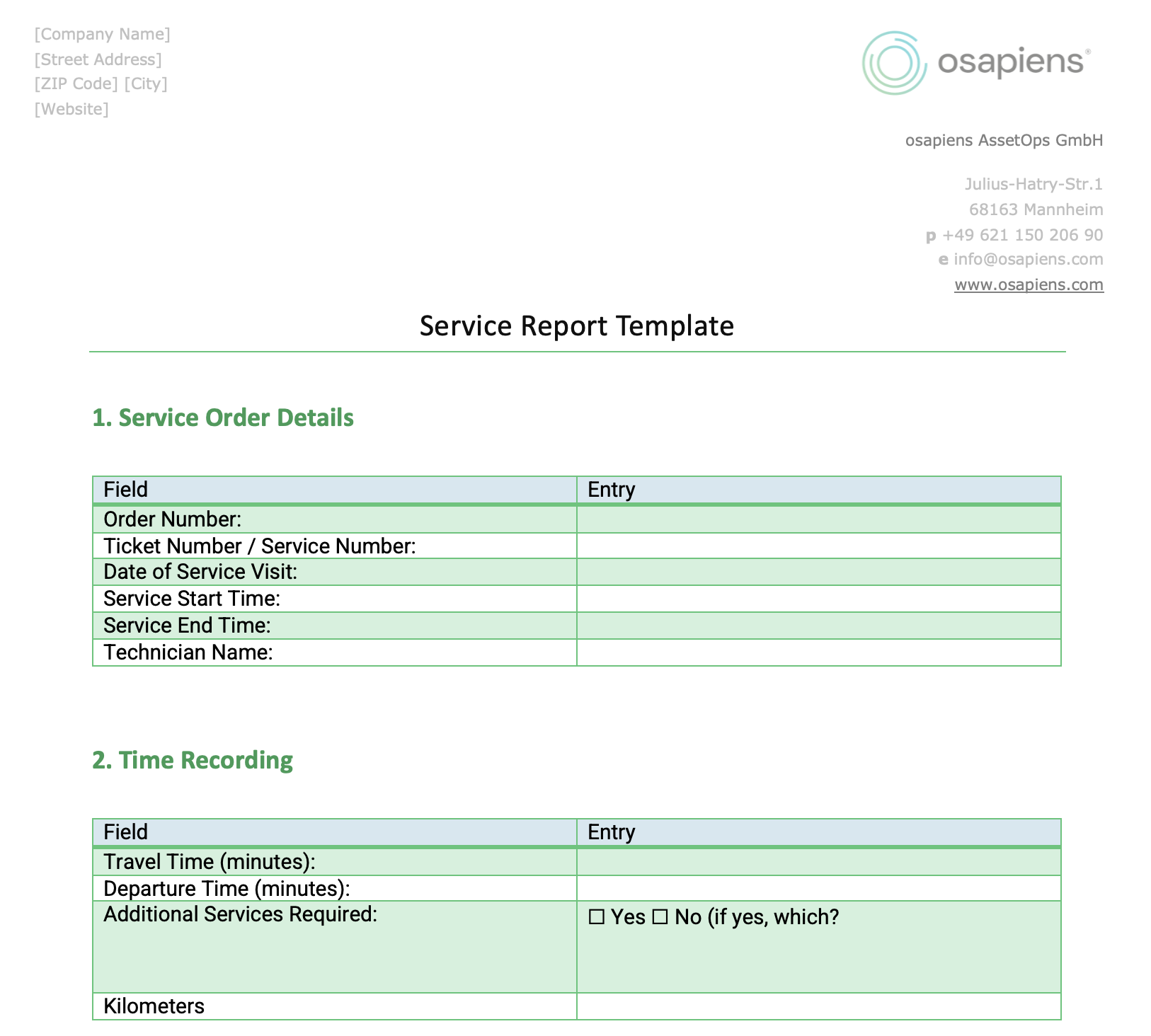
- The free service report template from osapiens covers all 9 areas of a service visit: order data, time tracking, equipment details, reason for visit, condition description, work performed, materials, result, and internal approval – including signature fields for technician and customer.
- For service teams in the technical field service sector who still work paper-based or want to introduce a uniform structure, the service report template is an immediately usable entry point without software costs.
- When is the template no longer sufficient? Once your team grows, reports need to be created on-site, or direct integration with billing is required, the osapiens HUB for Field Service is the logical next step. Start free today.
Free Service Report Templates for Technical Field Service
A service report is proof of performance that documents the complete execution of a service visit. It captures all relevant information from a technician’s visit – from travel time through work performed to the customer’s signature.
A service report template answers the key questions of every service visit:
- What work was performed on which equipment or device?
- When did the visit take place and how long did it take?
- Who performed the visit?
- What materials and spare parts were used?
- What is the result and was the problem resolved?
Service reports are used for repairs, maintenance, inspections, commissioning, and testing, and are standard in the technical field service sector.
Service Report Template vs. Digital FSM Software
Whenever your service team regularly performs visits at customer sites, service reports should be recorded uniformly and completely. The template is ideal for:
- Companies in the technical field service sector that still work paper-based or with their own Word documents
- Service teams that need a uniform structure for all technicians
- Businesses that must document performance proofs in a compliant manner
- Organizations preparing for digitalization
If your technicians currently each report in their own way or reports are only created in the office days after the visit, a structured template is an important first step.

Structure of a Professional Service Report Template
Missing documentation, illegible handwriting, delayed billing: many field service teams know these problems. Unplanned follow-up visits because the initial visit was inadequately documented, or disputes with customers about services rendered – all of this can be significantly reduced with a structured template.
The 5 Most Important Benefits of a Service Report Template
Complete Documentation from the Start
A structured template ensures that no mandatory field is forgotten: order number, equipment data, time tracking, materials used, visit outcome. Service technicians know exactly what they need to document, and customers receive a professional, traceable proof of performance.
Faster Billing Through Immediate Data Availability
Previously, service reports often had to be reworked in the office before invoicing could begin – this could take weeks. With a complete template that the technician fills out on-site, the back office can start billing immediately after the visit ends. This measurably improves cash flow.
Uniform Quality Across the Entire Service Team
Without a template, every technician works according to their own system. This leads to inconsistent reports, missing information, and time-consuming rework. A uniform service report template creates a standard, regardless of who performs the visit.
Complete Traceability for Follow-up Visits
A well-completed service report is the foundation for the next visit. Technicians can reference the service history, immediately understand the initial condition, and find solutions faster. This increases the likelihood that problems are resolved on the first visit and saves time and costs.
Legally Secure Documentation of Services Rendered
The service report serves as proof of contracted performance. With technician and customer signatures, it is legally binding. Especially for maintenance contracts, safety-relevant equipment, or regulated industries, this documentation is essential.
What Does the Free osapiens Service Report Template Include?
The osapiens service report template is divided into nine sections and comprehensively covers all relevant areas of a service visit – from order master data through time tracking and equipment details to condition description, work performed, and visit outcome.
Each section contains clearly defined fields, checkboxes, and free-text areas so service technicians can document systematically and completely without forgetting anything. The template is completed with an internal section for service management and dispatch, as well as signature fields for technician and customer.
The result: a professional, legally secure proof of performance – ready to use immediately after the visit.

Word Template vs. Professional Field Service Management Software: When the Template Reaches Its Limits
A Word or Excel template is the ideal starting point – it’s immediately available, familiar, and free. For smaller service teams with few technicians and manageable visit volumes, it provides everything needed for structured documentation.
The limits become apparent as growth occurs: once more technicians work in parallel, visits need to be planned in real-time, or compliance requirements increase, the manual template reaches its capacity limits. Transcription errors occur when typing data, reports get lost in transit, and invoicing delays by days or weeks.
Professional Field Service Management software like osapiens HUB for Service addresses exactly this:
- Automatic Report Generation: Work times, materials, and checklists are automatically compiled into a complete service report – no manual data entry required
- Mobile App: Technicians capture all data on-site via smartphone or tablet – including photos, customer signature, and real-time transmission to dispatch
- Immediate Invoicing: Once the technician completes the job, all data is immediately available to back office – no more waiting for paper reports
- Central Service History: All visits per equipment and customer are accessible at any time – for better preparation, faster problem-solving, and higher customer satisfaction
- SAP Integration: Seamless integration with existing ERP systems without media breaks
Data captured in your template can be easily transferred to osapiens HUB. You retain your structure and gain automation, real-time updates, and significantly higher field service productivity.
Test osapiens HUB for Service free and experience the difference between manual documentation and digital field service management.
Start with the Service Report Template – Grow with osapiens HUB for Service
A structured service report template is the ideal entry point for professional documentation in the technical field service sector. Especially for smaller teams and businesses that have previously worked without a uniform standard. It ensures complete performance documentation, accelerates invoicing, and protects you in case of complaints.
With our free template, you document service visits immediately in a uniform and professional manner – from order master data to customer signature.
The Natural Growth Path: From Template to Field Service Software
Once your service team grows, real-time planning is necessary, or you want to enable mobile documentation directly on-site, osapiens HUB is the logical next step.
What You Gain with osapiens HUB:
- Automation: Automatically generated service reports – no manual data entry required
- Mobile Work: Technicians document visits on-site via app – even offline
- Real-time Transparency: Dispatch sees all visit data immediately and can prepare invoicing right away
- SAP Integration: Seamless connection to existing systems without media breaks
- Complete Traceability: The full service history of every equipment is accessible at any time
FAQ
What is included in a service report?
A complete service report includes order master data, equipment and device information, the reason for the visit, a condition description upon arrival, work performed with detailed description, materials and spare parts used, and the visit outcome. It is concluded with signatures from technician and customer.
Who creates a service report?
Service reports are typically created by the assigned service technician either on-site or immediately after the visit. Many companies use standardized templates to ensure that all relevant information is captured completely and uniformly. In digitalized service teams, field service software handles automatic report generation based on data captured on mobile devices.
Can I use the service report digitally?
Yes – the osapiens template is available as a Word file for download and can be filled out or printed directly on your PC. For fully digital, mobile service reports created on-site at the customer’s location, we recommend osapiens HUB for Service, which automatically generates reports from captured visit data and transmits them in real-time to dispatch.
When is a service report template sufficient and when do I need a digital solution?
A Word or Excel template is ideal for smaller service teams structuring their documentation for the first time. It’s immediately ready to use, free, and requires no training.
However, once multiple technicians work in parallel, reports need to be created on-site with the customer, or dispatch needs data in real-time for invoicing, the manual template reaches its limits. At that point, upgrading to a Field Service Management Software like osapiens HUB for Service is worthwhile – it automatically generates service reports, transmits them instantly, and integrates seamlessly with invoicing.
Process more service orders in less time
Your technicians are on the road visiting customers – efficiency determines your margin. With osapiens HUB for Maintenance, you can optimize route planning, spare parts logistics, and order processing. Your teams work with a mobile app, and you control everything centrally via real-time dashboards.
Optimize your service processes
Related content

January 1, 2026
Forklift Maintenance Checklist: What to Inspect & When
January 1, 2026
Drilling Machine Maintenance Checklist – Tasks, Tips & Digital Execution
January 1, 2026
Granulation Equipment Maintenance Checklist – Tasks, Tips & Best Practices
January 1, 2026
Uninterruptible Power Supply Maintenance Checklist – Tasks, Safety & Digital Execution

June 11, 2026
Field Service Contractor Management: How Enterprise Teams Keep Control Over Third-Party Technicians

July 7, 2026
IFS Field Service Management Alternatives: 5 Options Worth Considering in 2026
January 1, 2026
Pressure Regulating Station Maintenance Checklist – Tasks, Safety & Digital Execution
January 1, 2026
Chromatography System Maintenance Checklist – Tasks, Best Practices & Digital Execution
January 1, 2026
Commercial Building Maintenance Checklist – Tasks, Systems & Digital Execution

January 20, 2026
Maintenance Schedule Template: Free CMMS Excel Template
January 1, 2026
Pump Maintenance Checklist: What to Inspect & When
January 1, 2026