

Blog

Florian Bartholomäus, osapiens Expert | 2. November 2026 | Lesezeit 9 min.
Maintenance teams running ServiceNow FSM contend with an IT-ticketing data model: asset history sits in CMDB-style tables, preventive maintenance plans need configuration, and SAP connectivity is an integration project. The result is admin-heavy work orders, slow rollouts, and technicians back on paper. osapiens HUB for Maintenance puts asset-centric maintenance, mobile technicians, and SAP PM on one platform.
Put your SAP PM maintenance on every technician's phone










TRUSTED BY LEADING COMPANIES




ENTERPRISE-READY
 SAP Certification
 ISO 27001
 EU Hosting
 Entra ID & Okta
 Multi-Entity
Table of Contents
- Key Takeaways
- Why Enterprise Maintenance Teams Look Beyond ServiceNow FSM
- The 5 Best ServiceNow FSM Alternatives for Enterprise Maintenance Teams
- What Enterprise Maintenance Teams Should Look For in a ServiceNow FSM Alternative
- What a Maintenance-First Platform Delivers
- The ServiceNow Field Service Management Alternative: osapiens HUB Keeps SAP PM at the Center
- FAQ
The field service tool was probably not your choice. In many enterprises, ServiceNow FSM arrived as part of a broader Now Platform rollout: IT standardized on the platform, and the maintenance team received the FSM module along with it. For service tickets, that heritage works. For maintaining plants, the fit is less certain, and the workarounds show it: asset history in spreadsheets, preventive maintenance plans maintained outside the system, technicians printing work orders so they can work at the machine. So what does an enterprise maintenance team actually need from a ServiceNow field service management alternative?
Key Takeaways
- ITSM heritage: ServiceNow FSM shares its data model and workflow engine with IT ticketing, so asset history and maintenance planning feel like configuration work.
- Costs measured in quarters: unofficial estimates put implementation at a multiple of annual licensing, with platform teams and partner consultants in tow.
- FSM is not CMMS: scheduling technicians and managing asset history, maintenance plans, and spare parts are two different jobs, and most tools do only one.
- The SAP question decides: for SAP-running manufacturers, a certified bidirectional SAP PM connection beats a bespoke integration project.
- SAP-certified bidirectional sync: osapiens HUB for Maintenance writes completed work orders straight back to SAP PM.
Why Enterprise Maintenance Teams Look Beyond ServiceNow FSM
ServiceNow FSM is enterprise orchestration built IT-first. Reviews consistently place it as a strong choice for organizations already running the Now Platform, and an awkward one for teams whose daily work is asset-centric maintenance. The friction is structural.
The FSM module extends the platform’s configuration-item tables, so machines and equipment land in CMDB-style records governed like IT assets. Preventive maintenance plans require configuration work before they run. Because FSM shares its infrastructure with ITSM and CSM, every addition carries licensing, scope, and configuration complexity. Reviewers also describe a cluttered, search-dependent desktop experience, while praising the mobile app for its clarity.

The deeper issue is a category mismatch. A field service scheduler routes technicians to jobs. A maintenance team needs more than dispatch:
- asset history and hierarchy for every machine
- preventive maintenance plans that run on schedule
- spare parts management tied to the asset
- integration with the system of record, usually SAP PM
Most FSM tools cover the scheduling side and leave the asset side to spreadsheets. That gap is what sends maintenance teams looking for an alternative.
Start Without an IT Project
A ServiceNow FSM implementation is measured in quarters and staffed by platform teams and partner consultants. osapiens HUB for Maintenance goes live in 1 to 3 weeks standalone, or 4 to 12 weeks with SAP integration, and your technicians start from a mobile app on day one.
Start in weeks, not quarters
The 5 Best ServiceNow FSM Alternatives for Enterprise Maintenance Teams
This comparison takes the maintenance-team lens: it asks which tools handle asset history, preventive maintenance, and SAP integration without a multi-year project. The five entries are compared on SAP and ERP integration, CMMS depth, mobile capability for technicians, and implementation effort.
| Tool | SAP / ERP integration | CMMS depth | Mobile for technicians | Implementation effort |
|---|---|---|---|---|
| osapiens HUB for Maintenance | SAP-certified, bidirectional SAP PM sync | Asset history, PM plans, spare parts | Mobile-first technician app | 1 to 3 weeks standalone, 4 to 12 with SAP |
| Salesforce Field Service | Often via iPaaS middleware | Limited, 2,000-asset cap on COUNT-based maintenance plans | Strong app, tied to CRM licensing | Months, CRM licensing required |
| Microsoft Dynamics 365 Field Service | Within the Microsoft stack, finance link ends February 2027 | Limited maintenance depth | Strong within the stack | Months |
| IFS Cloud FSM | Within the IFS suite | Deep EAM plus FSM | Available | Heavy suite step |
| SAP S/4HANA Service | Native S/4HANA | Not a full CMMS | Available | Within the SAP project |
osapiens HUB for Maintenance, the SAP-Certified CMMS
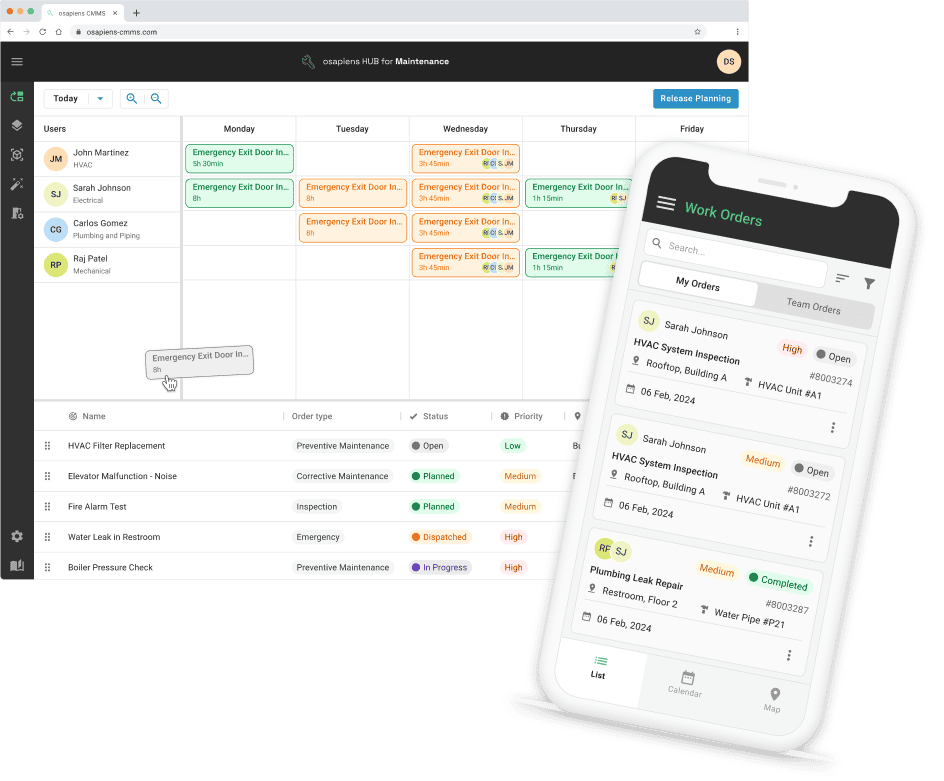
osapiens HUB for Maintenance is a CMMS built for enterprises where SAP PM is the system of record: it syncs with SAP, certified and bidirectionally, and puts the maintenance workflow on the technician’s phone.
Best for: SAP-running manufacturers and energy providers with asset-centric maintenance teams.
- SAP-certified bidirectional SAP PM integration: completed work orders flow straight back into SAP PM.
- Mobile-first technician app, built for the shopfloor.
- CMMS depth: complete asset history, preventive maintenance plans, and spare parts management.
- Implementation in 1 to 3 weeks standalone, 4 to 12 weeks with SAP integration.
- Enterprise scale proven: Coca-Cola North America runs osapiens HUB across 35 plants with 1,500 users. EU-hosted, with data security to ISO standards.
Two limitations, for fairness: dispatch is manual or assisted via the planning board, not automatic, and standalone depth for pure service-ops use cases such as quote-to-cash billing is not the focus. Pricing starts with a freemium entry tier, with usage-based packages and individual enterprise packages above it.
Bring Your SAP PM Work Orders to the Shop Floor
osapiens HUB for Maintenance syncs with SAP PM, SAP-certified and bidirectional. Technicians close their work orders at the machine, and the SAP PM record stays current.
Keep SAP PM as your system of record
Salesforce Field Service, the CRM-Led Scheduler
Salesforce Field Service is the scheduling heavyweight of the CRM world: assignment optimization, constraint handling, and a mature app ecosystem in one package.
Best for: service organizations already standardized on Salesforce CRM.
- Strong scheduling and constraint handling.
- Mature ecosystem of apps and partners.
The limitations matter for maintenance teams: the tool requires Salesforce CRM licensing, a documented limit caps maintenance plans with COUNT-based work rules at 2,000 assets, and ERP integration often expects iPaaS middleware. Pricing is on request.
Microsoft Dynamics 365 Field Service, the Microsoft-Stack Option
Dynamics 365 Field Service fits organizations whose IT estate is Microsoft end to end.
Best for: organizations committed to the Microsoft stack.
- Resource Scheduling Optimization for automated assignment.
- Familiar Microsoft integration surface.
Microsoft states that the existing Field Service to finance and operations integration will no longer be available after February 28, 2027 (the capability is transitioning to a Project Operations integration), and asset-centric maintenance depth is limited. Pricing is on request.
IFS Cloud FSM, the EAM-First Platform
IFS Cloud combines EAM, FSM, and ERP in one suite, built for asset-intensive industries.
Best for: asset-intensive industries wanting EAM, FSM, and ERP in a single suite.
- EAM depth plus FSM in a single platform.
- ERP in the same suite, so asset, service, and financial data stay in one system.
Users cite cumbersome updates, and a full suite migration is a heavy step for a team that only needs maintenance. Pricing is on request.
SAP S/4HANA Service, the Native SAP Route
For SAP shops, S/4HANA Service is the stay-native option: field service scheduling inside the S/4HANA world, with no third-party data model.
Best for: SAP shops wanting to stay entirely inside the SAP ecosystem.
- Native S/4HANA alignment.
- No third-party data model.
It remains a field service scheduling tool and stops short of full CMMS depth, and the shopfloor adoption problem SAP PM users already know is not solved by staying native. Pricing is on request.
💡 Good to Know
Before you shortlist any tool, map where your asset master data, work order history, and spare parts data will live, and make the system-of-record question your first filter. Teams that skip this step end up evaluating schedulers when they needed a CMMS, or the reverse: a CMMS that cannot reach SAP.
What Enterprise Maintenance Teams Should Look For in a ServiceNow FSM Alternative
Four criteria separate a maintenance-first platform from a service-desk extension. Weight them against your own stack before any demo.
System-of-record integration. Ask whether the tool syncs with SAP PM or your ERP bidirectionally and certified, or whether the connection is integration-project work. Clarify who owns reconciliation when records differ.
CMMS depth. Asset history and hierarchy, preventive maintenance plans, and spare parts belong in the tool, not in spreadsheets beside it. A scheduler without asset memory forces your team to rebuild context on every work order. Spare parts are an underestimated cost factor: tied to the asset, they show technicians what is available at the point of repair and show controlling what each machine really costs.
Mobile adoption on the shopfloor. Technicians work in noise, with gloves on, right at the machine. If the mobile app is an afterthought to a desktop-first tool, adoption fails and the paper process returns.
Implementation time and total cost of ownership. License cost is one line. Add implementation, middleware, platform-team hours, and ongoing configuration before comparing prices, and ask what the rollout timeline does to your maintenance backlog.
What a Maintenance-First Platform Delivers
Whichever tool you choose, the payoff of moving from an ITSM-shaped system to a maintenance-first one shows up in daily operations:
- complete asset history for every machine, one click from the work order
- preventive maintenance that runs on schedule
- technicians working from one app
- spare parts visibility at the point of repair
- audit-ready documentation without a second data entry
- SAP as the system of record, without media breaks between systems
The ServiceNow Field Service Management Alternative: osapiens HUB Keeps SAP PM at the Center
For an enterprise maintenance team, the decision comes down to three factors: asset-centric data, SAP as the system of record, and adoption on the shopfloor. osapiens HUB for Maintenance combines all three on one platform: a certified bidirectional SAP PM integration keeps master data and work order history where they belong, the mobile app puts the full workflow on the technician’s phone, and enterprise rollouts run 4 to 12 weeks.
If you are evaluating a ServiceNow field service management alternative, keep SAP PM at the center and let the maintenance workflow move.
Raise Your Asset Availability
Complete asset history, preventive maintenance that runs on schedule, and SAP PM as the system of record without media breaks. osapiens HUB for Maintenance combines the three in one platform, live in 4 to 12 weeks.
Raise your asset availability with osapiens HUB
FAQ
Is ServiceNow FSM a good fit for enterprise maintenance teams?
It can be, for organizations already on the Now Platform with internal platform teams to configure and govern it. The friction starts when the work is asset-centric maintenance and the system of record is SAP PM: machines land in CMDB-style tables and preventive maintenance becomes configuration work.
How much does ServiceNow FSM cost to implement?
ServiceNow does not publish prices. Unofficial estimates collected by pricing aggregators put licensing at $1,200 to $1,800 per user per year, with implementation often estimated at a multiple of that annual cost once platform teams and consultants are included. Treat these as estimates, not quotes.
What is the difference between FSM and CMMS software?
FSM software schedules and tracks field work: assignments, routes, appointments. A CMMS manages the asset side: machine history, preventive maintenance plans, spare parts. Maintenance teams usually need both, which is why a scheduling-first tool leaves the asset work in spreadsheets.
Which ServiceNow FSM alternative integrates natively with SAP PM?
osapiens HUB for Maintenance offers SAP-certified bidirectional integration with SAP PM. ServiceNow documents SAP RFC and IDOC spokes, but that connection is integration-project work on an ITSM data model, a difference in scope and effort rather than a missing connector.
Do we need our own IT project team to implement osapiens HUB?
No. Standalone implementations run 1 to 3 weeks, and with SAP integration 4 to 12 weeks, without a dedicated IT project team on your side. More than 350 companies start on the free entry tier, and self-onboarding paths exist for teams that want to begin immediately.
osapiens HUB for Maintenance
Learn how our CMMS solution improves your uptime, extends the service life of your equipment, and simplifies the management of your work orders.
Book demo
ENTERPRISE CAPABILITIES
- SAP ECC & S/4HANA Certified
- Infor & MS Dynamics
- Microsoft Entra ID / Okta
- ISO 27001 & 9001
- EU Cloud · Data Sovereignty
- Development, Test, and Production Environments
- Multi-Entity & Multi-Site
- Power BI Integration
- Audit Trail & Compliance
Related content

November 28, 2025
Preventive Maintenance Software for Small Companies: Top 6
January 1, 2026
CNC Machine Maintenance Checklist: What to Inspect, When & How
January 1, 2026
Bench Grinder Maintenance Checklist – Tasks, Safety & Digital Execution
January 1, 2026
Drilling Machine Maintenance Checklist – Tasks, Tips & Digital Execution
November 4, 2025
CMMS Software for Small Business: Choosing the Right Solution

July 6, 2026
Mobile CMMS Software: Real-Time Maintenance Management From Any Device
January 1, 2026
Sump Pump Maintenance Checklist – Tasks, Tips & Best Practices
January 1, 2026
Batching Plant Maintenance Checklist – Tasks, Tips & Template
January 1, 2026
Booster Pump Maintenance Checklist – Tasks, Tips & Template

September 19, 2025
Meet the osapiens maintenance experts at Pharma Maintenance Reloaded 2025
January 1, 2026
Lathe Machine Maintenance Checklist – Tasks, Safety & Digital Execution
January 1, 2026