

Blog

Florian Bartholomäus, osapiens Expert | 2. November 2026 | Lesezeit 11 min.
Free maintenance software rarely means the same thing twice: some plans expire after a trial period, others cap users, work orders or features, and the limits often surface only after setup. By then, assets and checklists are already in the system, and switching means entering them again or paying for an upgrade earlier than planned. osapiens HUB for Maintenance offers a free Starter plan with unlimited assets, checklists and offline mobile maintenance, and states its limits upfront.
Digitize Your Maintenance for Free







TRUSTED BY LEADING COMPANIES




ENTERPRISE-READY
 SAP Certification
 ISO 27001
 EU Hosting
 Entra ID & Okta
 Multi-Entity
Table of Contents
Every “free” maintenance software claim seems to promise the same thing: no cost, no commitment, a full CMMS from day one. Then the trial clock starts counting down, or a credit card is required at sign-up, or the mobile app that looked included during the demo turns out to be a paid add-on. A maintenance manager who signed up in good faith ends up re-entering assets and checklists into another tool, or paying for a plan nobody budgeted for. So what separates a genuinely free maintenance management tool from a trial wearing that word as a marketing label?
Key Takeaways
- Three kinds of “free” behave differently: open-source tools are free if you host and secure them yourself, freemium plans cap users, work orders or features, and trials simply expire.
- The cap matters more than the price tag: check whether users, work orders or preventive maintenance run out first, since that decides how long a free plan actually fits your team.
- Forever-free is not always full-featured: several free plans cover basic work orders and asset tracking while reserving preventive maintenance scheduling or inventory for a paid upgrade.
- Offline mobile maintenance on the free plan: osapiens HUB’s Starter plan gives up to 5 users checklists and mobile maintenance that works offline, with unlimited assets and locations and no credit card required.
Why “Free” Doesn’t Mean the Same Thing Twice
Three different offers get marketed with the same word. An open-source, self-hosted CMMS is free because the team running it takes on the infrastructure itself. A permanently capped freemium tier is free because the vendor limits users, assets, or work orders below what a growing team needs. A time-limited trial is free only until a countdown ends, whatever the landing page calls it. A team that cannot tell which one they are looking at picks the wrong tool and migrates within months.
The difference typically shows up in four places:
- User or asset caps that limit how far the team can grow
- Automation and reporting that stay on paid tiers
- Preventive maintenance scheduling reserved for paid plans
- Mobile app access that is partial, or missing, on the free tier
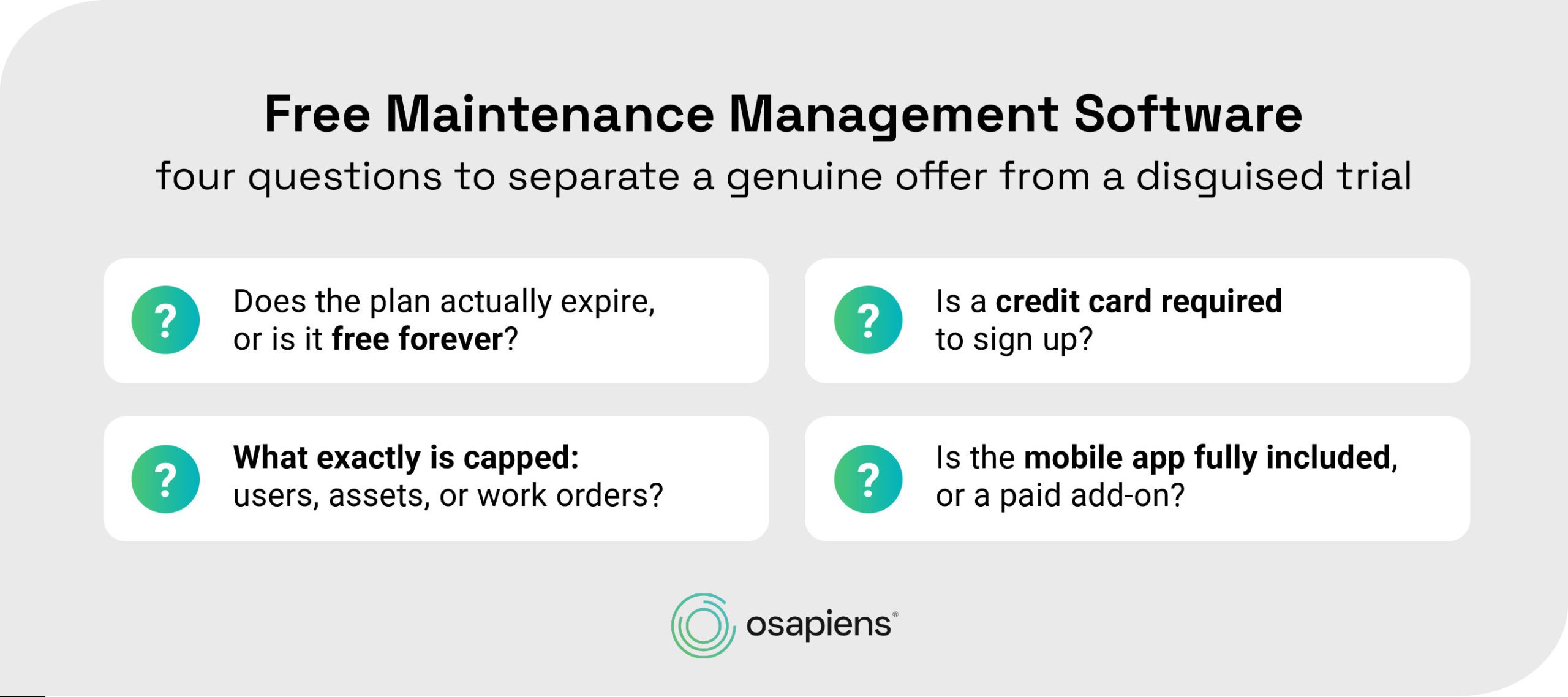
Before trusting any “free” claim, four questions separate a genuine offer from a disguised trial:
The 6 Best Free Maintenance Management Software Options
The six options below span the full spectrum, from self-hosted open source to a capped but usable freemium tier. Each is free today, in a different way, and the differences matter more than the price tag suggests.
| Tool | Free-tier user cap | Work order / PM limit | Hosting | Mobile app |
|---|---|---|---|---|
| osapiens HUB for Maintenance | Up to 5 users | 10 work orders/month, unlimited assets and locations; preventive maintenance planning on paid plans | Cloud | Yes, offline and online |
| Atlas CMMS | Unlimited (open source); Cloud Basic fits teams under 5 | Unlimited work orders on both tiers | Cloud or self-hosted | Yes, with offline sync |
| Free CMMS | Free for a small number of team members | Not numerically capped in vendor materials | Cloud | Yes, native mobile apps |
| Fiix | Not published on the free-tier page | Up to 25 active preventive maintenance tasks | Cloud | Yes, offline-capable |
| MaintainX | Not capped by user count | 2 active repeating work orders plus 2 procedure-attached work orders; 1 month of analytics | Cloud | Yes |
| Maintenance Care | Up to 2 users, per independent reviews | Unlimited work orders; preventive maintenance capped at 3 tasks and 5 assets, per independent reviews | Cloud | Full app on paid tiers only, per independent reviews |
osapiens HUB for Maintenance, the Free Plan With Offline Mobile Maintenance
osapiens HUB for Maintenance is a CMMS with SAP-certified integration and a free entry point built to run real maintenance work, not just a demo. It is best for small teams or single sites digitizing their first maintenance process without an IT project.
- Unlimited assets and locations on the free Starter plan, plus basic team management and planning to assign and track work across the team
- No credit card required to sign up, with access to the support center from day one for onboarding help
- Mobile maintenance that works offline and online, so technicians are not blocked by a weak signal on the shop floor
- Checklists and step-by-step instructions included from day one, not gated behind a paid tier
Its main limitations are real and worth naming plainly: the Starter tier caps out at 10 work orders per month and 5 users, and preventive maintenance planning and maintenance requests start with the paid Essential plan. That makes Starter a good fit for getting work orders, checklists and asset records into one system first, with planned maintenance as the next step.
Digitize Your First Maintenance Process for Free
A free plan only pays off if it covers the daily work. osapiens HUB's Starter plan gives small teams unlimited assets, checklists and offline mobile maintenance to run their first maintenance process end to end.
Run Real Maintenance Work at No Cost
Atlas CMMS, the Open-Source Self-Hosted Option
Atlas CMMS is best for technically comfortable teams that want full control and no vendor lock-in. The self-hosted, open-source tier is free with unlimited users, full source code access, and the complete feature set, including barcode and QR-code asset scanning and a mobile app with offline sync. A separate free Cloud Basic tier fits teams under 5 members, with unlimited work orders, basic asset tracking, and standard reporting.
Self-hosting means running and securing your own server. Cloud Basic trims the feature set to the essentials, with advanced dashboards, inventory control, and full preventive-maintenance automation reserved for the paid Cloud Starter tier.
Free CMMS, the Forever-Free Plan for Very Small Teams
Free CMMS is best for teams of two or three that want one tool, free permanently, with no expiry. It is explicitly positioned as not a trial, requires no credit card, and ships native mobile apps, with the vendor citing use across more than 50 countries. Even on the free tier, every asset gets its own QR code, checklists carry a full audit trail, and a rules engine can auto-generate work orders on a schedule.
The small team-member ceiling is the clearest limitation: past a handful of people, this plan stops fitting.
Fiix, the Freemium Plan With a Real Preventive-Maintenance Cap
Fiix is best for teams that want to run an actual preventive maintenance program, not just log work orders, before deciding on a paid tier. Its free plan allows up to 25 preventive maintenance tasks on date, time, meter, or event triggers, alongside unlimited work requests, asset hierarchies, downtime tracking, and a mobile app that keeps working offline; inventory management for parts and supplies is included as well.
The free tier does not publish an exact user-seat limit, so confirm this directly before relying on it. The paid Basic tier removes the preventive maintenance cap and adds deeper reporting and multi-site management.
MaintainX, the “Unlimited” Plan With a Narrow Practical Ceiling
MaintainX is best for teams that want to trial mobile-first work orders before committing to a paid tier. Unlimited work orders, unlimited asset cataloging, parts inventory tracking, and real-time team messaging headline the free Basic plan, alongside a limited set of customizable work order templates and checklists.
The practical ceiling shows up fast: only 2 active repeating work orders and 2 procedure-attached work orders are allowed at a time, with just 1 month of analytics access. It is the plan on this list that best illustrates “free in name, capped in practice.”
Maintenance Care, the Free-Forever Entry Point With Tight Caps
Maintenance Care is best for facilities teams that want to move off paper work orders at no cost before deciding whether to scale up. It is free with no stated expiry, covering unlimited work orders and straightforward request tracking for up to 2 users.
Independent reviews report the free tier caps preventive maintenance at 3 tasks, 5 assets, and 3 vendors, with the full mobile app and complete asset and inventory management reserved for paid tiers.
Expert tip from osapiens
Before loading your full asset register into any free CMMS, check whether you can export assets, work order history and checklists in a standard format such as CSV or Excel. If the free tier locks that data in, outgrowing the plan means retyping it, while a clean export keeps a later migration to a different system manageable.
Florian Bartholomäus, osapiens Expert
What to Check Before You Sign Up for a “Free” CMMS
These four criteria cut through the marketing language faster than reading every pricing page line by line.
- Does the plan actually expire? Some free tiers are permanent, with no end date, while others are trials with a countdown, whatever the landing page calls them, and the difference decides whether your maintenance data has a shelf life.
- What exactly is capped: users, assets, or work orders? This is the single most useful lens for comparing free plans, because a “free” label says nothing about which resource runs out first once a team starts using the tool for real.
- Is the mobile app fully included, or a paid add-on? Field technicians depend on mobile access, and several free plans gate full mobile functionality, like offline mode, behind a paid tier.
- Can you run real preventive maintenance, or just log work orders reactively? Several free tiers reserve preventive maintenance scheduling for paid tiers, which works for getting reactive work under control but means planned maintenance needs an upgrade later. Check which side of that line your first use case sits on.
Benefits of Free Maintenance Management Software at a Glance
Even with the caps and trade-offs described above, a free CMMS plan still delivers real value for a small team taking its first step away from manual processes.
✓A lower barrier to moving off spreadsheets and paper checklists
✓Real-world testing of maintenance workflows before any budget conversation
✓A natural entry point for small teams or single sites with no dedicated IT project
✓A digital asset history from day one: every completed work order and checklist is documented instead of lost on paper
Free Maintenance Management Software That Starts Free With osapiens HUB
“Free” is only useful when it is honest about its limits. The plans that hold up over time are the ones that state their caps upfront, whether that is a user ceiling, a work order limit, or a preventive maintenance cap. A team that knows exactly what it is signing up for can build a real maintenance process on a free tier instead of discovering the limits only after its data and workflows are already in place.
osapiens HUB’s Starter plan follows that same principle. It states its limits upfront (10 work orders per month, 5 users, preventive maintenance planning on paid plans) while still delivering unlimited assets and locations, real mobile maintenance that works offline, and no credit card requirement. That combination lets a small team run a first digital maintenance process instead of a countdown demo dressed up as free maintenance management software.
See What Your Team Gets in the Starter Plan
Want to know exactly what your team gets in the Starter plan? A digital maintenance expert from osapiens shows you free of charge in 30 minutes how assets, checklists and work orders map to your team.
Book Your Free 30-Minute Demo
FAQ
Is there a maintenance management CMMS that stays free, not just during a trial?
Yes. Several tools, including open-source options and osapiens HUB’s Starter plan, are free plans rather than time-limited trials. The clearest signals are no expiry date and no credit card requirement at signup, so a plan that asks for payment details upfront is worth a second look.
What should a small maintenance team check before picking free CMMS software?
Check four things: whether the plan expires, whether a credit card is required, exactly what is capped (users, assets, or work orders), and whether the mobile app is fully included. These four questions catch most of the gap between a genuine free plan and a disguised trial.
Can a small team run real preventive maintenance on a free CMMS plan?
It depends on the vendor. Some free plans allow a real, if capped, number of preventive maintenance tasks, while others reserve scheduling entirely for paid tiers. Always confirm this specifically rather than assuming any free CMMS label includes preventive maintenance by default.
Does osapiens HUB’s free Starter plan require a credit card?
No. The Starter plan requires no credit card and is capped at 5 users and 10 work orders per month. Teams that later need SAP PM integration can move to the Enterprise plan, which includes the certified SAP connector: implementation including SAP integration runs 4 to 12 weeks, while standalone deployment takes 1 to 3 weeks.
Is a self-hosted, open-source CMMS a good fit for a small business without dedicated IT staff?
It can be free financially, but the hosting and maintenance burden shifts to the business itself, including server setup, security patches, and backups. Teams without server management experience often do better on a cloud-hosted freemium plan, where the vendor handles hosting, backups, and updates automatically.
osapiens HUB for Maintenance
Learn how our CMMS solution improves your uptime, extends the service life of your equipment, and simplifies the management of your work orders.
Book demo
ENTERPRISE CAPABILITIES
- SAP ECC & S/4HANA Certified
- Infor & MS Dynamics
- Microsoft Entra ID / Okta
- ISO 27001 & 9001
- EU Cloud · Data Sovereignty
- Development, Test, and Production Environments
- Multi-Entity & Multi-Site
- Power BI Integration
- Audit Trail & Compliance
Related content

May 23, 2025
Whitepaper: How to Build a Strong Business Case for a CMMS
January 1, 2026
Backhoe Maintenance Checklist – Tasks, Tips & Best Practices
May 26, 2026
SAP Service and Asset Manager Alternatives 2026: The Best Solutions for Mobile Maintenance Compared
January 1, 2026
Heavy Duty Truck Preventive Maintenance Checklist – Tasks, Compliance & Digital Execution
January 1, 2026
Injection Molding Machine Maintenance Checklist: Tasks, Systems, and Digital Execution
April 7, 2026
Enterprise CMMS Software: Top 5 CMMS Solutions 2026

September 19, 2025
Meet the osapiens maintenance experts at Pharma Maintenance Reloaded 2025
January 1, 2026
Grinding Machine Maintenance Checklist – Tasks, Safety & Digital Execution
January 1, 2026
Hydroelectric Turbine Maintenance Checklist – Tasks, Tips & Best Practices
January 1, 2026
Filling Machine Maintenance Checklist – Tasks, Tips & Best Practices
January 1, 2026
Packaging Machine Maintenance Checklist – Tasks, Tips & Digital Execution
January 1, 2026